
1. Įvadas
The Dynatron A42 1U Active Air Cooler is designed for high-performance AMD Ryzen Socket AM4 and AM5 processors. This compact, side-blower PWM fan provides efficient heat dissipation for CPUs up to 95 Watts in 1U server environments. The Dynatron A42 ensures optimal system performance by maintaining appropriate operating temperatures.
Pagrindinės funkcijos:
- Recommended for AMD Ryzen Processors, Socket AM4 and AM5.
- Supports CPU power up to 95 Watts heat dissipation.
- Features an 80x80x13mm PWM Fan and Copper Fin construction.
- Active Air Cooler suitable for 1U Server and Up.
- Overall dimensions: 110.0mm (L) x 85.0mm (W) x 27.3mm (H).
2. Pakuotės turinys
Prieš tęsdami montavimą, patikrinkite, ar pakuotėje yra visi komponentai:
- Radiatoriaus surinkimas
- PWM Fan (integrated)
- Maitinimo kabelis
- Mounting Connectors/Screws
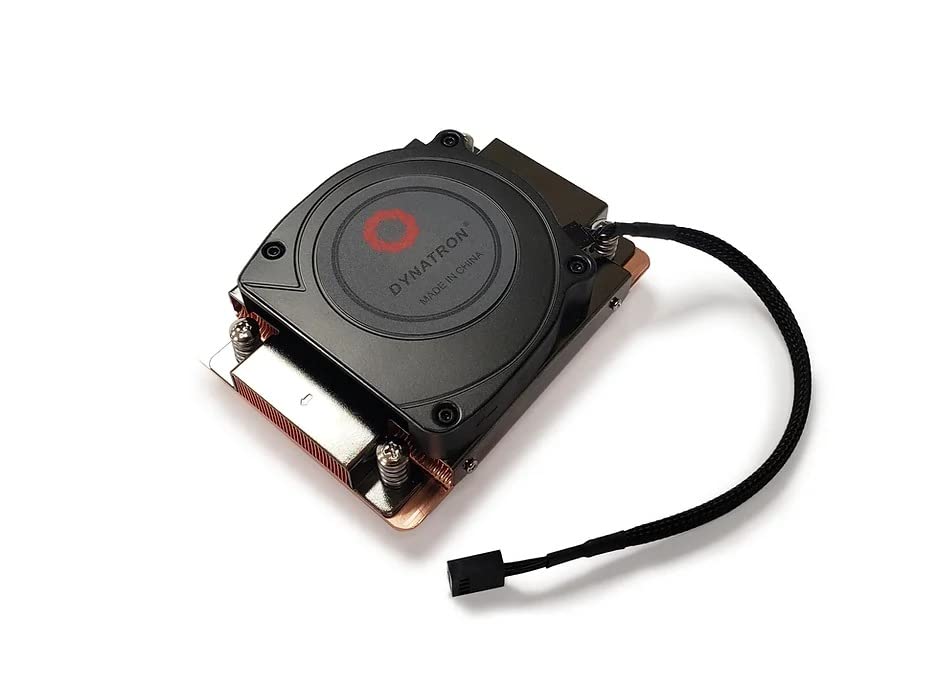
2.1 pav.: Viršus view of the Dynatron A42 CPU Cooler, showing the integrated fan and Dynatron branding.
3. Sąranka ir diegimas
Follow these steps carefully to install the Dynatron A42 CPU Cooler on your AMD AM4 or AM5 motherboard.
- Paruoškite pagrindinę plokštę: Ensure your motherboard is compatible with AMD AM4 or AM5 sockets. Remove any existing CPU cooler and clean the CPU surface thoroughly with isopropyl alcohol to remove old thermal paste.
- Taikyti terminę pastą: Apply a small, pea-sized amount of high-quality thermal paste to the center of the CPU's integrated heat spreader (IHS). Avoid applying excessive amounts, as this can lead to reduced cooling performance or unintended residue.
- Padėkite aušintuvą: Carefully align the Dynatron A42 cooler with the mounting holes on the motherboard around the CPU socket. The cooler's base should make even contact with the CPU's IHS.
- Pritvirtinkite aušintuvą: Use the provided mounting screws to secure the cooler to the motherboard. Tighten the screws in a diagonal pattern (e.g., top-left, bottom-right, top-right, bottom-left) gradually until the cooler is firmly seated. Do not overtighten.
- Prijunkite ventiliatoriaus laidą: Locate the 4-pin PWM fan header on your motherboard (typically labeled "CPU_FAN"). Connect the cooler's 4-pin fan cable to this header. Ensure the connector is fully seated.
- Galutinis patikrinimas: Double-check all connections and ensure the cooler is securely mounted and does not wobble.

3.1 pav.: Apačia view of the Dynatron A42 CPU Cooler, showing the copper base and pre-applied thermal paste (if applicable) or area for application.

Image 3.2: Dynatron A42 CPU Cooler with indicated dimensions for reference during installation.
4. Eksploatacijos gairės
Once installed, the Dynatron A42 operates automatically, controlled by your motherboard's PWM fan settings. For optimal performance and longevity:
- BIOS / UEFI nustatymai: Access your system's BIOS/UEFI to ensure the CPU fan control is set to PWM mode for dynamic fan speed adjustment based on CPU temperature.
- Temperatūros stebėjimas: Regularly monitor your CPU temperatures using system monitoring software to ensure they remain within safe operating limits, especially under heavy load.
- Oro srautas: Ensure adequate airflow within your server chassis. Proper case ventilation is crucial for the cooler's effectiveness.
5. Priežiūra
Reguliarus techninis aptarnavimas padeda užtikrinti procesoriaus aušintuvo ilgaamžiškumą ir optimalų veikimą.
- Dulkių šalinimas: Periodically (every 3-6 months, depending on environment) use compressed air to clean dust from the fan blades and heatsink fins. Ensure the fan is not spinning during cleaning to prevent damage.
- Terminė pasta: If CPU temperatures rise significantly over time, consider reapplying thermal paste. This typically involves removing the cooler, cleaning both the CPU and cooler base, and applying fresh thermal paste.
- Ventiliatoriaus patikrinimas: Check the fan for any signs of wear, unusual noise, or obstructions. Replace the fan if it becomes excessively noisy or stops functioning correctly.
6. Problemų sprendimas
If you encounter issues with your Dynatron A42 CPU Cooler, refer to the following common problems and solutions:
- Aukšta procesoriaus temperatūra:
- Įsitikinkite, kad aušintuvas yra tvirtai pritvirtintas ir visiškai liečiasi su procesoriumi.
- Verify that thermal paste was applied correctly and not excessively.
- Check for dust buildup on the heatsink and fan.
- Confirm proper case airflow and ventilation.
- Ensure the fan is spinning and connected to the correct motherboard header.
- Ventiliatorius nesisuka arba neskleidžia triukšmo:
- Patikrinkite 4 kontaktų ventiliatoriaus kabelio jungtį su pagrindine plokšte.
- Inspect for any obstructions preventing the fan blades from rotating.
- Verify fan settings in BIOS/UEFI.
- If the fan is making grinding or clicking noises, it may be faulty and require replacement.
- Diegimo sunkumai:
- Refer to the installation steps in Section 3.
- Ensure you are using the correct mounting hardware for your socket type (AM4/AM5).
7. Specifikacijos
| Funkcija | Specifikacija |
|---|---|
| Gaminio matmenys | 3.35 colio ilgio x 1.07 colio pločio x 4.33 colio aukščio (110.0 x 85.0 x 27.3 mm) |
| Prekės ženklas | Dynatron |
| Maitinimo jungties tipas | 4-Pin PWM |
| ttage | 12 voltų |
| Vattage (TDP Support) | 95 vatų |
| Aušinimo būdas | Oras |
| Suderinami įrenginiai | Desktop (AMD AM4, AM5 Sockets) |
| Triukšmo lygis | 62 decibelo (maks.) |
| Medžiaga | Varinis pelekas |
| Maksimalus sukimosi greitis | 2500 aps./min |
| Oro srauto talpa | 26.25 kubinės pėdos per minutę |
| Prekės svoris | 1 svaras |
| Modelio numeris | A42 (840556075493) |
8. Informacija apie garantiją
Dynatron products are manufactured to high-quality standards. Specific warranty terms and conditions may vary by region and retailer. Please refer to the warranty documentation included with your purchase or visit the official Dynatron webIšsamią informaciją apie garantiją ir registracijos procedūras rasite svetainėje. Išsaugokite pirkimo įrodymą, jei prireiktų pateikti garantijos pretenzijas.
9. Parama
For technical assistance, product inquiries, or further support, please visit the official Dynatron website or contact their customer service department. Online resources, FAQs, and driver downloads may also be available on the manufacturer's websvetainę.
Oficialus Websvetainė: www.dynatron.com (Prašome patikrinti naujausią kontaktinę informaciją ir pagalbos išteklius.)