
1. Įvadas
Thank you for choosing the Outwell Arctic Chill 50L Portable Refrigerator. This manual provides essential information for the safe and efficient operation, maintenance, and troubleshooting of your new appliance. Please read it thoroughly before first use and keep it for future reference.
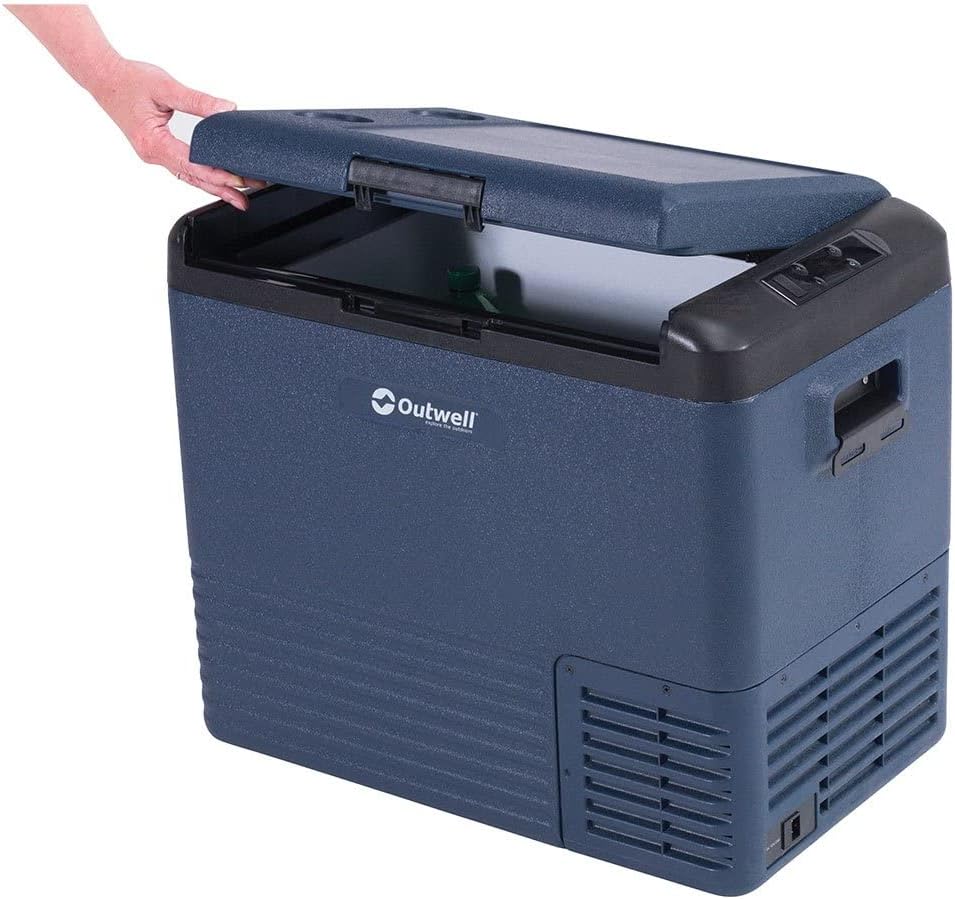
This image displays the Outwell Arctic Chill 50L portable refrigerator in a dark blue color, with its lid partially open, revealing the spacious interior suitable for storing food and beverages.
2. Saugos instrukcijos
- Užtikrinkite maitinimo šaltinio ttage atitinka prietaiso vardinę etiketę.
- Do not operate the refrigerator if the power cord is damaged. Contact qualified service personnel.
- Laikykite ventiliacijos angas be kliūčių.
- Nenaudokite elektros prietaisų maisto laikymo skyriuose, nebent jie yra gamintojo rekomenduojamo tipo.
- Venkite šaldytuvo laikymo tiesioginiuose saulės spinduliuose arba šalia šilumos šaltinių.
- Šis prietaisas nėra skirtas naudoti asmenims (įskaitant vaikus), kurių fizinės, jutimo ar psichikos negalios arba neturintys patirties ir žinių, nebent už jų saugumą atsakingas asmuo juos prižiūrėtų arba instruktuotų, kaip naudoti prietaisą.
- Vaikus reikia prižiūrėti, kad jie nežaistų su prietaisu.
3. Pakuotės turinys
Prašome patikrinti, ar visi daiktai yra ir yra geros būklės:
- Outwell Arctic Chill 50L Portable Refrigerator Unit
- AC Power Adapter (230V)
- DC Power Cable (12V)
- Vartotojo vadovas

This image illustrates the power accessories included with the refrigerator, featuring an AC adapter for household outlets and a 12V DC cable for vehicle power sources, ensuring versatile connectivity.
4. Sąranka
4.1 Išpakavimas
- Remove all packaging materials and inspect the refrigerator for any damage.
- Išvalykite vidų ir išorę naudodami skelbimąamp skudurėliu prieš pirmąjį naudojimą.
- Place the refrigerator on a stable, level surface, ensuring adequate ventilation around all sides.
4.2 Prijungimas prie elektros tinklo
The Arctic Chill 50L can be powered by either 12V DC (car/vehicle) or 230V AC (household mains).
- For 12V DC: Connect the DC power cable to the refrigerator's DC input port and then to your vehicle's 12V socket.
- For 230V AC: Connect the AC power adapter to the refrigerator's AC input port, then plug the adapter into a standard 230V wall outlet.
Ensure the power connection is secure before turning on the unit.
5. Naudojimo instrukcijos
5.1 Valdymo skydas baigtasview

This close-up image highlights the digital control panel of the refrigerator, showing temperature display, battery indicator, and buttons for adjusting settings like ECO mode.
The control panel features a digital display and several buttons for operation:
- Maitinimo mygtukas: Įjungia/išjungia įrenginį.
- Temperatūros reguliavimo mygtukai (+/-): Padidina arba sumažina tikslinę temperatūrą.
- Režimo mygtukas: Cycles through cooling modes (e.g., ECO, MAX).
- Ekranas: Shows current temperature, battery level, and selected mode.
5.2 Temperatūros nustatymas
- Press the Power button to turn on the refrigerator.
- Use the '+' or '-' buttons to set your desired temperature. The display will show the target temperature briefly, then revert to the current internal temperature.
5.3 aušinimo režimai
- MAX režimas: Užtikrina maksimalią aušinimo galią greitam temperatūros sumažinimui.
- ECO režimas: Optimizes power consumption for energy efficiency, suitable for maintaining temperature over longer periods.
Press the Mode button to switch between available cooling modes.
5.4 Smartphone App Connectivity
The Outwell Arctic Chill 50L may feature Bluetooth connectivity, allowing you to control and monitor the refrigerator via a dedicated smartphone app.
- Download the 'Outwell Arctic Cooler' app from your device's app store.
- Įsitikinkite, kad jūsų išmaniajame telefone įjungtas „Bluetooth“.
- Follow the in-app instructions to pair your refrigerator.

This image shows a user interacting with the Outwell Arctic Cooler mobile application on a smartphone, which allows for remote control and monitoring of the refrigerator's temperature and settings.
6. Priežiūra
6.1 Valymas
- Prieš valydami visada atjunkite maitinimą.
- Vidinius ir išorinius paviršius nuvalykite skelbimuamp skudurėliu ir švelniu plovikliu.
- Nenaudokite abrazyvinių valiklių ar stiprių cheminių medžiagų.
- Prieš vėl prijungdami maitinimą, įsitikinkite, kad prietaisas yra visiškai sausas.
6.2 Saugykla
When not in use for extended periods, ensure the refrigerator is clean, dry, and stored in a well-ventilated area. Leave the lid slightly ajar to prevent odors and mildew.
7. Problemų sprendimas
| Problema | Galima priežastis | Sprendimas |
|---|---|---|
| Šaldytuvas neįsijungia | No power supply; Damaged power cord; Blown fuse (vehicle) | Check power connection; Try a different outlet/socket; Inspect power cord; Check vehicle fuse. |
| Nepakankamas aušinimas | Ventilation blocked; Door not sealed properly; Ambient temperature too high; Overloaded with warm items | Clear vents; Ensure lid is closed tightly; Move to a cooler location; Allow time for cooling. |
| Neįprastas triukšmas | Įrenginys nelygus; Ventiliatorius užblokuotas | Place on a level surface; Check for debris near the fan. |
8. Specifikacijos
| Funkcija | Detalė |
|---|---|
| Prekės ženklas | Outwell |
| Modelio pavadinimas | Arctic Chill 50L |
| Modelio numeris | 590205 |
| Talpa | 50 litrai |
| Maitinimo įvestis | 12V DC / 230V AC |
| Spalva | Pilka |
| Medžiaga (išorė) | Poliesteris |
| Izoliacinė medžiaga | Polivinilchloridas |
| Produkto svoris | 2.7 kilogramo |
| Ypatinga funkcija | Lengva naudoti |
9. Garantija ir palaikymas
For warranty information and technical support, please refer to the warranty card included with your product or visit the official Outwell websvetainėje. Išsaugokite pirkimo įrodymą, jei prireiktų pateikti garantinį ieškinį.