
Įvadas
This manual provides essential information for the safe and efficient use of your ONN 42-Inch Full HD LED Smart TV, Model 100018254. Please read these instructions thoroughly before operating your television and retain them for future reference.
Kas yra dėžutėje
Prieš tęsdami sąranką, įsitikinkite, kad yra visi komponentai.
- ONN 42-Inch Full HD LED Smart TV
- Nuotolinio valdymo pultas
- TV stovas (2 vnt.)
- TV stovo varžtai
- Maitinimo laidas
- Greito paleidimo vadovas (neįtrauktas į šį vadovą)

Vaizdas: priekis view of the ONN 42-inch Smart TV displaying the Roku TV home screen with various streaming app icons like Netflix, Disney+, Apple TV, Hulu, Peacock, and Roku Channel. The TV is black with slim bezels and two stand feet.
Sąranka
1. Televizoriaus stovo pritvirtinimas
- Atsargiai padėkite televizorių ekranu žemyn ant minkšto, švaraus paviršiaus, kad nepažeistumėte.
- Sulygiuokite kiekvieną stovo dalį su atitinkamomis varžtų skylėmis televizoriaus apačioje.
- Pritvirtinkite kiekvieną stovo dalį pridėtais varžtais. Įsitikinkite, kad jie tvirtai priveržti.

Image: A diagram illustrating the dimensions of the ONN 42-inch TV, showing its width as 43 inches and height as 37 inches when placed on its stand.
2. Tvirtinimas prie sienos (neprivaloma)
This TV is compatible with VESA standard wall mounts. Refer to your wall mount's instructions for proper installation. Ensure the wall mount can support the weight of the television.

Vaizdas: Galinis view of the ONN 42-inch TV, highlighting the VESA mounting screw holes in a square pattern and various input ports on the side and bottom right.
3. Prietaisų prijungimas
Prijunkite išorinius įrenginius, pvz., kabelinės televizijos priedėlius, žaidimų konsoles arba „Blu-ray“ grotuvus, prie televizoriaus įvesties prievadų.
- HDMI: For high-definition audio and video. Use an HDMI cable to connect devices like set-top boxes, game consoles, or streaming sticks.
- USB: Skirta USB atmintinėms prijungti ir medijos atkūrimui files.
- „Wi-Fi“: For internet connectivity to access smart TV features and streaming services.
4. Pradinis įjungimo ir sąrankos vedlys
- Prijunkite maitinimo laidą prie televizoriaus, o tada – prie sieninio lizdo.
- Paspauskite maitinimo mygtuką ant nuotolinio valdymo pulto arba ant paties televizoriaus.
- Follow the on-screen instructions to complete the initial setup, including language selection, network connection (Wi-Fi), channel scanning, and linking to your Roku account (if applicable).
Televizoriaus valdymas
1. Nuotolinio valdymo pultasview
The remote control allows you to navigate the TV's interface and control various functions.
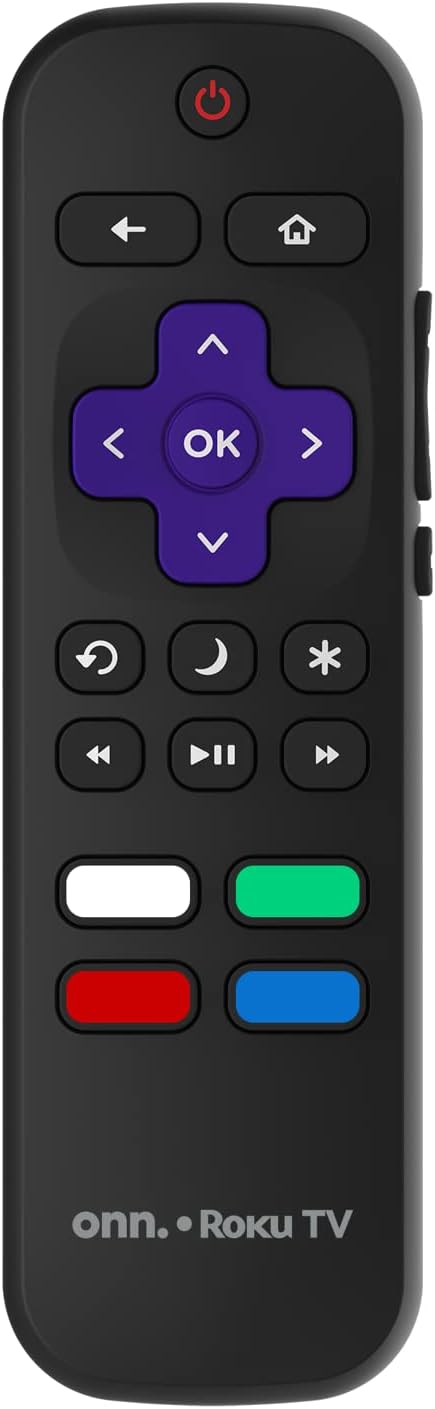
Image: The ONN Roku TV remote control, featuring a power button, directional pad, OK button, home button, back button, volume controls, and dedicated buttons for popular streaming services.
- Maitinimo mygtukas: Įjungia arba išjungia televizorių.
- Directional Pad (D-Pad) & OK: Naršo meniu ir patvirtina pasirinkimus.
- Namų mygtukas: Grąžina į „Roku TV“ pagrindinį ekraną.
- Atgal mygtukas: Grįžta į ankstesnį ekraną arba meniu.
- Garsumo didinimas / sumažinimas: Reguliuoja garso garsumą.
- Nutildymo mygtukas: Nutildo arba įjungia garsą.
- Kanalas aukštyn/žemyn: Changes channels (for antenna/cable inputs).
- Specialūs programėlių mygtukai: Quick access to popular streaming services like Netflix, Hulu, etc.
2. Išmaniojo televizoriaus funkcijos
Your ONN Smart TV provides access to a wide range of streaming content and smart functionalities.
- Srautinio perdavimo paslaugos: Access pre-installed apps like Netflix, YouTube, and many more through the Roku Channel Store.
- Valdymas balsu: Compatible with Alexa and Google Assistant for hands-free control (requires a separate compatible voice assistant device).
- Automatiniai programinės įrangos atnaujinimai: The TV will automatically update its software when connected to the internet, ensuring you have the latest features and security.
3. Įvesties pasirinkimas
To switch between connected devices (e.g., cable box, game console), use the Įvestis button on your remote or select the desired input from the Roku TV home screen.
4. Vaizdo ir garso nustatymai
Access the TV's settings menu to customize picture and sound preferences. Navigate to Nustatymai > Televizoriaus vaizdo nustatymai or Nustatymai > Garsas to adjust options like brightness, contrast, color, sound mode, and equalizer settings.
Priežiūra
1. Ekrano valymas
- Prieš valydami visada išjunkite televizorių ir atjunkite jį nuo elektros tinklo.
- Naudokite minkštą, nepūkuotą šluostę, šiek tiek sudrėkintąampnuplaukite vandeniu arba specializuotu ekrano valikliu.
- Nepurkškite valiklio tiesiai ant ekrano. Pirmiausia užtepkite jį ant šluostės.
- Venkite naudoti abrazyvinius valiklius, alkoholį, benzeną ar skiediklius, nes jie gali pažeisti ekraną.
2. Programinės įrangos atnaujinimai
Ensure your TV is connected to the internet to receive automatic software updates. These updates improve performance, add features, and enhance security. You can manually check for updates in the Nustatymai > Sistema > Sistemos naujinimas meniu.
Trikčių šalinimas
Jei kyla problemų dėl televizoriaus, žr. šiuos dažniausiai pasitaikančius sprendimus:
Nėra galios
- Patikrinkite, ar maitinimo laidas tvirtai įjungtas tiek į televizorių, tiek į sieninį lizdą.
- Patikrinkite, ar sieninis lizdas veikia, prijungdami prie jo kitą įrenginį.
- Pabandykite paspausti maitinimo mygtuką ant paties televizoriaus, o ne tik ant nuotolinio valdymo pulto.
Nėra vaizdo / Iškreiptas vaizdas
- Įsitikinkite, kad pasirinktas teisingas įvesties šaltinis (pvz., HDMI 1, HDMI 2).
- Patikrinkite visas kabelių jungtis tarp televizoriaus ir išorinių įrenginių.
- Jei įmanoma, pabandykite kitą HDMI kabelį.
- Televizoriaus meniu reguliuokite vaizdo nustatymus (ryškumą, kontrastą).
Nėra garso / tylus garsas
- Check if the TV is muted or if the volume is turned down.
- Ensure external audio devices (soundbars, receivers) are properly connected and powered on.
- Patikrinkite garso nustatymus televizoriaus meniu.
Tinklo ryšio problemos
- Verify your Wi-Fi router is powered on and functioning.
- Iš naujo paleiskite maršrutizatorių ir modemą.
- Eikite į Nustatymai > Tinklas > Tikrinti ryšį on your TV to diagnose the issue.
- Įsitikinkite, kad įvedėte teisingą „Wi-Fi“ slaptažodį.
Specifikacijos
| Funkcija | Detalė |
|---|---|
| Modelio numeris | 100018254 |
| Ekrano dydis | 42 colių |
| Ekrano technologija | LED |
| Rezoliucija | 1080p (viskas viename) |
| Atnaujinimo dažnis | 60 Hz |
| Ryšys | USB, Wi-Fi |
| Palaikomos interneto paslaugos | Netflix, YouTube (and others via Roku platform) |
| Kontrolės metodas | Voice (via Alexa & Google Assistant compatible devices), Remote Control |
| Montavimo tipas | Sieninis laikiklis (suderinamas su VESA) |
| Spalva | Juoda |
| UPC | 671227025567 |

Image: Energy Guide label for Television Model 100018254, indicating an estimated yearly energy cost of $11 based on 12 cents per kWh and 5 hours use per day.
Garantija ir palaikymas
For warranty information and technical support, please refer to the documentation included with your purchase or visit the official ONN support websvetainę. Išsaugokite pirkimo čekį garantiniams reikalavimams.