
1. Įvadas
This manual provides detailed instructions for the Loutoc Voice Remote Control, Model 1385a. This remote is designed as a replacement and upgrade for specific Samsung Smart TVs from 2021 and 2022, offering voice control and quick access to popular streaming services. It features a fast response time of 0.5 seconds and durable silicone buttons tested for over 15,000 clicks. Please read this manual carefully to ensure proper use and optimal performance.

Image 1: Loutoc Voice Remote Control, front view.
2. Suderinamumas
The Loutoc Voice Remote Control (Model 1385a) is specifically compatible with 2021/2022 Samsung Neo QLED / Crystal UHD 4K Smart TVs that have Alexa Built-in. It is designed to replace or function similarly to the following Samsung TV remote models with voice function:
- TM2180A (BN68-11642A, BN68-11929A, BN68-11929B, BN68-11929D)
- TM2180E (BN68-11645A, BN68-11645G)
- TM2280E (BN68-13842D, BN68-13842H, BN68-13842J)
- BN68-11645D
Pastaba: This remote control may not be fully compatible with Samsung TVs from other years or models that do not support voice control or the listed remote models.

Image 2: The remote is compatible with 2021/2022 Samsung Neo QLED and Crystal UHD 4K Smart TVs with Alexa Built-in.

Image 3: Visual representation of compatible Samsung TV remote models.
3. Sąranka
3.1. Akumuliatoriaus įdėjimas
The Loutoc Voice Remote Control requires dvi AAA baterijos for operation. To install the batteries:
- Nuotolinio valdymo pulto gale raskite baterijų skyriaus dangtelį.
- Slide the cover downwards or press the latch (if present) to open it.
- Įdėkite dvi AAA tipo baterijas, užtikrindami, kad teigiamas (+) ir neigiamas (-) poliai teisingai sutaptų su žymėjimais baterijų skyriuje.
- Saugiai uždarykite akumuliatoriaus skyriaus dangtelį.
3.2. Poravimo instrukcijos
For full functionality, including voice control and advanced features, the remote control must be paired with your Samsung Smart TV. If the remote does not automatically pair upon battery installation, follow these steps:
- Įsitikinkite, kad jūsų „Samsung“ išmanusis televizorius įjungtas.
- Point the Loutoc remote control directly at the front of your TV.
- Vienu metu paspauskite ir palaikykite "Return" mygtukas (lenkta rodyklė) ir "Play/Pause" button (triangle and two vertical lines) for at least 3 to 5 seconds.
- Release the buttons when a pairing message appears on your TV screen, indicating that the pairing process has begun or is complete.
- The TV screen should display a confirmation message once pairing is successful.
If pairing fails, ensure the batteries are correctly inserted and try again. Maintain a clear line of sight to the TV during the pairing process.
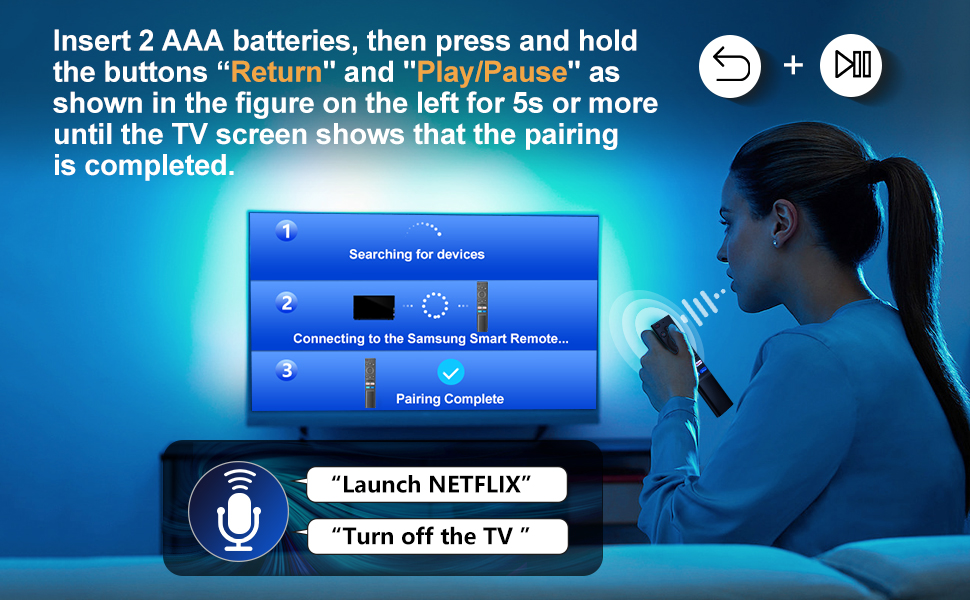
Image 4: Visual guide for pairing the remote control with your Samsung Smart TV by holding the Return and Play/Pause buttons.
4. Naudojimo instrukcijos
The Loutoc Voice Remote Control offers intuitive navigation and quick access to various TV functions and streaming services.
4.1. Mygtukų funkcijosview
Refer to the diagram below for a detailed overview kiekvieno mygtuko funkcijos:

Image 5: Labeled diagram of the Loutoc Voice Remote Control buttons and their functions.
| Mygtukas / funkcija | Aprašymas |
|---|---|
| Galia | Paspauskite, jei norite įjungti arba išjungti televizorių. |
| MIC / LED | Used as MIC when using voice recognition with the remote control. The LED indicates remote activity. |
| Balso asistentas | Press and hold this button to speak commands to the voice assistant (e.g., Alexa). Supported languages and features may vary by geographical region. |
| Color / Number button (123) | Press once to display the virtual numeric pad and color buttons. Use these to access additional options or enter numbers/text. Press and hold for 1 second or more to access the TTX menu. |
| Keli View | Press this button directly to enter the Multi View function. Press and hold for 1 second or more to access the Shortcuts menu screen. |
| Directional buttons (Up, Down, Left, Right) | Moves the focus and changes values on the TV's menu. |
| Pasirinkite | Selects or runs a focused item. When pressed while watching a broadcast program, detailed program information appears. |
| Grįžti | Returns to the previous menu. When pressed for 1 second or more, the running function is terminated. When pressed while watching a program, the previous channel appears. |
| Smart Hub (Home) | Grįžta į pagrindinį ekraną. |
| Leisti / pristabdyti | Controls media playback. Use to pause/play content. When pressed, the playback controls appear. Using these controls, you can control the media content that is playing. To use Game Bar, press and hold the button in Game Mode. Game Bar may not be supported depending on the model or geographical area. |
| Garsas (+/-) | Moves the button up or down to adjust the volume. To mute the sound, press the button. When pressed for 1 second or more, the Accessibility Shortcuts menu appears. |
| Kanalas (aukštyn/žemyn) | Moves the button up or down to change the channel. To see the Guide screen, press the button. When pressed for 1 second or more, the Channel List screen appears. |
| Launch App buttons (NFLX, Rakuten TV, Prime Video, Dis) | Press each button to launch its respective application directly. |
4.2. Balso valdymo funkcija
The remote features a dedicated voice control button, allowing you to interact with your Samsung Smart TV using voice commands. This function is particularly useful for searching content, changing settings, or controlling smart home devices connected to your TV's voice assistant.
- Paspauskite ir palaikykite Balso asistentas button (microphone icon).
- Speak your command clearly into the microphone located on the remote.
- Release the button once you have finished speaking.
Examples of commands include: "Launch Netflix", "Turn off the TV", "Ieškokite action movies".

Image 6: The remote control highlighting the voice function button.

Image 7: A user demonstrating the voice control feature to launch applications or control the TV.
4.3. Quick Access Shortcut Buttons
The remote includes four dedicated shortcut buttons for instant access to popular streaming applications:
- NFLX: Launches Netflix.
- Rakuten televizija: Launches Rakuten TV.
- Pagrindinis vaizdo įrašas: Launches Amazon Prime Video.
- Dis: Launches Disney+.

Image 8: Close-up of the dedicated shortcut buttons for streaming services.
5. Priežiūra
To ensure the longevity and proper functioning of your Loutoc Voice Remote Control, follow these maintenance guidelines:
- Valymas: Nuotolinio valdymo pultą valykite minkšta, sausa šluoste. Jei nešvarumai sunkiai įveikiami, šiek tiek nuvalykite.ampNuvalykite šluostę vandeniu arba švelniu, neabrazyviniu valikliu. Venkite naudoti stiprias chemines medžiagas ar abrazyvines medžiagas.
- Baterijos keitimas: Pakeiskite baterijas, kai nuotolinio valdymo pultas reaguoja lėtai arba nustoja veikti. Visada keiskite abi baterijas vienu metu naujomis to paties tipo (AAA) baterijomis.
- Saugykla: Laikykite nuotolinio valdymo pultą vėsioje, sausoje vietoje, toliau nuo tiesioginių saulės spindulių, ekstremalių temperatūrų ir didelės drėgmės.
- Venkite lašų: Saugokite nuotolinio valdymo pultą nuo fizinių smūgių, nes kritimas gali pažeisti vidinius komponentus.
6. Problemų sprendimas
If you encounter issues with your Loutoc Voice Remote Control, refer to the following common problems and solutions:
- Nuotolinis nereaguoja:
- Patikrinkite, ar baterijos tinkamai įdėtos ir ar jose pakankamai įkrovos. Jei reikia, pakeiskite jas.
- Įsitikinkite, kad tarp nuotolinio valdymo pulto ir televizoriaus nėra jokių kliūčių.
- Re-pair the remote control with your TV by following the "Pairing Instructions" in Section 3.2.
- Balso valdymas neveikia:
- Ensure the remote is properly paired via Bluetooth/RF (not just infrared).
- Make sure you are pressing and holding the Voice Assistant button while speaking.
- Speak clearly and close to the microphone on the remote.
- Check your TV's settings to ensure the voice assistant feature is enabled and configured correctly.
- Delayed response or intermittent functionality:
- This can sometimes occur if the remote is not fully paired or if there's interference. Try re-pairing the remote.
- Įsitikinkite, kad esate efektyviame veikimo diapazone (iki 8 metrų / 26 pėdų).
- Pakeiskite baterijas, jei jos išsikrovusios.
- Specific shortcut buttons not working:
- Ensure your TV has the corresponding application installed and updated.
- Verify that the remote is correctly paired.
Jei problema išlieka ir išbandžius šiuos sprendimus, susisiekite su klientų aptarnavimo tarnyba.
7. Specifikacijos
| Funkcija | Detalė |
|---|---|
| Prekės ženklas | Loutoc |
| Modelio numeris | 1385a |
| Maitinimo šaltinis | 2 x AAA baterijos (į komplektą neįeina) |
| Ryšio technologija | Bluetooth/RF (for pairing and voice control), Infrared (for basic functions) |
| Didžiausias diapazonas | Iki 8 metrų (26 pėdų) |
| Valdiklio tipas | Balso valdymas, mygtukų valdymas |
| Mygtukų skaičius | Approx. 20 (including directional pad) |
| Ypatingos savybės | Ergonomic design, No programming required (after pairing), Lightweight, Universal (for compatible Samsung models) |
| Spalva | Juoda |
| Matmenys (I x P x A) | Apytiksliai 19.7 x 4.8 x 1.5 cm (7.76 x 1.89 x 0.59 colio) |
| Svoris | Maždaug 40 gramų (1.41 uncijos) |
| Kilmės šalis | Kinija |

Image 9: Dimensions of the Loutoc Voice Remote Control.
8. Garantija ir palaikymas
Loutoc is committed to providing quality products and customer satisfaction. If you have any questions regarding your Loutoc Voice Remote Control or encounter any issues, please do not hesitate to contact our customer support team.
- Klientų aptarnavimas: For inquiries about your order or product, please contact us directly. We aim to respond within 12 hours on business days.
- Garantija: Specific warranty details may vary. Please refer to your purchase documentation or contact customer support for more information.