
1. Įvadas
This user manual provides detailed instructions for the MicroZone MC6C 2.4G 6-channel remote control transmitter and receiver system. This system is designed for controlling various remote-controlled models, including fixed-wing airplanes, unmanned aerial vehicles (UAVs), ground vehicles, and ships. Please read this manual thoroughly before operating your MC6C system to ensure safe and correct usage.
2. Produktas baigtasview
The MicroZone MC6C is a 2.4GHz 6-channel radio control system featuring FSK modulation for reliable communication. It provides 6 PWM signal outputs and 1 SBUS signal output, offering versatility for various model types. The system includes a transmitter and a compatible receiver (e.g., MC7RB or MC6REmini).
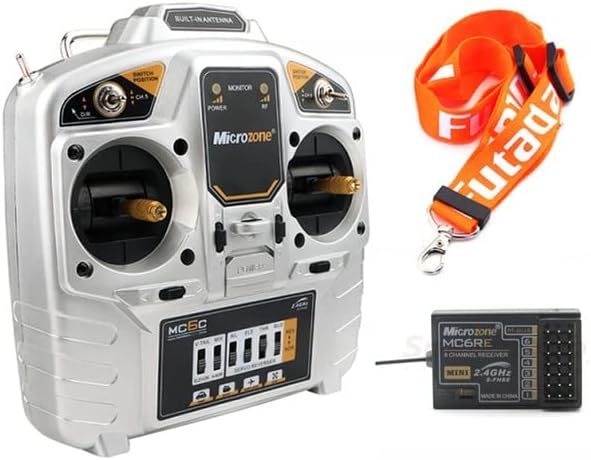
Figure 2.1: The MicroZone MC6C 2.4G 6-channel remote control transmitter and a compatible receiver, along with a neck strap.
Pagrindinės funkcijos:
- 2.4GHz FHSS (Frequency Hopping Spread Spectrum) technology for interference-free operation.
- 6 proportional channels for precise control.
- Supports 6 PWM signals and 1 SBUS signal output.
- Mažas tūristage alarm with LED indicator and buzzer.
- Suitable for fixed-wing aircraft, UAVs, vehicles, and ships.
- Ground control range exceeding 800 meters.

2.2 pav.: priekis view of the MicroZone MC6C transmitter, showing the gimbals, switches, and display panel.

2.3 pav.: Kampinis view of the MicroZone MC6C transmitter, highlighting the ergonomic design and control layout.
3. Specifikacijos
| Parametras | Vertė |
|---|---|
| Modelis | MC6C |
| RF diapazonas | 2401 MHz–2479 MHz |
| RF galia | ≤ 100MW |
| Darbo srovė | < 120MA |
| Darbo ttage | 4.5 V–8.5 V |
| Moduliacijos režimas | FSK (dažnio poslinkio klavišas) |
| Jautrumas | 1024 |
| Signalo išvestis | 6 PWM signals, 1 SBUS signal |
| Ground Control Range | > 800 m |
| Žemas tomastage Signalizacija | LED indicator and buzzer alarm |
| Maitinimo šaltinis | 6V (4 x 1.5V AA batteries) |
| Matmenys | 180 mm x 185 mm |
| Grynasis svoris | 426g |
| Authentication Standards | FCC, CE_RED |
4. Sąranka
4.1 Akumuliatoriaus įdėjimas
- Locate the battery compartment on the back of the MC6C transmitter.
- Atidarykite akumuliatoriaus skyriaus dangtelį.
- Insert four (4) 1.5V AA batteries, ensuring correct polarity (+/-) as indicated inside the compartment.
- Saugiai uždarykite akumuliatoriaus skyriaus dangtelį.

4.1 pav.: galinis view of the MC6C transmitter with the battery compartment open, showing the slots for four AA batteries.
4.2 Imtuvo susiejimas
The binding process establishes a secure communication link between the transmitter and the receiver. Refer to your receiver's specific manual for detailed binding instructions, as procedures may vary slightly. Generally, the steps involve:
- Įsitikinkite, kad siųstuvas yra išjungtas.
- Connect power to the receiver. The receiver's LED indicator will typically flash, indicating it is in binding mode or awaiting a binding signal.
- While holding the bind button (if present) on the receiver, or following a specific power-on sequence, power on the transmitter.
- Observe the receiver's LED. A solid light usually indicates successful binding.
- Power off both the transmitter and receiver, then power them on again in the normal sequence (transmitter first, then receiver) to confirm the binding.
5. Naudojimo instrukcijos
5.1 Įjungimas / išjungimas
- Norėdami įjungti: Ensure batteries are correctly installed. Flip the power switch on the transmitter to the "ON" position. The power indicator LED will illuminate. Then, power on your model's receiver.
- Norėdami išjungti: First, power off your model's receiver. Then, flip the power switch on the transmitter to the "OFF" position.
5.2 Pagrindiniai valdikliai
The MC6C transmitter features two primary control sticks (gimbals) and several switches for controlling your model. The specific functions of each channel and switch depend on your model's configuration.

5.1 pav.: Detalus priekis view of the MC6C transmitter, showing the gimbals, trim levers, and various switches for channel control.
- Kardaniniai elementai: Control primary functions like throttle, aileron, elevator, and rudder.
- Jungikliai: Used for auxiliary functions such as landing gear, flaps, flight modes, or channel 5 and 6 control.
- Apdaila: Small levers near the gimbals used to fine-tune the neutral position of control surfaces.
5.3 Žemas tomastage Signalizacija
The MC6C transmitter is equipped with a low voltage alarm system. When the battery voltage drops below a safe operating level, the LED indicator will flash, and a buzzer will sound. This indicates that the batteries need to be replaced or recharged immediately to prevent loss of control.
6. Priežiūra
- Valymas: Siųstuvą valykite minkšta, sausa šluoste. Venkite tirpiklių ar abrazyvinių valiklių.
- Saugykla: Siųstuvą laikykite vėsioje, sausoje vietoje, toliau nuo tiesioginių saulės spindulių ir ekstremalių temperatūrų. Jei ilgesnį laiką laikysite, išimkite baterijas, kad išvengtumėte ištekėjimo.
- Patikra: Periodically check all switches, gimbals, and connections for any signs of wear or damage.
- Akumuliatoriaus priežiūra: Visada naudokite naujas, aukštos kokybės AA baterijas. Jei naudojate įkraunamas baterijas, prieš kiekvieną naudojimą įsitikinkite, kad jos yra visiškai įkrautos.
7. Problemų sprendimas
| Problema | Galima priežastis | Sprendimas |
|---|---|---|
| Siųstuvas neįsijungia. | Neišsikrovusios arba neteisingai įdėtos baterijos. | Patikrinkite baterijų poliškumą ir pakeiskite jas naujomis baterijomis. |
| Nėra valdymo atsako iš modelio. | Receiver not bound, receiver not powered, or out of range. | Ensure receiver is powered and bound. Check range. |
| Mažas tūristagsignalizacija dažnai suveikia. | Batteries are low or nearing end of life. | Pakeiskite baterijas naujomis. |
| Intermittent control or signal loss. | Interference, transmitter/receiver too far apart, or damaged antenna. | Operate in an open area. Check antennas for damage. Re-bind if necessary. |
8. Saugos informacija
- Always operate your RC model in a safe and open area, away from people, animals, and property.
- Never operate your RC model near power lines, roads, or water bodies.
- Ensure the transmitter is powered on before the receiver, and powered off after the receiver, to prevent accidental activation.
- Regularly inspect your model and control system for any damage or loose connections.
- Do not operate the system if you are tired, under the influence of alcohol, or otherwise impaired.
- Nenaudojamą gaminį laikykite vaikams nepasiekiamoje vietoje.
9. Garantija ir palaikymas
For warranty information and technical support, please refer to the documentation provided with your purchase or contact the retailer where the product was acquired. Keep your proof of purchase for warranty claims.