
1. Įvadas
This manual provides detailed instructions for the setup, operation, maintenance, and troubleshooting of your Cosmic Byte ARES Wired Controller for PC. Designed for an enhanced gaming experience, this controller features Hall Effect joysticks and triggers, dual vibration, and customizable Turbo functions.
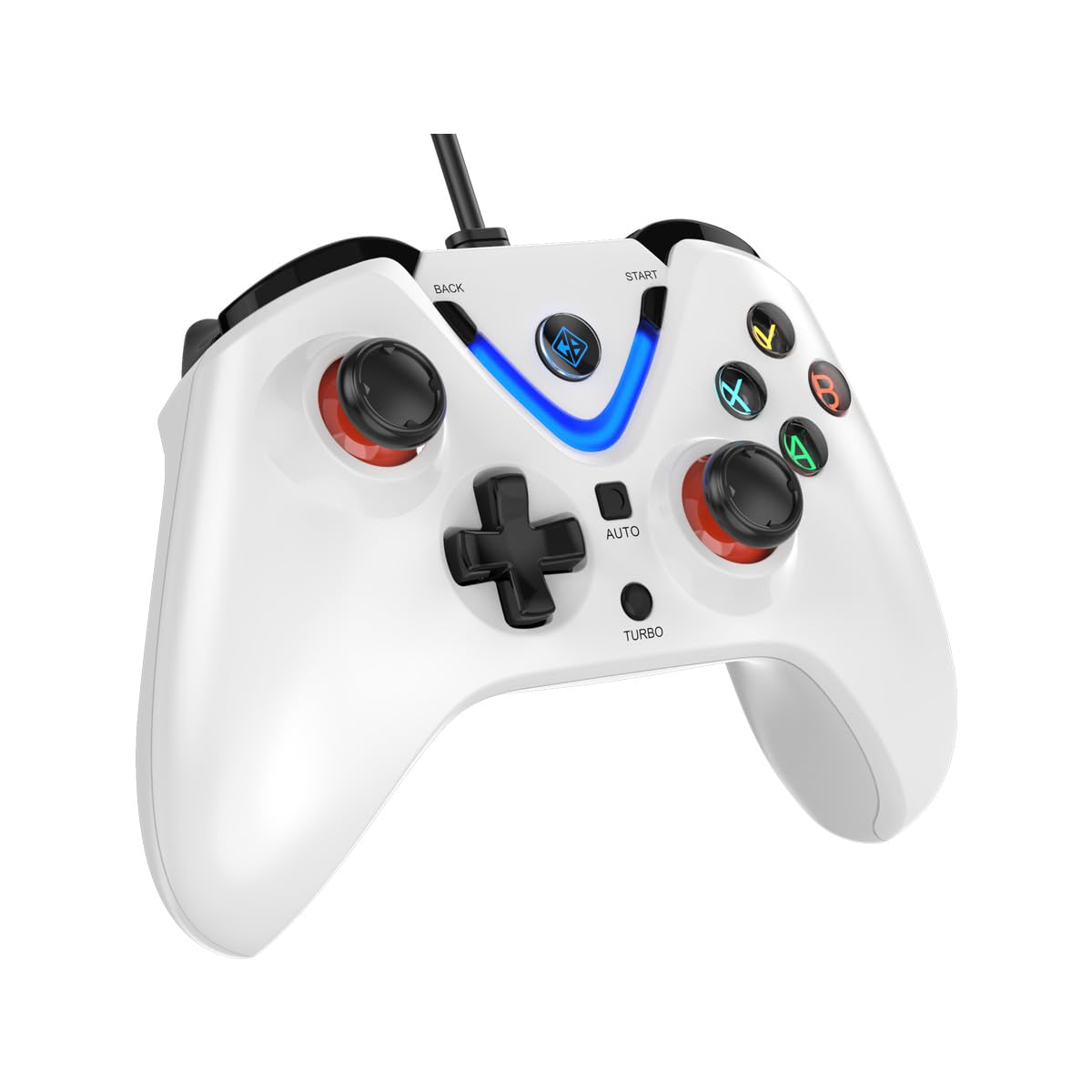
Image 1: The Cosmic Byte ARES Wired Controller in white, showcasing dėl savo ergonomiško dizaino.
2. Sąrankos instrukcijos
2.1 Prijungimas prie kompiuterio
- Įsitikinkite, kad jūsų kompiuteris yra įjungtas.
- Kompiuteryje raskite laisvą USB prievadą.
- Plug the USB connector of the Cosmic Byte ARES Wired Controller into the USB port.
- Operacinė sistema automatiškai aptiks ir įdiegs reikiamas tvarkykles. Šis procesas gali užtrukti kelias akimirkas.
- Kai diegimas bus baigtas, valdiklis bus paruoštas naudoti.

Image 2: The controller connected via its wired USB connection, ensuring fast response.
3. Naudojimo instrukcijos
3.1 Pagrindiniai valdikliai
The Cosmic Byte ARES controller features standard gamepad layouts, including:
- Left and Right Analog Joysticks: Tiksliam judesiui ir kameros valdymui.
- D-Pad: Kryptinei įvesčiai, dažnai naudojama meniu arba konkretiems žaidimo veiksmams.
- Veiksmų mygtukai (A, B, X, Y): For primary game interactions.
- Pečių mygtukai (L1, R1) ir gaidukai (L2, R2): For various in-game functions like shooting, aiming, or accelerating.
- Start and Back Buttons: For pausing games, accessing menus, or specific in-game commands.
- Turbo mygtukas: For activating rapid-fire functions.
- Automatinis mygtukas: For activating automatic rapid-fire functions.
3.2 Holo efekto valdymo svirtys ir paleidikliai
The controller is equipped with Hall Effect joysticks and triggers, which use magnetic sensors instead of physical contacts. This technology provides:
- Patobulintas tikslumas: More accurate and responsive input.
- Padidintas patvarumas: Reduces wear and tear, preventing stick drift over time.
- Sklandus veikimas: Consistent and linear response for triggers, allowing for nuanced control in games.

3 paveikslėlis: sprogęs view illustrating the Hall Effect joystick mechanism and the Hall Effect triggers.
3.3 Dvigubas vibracijos grįžtamasis ryšys
The controller features dual vibration motors that provide tactile feedback during gameplay, enhancing immersion by simulating in-game events such as impacts, explosions, or engine rumbling.
3.4 Backlit LED Buttons
The action buttons (A, B, X, Y) and the central V-shaped indicator feature LED backlighting, providing visibility in low-light conditions and adding to the controller's aesthetic.

Image 4: The controller with its LED buttons illuminated and visual representation of vibration effects.
3.5 Turbo and Auto Turbo Functions
The Turbo and Auto Turbo functions allow for rapid, repeated input of a button press without continuously pressing the button.
- Turbo aktyvinimas: Press and hold the desired action button (e.g., A) and then press the Turbo button. The button will now rapidly repeat its input as long as you hold it down.
- Activating Auto Turbo: Press and hold the desired action button (e.g., A) and then press the Auto button. The button will now rapidly repeat its input automatically without needing to be held down.
- Deactivating Turbo/Auto Turbo: To deactivate, repeat the activation steps for the specific button, or press the Aišku button (if available) or disconnect and reconnect the controller.

Image 5: Close-up of the controller showing the Turbo and Auto function buttons.
4. Priežiūra
- Valymas: Valdiklį valykite minkšta, sausa šluoste. Jei nešvarumai sunkiai įveikiami, naudokite šiek tiek sausą šluostę.amp cloth can be used, ensuring no liquid enters the controller. Avoid harsh chemicals or abrasive cleaners.
- Saugykla: Store the controller in a cool, dry place away from direct sunlight and extreme temperatures. Avoid placing heavy objects on the controller.
- Kabelio priežiūra: Do not sharply bend or pull the USB cable. Always grasp the plug when disconnecting from the PC.
5. Problemų sprendimas
- Valdiklis neatpažintas:
- Įsitikinkite, kad USB laidas yra tvirtai prijungtas tiek prie valdiklio, tiek prie kompiuterio.
- Pabandykite prijungti valdiklį prie kito USB prievado.
- Iš naujo paleiskite kompiuterį.
- Check Device Manager on Windows to see if the controller is listed and if there are any driver issues.
- Mygtukai / valdymo svirtys nereaguoja:
- Verify the controller is recognized by your PC (see above).
- Test the controller in a different game or a controller testing utility to rule out game-specific issues.
- Įsitikinkite, kad kiti įvesties įrenginiai netrukdo.
- Vibracija neveikia:
- Patikrinkite žaidimo nustatymus, kad įsitikintumėte, jog įjungtas vibracijos grįžtamasis ryšys.
- Some games may not support vibration or may have limited vibration effects.
6. Specifikacijos
| Funkcija | Detalė |
|---|---|
| Prekės ženklas | Kosminis baitas |
| Modelio pavadinimas | Ares |
| Suderinami įrenginiai | PC |
| Valdiklio tipas | Žaidimų pultelis |
| Ryšio technologija | USB |
| Produkto savybės | Ergonomiškas |
| Mygtukų kiekis | 16 |
| Aparatinės įrangos platforma | PC |
| Maitinimo šaltinio tipas | Su elektra, USB laidas |
| Prekės svoris | 220 gramų |
| Prekės matmenys | 6x10x4 cm |
| Spalva | Baltas |
| Kilmės šalis | Kinija |

Image 6: A comparison table highlighting features of different ARES controller models.
7. Garantija ir palaikymas
7.1 Informacija apie garantiją
The Cosmic Byte ARES Wired Controller comes with a 1 metų garantija dėl gamybos defektų nuo pirkimo datos. Prašome išsaugoti pirkimo įrodymą garantiniams reikalavimams.
7.2 Gamintojo kontaktinė informacija
For support, service, or warranty inquiries, please contact:
Kosminis baitasPrakash Warehousing, S. No.163, Hissa No 1-2-3-4-5A-5B/2/1,
Phursungi, Pune 412308, Maharashtra, India
For further assistance, please visit the official Cosmic Byte websvetainėje arba susisiekite su jų klientų aptarnavimo tarnyba.