
USHINING T380
USHINING T380 4G Unlocked Flip Phone
Vartotojo vadovas
1. Įvadas
Thank you for choosing the USHINING T380 4G Unlocked Flip Phone. This device is designed with simplicity and ease of use in mind, making it ideal for seniors. It features large buttons, a clear display, and essential functions like SOS emergency calls, speed dial, and a charging dock for convenient power management. This manual provides detailed instructions to help you set up, operate, and maintain your new phone.

Image: The USHINING T380 flip phone, closed and resting in its charging dock. The phone is blue with a black dock.
2. Pakuotės turinys
Pažymėkite langelį prie šių elementų:
- USHINING T380 4G Senior Cell Phone
- Įkrovimo dokas
- Long Lasting Battery (1000mAh Lithium Ion)
- Vartotojo vadovas (šis dokumentas)
- Speedtalk SIM Card (if included with your purchase)
- Charging Cord (USB to Micro USB)
- Maitinimo adapteris

Image: A visual representation of the items included in the product package, showing the phone, charging dock, battery, user manual, Speedtalk SIM card, and charging cable with adapter.
3. Produkto ypatybės
The USHINING T380 is equipped with a range of features designed for convenience and safety:
- 4G LTE ryšys: For reliable call quality and basic internet access.
- Dideli mygtukai ir aiškus ekranas: Easy to see and press for comfortable dialing and navigation.
- SOS avarinis mygtukas: Quickly contacts pre-set emergency numbers with a single press.
- Greitasis rinkimas: Assign up to 8 contacts for quick calling.
- Įkrovimo dokas: Simple drop-in charging, eliminating the need to fumble with cables.
- FM Radio & MP3 Player: Enjoy audio entertainment.
- Basic Camera: For simple photo capture.
- Žibintuvėlis: Convenient for low-light situations.
- Bluetooth: For connecting to compatible headsets or other devices.
- Calendar & Alarm Clock: Useful daily tools.
- Blacklist Function: Protects against unwanted calls.

Image: A graphic displaying various practical features of the phone, including FM Radio, Camera, Bluetooth, 4G LTE, MP3 player, Calendar, Call logs, Flashlight, Speed Dial, Alarm Clock, SMS, SOS, and Large buttons.
4. Sąranka
4.1 Akumuliatoriaus įdėjimas
- Open the back cover of the phone by gently prying it from the notch at the bottom.
- Align the battery's gold contacts with the phone's terminals.
- Tvirtai spauskite bateriją žemyn, kol ji spragtels į vietą.
- Uždėkite galinį dangtelį, įsitikindami, kad jis tvirtai užsifiksuoja.
4.2 SIM Card & Micro SD Card Installation
The phone supports dual SIM cards (Standard SIM) and one Micro SD card for expanded storage.
- With the back cover and battery removed, locate the SIM card slots. There are two standard SIM slots and one Micro SD card slot.
- Gently slide your SIM card(s) into the designated slot(s) with the gold contacts facing down, following the diagram on the phone.
- If installing a Micro SD card, carefully slide it into its slot. Note: There may be a small plastic cover over the Micro SD slot; slide the card underneath it.
- Įdėkite bateriją atgal ir uždėkite galinį dangtelį.
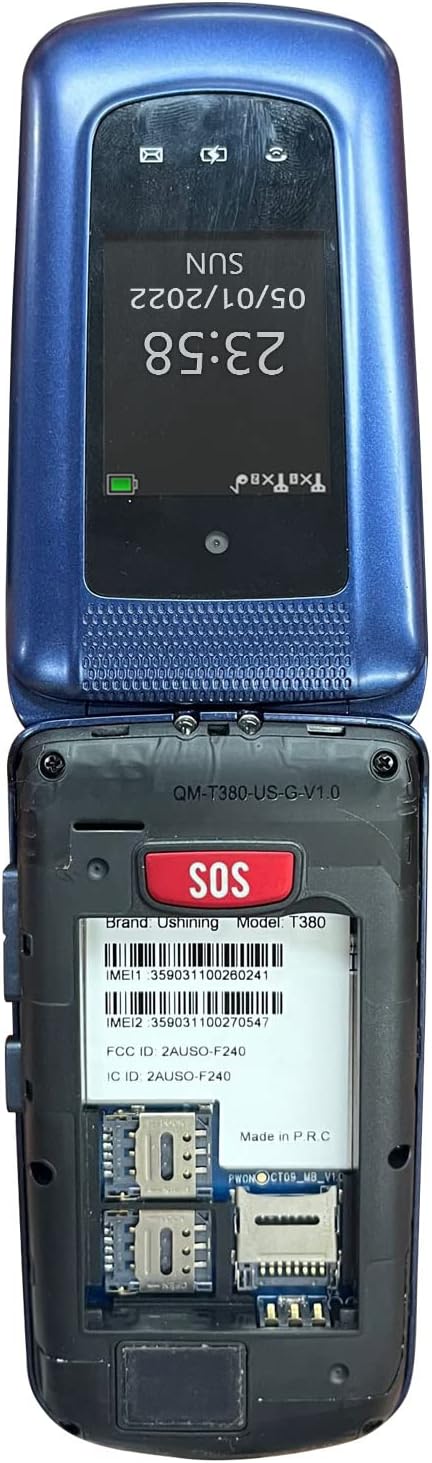
Image: The back of the USHINING T380 flip phone with the cover removed, revealing the battery compartment and slots for two SIM cards and one Micro SD card.
4.3 Telefono įkrovimas
Before first use, fully charge the phone for approximately 3 hours.
- Įkrovimo stotelės naudojimas: Place the phone into the charging dock, ensuring it sits securely. The charging indicator on the phone's screen will activate.
- Tiesioginis įkrovimas: Connect the Micro USB charging cable directly to the phone's charging port and the other end to the power adapter, then plug into a wall outlet.
4.4 Maitinimo įjungimas/išjungimas
- Norėdami įjungti: Paspauskite ir palaikykite raudoną skambučio baigimo / maitinimo mygtuką (⏏), kol ekranas įsijungs.
- Norėdami išjungti: Paspauskite ir palaikykite raudoną skambučio baigimo / maitinimo mygtuką (⏏) until the power off options appear, then select 'Power off'.
4.5 Tinklo suderinamumas
The USHINING T380 is designed to work with T-Mobile and its associated MVNOs (Mobile Virtual Network Operators) in the United States. It is nesuderinamas with AT&T, Sprint, or Verizon networks.
Compatible Carriers (T-Mobile Network):
- T-Mobile
- „T-Mobile“ metro
- RedPocket (GSMT)
- Speedtalk Mobile
- Tello
- Lyca Mobile
- Ultra Mobile
- Mint mobilusis

Image: A diagram illustrating compatible carriers (T-Mobile, Metro, RedPocket, Speedtalk, Tello, Lyca, Ultra, Mint Mobile) and incompatible carriers (AT&T, Sprint, Verizon) for the USHINING T380 phone.
5. Naudojimo instrukcijos
5.1 Pagrindinės skambinimo funkcijos
- Skambinimas: Enter the phone number using the keypad and press the green Call button (✆).
- Atsiliepimas į skambutį: When the phone rings, open the flip or press the green Call button (✆).
- Skambučio pabaiga: Press the red End Call button (⏏) or close the flip.
- Garso reguliavimas: Skambučio metu naudokite telefono šone esančius garsumo mygtukus.
5.2 SOS pagalbos skambutis
The SOS button is located on the back of the phone. It allows you to quickly contact pre-set emergency contacts.
- SOS kontaktų nustatymas: Navigate to the SOS settings in the phone's menu. You can typically add up to 5 emergency numbers. These numbers will be called in sequence until one answers. The phone will also send an emergency SMS message to these contacts.
- Naudojant SOS funkciją: In an emergency, press and hold the SOS button on the back of the phone for a few seconds. The phone will activate an alarm, send an SMS to your emergency contacts, and then begin dialing them one by one.

Image: A visual explanation of the SOS Emergency Call feature, showing how it supports up to 5 family numbers and guarantees safety, alongside a Blacklist feature for protection from fraud calls.
5.3 Greitasis rinkimas
Priskirkite dažnai skambinamus numerius konkretiems klavišams, kad galėtumėte greitai rinkti.
- Setting Up Speed Dial: Go to the phone's settings or contacts menu to find the speed dial options. You can typically assign numbers to keys 2-9.
- Naudojant greitąjį rinkimą: Press and hold the assigned number key (e.g., '2' for Son, '3' for Daughter) to automatically dial the pre-set contact.

Image: A graphic demonstrating the 8 speed dial buttons on the phone, allowing users to assign contacts like Son, Daughter, Mom, Dad, etc., for quick access.
5.4 Messaging (SMS)
- Eikite į meniu „Žinutės“.
- Norėdami parašyti naują SMS žinutę, pasirinkite „Rašyti žinutę“.
- Įveskite gavėjo numerį arba pasirinkite iš kontaktų, tada klaviatūra įveskite žinutę.
- Paspauskite „Siųsti“.
5.5 FM radijas
- Pagrindiniame meniu atidarykite programėlę „FM radijas“.
- Norėdami ieškoti stočių arba rankiniu būdu nustatyti dažnį, naudokite naršymo mygtukus.
- Headphones may be required to act as an antenna for optimal reception.
5.6 MP3 grotuvas
- Ensure you have MP3 files stored on a Micro SD card inserted into the phone.
- Go to the 'MP3 Player' or 'Music' application.
- Naršykite ir pasirinkite norimą garso įrašą files žaisti.
5.7 Kamera
- Meniu atidarykite programą „Kamera“.
- Kadruokite kadrą naudodami ekraną.
- Press the 'OK' or center navigation button to capture the photo.
5.8 Žibintuvėlis
- The flashlight can typically be activated by a dedicated button on the side of the phone or through the main menu.
NETURI „Bluetooth“
- Go to 'Settings' and then 'Bluetooth'.
- Įjunkite „Bluetooth“.
- Ieškokite available devices and pair with your desired Bluetooth headset or speaker.
5.10 Calendar & Alarm Clock
- Access 'Calendar' to view datas ir pridėti priminimus.
- Access 'Alarm Clock' to set multiple alarms with custom times and tones.
6. Priežiūra
- Valymas: Telefono išorę valykite minkšta, sausa šluoste. Venkite skystų valiklių.
- Akumuliatoriaus priežiūra: Norėdami pailginti baterijos veikimo laiką, venkite ekstremalių temperatūrų. Nepalikite telefono visiškai išsikrovusio ilgą laiką.
- Saugykla: Kai nenaudojate telefono, laikykite jį vėsioje, sausoje vietoje.
- Venkite lašų: While durable, repeated drops can damage the internal components.
7. Problemų sprendimas
| Problema | Galima priežastis / sprendimas |
|---|---|
| Telefonas neįsijungia | Battery is low or not installed correctly. Charge the phone for at least 30 minutes. Ensure battery is properly seated. |
| "Emergency Call Only" or No Network | SIM card not installed correctly or not activated. Ensure your carrier is compatible with the phone (T-Mobile network only). Contact your service provider. |
| Cannot hear caller / Low sound | Volume is too low. Press the volume up button during a call. Ensure speaker is not blocked. |
| Cannot send/receive SMS | Check network signal. Verify SMS center number in message settings (contact your carrier for this). |
| Flashlight is dim | This phone's flashlight is designed for basic illumination and may not be as bright as smartphone flashlights. Ensure battery is charged. |
| Telefonas užstringa arba nereaguoja | Remove the battery, wait a few seconds, then reinsert it and power on the phone. |
8. Specifikacijos
| Funkcija | Detalė |
|---|---|
| Modelio pavadinimas | T380 |
| Prekės ženklas | USHINING |
| Formos faktorius | Apverskite telefoną |
| Spalva | Mėlyna |
| Korinio ryšio technologija | 4G |
| Belaidžio ryšio operatorių suderinamumas | T-Mobile Network (e.g., T-Mobile, Metro, Speedtalk, Mint Mobile) |
| Ekrano dydis | 2.4 colių |
| Rezoliucija | 240 x 320 pikselių |
| RAM | 64 MB |
| Atminties talpa | 128 MB (vidinė) |
| Išplečiama saugykla | Micro SD kortelės lizdas (kortelė neįtraukta) |
| Baterijos talpa | 1000 milijonųamp Valandos (ličio jonų) |
| Ryšio technologijos | „Bluetooth“, mobilusis ryšys |
| Žmogaus sąsajos įvestis | Mygtukai, ratukas |
| Gaminio matmenys | 4.09 x 2.11 x 0.83 colio |
| Prekės svoris | 10.2 uncijos |
9. Garantija ir palaikymas
For warranty information and technical support, please refer to the documentation provided with your purchase or contact USHINING customer service directly. Contact details can typically be found on the manufacturer's official websvetainėje arba ant produkto pakuotės.
Ask a question about this manual
Ask about setup, troubleshooting, compatibility, parts, safety, or missing instructions. Manuals+ will review the question and use this page’s manual context to help answer it.