
VIGORWORK B500W
VIGORWORK Portable Car MP5 Player User Manual
Model: B500W
Įvadas
This manual provides detailed instructions for the installation, operation, and maintenance of your VIGORWORK Portable Car MP5 Player, Model B500W. This device is designed to enhance your in-car entertainment and connectivity with features like Apple CarPlay, Android Auto, Bluetooth 5.1, FM transmission, and multimedia playback.
Pakuotės turinys
Patikrinkite pakuotę, ar joje yra šie daiktai:
- 1 x Main Unit (Portable Car MP5 Player)
- 1 x Vartotojo vadovas
- 1 x cigarečių degiklio maitinimo laidas
- 1 x Suction Cup Holder
- 1 x 2-Key Silicone Remote Control
- 1 x Reversing Video Cable (for optional backup camera)

Image: The VIGORWORK Portable Car MP5 Player main unit, suction cup holder, remote control, cigarette lighter power cable, and reversing video cable.
Pagrindinės savybės
- Wired and Wireless Apple CarPlay & Android Auto: Sklandi išmaniojo telefono integracija navigacijai, skambučiams, žinutėms ir muzikai.
- FM Signal Transmission: Transmit audio to your original car speakers via FM radio.
- Keli ryšiai: USB, TF Card, Bluetooth 5.1, AUX, Type-C Port.
- Telefono veidrodinė nuoroda: Mirror your smartphone screen to the 7-inch HD display.
- "Bluetooth 5.1": Stable and fast wireless connection for hands-free calls and audio streaming.
- Cigarečių žiebtuvėlio maitinimas: Easy plug-and-play installation without modifying car wiring.
- Atbulinės eigos kameros palaikymas: Compatible with optional rear cameras for safer reversing.
- Integruotas garsiakalbis: Tiesioginei garso išvesčiai.
Saugos informacija
Please read and understand all safety instructions before using the device. Failure to follow these instructions may result in injury or damage to the device or vehicle.
- Nenaudokite įrenginio taip, kad tai atitrauktų jūsų dėmesį nuo vairavimo. Visada teikite pirmenybę eismo saugumui.
- Įsitikinkite, kad įrenginys yra tvirtai pritvirtintas ir netrukdo view arba trukdyti automobilio valdymui.
- Use only the provided power cable. Using incompatible power sources may damage the device.
- Venkite įrenginio ilgalaikio laikymo itin aukštose temperatūrose, tiesioginiuose saulės spinduliuose ar drėgmėje.
- Nebandykite patys ardyti ar taisyti įrenginio. Kreipkitės į kvalifikuotus techninės priežiūros darbuotojus.
Sąrankos vadovas
1. Prietaiso montavimas
Attach the suction cup holder to a clean, smooth surface on your dashboard or windshield. Ensure it does not obstruct your view or interfere with airbags. Securely attach the main unit to the holder.
2. Maitinimo prijungimas
Insert the cigarette lighter power cable into your vehicle's 12V-24V cigarette lighter socket. The device will power on automatically.

Image: The cigarette lighter power plug inserted into a vehicle's power outlet, demonstrating the plug-and-play power connection.
3. Backup Camera Connection (Optional)
If you have an optional backup camera, connect its video output to the "Reverse Video Input" port on the MP5 player using the provided reversing video cable. The system will automatically switch to the camera view kai transporto priemonė važiuoja atbuline eiga.

Image: The device screen showing a wide-angle view from a backup camera with green, yellow, and red customizable guidelines for parking assistance.
Naudojimo instrukcijos
1. Bluetooth Connection (Version 5.1)
Norėdami prijungti išmanųjį telefoną per „Bluetooth“:
- On the MP5 player, navigate to the Bluetooth settings.
- Įjunkite „Bluetooth“ savo išmaniajame telefone ir ieškokite galimų įrenginių.
- Select "CarPlay" (default name) from the list on your phone.
- Jei būsite paraginti, patvirtinkite susiejimo kodą.
Bluetooth 5.1 offers improved connection range, signal reception, and transfer speed compared to previous versions.

Image: A visual representation of Bluetooth 5.1 technology, highlighting a 50% increase in connection range, 75% improvement in signal reception, and 150% faster transfer speed.
2. Apple CarPlay
Connect your iPhone to the MP5 player via wired USB or wirelessly via Bluetooth/Wi-Fi. CarPlay allows you to access iPhone features like navigation, calls, messages, and music directly on the car's display.

Image: The device screen showing the Apple CarPlay interface, which includes common iOS app icons for in-car use. It indicates both wireless and wired connection options.
„Siri“ balso valdymas: Use Siri for hands-free operation. Simply say "Hey Siri" or press the voice command button to activate Siri and control functions like making calls or sending messages.
3. Android Auto
Connect your Android phone to the MP5 player via wired USB or wirelessly via Bluetooth/Wi-Fi. Android Auto mirrors your phone's essential apps to the display, enabling navigation, communication, and entertainment.

Image: The device screen showing the Android Auto interface, displaying app icons like Google Maps, YouTube Music, and Spotify. It also indicates both wireless and wired connection options.
„Google“ padėjėjas: Use Google Assistant for voice commands. Say "Hey Google" to control functions hands-free.
Note: For Android Auto, your phone needs Android 6.0 or higher and an active data cable for wired connection.
4. FM Signal Transmission
This feature allows the MP5 player's audio to be played through your car's original speakers by transmitting it over an FM frequency.
- Adjust your original car radio to an empty FM channel (e.g., 92.3MHz) with no strong broadcast signal.
- On the MP5 player, navigate to the FM transmission settings.
- Set the MP5 player's FM transmission frequency to match the empty channel you selected on your car radio.
- The audio from the MP5 player will now be transmitted and played through your car's speakers.
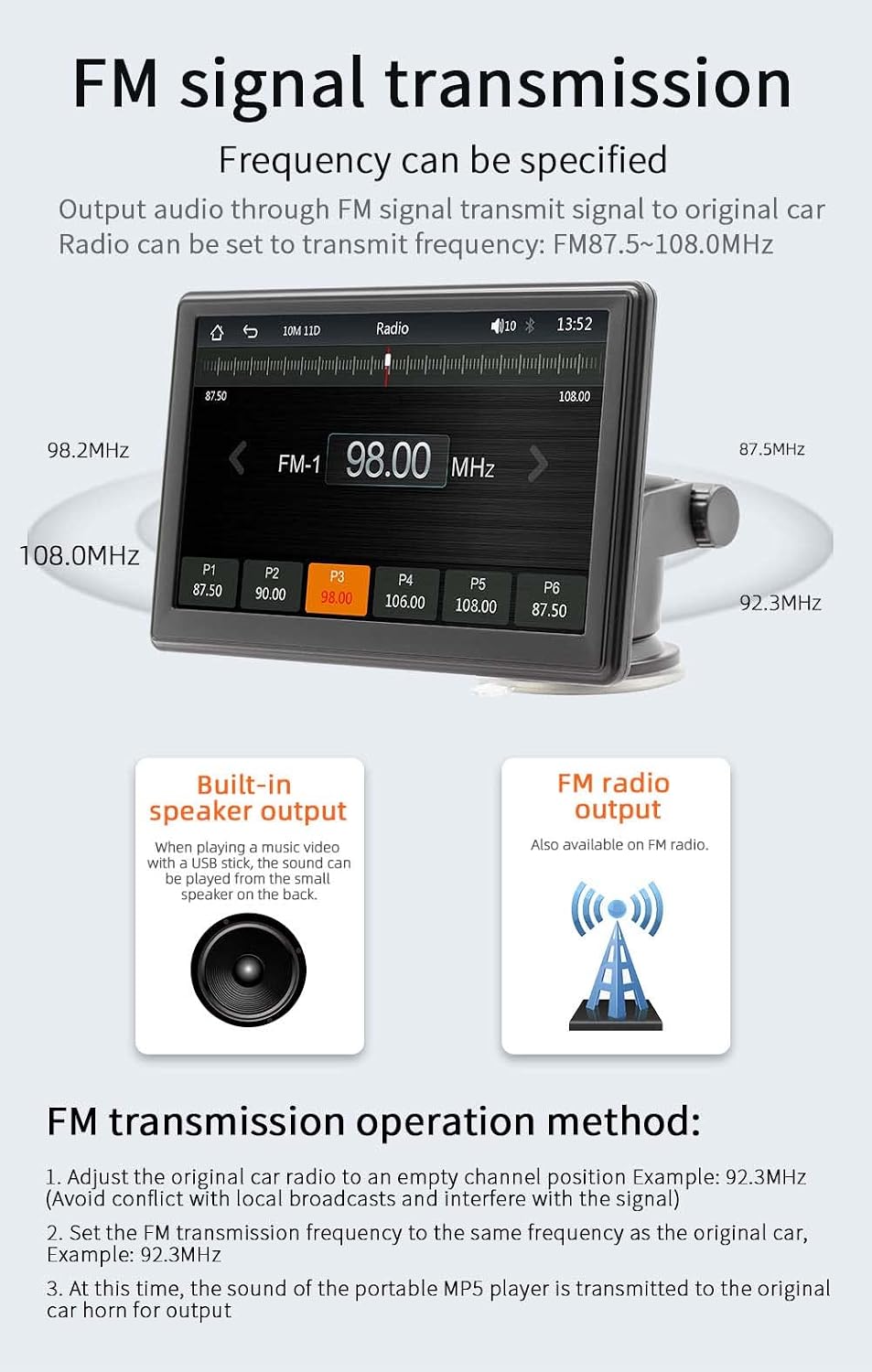
Image: The device screen showing the FM radio interface, demonstrating how to select a frequency for FM signal transmission. It also illustrates the concept of transmitting audio to the car's original speakers.
5. Multimedia Playback (USB/TF Card)
Insert a USB drive or TF card into the respective ports on the device. The MP5 player supports various audio (MP3/AAC/APE/OGG/M4A/RA/WAV), video (MP4/AVI/MKV/ASF/H264), and picture (JPG/PNG/BMP) formats for direct playback.

Image: The device screen showing options for multimedia playback, including music, video, and pictures. It highlights the use of a TF card and USB drive for media input.
6. Telefono veidrodinis ryšys
The mirror link function allows you to display your smartphone's screen directly onto the MP5 player's 7-inch HD screen. This is useful for viewturinio, kurio tiesiogiai nepalaiko „CarPlay“ arba „Android Auto“.
7. Kalbos nustatymai
The device supports multiple languages including English, Chinese, Spanish, Portuguese, Russian, German, French, Polish, Turkish, Arabic, Hebrew, Italian, Czech, and Japanese. Navigate to the system settings to change the display language.
8. Factory Reset Password
The factory set password for system settings is 113266. Use this password if prompted for advanced configurations or a factory reset.
Priežiūra
To ensure the longevity and optimal performance of your MP5 player:
- Clean the screen and exterior with a soft, dry cloth. Do not use abrasive cleaners or solvents.
- Saugokite įrenginį nuo dulkių ir šiukšlių.
- Nedėkite ant įrenginio sunkių daiktų.
- Disconnect the power cable when the device is not in use for extended periods.
Trikčių šalinimas
| Problema | Galima priežastis | Sprendimas |
|---|---|---|
| Įrenginys neįsijungia. | Cigarette lighter cable not properly connected or no power from socket. | Ensure the cigarette lighter cable is securely plugged in. Check if the car's cigarette lighter socket is working. |
| No sound from car speakers. | FM transmission not set correctly or car radio not tuned to the correct frequency. | Verify FM transmission settings on the MP5 player and ensure your car radio is tuned to the same empty frequency. Increase volume on both devices. |
| „Bluetooth“ ryšys nestabilus. | Interference or device too far from the MP5 player. | Ensure your phone is within range. Restart Bluetooth on both devices. Clear previous pairings and re-pair. |
| „CarPlay“ / „Android Auto“ neprisijungia. | Incorrect cable, phone settings, or software incompatibility. | For wired connection, use a high-quality data cable. Ensure CarPlay/Android Auto is enabled on your phone. Check phone's operating system version. Restart both devices. |
| Galinio vaizdo kameros vaizdas nerodomas. | Camera not connected, faulty cable, or camera not powered. | Ensure the reversing video cable is securely connected. Check the camera's power supply. (Note: Camera is optional and sold separately). |
Specifikacijos
| Parametras | Detalė |
|---|---|
| Modelis | B500W |
| Tipas | Nešiojamas automobilinis MP5 grotuvas |
| Sistema | Allwinner Melis System |
| Radijo dažnis | FM 87.5 ~ 108.0MHz |
| Išėjimo galia | Integruotas 1W garsiakalbis |
| Veiklos ttage | 12~24V |
| Darbinė temperatūra | -10-60 ℃ |
| Bluetooth versija | 5.1 (numatytasis pavadinimas: „CarPlay“) |
| Wi-Fi dažnis | 2.4G/5G dviejų dažnių |
| Ekrano raiška | 1024x600 |
| Ekrano dydis | 7 colių HD raiška |
| Montavimo dydis | 65x65mm |
| Faceplate Size | 178x98mm |
| Mainframe Depth | 17 mm |
| Vieneto svoris | 0.56 kg (1.23 svaro) |
| USB sąsaja | USB 2.0 |
| TF kortelių palaikymas | Taip |
| Palaikomos kalbos | Anglų, kinų, ispanų, portugalų, rusų, vokiečių, prancūzų, lenkų, turkų, arabų, hebrajų, italų, čekų, japonų |
| Gamykloje nustatytas slaptažodis | 113266 |
Garantija ir palaikymas
For warranty information and technical support, please refer to the contact details provided with your purchase or visit the official VIGORWORK websvetainėje. Išsaugokite pirkimo kvitą kaip pirkimo įrodymą.
Ask a question about this manual
Ask about setup, troubleshooting, compatibility, parts, safety, or missing instructions. Manuals+ will review the question and use this page’s manual context to help answer it.