
1. Įvadas
Thank you for choosing the ILM Smart Bike Helmet E3-12LSBT. This helmet is designed to enhance your cycling experience with advanced safety features, including integrated LED lighting, smart braking warnings, gravity-sensing turn signals, and Bluetooth connectivity. Please read this manual thoroughly before using the helmet to ensure proper operation and safety.
2. Saugos informacija
- The helmet features a durable polycarbonate (PC) outer shell and an EPS shock-absorbing inner foam for enhanced protection.
- This helmet is designed for cycling and electric bike use at speeds up to 12.5 m/s. It is not intended for motorcycling or other high-impact sports.
- Always ensure the helmet is properly fitted and the chin strap is securely fastened before riding.
- Regularly inspect the helmet for any signs of damage. If damaged, replace the helmet immediately.
- Do not modify the helmet or its components, as this may compromise its safety features.
3. Pakuotės turinys
Patikrinkite, ar jūsų pakuotėje yra visi šie daiktai:
- 1 x ILM Smart Bike Helmet E3-12LSBT
- 1 x USB Type-C įkrovimo laidas
- 1 x Vartotojo vadovas
- 1x nuotolinio valdymo pultas
- 1 x Black Visor
- 2 x Wind Plugs
4. Sąranka
4.1. Šalmo įkrovimas
Before first use, fully charge the helmet's integrated Lithium-ion battery using the provided USB Type-C cable. Connect the cable to the charging port on the helmet and a suitable USB power source. The charging indicator will show the charging status.
4.2. Visor Installation
The helmet comes with a detachable black visor that provides protection against UV rays, dust, and flying debris. Align the visor's attachment points with the corresponding slots on the helmet and press firmly until it clicks into place. To remove, gently pull the visor away from the helmet.
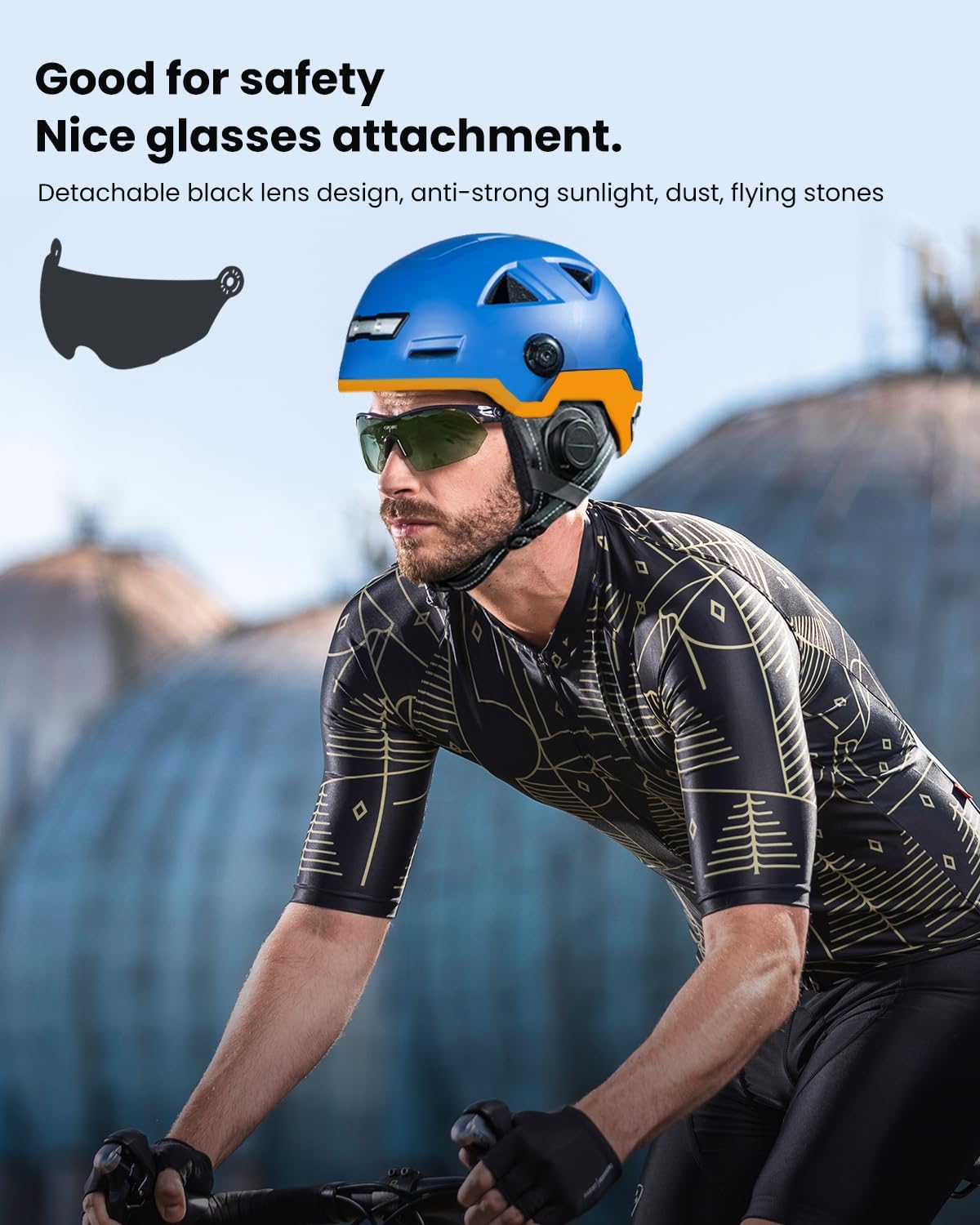
Image: The ILM Smart Bike Helmet shown with its detachable black visor, designed to protect against sunlight, dust, and debris.
4.3. Helmet Fitting and Sizing
Ensure a snug and comfortable fit. Use the adjustable straps and retention system to secure the helmet. Refer to the size chart below to determine the correct helmet size for your head circumference.

Image: A size chart illustrating how to measure head circumference for proper helmet fit, with corresponding S/M, L/XL, and XXL sizes in centimeters, inches, and hat sizes.
4.4. „Bluetooth“ poravimas
To connect your helmet to your smartphone via Bluetooth 5.0:
- Ensure the helmet is powered on and in pairing mode (refer to the helmet's power button instructions for specific pairing activation).
- Išmaniajame telefone eikite į „Bluetooth“ nustatymus ir ieškokite galimų įrenginių.
- Select "ILM Helmet" (or similar name) from the list to pair.
- Once paired, you can use the helmet for music, phone calls, and voice assistant functions.

Image: A person wearing the ILM Smart Bike Helmet, demonstrating Bluetooth 5.0 connectivity with a smartphone for music, phone calls, and voice assistant, with an operating range of 10 meters (33 feet) and 8 hours of working time.
5. Naudojimo instrukcijos
5.1. Maitinimo įjungimas/išjungimas
Press and hold the main power button on the helmet for approximately 3 seconds to power on or power off the device. A sound indicator will confirm the action.
5.2. Light Control Function
After the main board is switched on, the helmet's front and rear lights will automatically adjust based on ambient light intensity. The lights will illuminate automatically at night or in low-light conditions. During the day, the lights will not activate automatically.

Image: A cyclist wearing the ILM Smart Bike Helmet at dusk, demonstrating the automatic light control function where lights activate in low-light conditions. The helmet also features Bluetooth connectivity.
5.3. Gravity Sensing Turn Signal
The helmet is equipped with gravity-sensing turn signals. If you tilt your head more than 15 degrees to the left, the left turn signal will activate for 10 seconds. Similarly, tilting your head more than 15 degrees to the right will activate the right turn signal for 10 seconds. This function does not operate during daylight hours.

Image: Close-up of the rear of the ILM Smart Bike Helmet showing the gravity-sensing turn signals. Illustrations indicate that tilting the head left or right by more than 15 degrees activates the corresponding turn signal for 10 seconds. The image also shows strobe headlight and steady taillight indicators.
5.4. Smart Braking Warning Function
In the event of emergency braking, the helmet's rear lights will automatically increase to 100% brightness. This provides a clear warning to vehicles approaching from behind, enhancing your safety.

Image: A cyclist wearing the ILM Smart Bike Helmet from behind, illustrating the smart braking warning function where rear lights illuminate at 100% brightness during emergency braking to alert following vehicles. The helmet also features Bluetooth.
5.5. „Bluetooth“ funkcijos
Once paired with your smartphone, the helmet's integrated Bluetooth system allows you to:
- Klausykitės muzikos: Stream audio directly to the helmet's speakers.
- Make/Receive Phone Calls: Handle calls hands-free.
- Naudokite balso asistentą: Access your phone's voice assistant for navigation or other commands.
The Bluetooth system offers approximately 8 hours of working time and a range of up to 10 meters (33 feet).
5.6. Helmet Locking Mechanism
The helmet includes two integrated locking holes at the rear. These allow you to secure your helmet to your bicycle using a standard cable lock, preventing theft.

Vaizdas: Stambus planas view of the rear of the ILM Smart Bike Helmet, highlighting the 'Tow Locks' feature. It shows a vent that doubles as a locking hole, allowing a cable lock to pass through to secure the helmet to a bike.
6. Priežiūra
6.1. Valymas
- Šalmo apvalkalas: Išorinį apvalkalą nuvalykite minkšta, damp šluoste ir švelniu muilu. Venkite abrazyvinių valiklių ar tirpiklių.
- Vidinis paminkštinimas: The inner padding can be gently hand-washed with mild soap and water, then air-dried. Ensure it is completely dry before reinserting.
- Antveidis: Clean the visor with a soft cloth and water. Do not use harsh chemicals that could scratch or damage the coating.
6.2. Akumuliatoriaus priežiūra
- Reguliariai kraukite šalmą, net jei jo nenaudojate dažnai, kad palaikytumėte akumuliatoriaus veikimo laiką.
- Avoid exposing the helmet to extreme temperatures, which can affect battery life.
- Įkrovimui naudokite tik pridedamą USB C tipo laidą arba sertifikuotą lygiavertį laidą.
7. Problemų sprendimas
- Lights not activating during the day: This is normal. The light control function is designed to activate automatically only in low-light conditions or at night. Turn signals also do not operate during the day.
- „Bluetooth“ ryšio problemos: Ensure the helmet is charged and in pairing mode. Delete previous pairings on your phone and try reconnecting. Move closer to your phone to ensure you are within the 10m range.
- Helmet not charging: Check the USB Type-C cable and power source. Ensure the cable is fully inserted into the helmet's charging port.
- Audio quality is low: Ensure the helmet is properly positioned on your head. Check your phone's volume settings.
8. Specifikacijos
| Funkcija | Specifikacija |
|---|---|
| Modelio numeris | E3-12LSBT |
| Išorinė medžiaga | Polikarbonatas (PC) |
| Vidinė medžiaga | EPS putplastis |
| Ypatingos savybės | Bluetooth, LED Lights, Brake Warning, Turn Signals, Light Sensor |
| Bluetooth versija | 5.0 |
| Bluetooth diapazonas | Iki 10 m (33 pėdų) |
| „Bluetooth“ darbo laikas | apytiksliai 8 valandas |
| Baterijos tipas | 1 ličio jonų (į komplektą įeina) |
| Svoris | 575 gramų |
| Vėdinimas | 10 angos |
| Rekomenduojamas naudojimas | Važiavimas dviračiu |
9. Informacija apie garantiją
ILM products are manufactured to high-quality standards. For specific warranty terms and conditions, please refer to the warranty card included with your product or visit the official ILM websvetainėje. Išsaugokite pirkimo įrodymą, jei prireiktų pateikti garantinį ieškinį.
10. Parama
If you encounter any issues or have questions not covered in this manual, please contact ILM customer support. Contact details can typically be found on the product packaging or the official ILM websvetainę.