
1. Sąrankos vadovas
This section provides instructions for setting up your WEILAILIFE Wireless Security Camera System.
1.1. Kas yra dėžutėje
Įsitikinkite, kad pakuotėje yra visi komponentai:
- 10CH 5.0MP NVR Pre-install 4TB Hard Drive x 1
- 5MP 2-Way Audio Wireless Security Camera x 8
- 10FT Cable Power Supply for Camera x 8
- 3FT Cable Power Supply for NVR x 1
- Antenna for Camera x 16
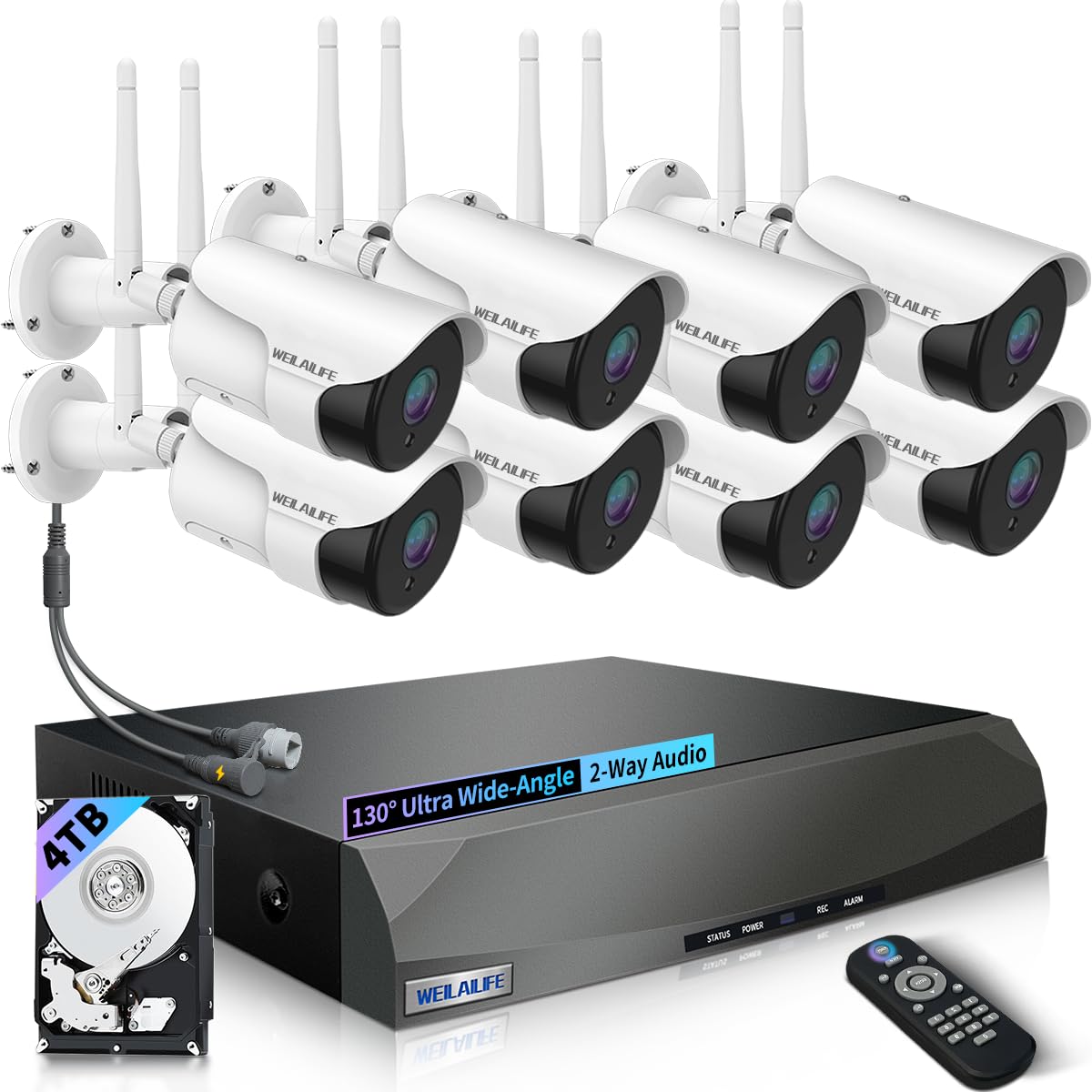
Vaizdas: Viršview of the WEILAILIFE 5MP 8-Camera 4TB Wireless Security Camera System, showing the NVR and multiple cameras.
1.2. Camera Antenna Installation
Before mounting, ensure the antennas are correctly attached to each camera for optimal wireless signal.
- Remove the red protective cap from the antenna port on the camera.
- Firmly screw in the antenna to the designated port.
- Adjust the angle of the antenna for best signal reception.
Video: Demonstrates the installation process for the wireless camera antennas and mounting.
1.3. Sistemos prijungimas
Follow these steps to connect your wireless security camera system:
- Connect the power adapter to the NVR and plug it into an electrical outlet.
- Connect the power adapters to each camera and plug them into electrical outlets.
- Connect the NVR to a monitor (VGA or HDMI) and a mouse for local control.
- For remote access, connect the NVR to your router using the provided LAN cable.
Video: Illustrates the connection settings for the wireless security camera system, including NVR and camera power, and network connections.
1.4. App Setup and Camera Pairing
Use the "HonestView" app for remote viewvaldymas.
- Download the "HonestView" app from your smartphone's app store (iOS/Android).
- Open the app and follow the on-screen instructions to add your NVR by scanning the QR code on the device.
- The app will guide you through pairing the cameras to the NVR. Ensure cameras are powered on and within range.
Video: Shows how to add a WiFi camera to the wireless security system using the mobile application.
2. Naudojimo instrukcijos
Learn how to utilize the key features of your security system.
2.1. 90ft Super Night Vision
Each camera is equipped with 18 hidden infrared LEDs, providing clear surveillance up to 90 feet in complete darkness. The LEDs activate automatically at night.

Image: Illustrates the camera's 90ft Super Night Vision capability, showing clear visibility in low-light conditions.
2.2. Dual Antenna Enhanced Wireless Signal
The dual-antenna design enhances wireless signal transmission up to 150 feet, ensuring stable and reliable connectivity for your 5-megapixel cameras, delivering stunning 1944P resolution.

Image: Diagram showing enhanced wireless signal transmission with dual antennas, improving range and stability.
2.3. 2-Way Audio Communication
Equipped with advanced noise-canceling microphones and speakers, the cameras allow for clear two-way communication. This feature enables you to speak with visitors or deter intruders remotely via the app.

Image: Depicts a user communicating through the camera's two-way audio feature with a person at the door.
2.4. 130° Wide-angle Lens
The cameras feature a 130° wide-angle lens, providing extensive coverage and minimizing blind spots in the monitored area. This is ideal for thorough inspections and capturing a broader view.

Image: Visual representation of the 130-degree wide-angle lens coverage from a security camera.
2.5. Judesio aptikimas ir įspėjimai
The system detects movement and sends real-time notifications to your smartphone (via app push, email, or buzzer), ensuring you are immediately aware of any activity.

Image: Shows motion detection in action, highlighting a person entering the monitored area and the various alert options.
2.6. Nuotolinis Viewing with "HonestView" App
Pasiekite tiesioginius vaizdo transliacijas ir įrašytą maistątage from your smartphone, PC, or tablet using the free "HonestView" app, with no monthly fees.

Paveikslėlis: Žmogus viewing live camera footage on a smartphone, demonstrating remote monitoring capabilities.
Vaizdo įrašas: Įvadinis vaizdo įrašasasing the features and benefits of the WEILAILIFE Wireless Security System.
Video: Highlights the 5MP resolution and wireless capabilities of the security camera system.
3. Priežiūra
Tinkama priežiūra užtikrina jūsų apsaugos sistemos ilgaamžiškumą ir optimalų veikimą.
3.1. Valymas
- Reguliariai valykite fotoaparato objektyvus minkšta,amp cloth to remove dust and smudges. Avoid abrasive cleaners.
- Keep the NVR unit free from dust by gently wiping its exterior. Ensure ventilation openings are not blocked.
3.2. Aplinkosaugos svarstymai
The cameras are IP66 waterproof, designed to withstand various weather conditions. However, extreme temperatures can affect performance.

Image: Demonstrates the IP66 waterproof rating of the camera, showing its resilience to rain and varying temperatures.
3.3. Firmware atnaujinimai
Check the "HonestView" app or the WEILAILIFE website periodically for firmware updates to ensure your system has the latest features and security enhancements.
4. Problemų sprendimas
Dažnos problemos ir jų sprendimai.
4.1. Nėra vaizdo transliacijos
- Patikrinkite galią: Ensure both the camera and NVR are powered on and connected to a working power source.
- Patikrinkite jungtis: Verify all cables (HDMI/VGA, LAN) are securely connected.
- Belaidis signalas: If using wireless, check the signal strength in the NVR settings or app. Relocate cameras closer to the NVR if the signal is weak.
- Iš naujo susiekite kamerą: If a specific camera is offline, try re-pairing it through the NVR's menu or the app.
4.2. Judesio aptikimas neveikia
- Įjungti judesio aptikimą: Ensure motion detection is enabled in the NVR settings or app for the specific camera.
- Sureguliuokite jautrumą: The sensitivity level might be too low. Increase it in the settings.
- Nustatyti aptikimo zonas: Verify that detection zones are correctly configured and cover the desired areas.
4.3. Nuotolinės prieigos problemos
- Interneto ryšys: Ensure both your NVR and smartphone have a stable internet connection.
- Programos versija: Make sure your "HonestView" app is updated to the latest version.
- Maršrutizatoriaus nustatymai: Check your router's firewall or port forwarding settings if you experience persistent connectivity issues. Consult your router's manual or ISP for assistance.
5. Gaminio specifikacijos
| Funkcija | Detalė |
|---|---|
| Prekės ženklas | WEILAILIFE |
| Modelio pavadinimas | CSWL-08SW5MP18-8ch+3.5"4TB-BW |
| Rekomenduojami naudojimo būdai | Apsauga viduje, apsauga lauke |
| Ryšio technologija | IEEE802.11 1/n/f, WiFi, Wireless |
| Ypatingos savybės | 130° Wide-angle Lens, 2-Antennas Enhancement, 2-Way Audio, 90ft Night Vision, Motion Sensor |
| Naudojimas viduje / lauke | Viduje, Lauke |
| Suderinami įrenginiai | Cameras, Personal Computers, Smartphone, Tablet, Television |
| Valdiklio tipas | APP Control, Remote Control, USB Mouse |
| Montavimo tipas | Įdėta |
| Spalva | Baltas |
| Formos faktorius | Kulka |
| Diegimo tipas | Sieninis laikiklis |
| Korpuso medžiaga | Aliuminis |
| Atsparumo vandeniui lygis | Neperšlampamas (IP66) |
| Įspėjimo tipas | Garsas ir judesys |
| Veiksminga nejudančioji raiška | 5 MP |
| Nuotraukų jutiklio skiriamoji geba | 5 MP |
| Maitinimo šaltinis | AC/DC |
| ttage | 110 voltai (kintamoji srovė) |
| Vattage | 50 vatų |
| Kanalų skaičius | 10 |
| Vaizdo įrašų kodavimas | MPEG-4 |
| Naktinio matymo diapazonas | 90 pėdų |
| Vaizdo įrašymo raiška | 2536 x 1944p, 5.0 Megapixel |
| Kadrų dažnis | 15 kadrų per sekundę |
| Viewing kampas | 130 laipsnių |
| Priartinimo tipas | Skaitmeninis priartinimas |
| Prekės matmenys | 13 x 11 x 9 colio |
6. Garantija ir palaikymas
6.1. Gamintojo garantija
The WEILAILIFE 5MP 8-Camera 4TB Wireless Security Camera System comes with a US Location Service Manufacturer Warranty for 1 Year from Date of Purchase.
6.2. Pagalba klientams
For further assistance, technical support, or to explore other WEILAILIFE products, please visit the official WEILAILIFE Store: