
1. Įvadas
Thank you for choosing the Bimar VC77 Tower Fan. This manual provides important information regarding the safe operation, installation, maintenance, and troubleshooting of your new fan. Please read these instructions carefully before use and keep them for future reference.
The Bimar VC77 is an 80 cm tower fan designed for domestic indoor ventilation. It features 3 speed settings, a 60-minute timer, automatic right/left oscillation, and adjustable up/down tilt, powered by a 45W induction motor.
2. Saugos instrukcijos
ĮSPĖJIMAS: Nesilaikant šių saugos nurodymų, gali kilti elektros smūgis, gaisras arba sunkūs sužalojimai.
- This appliance is intended for domestic indoor use only. Do not use it for any other purpose. Any other use is considered improper and dangerous.
- Ensure the power outlet is easily accessible to quickly disconnect the plug in an emergency.
- Position the fan away from heat sources (open flames, gas stoves, etc.) and liquid containers to prevent water splashes.
- Do not insert any tools or fingers between the protective grille meshes of the fan.
- Nenaudokite ventiliatoriaus su pažeistu laidu ar kištuku. Jei maitinimo laidas pažeistas, jį turi pakeisti gamintojas, jo techninės priežiūros atstovas arba panašios kvalifikacijos asmenys, kad būtų išvengta pavojaus.
- Always unplug the fan before cleaning or when not in use for extended periods.
- Prietaisą laikykite vaikams ir naminiams gyvūnėliams nepasiekiamoje vietoje.
- Neuždenkite ventiliatoriaus veikimo metu.
3. Produktas baigtasview
Familiarize yourself with the components of your Bimar VC77 Tower Fan.
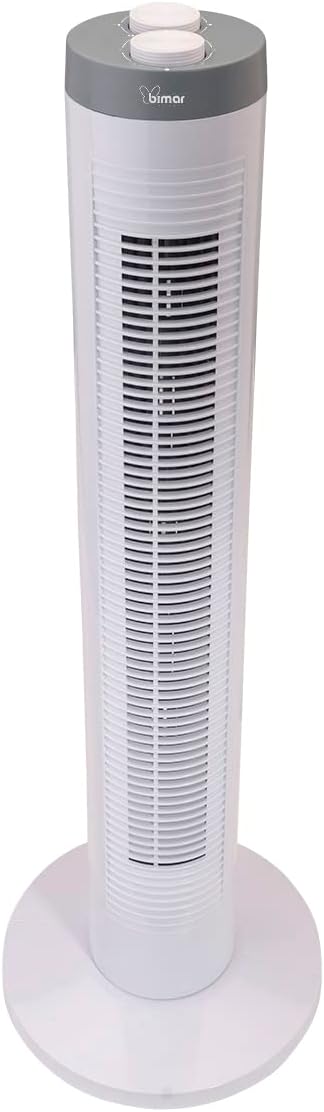
3.1 vaizdas: Priekyje view of the Bimar VC77 Tower Fan, showing the main body, base, and control panel on top.

3.2 vaizdas: Šoninė view of the Bimar VC77 Tower Fan, illustrating its compact design and the handle for easy transport.

3.3 vaizdas: Detailed diagram of the fan's top control panel, indicating the knobs for speed selection, timer setting, and oscillation function.
Pagrindiniai komponentai:
- Valdymo skydelis: Located on the top of the fan, featuring selector knobs for various functions.
- Oro išleidimo grotelės: Front grille through which air is expelled.
- Bazė: Užtikrina bokštinio ventiliatoriaus stabilumą.
- Integruota rankena: Kad įrenginį būtų lengva transportuoti.
- Maitinimo laidas: Skirta prijungti prie elektros lizdo.
4. Sąranka ir diegimas
Follow these steps to set up your Bimar VC77 Tower Fan:
- Išpakavimas: Carefully remove the fan from its packaging. Retain the packaging for storage or if the product needs to be returned.
- Pagrindo surinkimas (jei reikia): Some models may require simple assembly of the base. Align the base parts and secure them according to the diagrams in the separate installation manual (if provided). Ensure the base is firmly attached for stability.
- Vieta: Place the fan on a flat, stable surface. Ensure there is adequate space around the fan for proper air circulation and oscillation. Avoid placing it near curtains or other objects that could obstruct airflow or get caught in the fan.
- Maitinimo jungtis: Plug the power cord into a standard 220-240V~ 50Hz electrical outlet. Ensure the outlet is easily accessible.
5. Naudojimo instrukcijos
The Bimar VC77 Tower Fan is controlled via selector knobs located on the top panel.
- Maitinimo įjungimas/išjungimas: Turn the speed selector knob to one of the speed settings (Min, Med, Max) to turn the fan on. Turn it to '0' to turn the fan off.
- Ventiliatoriaus greičio reguliavimas: Rotate the speed selector knob to choose your desired airflow intensity:
- Min.: Mažas greitis švelniai oro cirkuliacijai.
- Vid.: Vidutinis greitis vidutiniam oro srautui.
- Maks.: Didelis greitis maksimaliam aušinimui.
- Automatinis osciliavimas: To activate the automatic right/left oscillation, turn the oscillation knob to the 'ON' position. The fan will sweep air across a wider area. Turn the knob to 'OFF' to stop oscillation.
- Reguliuojamas pakreipimas: The fan head can be manually tilted up or down to direct the airflow vertically. Gently push or pull the top section of the fan to adjust the tilt angle.
- Laikmačio funkcija: Use the timer knob to set the fan to operate for a specific duration, up to 60 minutes. Rotate the timer knob clockwise to the desired time setting. The fan will automatically turn off once the set time has elapsed. To bypass the timer, ensure the timer knob is set to the 'ON' position (usually indicated by a continuous operation symbol or '0' if it's a countdown timer).
6. Priežiūra
Reguliarus valymas ir priežiūra užtikrins jūsų ventiliatoriaus ilgaamžiškumą ir efektyvų veikimą.
- Valymas:
- Prieš valydami, visada atjunkite ventiliatorių nuo elektros lizdo.
- Naudokite minkštą, damp cloth to wipe the exterior surfaces of the fan. Do not use abrasive cleaners, solvents, or harsh chemicals, as these can damage the plastic.
- For dust accumulation on the grilles, use a vacuum cleaner with a brush attachment or compressed air to gently remove dust. Do not attempt to disassemble the fan to clean internal components.
- Ensure the fan is completely dry before plugging it back in and operating it.
- Saugykla: Jei ventiliatoriaus nenaudojate ilgesnį laiką, laikykite jį originalioje pakuotėje arba uždenkite, kad apsaugotumėte nuo dulkių. Laikykite vėsioje, sausoje vietoje.
7. Problemų sprendimas
If you encounter issues with your Bimar VC77 Tower Fan, refer to the following common problems and solutions:
| Problema | Galima priežastis | Sprendimas |
|---|---|---|
| Ventiliatorius neįsijungia. |
|
|
| Silpnas arba jo visai nėra oro srauto. |
|
|
| Fan is noisy during operation. |
|
|
| Osciliacija neveikia. |
|
|
If the problem persists after trying these solutions, please contact Bimar customer support.
8. Specifikacijos
| Funkcija | Detalė |
|---|---|
| Modelio pavadinimas | VC77 |
| Prekės ženklas | bimaras |
| Tipas | Tower Fan (Column Fan) |
| Aukštis | 81.5 cm |
| Matmenys (DxPxH) | 26.8P x 26.8lx 81.5A cm |
| Svoris | 2.4 kg |
| Maitinimo šaltinis | Su laidu elektra |
| ttage | 220-240V ~ 50Hz |
| Vattage | 45W |
| Variklio tipas | Indukcinis variklis |
| Greičių skaičius | 3 (Min / Med / Max) |
| Laikmatis | Iki 60 minučių |
| Osciliacija | Automatic Right/Left |
| Pasvirimo reguliavimas | Adjustable Up/Down |
| Kontrolės metodas | Mygtukas / rankenėlė |
| Medžiaga | Plastikiniai |
| Triukšmo lygis | 45 decibelų |
| Naudojimas viduje / lauke | Vidinis |
9. Garantija ir palaikymas
For warranty information, please refer to the documentation provided with your purchase or contact the retailer. Bimar products are designed for reliability and performance.
If you require technical assistance, have questions about your product, or need to report a fault, please contact Bimar customer support. You may also find additional resources, including detailed user and installation manuals, on the manufacturer's website or through the following links:
Please have your model number (VC77) and purchase details ready when contacting support.