
Įvadas
Thank you for choosing the Chieftec PPS-850FC-A3 850W ATX 3.0 Power Supply Unit. This manual provides essential information for the safe and efficient installation, operation, and maintenance of your new power supply. Please read this manual thoroughly before installation and retain it for future reference.
Saugos instrukcijos
- Always disconnect the AC power cord from the wall outlet before installing or removing the power supply.
- Neatidarykite maitinimo bloko c.asing. Didelis tūristages are present inside, and there are no user-serviceable parts. Opening the casing, garantija bus anuliuota.
- Ensure the power supply is installed in a well-ventilated area, free from excessive heat, humidity, or dust.
- Use only the modular cables provided with this power supply. Using incompatible cables may cause damage to the PSU or connected components.
- Ensure all connectors are securely attached before powering on the system.
- Šis gaminys skirtas naudoti asmeniniuose kompiuteriuose. Nenaudokite jo jokiems kitiems tikslams.
Pakuotės turinys
Patikrinkite pakuotės turinį. Jei trūksta kokių nors daiktų arba jie pažeisti, susisiekite su pardavėju.
- Chieftec PPS-850FC-A3 850W ATX 3.0 Power Supply Unit
- Modular Cable Set (including PCIe Gen 5 connector)
- Kintamosios srovės maitinimo laidas
- Tvirtinimo varžtai
- Vartotojo vadovas (šis dokumentas)
Sąranka ir diegimas
Follow these steps to properly install your Chieftec PPS-850FC-A3 power supply unit.
1. Patikrinimas prieš montavimą
- Ensure your computer case supports ATX form factor power supplies.
- Verify that your motherboard and other components are compatible with an 850W power supply and ATX 3.0 standard.
2. Fizinis įrengimas
- Maitinimo bloko montavimas: Carefully slide the power supply into the designated PSU bay in your computer case. Ensure the fan is oriented correctly for optimal airflow (typically facing down if there's a bottom vent, or facing inside the case). Secure the PSU with the provided mounting screws.
- Modulinių kabelių prijungimas: Identify the necessary modular cables for your system components (motherboard, CPU, GPU, storage drives). Connect them to the appropriate ports on the power supply.

Image: Chieftec PPS-850FC-A3 power supply shown with its retail packaging, highlighting the unit itself and a detailed view of the PCIe Gen 5 connector, which is essential for modern high-performance graphics cards.
- Prijungimas prie pagrindinės plokštės: Prijunkite 24 kontaktų ATX maitinimo jungtį prie pagrindinės plokštės.
- Connecting to CPU: Connect the 4+4-pin or 8-pin EPS/CPU power connector(s) to your motherboard.
- Connecting to GPU: For graphics cards, use the appropriate PCIe power connectors. For modern GPUs, utilize the dedicated 12VHPWR (PCIe Gen 5) connector if your GPU supports it.
- Connecting to Peripherals: Connect SATA power cables to SSDs/HDDs and Molex connectors to other peripherals as needed.
- Kintamosios srovės maitinimo jungtis: Kai visos vidinės jungtys yra tvirtos, prijunkite kintamosios srovės maitinimo laidą prie maitinimo šaltinio, o tada – prie sieninio lizdo.
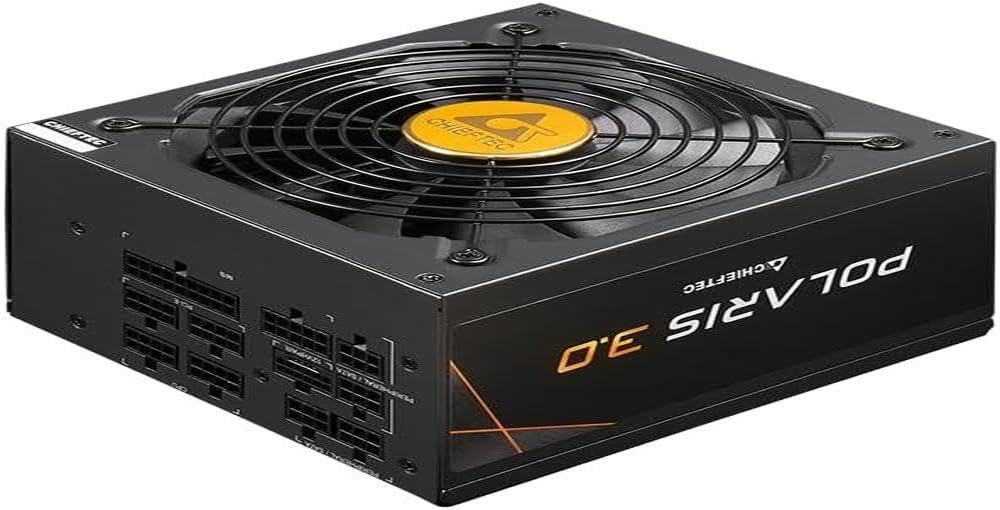
Paveikslėlis: Tiesioginis frontas view of the Chieftec PPS-850FC-A3 power supply, showcasing its large cooling fan and the protective grille. The Chieftec logo is visible in the center of the fan.
Naudojimo instrukcijos
After successful installation, ensure the power switch on the back of the PSU is in the 'ON' position (usually marked 'I'). You can then power on your computer system using the case's power button. The power supply will automatically manage power delivery to your components.
Priežiūra
- Valymas: Periodically clean the exterior of the power supply and its fan grille to prevent dust buildup, which can impede airflow and cooling performance. Use compressed air to gently remove dust. Ensure the system is powered off and unplugged before cleaning.
- Vėdinimas: Ensure that the computer case has adequate ventilation and that the power supply's fan intake and exhaust are not obstructed.
- Kabelių valdymas: Proper cable management can improve airflow within your case, contributing to better cooling for all components, including the PSU.
Trikčių šalinimas
Jei kyla problemų dėl maitinimo šaltinio, vadovaukitės toliau pateiktais įprastais trikčių šalinimo veiksmais.
- Nėra galios:
- Patikrinkite, ar kintamosios srovės maitinimo laidas yra tvirtai prijungtas prie maitinimo bloko ir sieninio lizdo.
- Ensure the power switch on the PSU is in the 'ON' position ('I').
- Patikrinkite, ar sieninis lizdas veikia, prijungdami prie jo kitą įrenginį.
- Confirm all internal power cables (24-pin ATX, CPU, GPU) are correctly and firmly seated.
- Sistemos nestabilumas / atsitiktiniai išsijungimai:
- This could indicate insufficient power or a faulty component. Ensure your system's power requirements do not exceed the PSU's 850W capacity.
- Check for overheating of components.
- Ensure the PSU fan is spinning freely and not obstructed.
- Neįprasti garsai:
- A rattling or grinding noise may indicate a fan issue. If the noise is persistent and loud, contact support.
- Coil whine (a high-pitched electronic noise) can occur under certain loads but is generally harmless.
If these steps do not resolve your issue, please contact Chieftec customer support or your retailer for further assistance.
Specifikacijos
| Funkcija | Specifikacija |
|---|---|
| Modelio pavadinimas | PPS-850FC-A3 |
| Prekės ženklas | Chieftec |
| Suderinami įrenginiai | Asmeninis kompiuteris |
| Jungties tipas | ATX |
| Išėjimo vattage | 850 vatų |
| Formos faktorius | ATX |
| Aušinimo būdas | Oras |
| Ventiliatoriaus dydis | 120 milimetrų |
| Maksimalus įvesties tūristage | 230 voltų |
| Kabeliui naudojamas jungties tipas | ATX |
| System Bus Connector Type | 4 Smeigtukas |
| UPC | 753263078131 |
Garantija ir palaikymas
This Chieftec PPS-850FC-A3 power supply unit comes with a manufacturer's warranty. Please refer to the warranty card included in your package or visit the official Chieftec websvetainėje, kurioje pateikiamos išsamios garantijos sąlygos.
For technical support, product inquiries, or warranty claims, please contact Chieftec customer service through their official websvetainę arba perkant pateiktą kontaktinę informaciją.


