
DEERC DEERC-D11
DEERC D11 Mini Drone Instruction Manual
Model: DEERC-D11
Įvadas
Ačiū, kad pirkoteasing the DEERC D11 Mini Drone. This manual provides essential information for safe operation, setup, maintenance, and troubleshooting. Please read it thoroughly before using your drone to ensure optimal performance and longevity.

The DEERC D11 Mini Drone, its remote controller, and two modular batteries.
Kas yra dėžutėje
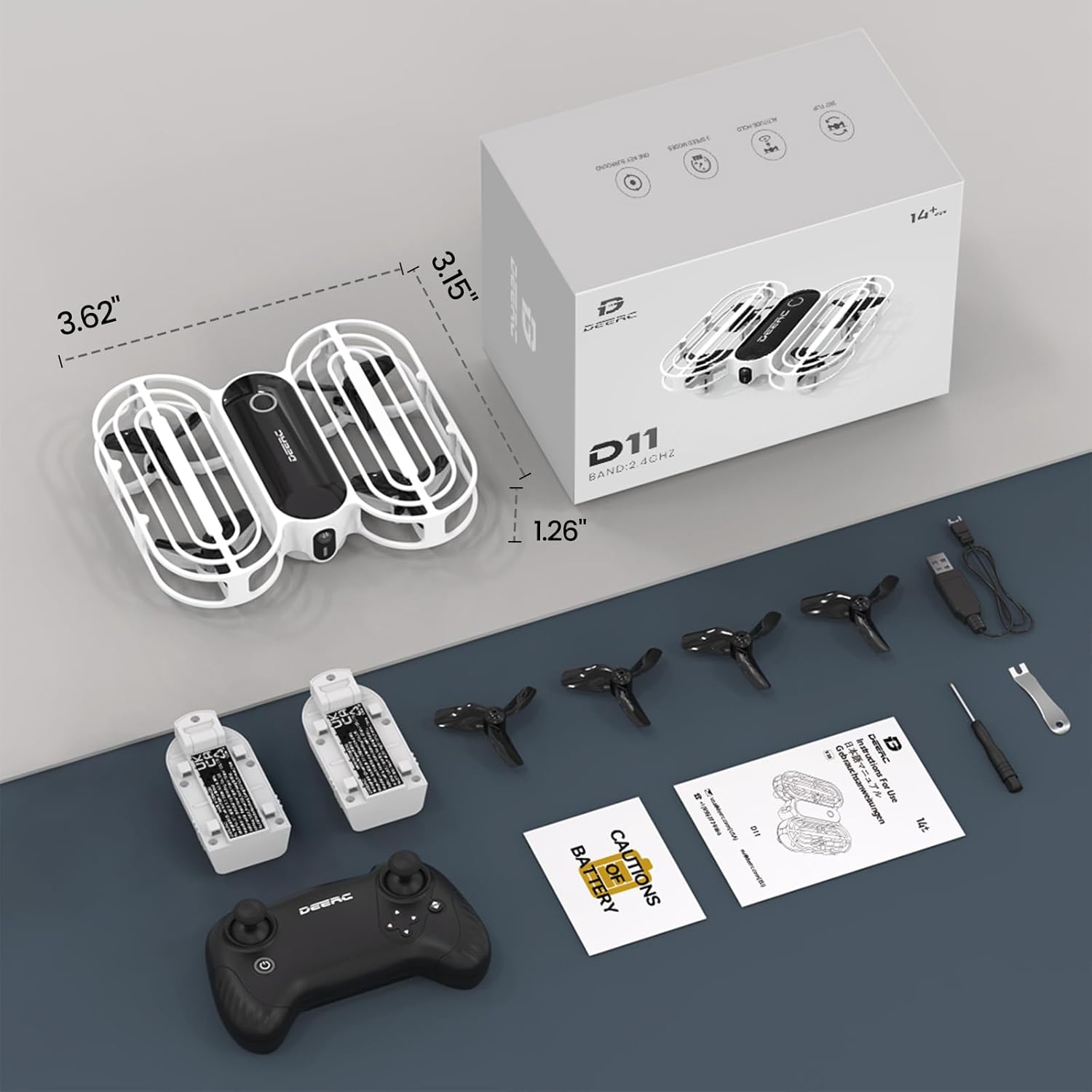
All components included in the DEERC D11 Mini Drone package.
- DEERC D11 Mini Drone
- Nuotolinio valdymo pultelis
- 2 x Rechargeable Drone Batteries
- USB įkrovimo laidas
- 4 x atsarginiai sraigtai
- Propelerio pašalinimo įrankis
- Atsuktuvas
- Instrukcijų vadovas
Sąrankos vadovas
1. Nuotolinio valdymo pulto baterijų įdėjimas
The remote controller requires 3 x AAA batteries (not included). Open the battery compartment on the back of the controller, insert the batteries according to the polarity markings, and close the compartment securely.
2. Drone Battery Charging & Installation
The DEERC D11 comes with 2 modular rechargeable batteries. Each battery provides approximately 8 minutes of flight time.
- Įkrovimas: Connect the drone battery to the USB charging cable. Plug the USB end into a compatible USB power source (e.g., computer USB port, USB wall adapter). The indicator light on the cable will show charging status (e.g., red for charging, green for fully charged).
- Montavimas: Gently slide the charged battery into the battery slot on the drone until it clicks into place.

The modular battery design allows for easy insertion and removal from the drone.
3. Susiejimas ir kalibravimas
- Place the drone on a flat, level surface with its head (front) pointing forward.
- Turn on the remote controller by pressing and holding the power button. The remote will beep.
- Press and hold the power button on the drone. The drone's lights will blink, indicating it's searching for the remote.
- Once the drone's lights become solid, it is successfully paired.
- To calibrate the gyroscope, simultaneously push both joysticks on the remote controller towards the outer, lower corners. The drone's lights will blink rapidly and then turn solid, indicating successful calibration.
- To unlock the motors, simultaneously push both joysticks towards the inner bottom corners. The propellers will start spinning slowly.
Naudojimo instrukcijos
Pagrindiniai skrydžio valdikliai
- Vienas pagrindinis pakilimas/nusileidimas: After unlocking the motors, press the One Key Takeoff/Landing button (usually indicated by an up/down arrow icon) to automatically take off or land.
- Droselis (kairioji valdymo svirtis): Spauskite aukštyn, kad kiltumėte, traukite žemyn, kad leistumėte.
- Kryptis (dešinė valdymo svirtis): Spauskite į priekį, kad skristumėte į priekį, traukite atgal, kad skristumėte atgal. Spauskite į kairę, kad skristumėte į kairę, spauskite į dešinę, kad skristumėte į dešinę.
- Kairysis valdymo svirtis (kairė/dešinė): Push left to rotate counter-clockwise, push right to rotate clockwise.
Ypatingos savybės
- Throw to Go: With motors unlocked, gently toss the drone into the air, and it will automatically stabilize and hover.
- „Circle Fly“: Press the Circle Fly button (refer to remote diagram) to make the drone perform circular motions in the air.
- 3D apvertimai: Press the 3D Flip button (refer to remote diagram) and then push the right joystick in any direction to perform a 360-degree flip.
- Greičio jungiklis: The drone has 3 speed modes (low, medium, high). Press the Speed Switch button to cycle through them, offering progressive challenges for pilots.
- Aukščio laikymas: This feature ensures stable hovering at a set altitude, making it easier for beginners to control the drone.
- Režimas be galvos: In Headless Mode, the drone's direction is always relative to the pilot's orientation, regardless of the drone's actual front. This provides care-free flying for beginners.
- Avarinis sustojimas: In case of emergency, press the Emergency Stop button (refer to remote diagram) to immediately cut power to the motors and stop the drone.

The 'Throw to Go' feature allows for an easy start by simply tossing the drone.

The drone executing a 'Circle Fly' maneuver, adding dynamic movement to playtime.

The drone performing a 360-degree flip, showcasing savo akrobatiniais sugebėjimais.

The Altitude Hold function keeps the drone stable at a desired height.

The Emergency Stop feature provides immediate shutdown for safety.
Oficialūs produktų vaizdo įrašai
Official DEERC D11 Mini Drone for Kids video, demonstrating key features and ease of use.
Official D11 Promotional Video, showcasing various flight modes and the drone's durable design.
Priežiūra
- Propelerio keitimas: If a propeller is damaged, use the provided propeller removal tool to carefully detach it. Install a new propeller, ensuring it is correctly oriented (refer to the manual for specific markings if any).
- Valymas: Use a soft, dry cloth to clean the drone body and propellers. Avoid using water or harsh chemicals.
- Akumuliatoriaus priežiūra: Store batteries in a cool, dry place away from direct sunlight. Do not overcharge or over-discharge the batteries. If not used for a long period, charge them to about 50% capacity.
Trikčių šalinimas
- Drone not pairing: Ensure both the drone and remote controller are fully charged. Turn on the remote first, then the drone. Make sure they are within range and there is no interference. Repeat the pairing steps.
- Drono dreifavimas: Perform a gyroscope calibration on a flat, level surface. If drifting persists, check for any damaged propellers and replace them if necessary.
- Trumpas skrydžio laikas: Ensure batteries are fully charged before each flight. Flight time can be affected by aggressive flying, wind conditions, and frequent use of special features.
- Nesisuka sraigtai: Ensure motors are unlocked after pairing and calibration. Check for any obstructions around the propellers.
Specifikacijos
| Funkcija | Detalė |
|---|---|
| Prekės ženklas | ELNIAS |
| Modelio pavadinimas | DEERC-D11 |
| Spalva | Baltas |
| Ryšio technologija | Nuotolinio valdymo pultas |
| Įtraukti komponentai | Propeleris |
| Įgūdžių lygis | Vaikai |
| Prekės svoris | 31 gramų (1.09 uncijos) |
| Baterijos talpa | 390 milijonųamp Valandos |
| Vaizdo įrašymo formatas | MP4 |
| Valdymo tipas | Nuotolinio valdymo pultas |
| Medžiaga | Akrilnitrilo butadieno stirenas |
| Gaminio matmenys | 3.62 colio ilgio x 3.15 colių pločio x 1.26 colio aukščio |
| Reikalingos baterijos | 2 ličio polimero baterija (pridedama) |
Garantija ir palaikymas
For warranty information and customer support, please refer to the contact details provided in your product packaging or visit the official DEERC websvetainėje. Išsaugokite pirkimo kvitą, jei prireiktų garantijos.
Ask a question about this manual
Ask about setup, troubleshooting, compatibility, parts, safety, or missing instructions. Manuals+ will review the question and use this page’s manual context to help answer it.