
1. Įvadas
The UNI-T UT60S is a smart, true RMS digital multimeter designed for accurate and reliable electrical measurements. Featuring 9999 counts, this device can measure AC/DC voltage, AC/DC current, resistance, diode, capacitance, temperature, and frequency. Its fully automatic anti-burn intelligent design helps prevent operational errors and device damage, making it suitable for both professional technicians and everyday users.

1 pav.: priekis view of the UNI-T UT60S Digital Multimeter.
2. Saugos informacija
Always adhere to safety precautions when using the multimeter. Failure to do so may result in electric shock, injury, or damage to the meter or equipment under test.
- Perskaitykite vadovą: Before use, thoroughly read and understand all instructions and safety warnings in this manual.
- Įvertintas ttage: Netepkite daugiau nei vardinis tūristage, as marked on the meter, between terminals or between any terminal and earth ground. The UT60S is capable of withstanding a maximum overvoltage impulse of 1000V.
- Prieš naudodami patikrinkite: Prieš kiekvieną naudojimą patikrinkite, ar matuoklis, bandymo laidai ir priedai nėra pažeisti. Nenaudokite, jei pažeisti.
- Proper Terminals: Ensure test leads are connected to the correct input terminals for the measurement function selected.
- Circuit De-energization: Always de-energize the circuit and discharge all high-voltagPrieš atlikdami varžos, laidumo, diodų ar talpos matavimus, atjunkite kondensatorius.
- Live Circuit Work: When working on live circuits, work alone as little as possible, and ensure another person is present to provide assistance if needed.
- Apsauga nuo viršsrovių: The meter features overcurrent alarms and protection functions. Do not exceed the maximum current ratings for the input terminals.
- Aplinkos sąlygos: Use the meter only as specified in this manual. Do not use the meter in explosive gas, vapor, or dusty environments.
- Asmeninės apsaugos priemonės: Always wear appropriate personal protective equipment (PPE), such as safety glasses and insulated gloves, when working with electrical circuits.
3. Produkto ypatybės
The UNI-T UT60S Digital Multimeter offers a range of features for versatile and safe electrical testing:
- 9999 skaitmenų ekranas: Provides high-resolution measurements for precision.
- Tikrasis RMS matavimas: Ensures accurate readings for non-sinusoidal waveforms.
- Fully Automatic Anti-Burn Design: Intelligent protection against operational errors and potential device damage.
- Plačios matavimo galimybės: Matuoja AC/DC ttage (up to 1000V), AC/DC current, resistance, diode, capacitance, temperature, and frequency.
- Large LCD Screen with Dual Display: Allows simultaneous display of AC voltage and frequency, enhancing readability.
- Full Button Design: Offers intuitive control and automatic recognition of current input jacks.
- Fast ADC (Analog to Digital Converter): Provides rapid measurement updates (3 times/second).
- Misoperation Protection: Capable of withstanding a maximum overvoltage impulse of 1000V, with overvoltage and overcurrent alarms.
- NCV (Non-Contact VoltagFunkcija: Aptinka AC ttage without physical contact, featuring audible and visual alarms for safety.
- Automatinis energijos taupymas: Low power consumption (7mA during operation, 5uA in sleep state) and automatic backlight display in dark environments, extending battery life. Automatic shut-down feature.

Figure 2: The UT60S display with 9999 counts for precise readings.
4. Kas yra dėžutėje
Atidarę pakuotę turėtumėte rasti šiuos elementus:
- UNI-T UT60S skaitmeninis multimetras
- Thermocouple (for temperature measurements)
- Multimeter Test Leads (red and black)
- 1.5V AAA Batteries (pre-installed or included separately)

Figure 3: Contents of the UNI-T UT60S package, including the multimeter, test leads, and thermocouple.
5. Sąranka
5.1. Akumuliatoriaus įdėjimas
The UT60S typically uses 1.5V AAA batteries. To install or replace batteries:
- Įsitikinkite, kad multimetras yra išjungtas, o bandymo laidai atjungti.
- Raskite baterijų skyrių matuoklio gale.
- Baterijų skyriaus dangteliui atidaryti naudokite atsuktuvą.
- Insert the AAA batteries, observing correct polarity (+ and -).
- Uždėkite akumuliatoriaus skyriaus dangtelį ir pritvirtinkite jį varžtu.
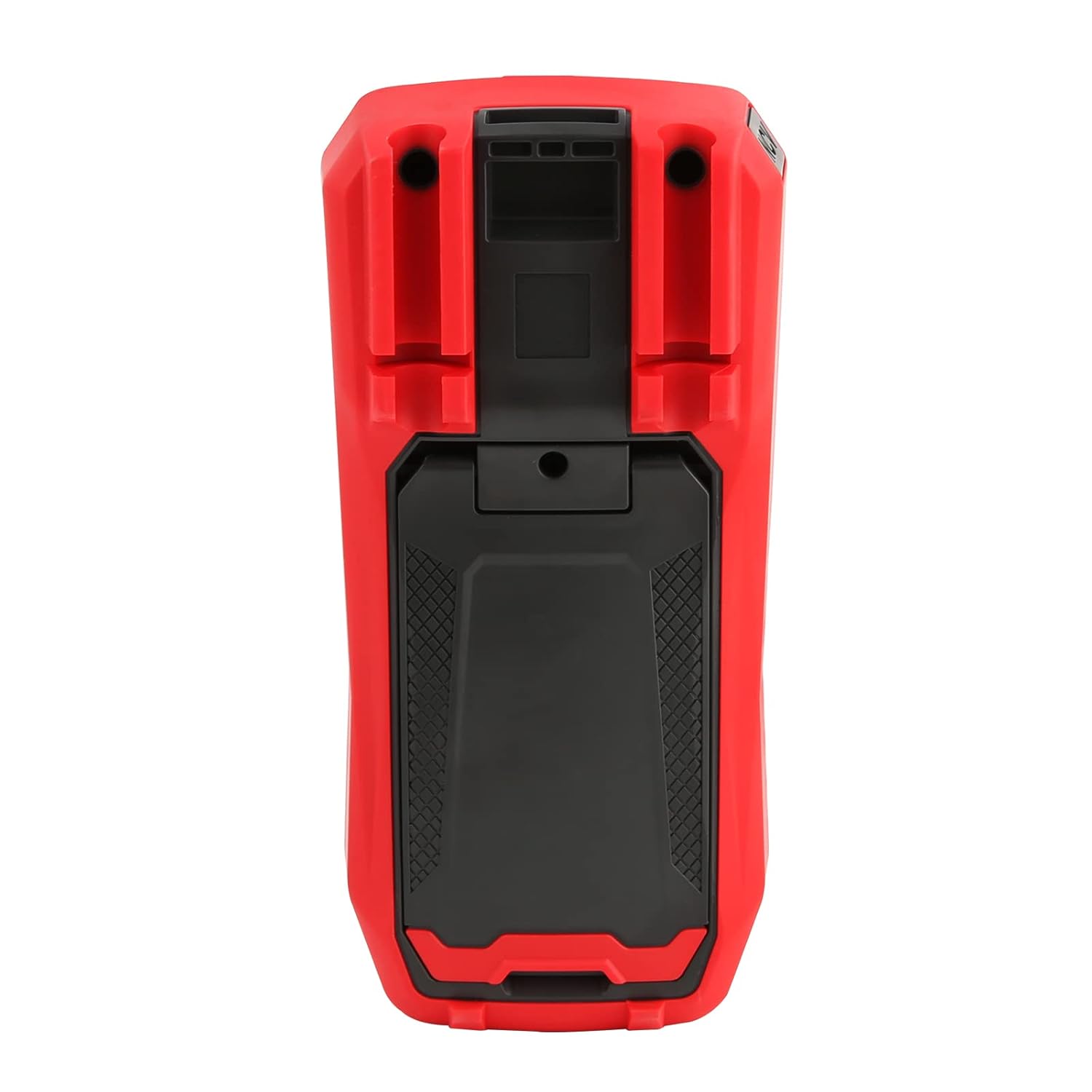
4 pav.: galinis view of the UT60S, indicating the battery compartment location.
5.2. Bandymo laidų prijungimas
Connect the test leads to the appropriate input terminals:
- The black test lead (common) should always be connected to the COM terminalas.
- Už ttage, resistance, capacitance, frequency, diode, and continuity measurements, connect the red test lead to the VΩHzCAP terminalas.
- For current measurements (mA/A), connect the red test lead to the mA/A terminalas.
- Mikroampere current measurements (μA), connect the red test lead to the μA terminalas.

Figure 5: Input terminals of the UT60S for connecting test leads.
6. Naudojimo instrukcijos
The UT60S features a full button design for selecting measurement functions. The meter's intelligent anti-burn design automatically recognizes the input jack and selected function.
6.1. Maitinimo įjungimas/išjungimas
Paspauskite GALIA button to turn the meter on or off. The meter will automatically shut down after a period of inactivity to save battery life.
6.2. Automatinis režimas
In Auto mode, the meter automatically identifies the measurement type (voltage, resistance, continuity) and selects the appropriate range. This simplifies operation for general troubleshooting.
6.3. Kintamosios/nuolatinės srovės įtampos matavimastage
Išmatuoti ttage:
- Prijunkite juodą bandymo laidą prie COM terminalas ir raudonas bandymo laidas prie VΩHzCAP terminalas.
- Paspauskite V~ / Hz button to select AC voltage measurement, or the V= / NCV button for DC voltage. The meter may automatically select the correct mode in Auto range.
- Prijunkite bandymo zondus prie matuojamos grandinės arba komponento.
- Perskaitykite ttage value on the display. For AC voltage, the frequency may also be displayed simultaneously.

6 pav.: Kintamosios srovės įtampos matavimastage and frequency with the UT60S.
6.4. Measuring AC/DC Current
Norėdami išmatuoti srovę:
- SVARBU: To measure current, the meter must be connected in series with the circuit. Always turn off power to the circuit before connecting the meter.
- Prijunkite juodą bandymo laidą prie COM terminalas.
- For current up to 10A, connect the red test lead to the mA/A terminal. For microampere current, connect to the μA terminalas.
- Paspauskite ACA/DCA button to select AC or DC current measurement.
- Break the circuit and connect the test leads in series with the load.
- Įjunkite grandinę ir ekrane nuskaitykite srovės vertę.
6.5. Measuring Resistance, Diode, and Continuity
To measure resistance, diode, or continuity:
- Ensure the circuit is de-energized and capacitors are discharged.
- Prijunkite juodą bandymo laidą prie COM terminalas ir raudonas bandymo laidas prie VΩHzCAP terminalas.
- Paspauskite Ω→+ button to cycle through resistance, diode, and continuity functions.
- Prijunkite bandymo zondus prie komponento.
- Read the measurement. For continuity, an audible buzzer will sound if continuity is detected.
6.6. Talpos matavimas
Norėdami išmatuoti talpą:
- Prieš bandymą įsitikinkite, kad kondensatorius yra visiškai išsikrovęs.
- Prijunkite juodą bandymo laidą prie COM terminalas ir raudonas bandymo laidas prie VΩHzCAP terminalas.
- Paspauskite mV~°C°F button to select temperature measurement.
- Prijunkite bandymo zondus prie kondensatoriaus gnybtų.
- Ekrane perskaitykite talpos vertę.

Figure 7: The UT60S performing a capacitance measurement.
6.7. Temperatūros matavimas
Norėdami išmatuoti temperatūrą:
- Connect the thermocouple to the appropriate input terminals (usually the VΩHzCAP ir COM terminals, or dedicated temperature inputs if available).
- Paspauskite mV~°C°F button to select temperature measurement.
- Place the thermocouple probe at the point where temperature needs to be measured.
- Temperatūros reikšmę ekrane skaitykite Celsijaus arba Farenheito laipsniais.
6.8. NCV (Non-Contact VoltagFunkcija
NCV funkcija leidžia aptikti kintamosios srovės tūrįtage be tiesioginio kontakto su laidininkais.
- Paspauskite V= / NCV button to activate the NCV function.
- Move the top of the meter close to the conductor or outlet.
- The meter will provide an audible alarm and visual indication (flashing light) if AC voltage is detected. The intensity of the alarm and light may vary with voltage stiprybė.

8 pav.: NCV funkcijos naudojimas kintamosios srovės įtampos nustatymuitage.
6.9. Duomenų sulaikymas
Paspauskite LAIKYTI mygtuką, kad sustabdytumėte dabartinį rodmenį ekrane. Paspauskite jį dar kartą, kad atšauktumėte laikymo funkciją.
6.10. Diapazono pasirinkimas
While the meter typically operates in Auto range, you can manually select a range by pressing the ASORTIMENTAS button. This can be useful for specific applications or to speed up measurements in stable conditions. Press and hold the ASORTIMENTAS button to return to Auto range.
6.11. USB Communication (if applicable)
The UT60S series may support USB communication for data logging and analysis on a computer. If your model includes this feature, connect the meter to your computer using the provided USB cable and install the UNI-T software. Refer to the software manual for detailed instructions.
Video 1: Demonstration of features like NCV, LoZ, and USB communication on a UNI-T UT161 series multimeter. The UT60S shares similar functionalities.
7. Priežiūra
7.1. Valymas
Nuvalykite skaitiklio korpusą reklamaamp šluoste ir švelniu plovikliu. Nenaudokite abrazyvinių medžiagų ar tirpiklių. Prieš naudodami įsitikinkite, kad matuoklis yra visiškai sausas.
7.2. Baterijos keitimas
Kai ekrane pasirodo išsikrovusio akumuliatoriaus indikatorius, pakeiskite baterijas. Baterijų įdėjimo instrukcijas rasite 5.1 skyriuje.
7.3. Saugiklio keitimas
If the current measurement function stops working, the fuse may need replacement. Refer to the full user manual for specific fuse ratings and replacement procedures. Always use fuses with the specified voltage ir dabartiniai reitingai.
8. Problemų sprendimas
If you encounter issues with your UNI-T UT60S, try the following basic troubleshooting steps:
- Nėra ekrano / įjungtas maitinimas: Patikrinkite baterijų įdėjimą ir įsitikinkite, kad jos nėra išsikrovusios. Jei reikia, pakeiskite.
- Neteisingi skaitymai: Verify that the test leads are correctly connected to the appropriate terminals for the selected function. Ensure the function dial is set correctly. Check for damaged test leads.
- Srovės matavimas neveikia: Check the fuse. If blown, replace it with a fuse of the correct rating. Ensure the meter is connected in series with the circuit.
- „OL“ arba perkrovos indikacija: This indicates that the measured value is outside the selected range or the maximum capability of the meter. Try selecting a higher range (if in manual range mode) or ensure the component is within the meter's specifications.
- NCV neaptinka: Ensure the NCV function is activated and the meter is brought close enough to the AC voltage šaltinis.
For more complex issues, refer to the detailed troubleshooting section in the complete user manual or contact UNI-T customer support.
9. Specifikacijos
Key specifications for the UNI-T UT60S Digital Multimeter:
| Funkcija | Specifikacija |
|---|---|
| Ekrano skaičius | 9999 |
| Tikras RMS | Taip |
| AC/DC ttage | Iki 1000V |
| AC / DC srovė | Up to 10A (mA/A terminals), Up to 1000μA (μA terminal) |
| Atsparumas | 0.1 Ω - 40 MΩ |
| Talpa | 1nF - 4000μF |
| Temperatūra | Yes (with thermocouple) |
| Dažnis | Taip |
| Diodo testas | Taip |
| Tęstinumo testas | Taip |
| NCV (Non-Contact Voltage) | Taip |
| Maitinimo šaltinis | Battery Powered (1.5V AAA batteries) |
| Prekės svoris | 370 gramų |
| Saugos laikymasis | UL 61010-1, IEC 61010-2-030, CAT III 1000V, CAT II 600V |
10. Garantija ir palaikymas
UNI-T provides customer support for their products. If you encounter any problems during use, please contact UNI-T customer service directly via email. They offer 7/24 1-to-1 user support to address your concerns promptly.
For specific warranty details, please refer to the warranty card included with your product or visit the official UNI-T websvetainę.