
Svarbi saugos informacija
Please read and understand all safety instructions before assembly and operation. Retain this manual for future reference.
- Assembly is required for this product. Keep these instructions readily available during the entire installation process.
- Do not connect the LED lights to a power source without first reading and fully understanding the specific instructions provided for the lighting system.
- Never use damaged electrical outlets or cables. Inspect all electrical components for damage before use.
- Keep all components, especially small parts and electrical elements, out of reach of children and pets to prevent choking hazards or electrical shock.
- Įsitikinkite, kad televizoriaus spintelė pastatyta ant stabilaus, lygaus paviršiaus, kad ji neapvirstų.
- Neperkraukite spintelių lentynų. Svorio apribojimus žr. specifikacijose.
Produktas baigtasview
The vidaXL TV Cabinet with LED Lights (Model 804431) is designed to provide a modern and functional entertainment solution for your living space. It features integrated LED lighting to enhance ambiance and ampmedijos įrenginių ir priedų saugykla.

Image: The vidaXL TV cabinet in concrete grey, featuring blue LED lighting, positioned beneath a wall-mounted television in a modern living room.

Image: The vidaXL TV cabinet in concrete grey, featuring red LED lighting, providing an alternative ambiance in a modern living room setup.
Pakuotės turinys
Atidarę pakuotę, patikrinkite, ar yra visi komponentai ir ar jie nepažeisti. Pakuotėje turi būti:
- All engineered wood panels for the cabinet structure.
- Assembly hardware (screws, dowels, hinges, etc.).
- LED light strip(s) and power adapter.
- Remote control for LED lights (if applicable).
- Surinkimo instrukcija.
Jei trūksta kokių nors dalių arba jos pažeistos, prieš pradėdami surinkimą susisiekite su vidaXL klientų aptarnavimo tarnyba.
Sąrankos ir surinkimo instrukcijos
Assembly of the vidaXL TV cabinet is required. While the process is designed to be straightforward, careful attention to the provided assembly manual is crucial. It is recommended to have a second person assist with assembly.
Prieš pradėdami:
- Išvalyti darbo sritį: Ensure you have a spacious, clean, and flat area for assembly.
- Atpažinkite dalis: Lay out all components and hardware. Although parts may not be individually numbered or labeled, refer to the diagrams in the included assembly manual to identify each piece. Pay close attention to the shape and size of each panel.
- Reikalingi įrankiai: Gather necessary tools, typically a screwdriver (Phillips head), and possibly a hammer or mallet.
Surinkimo žingsniai:
Follow the step-by-step diagrams and instructions in the dedicated assembly manual provided in your package. The general sequence involves:
- Pagrindo surinkimas: Construct the base frame of the TV cabinet.
- Šoninės plokštės: Pritvirtinkite šonines plokštes prie pagrindo.
- Shelving and Dividers: Install internal shelves and dividers as indicated in the manual.
- Viršutinis skydelis: Pritvirtinkite viršutinį skydelį, kad užbaigtumėte pagrindinę konstrukciją.
- Durų montavimas: Attach hinges and mount the doors. Adjust hinges for proper alignment.
- LED lempučių montavimas: Follow the separate instructions for installing the LED light strip(s) into the designated areas. Ensure all connections are secure before plugging into a power source.

Image: A technical diagram illustrating the overall dimensions and internal compartment measurements of the TV cabinet, including height, width, and depth.

Paveikslėlis: Interjeras view of the TV cabinet with its doors open, revealing the storage compartments and shelves designed for media devices and other items.
Naudojimo instrukcijos (LED lemputės)
The integrated LED lights provide customizable ambiance. Ensure the LED strip is correctly installed and connected to the power adapter before proceeding.
- Maitinimo jungtis: Plug the LED power adapter into a functional electrical outlet.
- Nuotolinio valdymo pultas: LED lemputėms valdyti naudokite pridedamą nuotolinio valdymo pultą.
- Maitinimo mygtukas: Press to turn the lights ON or OFF.
- Spalvos pasirinkimas: Select desired colors (e.g., red, green, blue, white) using the dedicated buttons.
- Ryškumo reguliavimas: Šviesų intensyvumui reguliuoti naudokite ryškumo didinimo / mažinimo mygtukus.
- Režimo pasirinkimas: Cycle through various lighting modes (e.g., flash, strobe, fade, smooth) if available on your remote.
- Baterijos keitimas: If the remote control stops responding, replace its battery (typically a CR2025 or CR2032 coin cell battery).
Priežiūra
Tinkama priežiūra užtikrins jūsų televizoriaus spintelės ilgaamžiškumą ir estetišką išvaizdą.
- Valymas: Paviršius nuvalykite minkšta, damp šluoste. Venkite naudoti abrazyvinius valiklius, stiprias chemines medžiagas ar per didelę drėgmę, nes tai gali pažeisti inžinerinės medienos apdailą.
- Išsiliejimai: Nedelsdami nuvalykite išsiliejusius skysčius, kad išvengtumėte dėmių ar medžiagos pažeidimo.
- Dulkės: Reguliariai valykite spintelę sausa, minkšta šluoste.
- LED lemputės: Ensure the LED strips remain clean and free of dust for optimal performance. Do not attempt to clean the LED strips with liquids while they are powered on.
Trikčių šalinimas
| Problema | Galima priežastis | Sprendimas |
|---|---|---|
| LED lemputės neįsijungia. |
|
|
| Spintelė nestabili arba nestabili. |
|
|
| Durys netinkamai sulygiuotos arba netinkamai užsidaro. |
|
|
Specifikacijos
- Modelis: 804431
- Prekinis ženklas: vidaXL
- Spalva: Betono pilka
- Medžiaga: Inžinierinė mediena
- Bendri matmenys (I x P x A): 160 cm x 35 cm x 40 cm (63" x 13.8" x 15.8")
- Svoris: Apytiksliai 28 kg (61.7 svaro)
- Reikalingas surinkimas: Taip
- LED lemputės: Integrated, multi-color with remote control (specific features may vary).
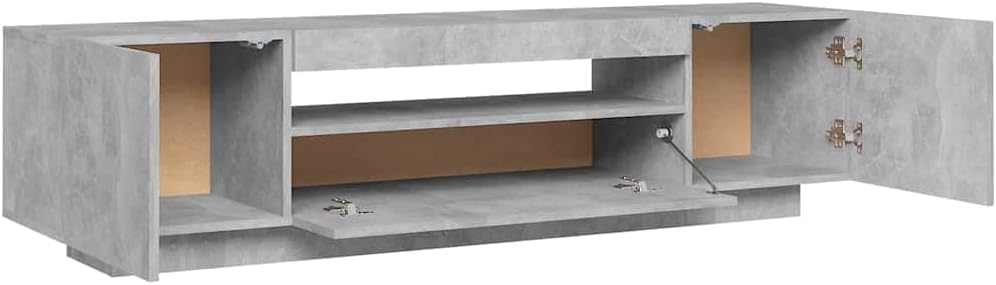
Paveikslėlis: Viršutinė dalis view of the vidaXL TV cabinet with all doors and compartments open, showcasing the internal storage layout.
Garantija ir palaikymas
vidaXL produktai gaminami atsižvelgiant į kokybę ir ilgaamžiškumą. Dėl konkrečios informacijos apie garantiją žr. prie pirkinio pridėtus dokumentus arba apsilankykite oficialioje vidaXL svetainėje. websvetainę.
Jei kyla problemų, reikia atsarginių dalių arba turite klausimų, neaptartų šiame vadove, susisiekite su vidaXL klientų aptarnavimo tarnyba. Turėkite po ranka savo modelio numerį (804431) ir pirkimo informaciją, kad galėtumėte greičiau gauti pagalbą.
Kontaktinė informacija: Prašome peržiūrėti pirkimo kvitą arba vidaXL oficialią parduotuvę. websvetainę, kurioje rasite naujausią klientų aptarnavimo kontaktinę informaciją.