
Įvadas
This manual provides detailed instructions for the installation, operation, and maintenance of your Strong SRT 7040 Digital Satellite HD Receiver. Please read this manual carefully before using the device to ensure proper functionality and to prevent damage.

Image: The Strong SRT 7040 DTT Tuner and its retail packaging.
The Strong SRT 7040 is a Full HD digital satellite receiver designed for Free-To-Air (FTA) channels. It features a USB port for multimedia playback and software updates, and supports Dolby Audio for enhanced sound quality.
1. Sąranka
1.1 Išpakavimas
Atsargiai išimkite visus komponentus iš pakuotės. Įsitikinkite, kad yra šie daiktai:
- Strong SRT 7040 DTT Tuner
- Nuotolinio valdymo pultas (su 2 AAA baterijomis)
- Maitinimo adapteris
- Vartotojo vadovas
1.2 Prietaiso prijungimas
Follow these steps to connect your SRT 7040 receiver:
- Palydovinė įvestis: Connect your satellite dish cable to the SĖDĖJO prievadą imtuvo gale.
- Video Output (HDMI): Prijunkite HDMI kabelį nuo HDMI prie imtuvo HDMI įvesties prievado prie televizoriaus.
- Video Output (SCART): Alternatively, for older televisions, connect a SCART cable from the TV SCART imtuvo SCART prievadą prie televizoriaus SCART įvesties.
- Audio Output (Digital): For digital audio, connect a coaxial cable from the COAXIAL S/PDIF port to your digital audio ampgyvesnis.
- Audio Output (Analog): For analog audio, connect RCA cables from the AUDIO R/L ports to your audio Hi-Fi ampgyvesnis.
- USB įrenginys: If desired, connect a USB storage device to the USB port for multimedia playback or software updates.
- Galia: Prijunkite maitinimo adapterį prie 12V === 1.5A įvestį imtuve, tada prijunkite adapterį prie sieninio lizdo.

Image: Rear panel connections of the Strong SRT 7040 DTT Tuner, showing SAT IN, HDMI, TV SCART, COAXIAL S/PDIF, AUDIO R/L, USB, and Power input.
1.3 First-Time Installation and Channel Scan
Upon first power-on, the receiver will guide you through an initial setup wizard. Follow the on-screen prompts to select your language, country, and perform an automatic channel scan. This process will detect and store all available satellite channels.
2. Naudojimo instrukcijos
2.1 Nuotolinio valdymo pultasview
The included remote control allows you to access all functions of the SRT 7040. Insert the two AAA batteries into the remote control, ensuring correct polarity.

Image: The remote control for the Strong SRT 7040 DTT Tuner, showing buttons for power, numbers, volume, channel, menu, and special functions.
2.2 Pagrindinės funkcijos
- Galia: Paspauskite GALIA button to turn the receiver on or off (standby mode).
- Kanalo pasirinkimas: Naudokite CH+ / CH- buttons to change channels sequentially, or use the numeric keypad to enter a channel number directly.
- Garsumo valdymas: Naudokite VOL+ / VOL- mygtukai garso garsumui reguliuoti.
- Nutildyti: Paspauskite Nutildyti mygtuką, kad laikinai nutildytumėte garsą.
2.3 Meniu naršymas
Paspauskite MENIU mygtuką, kad pasiektumėte pagrindinį meniu. Naudokite rodyklių klavišus (UP, ŽEMYN, KAIRĖ, TEISINGAI) to navigate through options and OK , kad patvirtintumėte pasirinkimus. Paspauskite EXIT to return to the previous screen or live TV.
2.4 Ypatingos savybės
- Laikmačiai: The receiver supports programming timers for recording or switching to specific channels at scheduled times. Access this feature via the menu.
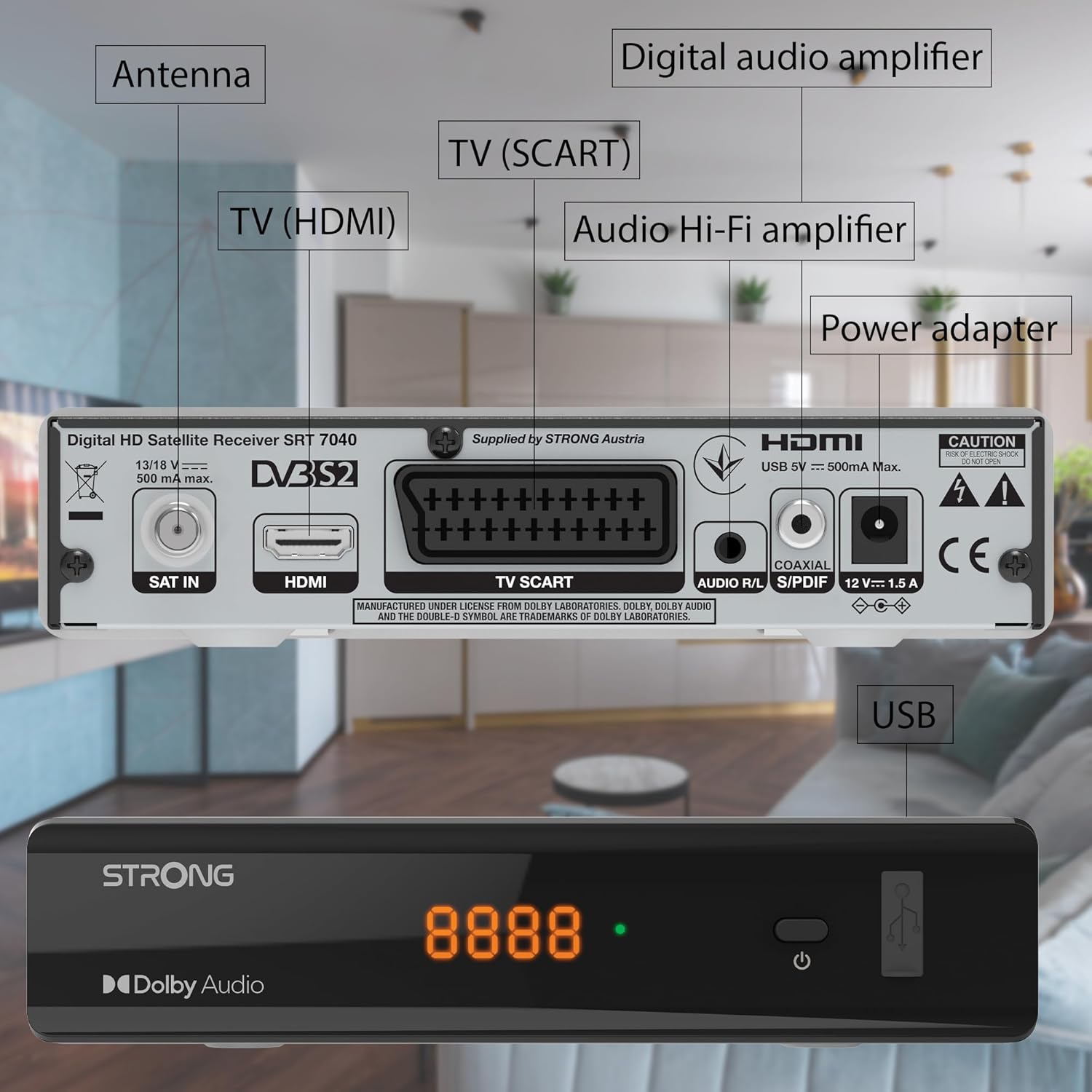
Image: The Strong SRT 7040 DTT Tuner displaying a timer icon, indicating its scheduling capabilities.
- Mėgstamiausių sąrašai: Create customized lists of your preferred channels for quick access.
- Subtitrai: Enable or disable subtitles for compatible broadcasts using the SUB nuotolinio valdymo pulto mygtuką.
- Elektroninis programų vadovas (EPG): Paspauskite EPG mygtuką prie view program information for upcoming broadcasts.
- Dolby Audio: The receiver supports Dolby Audio for a high-quality sound experience.

Image: The Strong SRT 7040 DTT Tuner with the Dolby Audio logo, illustrating its sound processing capability.
3. Priežiūra
3.1 Valymas
To clean the receiver, disconnect it from the power supply. Use a soft, dry cloth to wipe the exterior. Do not use liquid cleaners, aerosols, or abrasive materials, as these can damage the finish or internal components.
3.2 Programinės įrangos naujiniai
Periodiškai tikrinkite gamintojo website for available software updates. Updates can improve performance, add new features, or resolve issues. Software updates are typically performed via the USB port following specific instructions provided with the update file.
3.3 Saugos informacija
- Neatidarykite imtuvo c.asing. Viduje nėra dalių, kurias galėtų aptarnauti vartotojas. Visus techninės priežiūros darbus patikėkite kvalifikuotiems darbuotojams.
- Keep the receiver away from direct sunlight, heat sources, and moisture.
- Užtikrinkite tinkamą vėdinimą aplink įrenginį, kad jis neperkaistų.
- Naudokite tik pateiktą maitinimo adapterį.
4. Problemų sprendimas
If you encounter problems with your SRT 7040, consult the following table before contacting support.
| Problema | Galima priežastis | Sprendimas |
|---|---|---|
| Nėra galios | Maitinimo adapteris neprijungtas; Maitinimo lizdas sugedęs | Check power adapter connection; Try a different power outlet |
| Nėra signalo / Juodas ekranas | Satellite cable loose or disconnected; Incorrect input selected on TV; Satellite dish alignment issue | Check SAT IN cable connection; Ensure TV is on correct HDMI/SCART input; Perform a channel scan; Consult a professional for dish alignment if necessary |
| Nuotolinio valdymo pultas neveikia | Batteries depleted or incorrectly inserted; Obstruction between remote and receiver | Replace batteries; Ensure correct polarity; Remove any obstructions; Point remote directly at receiver |
| Prasta vaizdo kokybė | Weak satellite signal; Incorrect display settings | Check satellite signal strength in menu; Adjust TV display settings; Ensure Full HD content is being broadcast |
5. Specifikacijos
The following are the technical specifications for the Strong SRT 7040 Digital Satellite HD Receiver:
- Modelis: SRT 7040 (SAT FTA Full HD)
- Prekinis ženklas: Stiprus
- Matmenys: 3.39 x 6.46 x 1.38 colio (8.6 x 16.4 x 3.5 cm)
- Prekės svoris: 9.2 uncijos (260 gramų)
- Spalva: Juoda
- Ryšio technologija: USB
- ttage: 100–240 V
- Dažnis: 50–20 000 Hz
- Energijos suvartojimas: 18 kWh (operational, typical)
- Darbinės temperatūros diapazonas: 0ºC iki 40ºC
- Santykinė oro drėgmė: 10 % – 95 %
- Baterijos: 2 AAA baterijos (pridedamos nuotolinio valdymo pultui)
- Atitinkama specifikacija: DVB-S2
- Į kainą įskaičiuota: Wally Receiver
6. Garantija ir palaikymas
For warranty information and technical support, please refer to the warranty card included in your product packaging or visit the official Strong websvetainėje. Išsaugokite pirkimo kvitą kaip pirkimo įrodymą garantiniams reikalavimams.
For further assistance, you may contact Strong customer service through the contact details provided on their official websvetainę.