
1. Produktas baigtasview
The Cudy GS108D is an 8-port Gigabit Ethernet Network Switch designed for expanding your network connectivity. It offers high-speed data transfer for devices such as computers, IPTVs, printers, NAS, game consoles, and routers. Featuring a plug-and-play design, fanless operation, and energy-efficient technology, this switch provides a reliable and quiet solution for both home and office networks.

Vaizdas: priekis view of the Cudy GS108D switch, highlighting its 8 Gigabit Ethernet ports and LED indicators.
Pagrindinės funkcijos:
- 8 gigabitų Ethernet prievadai: Užtikrina didelės spartos laidinį ryšį keliems įrenginiams.
- Plug and Play: Requires no software installation or configuration for immediate use.
- Dizainas be ventiliatoriaus: Ensures quiet operation, suitable for any environment.
- Energiją taupantis: Compliant with IEEE802.3az standard, saving power when ports are idle.
- Universalus montavimas: Palaiko tiek pastatymą ant stalo, tiek montavimą prie sienos.
2. Pakuotės turinys
Patikrinkite, ar jūsų pakuotėje yra šie elementai:
- Cudy GS108D 8-Port Gigabit Ethernet Network Switch
- Maitinimo adapteris
- Instrukcijų vadovas (šis dokumentas)
- Ethernet Cable (may vary by region/package)

Image: Contents of the Cudy GS108D package, showing the switch, power adapter, and an Ethernet cable.
3. Fizinis aprašymas
Priekinis skydelis:
The front panel features eight 10/100/1000 Mbps RJ45 ports. Each port has an associated LED indicator to show link/activity status.
- Maitinimo šviesos diodas: Nurodo jungiklio maitinimo būseną.
- Ryšio / veiksmo šviesos diodai (1–8):
- Tvirtai žalia: A device is connected and the link is active.
- Mirksi žaliai: Duomenys perduodami arba gaunami per prievadą.
- Išjungta: No device is connected or the link is inactive.

Vaizdas: Išsamus view of the Cudy GS108D's front panel, showing the 8 RJ45 ports and their corresponding LED indicators.
Galinis skydas:
Galiniame skydelyje paprastai yra maitinimo įvesties prievadas.
Matmenys:
The compact design of the GS108D allows for flexible placement. Approximate dimensions are 138mm (5.43") L x 61.5mm (2.42") W x 24mm (0.94") H.
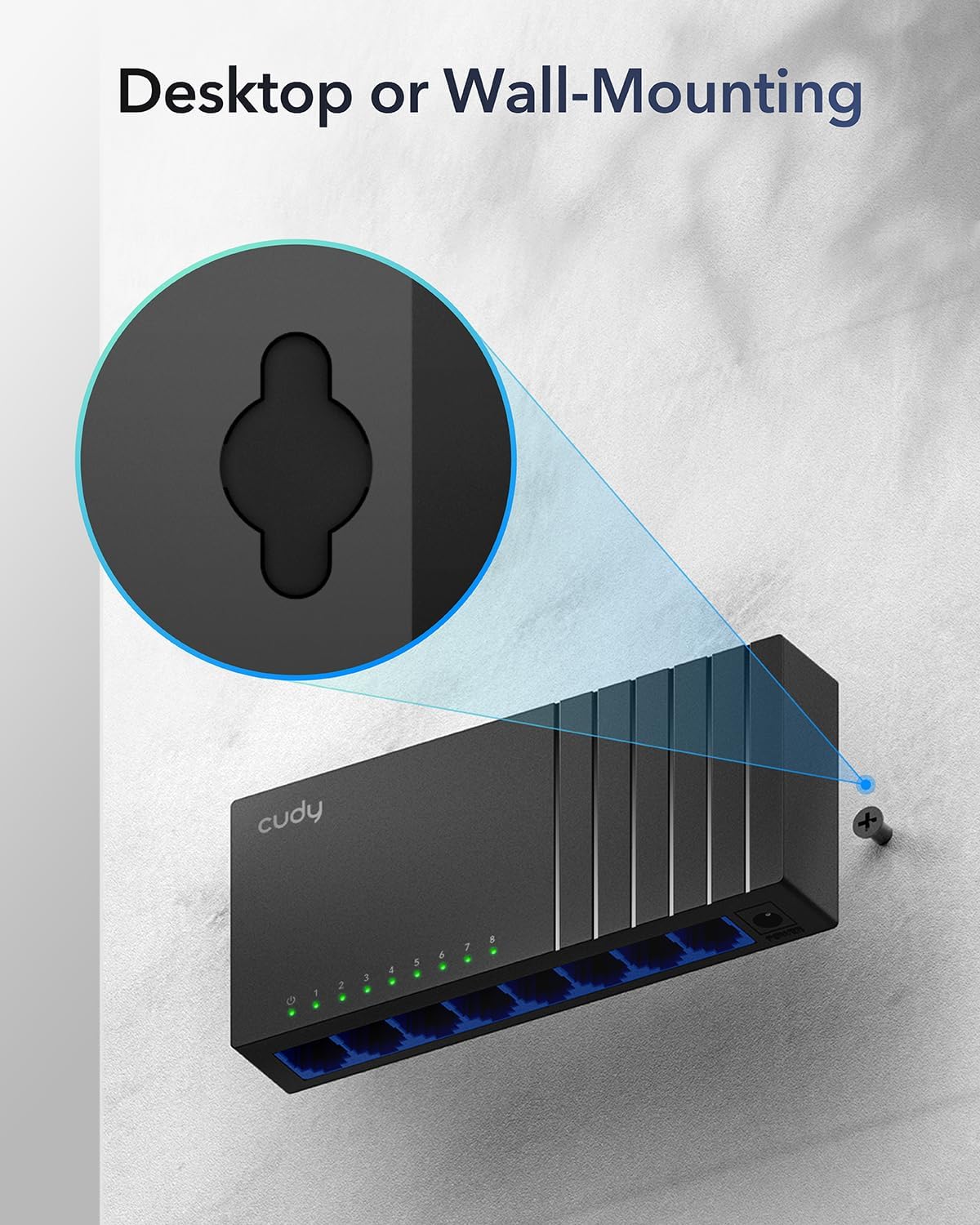
Image: The Cudy GS108D switch with its compact dimensions clearly indicated.
4. Sąrankos instrukcijos
The Cudy GS108D switch is designed for simple plug-and-play installation. No complex configuration is required.
1 veiksmas: maitinimo prijungimas
- Connect one end of the provided power adapter to the power port on the rear panel of the GS108D switch.
- Kitą maitinimo adapterio galą prijunkite prie standartinio elektros lizdo.
- Įsitikinkite, kad priekiniame skydelyje šviečia maitinimo šviesos diodas, rodantis, kad jungiklis gauna maitinimą.

Image: The Cudy GS108D switch with its power adapter connected and ready for use.
2 veiksmas: įrenginio prijungimas
- Connect your network devices (e.g., computer, router, NAS, game console) to any of the 8 RJ45 ports on the front panel using standard Ethernet cables (Cat5e or higher recommended for Gigabit speeds).
- Ensure the Link/Act LED for each connected port illuminates, indicating a successful connection. If the LED is flashing, data is being transmitted.

Image: A laptop being connected to the Cudy GS108D switch with an Ethernet cable, demonstrating a typical setup.
3 veiksmas: montavimo parinktys
The GS108D supports both desktop placement and wall mounting.
- Vieta darbalaukyje: Tiesiog padėkite jungiklį ant lygaus, stabilaus paviršiaus.
- Montavimas ant sienos: The switch features mounting slots on its underside. Use appropriate screws (not included) to secure the switch to a wall.

Image: The Cudy GS108D switch shown with its wall-mounting slots, illustrating how it can be securely attached to a wall.
5. Naudojimo instrukcijos
Once connected, the Cudy GS108D operates automatically without further user intervention.
Automatinės derybos
Each port on the switch automatically detects the network speed (10/100/1000 Mbps) and duplex mode (Half/Full Duplex) of the connected device and adjusts accordingly for optimal performance.
Eismo optimizavimas
The switch features a 4 Mbit packet buffer to ensure stable and efficient data forwarding, reducing packet loss and improving overall network performance, especially during high traffic loads.
Energy Efficiency (IEEE 802.3az)
The GS108D incorporates energy-efficient Ethernet technology. It automatically adjusts power consumption based on cable length and network traffic, reducing energy usage when ports are idle or when connected devices are turned off.

Image: Visual representation of the power-saving feature, showing reduced energy consumption when ports are idle.
Tolimųjų atstumų transmisija
The switch supports long-distance Ethernet cable runs, allowing for reliable data transmission up to 170 meters (557 feet) with Cat5e or higher Ethernet cables.

Image: Illustration of the Cudy GS108D's capability for long-distance transmission, up to 170 meters, requiring Cat5e or higher cables.
6. Priežiūra
To ensure optimal performance and longevity of your Cudy GS108D switch, follow these maintenance guidelines:
- Vieta: Jungiklį padėkite vėsioje, sausoje vietoje, toliau nuo tiesioginių saulės spindulių, šilumos šaltinių ir per didelės drėgmės. Užtikrinkite tinkamą įrenginio vėdinimą.
- Valymas: Jungiklio išorę valykite minkštu, sausu skudurėliu. Nenaudokite skystų ar aerozolinių valiklių.
- Galia: Use only the provided power adapter. Disconnect the power adapter during electrical storms or when unused for long periods.
- Kabeliai: Ensure all Ethernet cables are securely connected and free from damage.
7. Problemų sprendimas
If you encounter issues with your Cudy GS108D switch, refer to the following common troubleshooting steps:
Nėra galios
- Įsitikinkite, kad maitinimo adapteris yra tvirtai prijungtas tiek prie jungiklio, tiek prie veikiančio elektros lizdo.
- Patikrinkite, ar maitinimo lizdas veikia, prijungdami prie jo kitą įrenginį.
- Verify that the Power LED on the switch is illuminated. If not, try a different power outlet.
No Link/Activity on a Port
- Įsitikinkite, kad Ethernet kabelis yra tvirtai prijungtas prie komutatoriaus prievado ir prijungto įrenginio.
- Try using a different Ethernet cable to rule out cable damage.
- Prijunkite įrenginį prie kito komutatoriaus prievado.
- Verify that the connected device (e.g., computer, router) is powered on and its network adapter is enabled.
- If connecting to a router, ensure the router's port is active.
Mažas tinklo greitis
- Ensure you are using Cat5e or higher Ethernet cables for Gigabit speeds. Older Cat5 cables may limit speed.
- Check the Link/Act LED for the port. A solid green light indicates a Gigabit connection. If it's amber or off, there might be a speed mismatch or connection issue.
- Verify that the connected devices also support Gigabit Ethernet.
- Reduce network congestion by limiting simultaneous high-bandwidth activities.
8. Specifikacijos
| Funkcija | Aprašymas |
|---|---|
| Prekės ženklas | Cudy |
| Modelio numeris | GS108D |
| Prievadų skaičius | 8 |
| Sąsaja | RJ45 |
| Duomenų perdavimo sparta | 1000 megabitų per sekundę (gigabitas) |
| Jungiklio tipas | Ethernet Switch |
| Suderinami įrenginiai | Camera, Desktop, Laptop, Router |
| ttage | 28 Volts (Input for power adapter) |
| Darbinė temperatūra | nuo 40 °F iki 104 °F (nuo 4.4 °C iki 40 °C) |
| Korpuso medžiagos tipas | Plastikiniai |
| Prekės matmenys (I x P x A) | 7.87" x 5.91" x 5.91" (Product packaging dimensions, actual device is smaller) |
| Prekės svoris | 200 gramų |
9. Garantija ir palaikymas
Informacija apie garantiją:
The Cudy GS108D 8-Port Gigabit Ethernet Network Switch comes with a 2 metų garantija nuo pirkimo datos. Prašome išsaugoti pirkimo įrodymą garantiniams reikalavimams. Ši garantija taikoma medžiagų ir gamybos defektams, atsiradusiems įprasto naudojimo sąlygomis.
Techninė pagalba:
For technical assistance, troubleshooting, or further inquiries, please visit the official Cudy website or contact Cudy customer support. Cudy is committed to delivering high-performance, user-friendly communication technology and provides resources to help you with your product.
Dažnai galite rasti pagalbos išteklių, DUK ir kontaktinės informacijos svetainėje Cudy Store on Amazon or the main Cudy websvetainę.