
Įvadas
This manual provides instructions for the VINABTY MBE741 replacement remote control. This remote is designed to be compatible with various AKAI LCD/LED TV models, including ATE-48N1104K, ATE-55N1104K, and ATE-55D1044K. It offers a direct replacement for your original remote without requiring complex programming.
Sąranka
Akumuliatoriaus montavimas
The VINABTY MBE741 remote control requires two AAA batteries for operation. No programming or setup is needed; simply insert the batteries, and the remote will be ready to use.
- Nuotolinio valdymo pulto gale raskite baterijų skyrių.
- Baterijų skyriaus dangtelį stumkite žemyn arba į išorę, kad jį atidarytumėte.
- Įdėkite dvi AAA tipo baterijas, užtikrindami, kad teigiamas (+) ir neigiamas (-) poliai teisingai sutaptų su žymėjimais baterijų skyriuje.
- Stumkite baterijų skyriaus dangtelį atgal į vietą, kol jis tvirtai spragtelės.
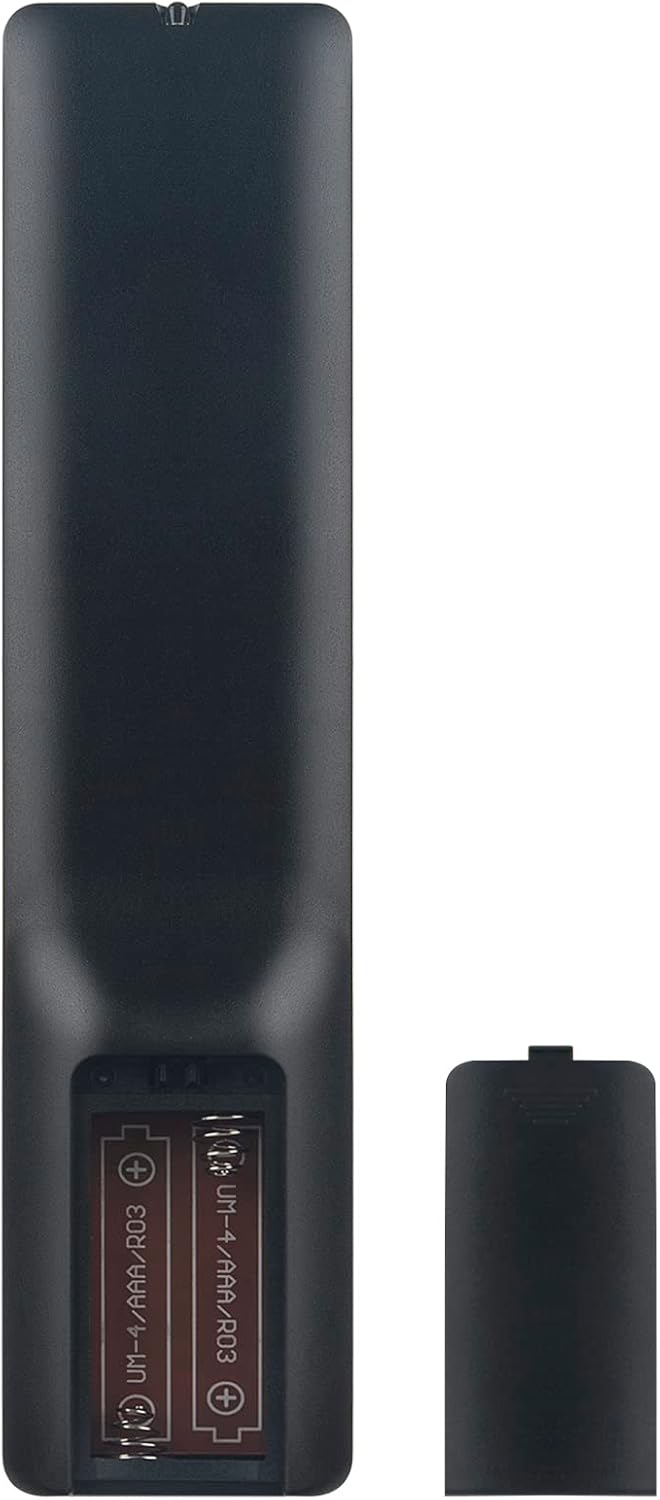
Image: Back of the remote control with the battery compartment open, illustrating correct battery placement.
Naudojimo instrukcijos
Once batteries are installed, the remote control is ready for immediate use with compatible AKAI LCD/LED TVs. Point the remote directly at your television's infrared receiver.
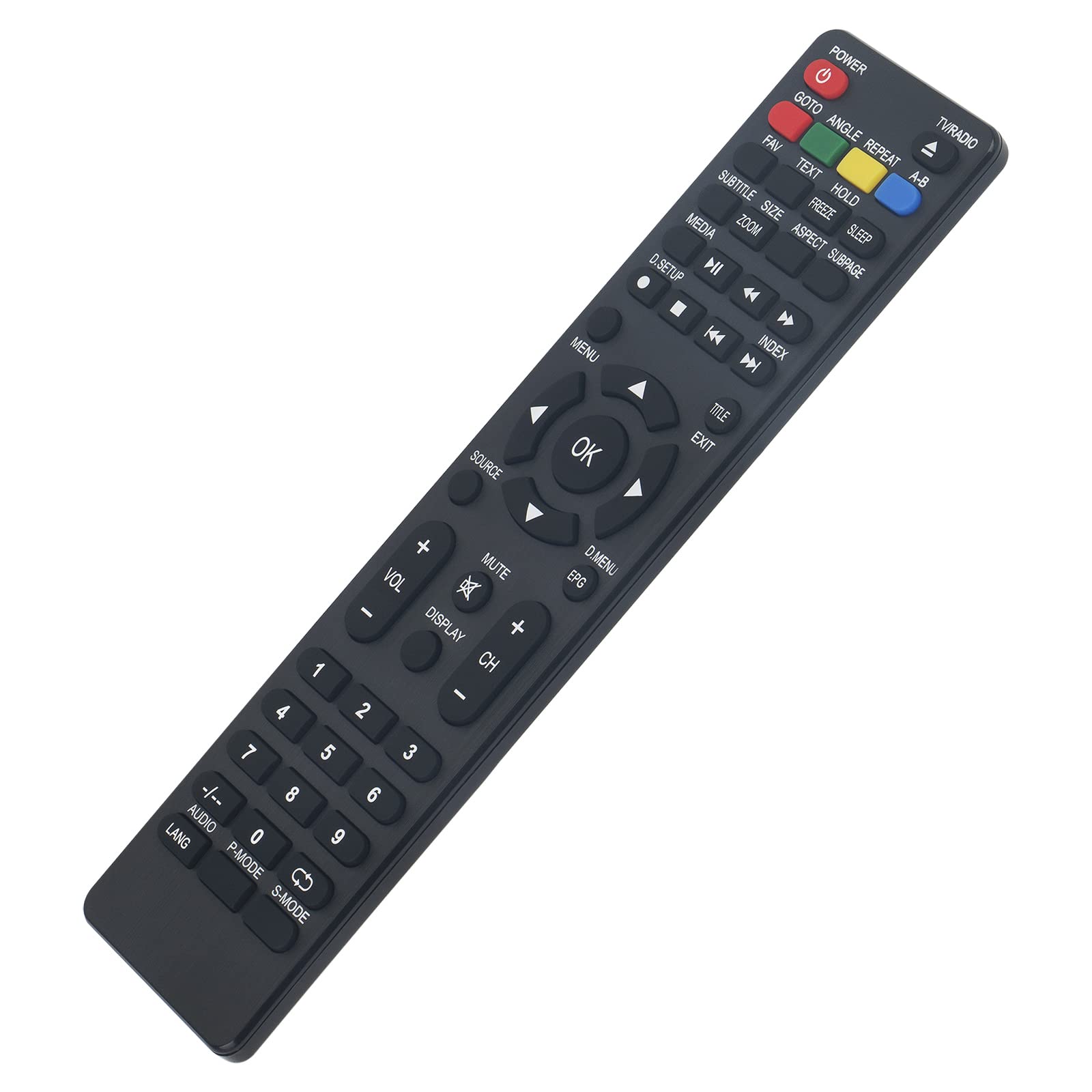
Vaizdas: priekis view of the remote control, displaying all function buttons.
Pagrindinės funkcijos baigtosview
- GALIA: Įjungia arba išjungia televizorių.
- TV / RADIJAS: Perjungia tarp televizijos ir radijo režimų.
- Skaičių mygtukai (0–9): Tiesioginis kanalų pasirinkimas.
- VOL +/-: Reguliuoja garsumo lygį.
- CH +/-: Keičia kanalą aukštyn arba žemyn.
- Nutildyti: Išjungia arba įjungia televizoriaus garsą.
- MENIU: Įjungia pagrindinį televizoriaus meniu.
- GERAI: Patvirtina pasirinkimus meniu.
- Naršymo rodyklės (aukštyn, žemyn, kairėn, dešinėn): Naršo meniu parinktis.
- UŽDARYTI: Išeina iš esamo meniu arba funkcijos.
- ŠALTINIS: Pasirenka įvesties šaltinius (HDMI, AV ir kt.).
- MEDIA Controls (Play, Pause, Stop, Rewind, Fast Forward, Skip): Valdo medijos atkūrimą.
- EPG: Rodo elektroninį programų vadovą.
- SUBTITRAS: Įjungia arba išjungia subtitrus.
- LANG / AUDIO: Keičia garso kalbą arba takelį.
- P režimas: Selects picture modes.
- S REŽIMAS: Selects sound modes.
- DISPLAY: Rodo informaciją ekrane.
- Other Function Buttons (GOTO, ANGLE, REPEAT, A-B, FAV, TEXT, HOLD, FREEZE, SLEEP, SIZE, ZOOM, ASPECT, SUBPAGE, D.SETUP, INDEX, TITLE, D.MENU): Provide access to specific TV features as labeled.
Priežiūra
Valymas
Nuotolinio valdymo pultą valykite minkšta, sausa šluoste. Jei nešvarumai sunkiai įveikiami, šiek tiek nuvalykite.ampen the cloth with water or a mild cleaning solution. Avoid using abrasive cleaners, alcohol, or solvents, as these can damage the remote's surface or internal components.
Baterijos keitimas
Replace batteries when the remote control's response becomes sluggish or stops working. Always replace both batteries at the same time with new AAA alkaline batteries. Do not mix old and new batteries, or different types of batteries, as this can lead to leakage or malfunction.
Trikčių šalinimas
- Nuotolinio valdymo pultas nereaguoja:
- Patikrinkite baterijas: Įsitikinkite, kad baterijos įdėtos teisingai, laikantis poliškumo (+/-). Senas baterijas pakeiskite naujomis AAA šarminėmis baterijomis.
- Matymo linija: Make sure there are no obstructions between the remote control and the TV's infrared sensor. Point the remote directly at the TV.
- Nuotolinis jutiklis: Įsitikinkite, kad televizoriaus infraraudonųjų spindulių jutiklis yra švarus ir neuždengtas.
- Some buttons do not work:
- While this remote is designed for broad compatibility, some specific TV models might have unique functions not directly mapped to a button. Refer to your TV's original manual for specific feature access.
- Ensure the remote is in the correct mode (e.g., TV mode if applicable, though this remote is generally universal for the listed models).
Specifikacijos
| Prekės ženklas | VINABTY |
| Modelio numeris | MBE741 |
| Suderinami įrenginiai | AKAI ATE-48N1104K, ATE-55N1104K, ATE-55D1044K, Linsar LED LCD HDTV TV LS50UHD LS32CHD LS40CFHD LS24CFHD12V |
| Ryšio technologija | Infraraudonųjų spindulių |
| Didžiausias diapazonas | 10 metrų |
| Baterijos tipas | 2 x AAA (rekomenduojamos šarminės) |
| Medžiaga | ABS |
| Ypatinga funkcija | Ergonomiškas dizainas |
Garantija ir palaikymas
VINABTY is committed to customer satisfaction. If you encounter any issues with your product or require assistance, please contact our customer support. We aim to provide a satisfactory response within 24 hours.
For support inquiries, please refer to the contact information provided with your purchase or on the VINABTY official websvetainę.