
Įvadas
This manual provides comprehensive instructions for the Dpofirs 1080P 30FPS Vlogging Camera Recorder. Please read this manual carefully before using the device to ensure proper operation and to maximize its performance. Keep this manual for future reference.
Produktas baigtasview
The Dpofirs Vlogging Camera Recorder is designed for capturing high-definition videos and photos. It features a 2.7-inch TFT rotatable screen, 16x digital zoom, and 16MP image resolution.
Pagrindinės funkcijos:
- HD kamera: 2.7-inch TFT rotatable screen, 1080P video resolution, 16x digital zoom, 16MP pixels.
- Selfie Support: Front fill light for photos, 2 or 10-second self-timer.
- Saugykla: Supports up to 32GB memory card (not included). A Class10 U3 chip memory card is recommended for optimal performance.
- USB jungtis: Jungiamasi prie kompiuterio, skirto file transfer and can function as a PC camera.
- Integruotas garsiakalbis: Built-in speaker for audio playback.
- Recording while Charging: Supports continuous recording while connected to a power source.
Kameros komponentai:

1 vaizdas: Iš arti view of the camera's video lens, showing the focal length and aperture details.

2 vaizdas: Galinis view of the camcorder, highlighting the control buttons, menu button, mode button, and speaker grille.
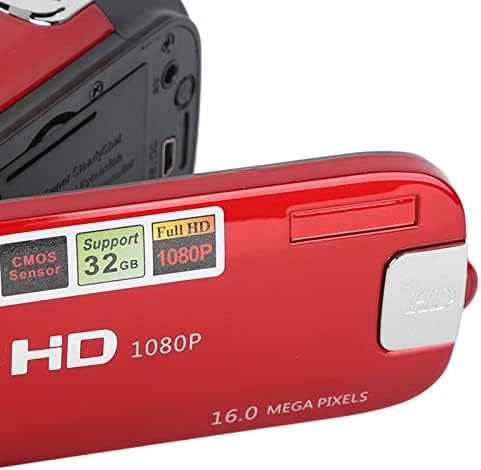
3 vaizdas: Išsamus view of the camera's flip-out screen, showing resolution and megapixel information.

4 vaizdas: The Dpofirs camcorder displayed with its standard accessories, including the battery, USB cable, and wrist strap.
Sąranka
- Įkraukite akumuliatorių: Insert the included lithium battery into the camera. Connect the camera to a power source using the USB cable to fully charge the battery before first use.
- Įdėkite atminties kortelę: Open the memory card slot cover. Insert a compatible SDHC memory card (up to 32GB, Class10 U3 recommended) into the slot until it clicks into place. Ensure the card is inserted in the correct orientation.
- Maitinimas: Paspauskite ir palaikykite maitinimo mygtuką, kad įjungtumėte fotoaparatą.
Naudojimo instrukcijos
Pagrindinė operacija:
- Maitinimo įjungimas/išjungimas: Norėdami įjungti arba išjungti kamerą, paspauskite ir palaikykite maitinimo mygtuką.
- Režimo pasirinkimas: Paspauskite REŽIMAS button to switch between Photo mode and Video recording mode.
- Vaizdo įrašo įrašymas:
- Vaizdo įrašo režimu paspauskite Įrašas button (usually marked with a red dot or camera icon) to start recording.
- Paspauskite Įrašas mygtuką dar kartą, kad sustabdytumėte įrašymą.
- Fotografuoti:
- Fotografavimo režimu paspauskite Užraktas button (usually a larger button on top) to capture a photo.
- Priartinimo funkcija: Use the zoom lever/buttons (often marked with 'W' for Wide and 'T' for Telephoto) to adjust the 16x digital zoom.
- ReviewTurinys: Paspauskite Atkūrimas button (often marked with a play icon) to view recorded videos and photos. Use navigation buttons to browse.
Išplėstinės funkcijos:
- Laikmatis: Access the menu settings to select a 2-second or 10-second self-timer for photos.
- Užpildymo lemputė: The camera features a front fill light. Activate it through the menu settings for improved lighting in low-light conditions, especially for selfies.

5 vaizdas: The camcorder in use for a selfie, demonstrating the rotatable screen and front fill light feature.
- Prisijungimas prie kompiuterio: Use the provided USB cable to connect the camera to a computer. The camera can be used to transfer files or as a PC camera.
- HD išvestis: The camera supports HD output for viewing content on compatible displays.
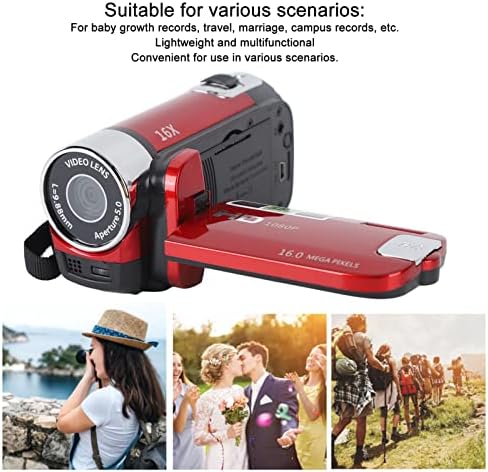
6 vaizdas: Illustrates various applicable scenarios for the camcorder, such as travel, weddings, and personal recordings.
Priežiūra
- Valymas: Fotoaparato korpusą valykite minkšta, sausa šluoste. Objektyvui ir ekranui valyti naudokite specializuotą objektyvo valymo šluostę ir tirpalą. Venkite abrazyvinių medžiagų.
- Saugykla: Laikykite fotoaparatą vėsioje, sausoje vietoje, toliau nuo tiesioginių saulės spindulių ir ekstremalių temperatūrų. Išimkite bateriją, jei fotoaparatas bus nenaudojamas ilgesnį laiką.
- Akumuliatoriaus priežiūra: Fully charge the battery before storage and recharge it every few months to maintain its lifespan.
- Atminties kortelė: Regularly back up your data from the memory card to a computer or external storage device. Format the memory card periodically to maintain performance.
Trikčių šalinimas
| Problema | Galima priežastis | Sprendimas |
|---|---|---|
| Kamera neįsijungia. | Baterija išsikrovusi arba netinkamai įdėta. | Įsitikinkite, kad akumuliatorius yra visiškai įkrautas ir teisingai įdėtas. |
| Negalima įrašyti vaizdo ar fotografuoti. | Memory card is full, not inserted, or incompatible. | Check memory card status. Ensure it is inserted, has free space, and is a Class10 U3 card. |
| Prasta vaizdo / vaizdo kokybė. | Insufficient lighting, dirty lens, or incorrect settings. | Ensure adequate lighting. Clean the lens. Check resolution settings in the menu. |
| Kompiuteris neatpažįsta kameros. | Faulty USB cable or incorrect connection mode. | Try a different USB cable. Ensure the camera is in PC camera or mass storage mode if applicable. |
Specifikacijos
| Funkcija | Detalė |
|---|---|
| Modelio numeris | Dpofirsgn9zt6aq2u-12 |
| Vaizdo raiška | 16 Megapixels (effective), supports VGA, 1M, 5M, 12M, 16M |
| Vaizdo formatas | JPG |
| Vaizdo raiška | 1080 Pixels (effective), supports FHD (1920x1080), HD (1280x720), 640x480 |
| Vaizdo įrašo formatas | AVI |
| Ekrano dydis | 2.7 colio TFT |
| Skaitmeninis priartinimas | 16x |
| Optinis priartinimas | 16x |
| Užrakto tipas | Elektroninė |
| Laikmatis | 2 sekundės, 10 sekundės |
| TV išvestis | NTSC 30fps, PAL 25fps |
| Saugojimo laikmena | SDHC memory card (up to 32GB, Class10 U3 recommended) |
| Baterija | 1 x 10²⁰mAh Lithium Battery (built-in) |
| Ryšys | USB |
| Jutiklio technologija | CMOS |
| Svoris | 216 gramų |
| Pakuotės matmenys | 14 x 11 x 7 cm |
| Vaizdo kraštinių santykis | 16:9 |
| Baltos spalvos balanso nustatymai | Auto |
| Ekspozicijos valdymo tipas | Automatinis |
| Kalbėtojų skaičius | 1 |
| Suderinami įrenginiai | Asmeninis kompiuteris |
| Vaizdo kameros tipas | Vaizdo kamera |
| Rekomenduojami naudojimo būdai | Personal recordings, baby growth records, travel, campus activities |
| Atsparumo vandeniui lygis | Neatsparus vandeniui |
| Vaizdo stabilizavimas | Digital (Not Assured) |
| Formos faktorius | Rankinis |
| Objektyvo tipas | Padidinti |
| Fokusavimo tipas | Automatinis fokusavimas |
| Fotografavimo režimai | Automatinis |
Garantija ir palaikymas
For warranty information and technical support, please refer to the documentation included with your purchase or contact Dpofirs customer service.
Grąžinimo politika: This product has a 30-day return policy for refund or replacement.