
Įvadas
The TAXNELE THC30A is a digital programmable timer switch designed for automatic control of various electrical equipment. It features daily and weekly programming capabilities with up to 20 ON/OFF settings, a manual override function, and a built-in lithium battery for power-off memory. This manual provides detailed instructions for installation, operation, and maintenance to ensure safe and efficient use of your timer switch.
Saugos informacija
- Prieš montuodami arba atlikdami techninę priežiūrą įsitikinkite, kad maitinimas yra atjungtas.
- Installation should be performed by a qualified electrician or knowledgeable individual.
- Do not exceed the maximum load capacity of 30A / 5000W.
- Saugokite įrenginį nuo vandens ir ekstremalių temperatūrų.
- Verify correct wiring connections to prevent damage to the device or connected appliances.
Produkto savybės
- Programuojamas valdymas: Up to 20 ON/OFF settings per day or week.
- Išjungimo atmintis: Built-in 3V lithium battery maintains timing, display, and data storage for up to 3 years during power interruptions.
- Didelis tikslumas: Industrial-grade chip for accurate timing.
- Rankinis nepaisymas: Allows temporary or permanent manual control.
- LCD ekranas: Clear digital display for easy programming and monitoring.
- Din Rail Mount: Designed for easy installation on a standard DIN rail.
- Platus pritaikymas: Suitable for street lights, neon lamps, advertising signs, production equipment, and home appliances.

Figure 1: The THC30A timer switch highlighting its power-off memory function, which retains data for up to 3 years using a built-in CR2032 lithium battery.

Figure 2: The THC30A timer switch featuring a 30A big load relay for stable and safe operation with various electrical loads.
Product Components and Display
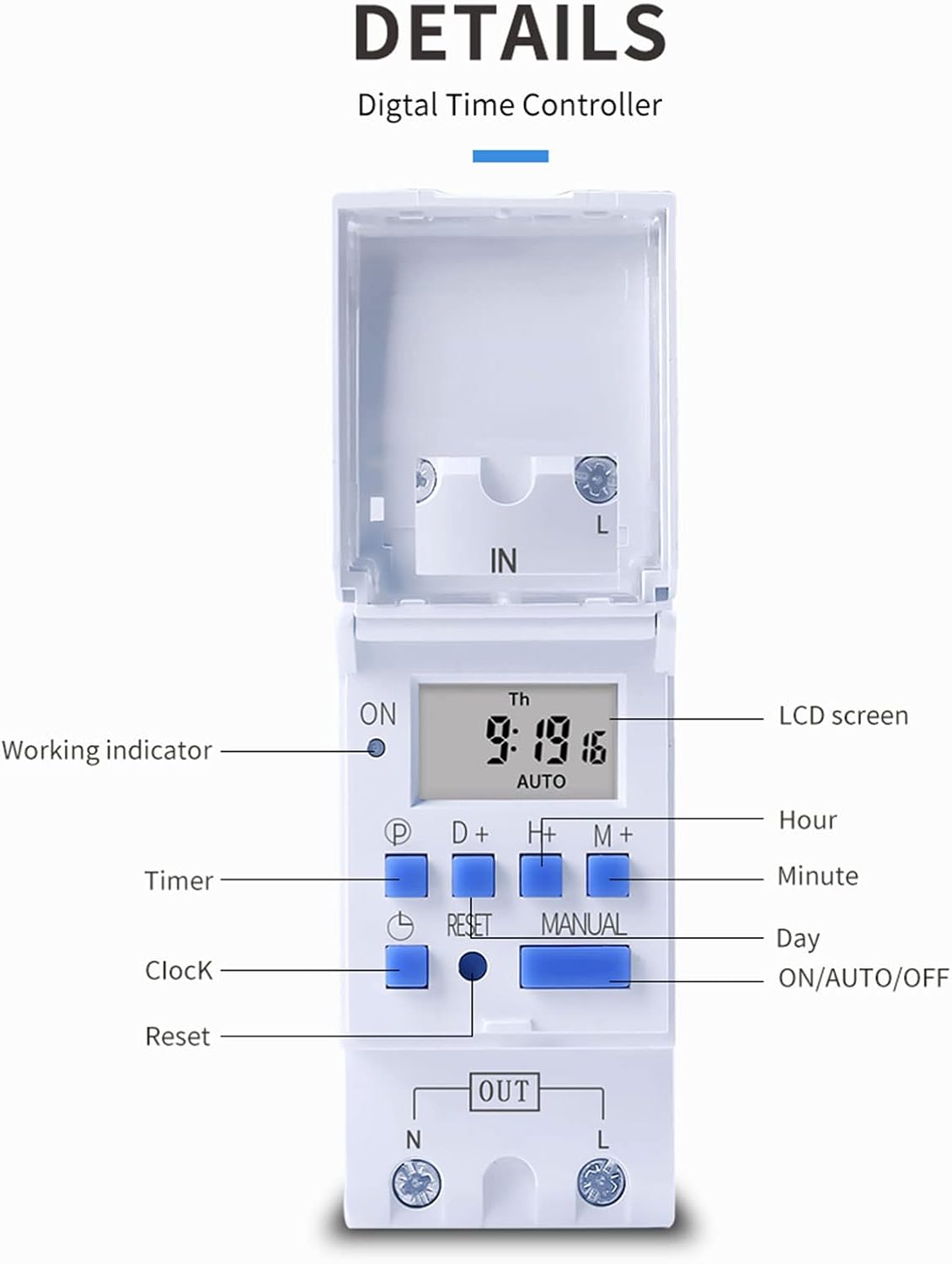
3 pav. Išsamus view of the THC30A timer switch's LCD screen and control buttons. Labels include Working indicator, Timer, Clock, Reset, P (Program), D+ (Day), H+ (Hour), M+ (Minute), Manual, and ON/AUTO/OFF status.
- LCD ekranas: Displays current time, day, and ON/OFF status.
- Veikimo indikatorius: LED light indicating operation status.
- P mygtukas: Įjungiamas programavimo režimas.
- D+ Button: Adjusts day in clock setting or program.
- H+ Button: Adjusts hour in clock setting or program.
- M+ Button: Adjusts minute in clock setting or program.
- Laikrodžio mygtukas: Returns to clock display or exits programming mode.
- Atkūrimo mygtukas: Clears all settings and resets the timer.
- Rankinis mygtukas: Toggles between ON, AUTO, and OFF modes.
Specifikacijos
| Parametras | Vertė |
|---|---|
| Modelis | THC30A |
| Dabartinis reitingas | 30A |
| Galios įvertinimas | 5000W |
| ttage Parinktys | 12V DC AC, 24V DC AC, 48V DC AC, 110V AC, 220V AC |
| Laiko klaida | ≤2 seconds/day |
| Ekranas | LCD |
| Laiko diapazonas | 1 minute to 168 hours (7 days) |
| ON/OFF Nustatymai | 20 grupės |
| Darbinė temperatūra | -20 ℃ iki 50 ℃ |
| Matmenys | 86 x 36 x 65 mm (3.38 x 1.41 x 2.56 coliai) |
| Maitinimo rezervas | 3V Lithium battery (CR2032 type) for 3 years data retention |

Figure 4: Dimensions of the THC30A timer switch, showing measurements for height, width, and depth for proper installation planning.
Sąranka ir diegimas
1. Montavimas
The THC30A timer switch is designed for DIN rail mounting. Securely attach the device to a standard 35mm DIN rail in an appropriate electrical enclosure.
2. Laidai
ĮSPĖJIMAS: Ensure all power is disconnected before performing any wiring.
Connect the input power supply to the "IN" terminals (N for Neutral, L for Live). Connect the load (e.g., light, appliance) to the "OUT" terminals (N for Neutral, L for Live). The timer acts as a switch for the live wire. Refer to the wiring diagram below for correct connections.

Figure 5: Simplified wiring diagram for the THC30A timer switch. The new version offers direct power output, simplifying connections compared to older models.
- Įvestis (IN): Connect your main power supply (e.g., AC 12V, 24V, 48V, 110V, 220V) to these terminals.
- Išvestis (OUT): Connect your electrical load (e.g., light, motor) to these terminals. The timer controls the power flow to this output.
Naudojimo instrukcijos
1. Pradinis nustatymas / atstatymas
Upon first use or after a prolonged power outage, the display may be blank. Press the Nustatyti iš naujo button (located in a small hole, use a pointed object) to clear all settings and initialize the timer. The LCD will display "0:00" and "AUTO".
2. Dabartinio laiko ir dienos nustatymas
- Paspauskite ir palaikykite Laikrodis mygtuką.
- Laikant Laikrodis, paspauskite D+ to set the current day (Monday to Sunday).
- Laikant Laikrodis, paspauskite H+ to set the current hour (0-23).
- Laikant Laikrodis, paspauskite M+ to set the current minute (0-59).
- Atleiskite Laikrodis mygtuką. Laikas dabar nustatytas.
3. ĮJUNGIMO/IŠJUNGIMO ciklų programavimas
Laikmatis palaiko iki 20 įjungimo/išjungimo programų. Kiekviena programa susideda iš įjungimo laiko ir išjungimo laiko.
- Paspauskite P button once. The display will show "1 ON". This is for the first ON setting.
- Paspauskite D+ to select the day(s) for this ON event. You can choose a single day, specific days, or blocks of days (e.g., Mon-Fri, Sat-Sun, Mon-Sun).
- Paspauskite H+ to set the hour for the first ON event.
- Paspauskite M+ to set the minute for the first ON event.
- Paspauskite P button again. The display will show "1 OFF". This is for the first OFF setting.
- Repeat steps 2-4 to set the day(s), hour, and minute for the first OFF event.
- Spauskite toliau P to cycle through "2 ON", "2 OFF", up to "20 ON", "20 OFF" and set additional programs as needed.
- Nustatę visas norimas programas, paspauskite Laikrodis mygtuką, kad išeitumėte iš programavimo režimo ir grįžtumėte į dabartinio laiko rodymą.
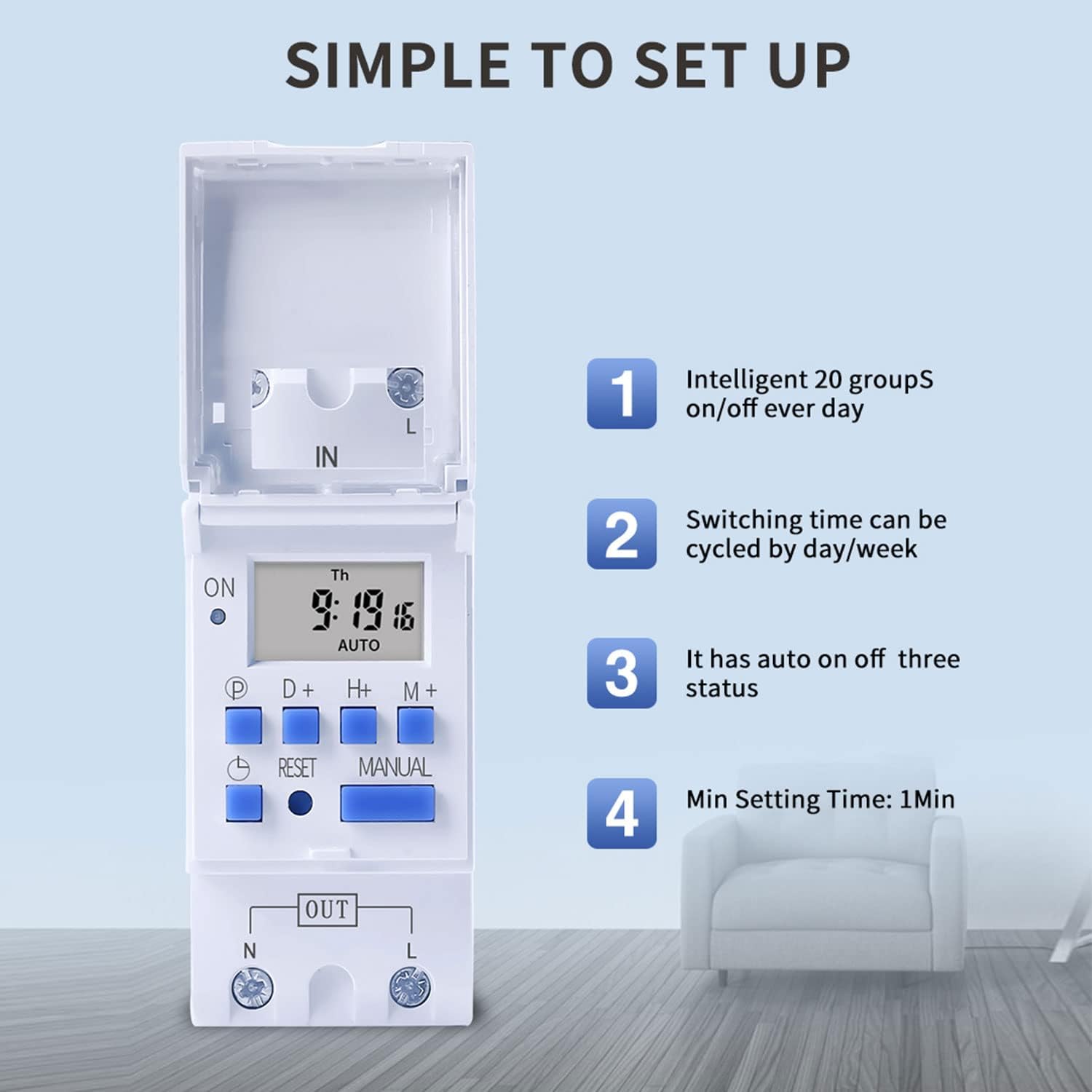
Figure 6: Visual guide to the simple setup of the THC30A timer, highlighting its 20 ON/OFF groups, daily/weekly cycling, auto ON/OFF status, and minimum 1-minute setting time.
4. Rankinis nepaisymas
Paspauskite vadovas button to cycle through the output modes:
- ĮJUNGTA: The output is continuously ON, overriding all programs.
- AUTOMATINIS: The output operates according to the programmed ON/OFF cycles. This is the standard operating mode.
- IŠJUNGTA: The output is continuously OFF, overriding all programs.
Įsitikinkite, kad laikmatis įjungtas AUTO mode for programmed operations to function.
Priežiūra
- Keep the timer clean and free from dust. Use a dry, soft cloth for cleaning.
- Nenaudokite abrazyvinių valiklių ar tirpiklių.
- The internal lithium battery (CR2032) has a long lifespan (up to 3 years). If the display consistently goes blank after power outages, the battery may need replacement. This should be done by a qualified technician.
Trikčių šalinimas
| Problema | Galima priežastis | Sprendimas |
|---|---|---|
| Ekranas tuščias. | Nėra maitinimo šaltinio; išsikrovusi vidinė baterija. | Check power connections. Press the Reset button. If problem persists, internal battery may need replacement. |
| Timer does not switch ON/OFF as programmed. | Timer is not in AUTO mode; incorrect program settings; current time/day is wrong. | Paspauskite vadovas until "AUTO" is displayed. Verify program settings (ON/OFF times, days). Check and correct current time and day. |
| Output is always ON or always OFF. | Timer is in manual ON or OFF mode. | Paspauskite vadovas until "AUTO" is displayed. |
| Programs are lost after power outage. | Internal backup battery is depleted. | The internal CR2032 battery may need replacement. Contact support if necessary. |
Programos
The TAXNELE THC30A timer switch is versatile and can be used in various applications to automate electrical devices:

7 pav. Pvzamples of common applications for the THC30A timer switch, including street light control, home appliance control, battery charging control, and advertising light control.
- Street Light Control: Automate the turning ON/OFF of street lights based on time.
- Home Appliance Control: Schedule operation of water heaters, fans, or other household devices.
- Battery Charging Control: Manage charging cycles for batteries to prevent overcharging.
- Advertising Light Control: Program display times for neon signs and advertising boards.
- Production Equipment: Control machinery operation in industrial settings.
Garantija ir palaikymas
For warranty information or technical support, please refer to the contact details provided with your purchase or visit the official TAXNELE websvetainėje. Išsaugokite pirkimo kvitą kaip pirkimo įrodymą.