
Įvadas
This manual provides detailed instructions for the setup, operation, and maintenance of your Zetta Z16 Digital Camcorder. Please read this manual thoroughly before using the device to ensure proper functionality and to maximize its performance.
Produktas baigtasview
The Zetta Z16 is a compact digital camcorder designed for security and surveillance. It features a 160-degree rotatable lens and multiple recording modes.

Figure 1: Zetta Z16 Digital Camcorder. A priekis view of the compact Zetta Z16 device.
Komponentai ir valdikliai

Figure 2: Zetta Z16 at a Glance. This diagram illustrates the key components and controls of the Zetta Z16 Digital Camcorder, including the LED indicator, card slot, mode switches, power button, camera lens, microphone, and USB port.
- LED indikatorius: Pateikiama būsenos informacija.
- Kortelės lizdas: For inserting a FAT32 formatted SD card.
- Surveillance Mode Switch: Activates surveillance recording.
- On-the-GO Mode Switch: Activates motion detection recording.
- Custom Mode Switch: For advanced configurations via "Zetta Widget" software.
- Įjungimo/išjungimo mygtukas: Įjungia arba išjungia įrenginį.
- Kameros objektyvas: 160-degree rotatable lens for video capture.
- Mikrofonas: Garso įrašymui.
- USB prievadas: Skirta įkrovimui ir prijungimui prie kompiuterio.

3 paveikslas: viršuje View of Zetta Z16 Controls. This image shows the top panel of the camcorder, highlighting the SD card slot, the status LED, and the mode selection buttons.

4 pav. Apačia View of Zetta Z16. The bottom of the device displays the Zetta branding, input voltage information (5V), and a warning regarding cover removal.
Sąranka
- Įkraukite įrenginį: Before first use, fully charge the Zetta Z16 using the provided USB cable and a 5V power adapter. The LED indicator will show charging status.
- Įdėkite SD kortelę: Ensure the device is off. Insert a FAT32 formatted SD card into the card slot. A minimum of 8GB and maximum of 128GB is recommended for optimal performance.
- Pradinis įjungimas: Press and hold the On/Off button for 2 seconds. The green light will flash, indicating the camera is operational.
Veikimo režimai
The Zetta Z16 offers several operating modes to suit different surveillance needs.
1. Custom Mode (Advanced Configuration)
This mode allows for detailed customization of recording settings using the "Zetta Widget" software on a computer. Connect the camcorder to your computer via USB to access these settings.

Figure 5: Zetta Widget Software Interface. This image displays the software used for advanced configuration, allowing users to adjust video quality, resolution, frame rate, and other recording parameters.
- Download "Zetta Widget": Obtain the software from the official Zetta websvetainę.
- Prisijunkite prie kompiuterio: Use a USB cable to connect the Z16 to your computer.
- Konfigūruoti nustatymus:
- Ciklo įrašymas: Enable/disable continuous recording that overwrites older files.
- Laikuamp: Add date and time stamps to recordings.
- Suplanuotas įrašymas: Nustatykite konkretų laiką, kada kamera įrašys.
- Judesio aptikimo įrašymas: Activate recording only when motion is detected.
- Automatinis įjungimas/išjungimas: Schedule power cycles.
- Voice-Activated Recording: Initiate recording based on sound detection.

Figure 6: Scheduled Recording Configuration. The Zetta Widget allows users to set up recording schedules and define triggers such as voice, vibration, or motion detection.
2. On-the-GO Mode (Motion Detection)
In this mode, the camera records only when motion is detected within a range of 3-5 meters. Recording stops when the memory card is full. Video resolution is 1280 x 720 pixels.
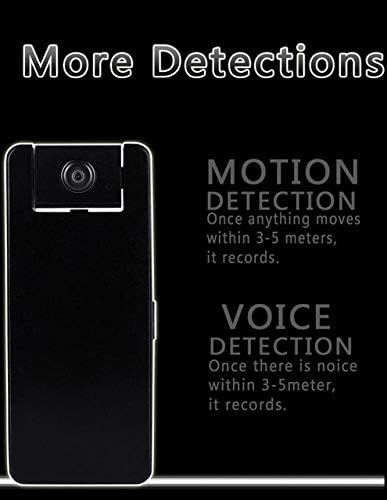
Figure 7: Motion and Voice Detection. This graphic explains how motion detection triggers recording when movement occurs within 3-5 meters, and voice detection triggers recording when noise is detected within the same range.
3. Nepertraukiamas režimas
The Z16 features a built-in 1200 mAh rechargeable battery, allowing for up to 10 hours of continuous video recording. The video resolution in this mode is 640 x 360 pixels.
Priežiūra
- Valymas: Kameros objektyvą ir išorę valykite minkštu, sausu skudurėliu. Venkite abrazyvinių valiklių ar tirpiklių.
- Saugykla: Laikykite prietaisą vėsioje, sausoje vietoje, apsaugotoje nuo tiesioginių saulės spindulių ir ekstremalių temperatūrų.
- Akumuliatoriaus priežiūra: Norėdami pailginti akumuliatoriaus veikimo laiką, venkite dažnai visiškai jį iškrauti. Reguliariai įkraukite įrenginį, net jei jo nenaudojate.
- Firmware atnaujinimai: Check the Zetta website periodically for firmware updates to ensure optimal performance and access to new features. The "UPGRADE" label on the bottom of the device indicates this capability.
- SD kortelės tvarkymas: Regularly back up important recordings and format the SD card to maintain performance and prevent data corruption.
Trikčių šalinimas
| Problema | Galima priežastis | Sprendimas |
|---|---|---|
| Įrenginys neįsijungia. | Žemas akumuliatoriaus įkrovos lygis; įrenginys neįkrautas. | Charge the device fully. Ensure the power button is held for 2 seconds. |
| Įrašymas neprasideda. | SD card not inserted or not formatted correctly (FAT32); incorrect mode selected. | Insert a FAT32 formatted SD card. Check mode selection. Use Zetta Widget for advanced settings. |
| Prasta vaizdo kokybė. | Lens is dirty; low light conditions; incorrect resolution setting. | Clean the lens. Ensure adequate lighting. Adjust video resolution in Custom Mode via Zetta Widget. Note that Continuous Mode records at 640x360. |
| Judesio aptikimas neveikia. | On-the-GO mode not activated; sensitivity settings too low. | Ensure On-the-GO mode is selected. Adjust motion detection sensitivity using Zetta Widget. |
| Įrenginys nereaguoja. | Programinės įrangos triktis. | Locate the reset pinhole (often near the SD card slot or on the bottom) and gently press with a thin object (e.g., paperclip) to reset the device. Refer to Figure 4 for the "RESET" label on the bottom. |
Specifikacijos
- Modelis: Z16
- Vaizdo įrašo raiška: 720p (1280x720 in On-the-GO mode), 640x360 (in Continuous mode)
- Objektyvas: 160 laipsnių pasukamas
- Baterija: 1200 mAh įkraunamas
- Continuous Recording Time: Iki 10 valandų
- Ryšys: Laidinis (USB)
- Saugykla: MicroSD card (FAT32 format required)
- Maitinimo įvestis: 5 V, 10 W
- Rekomenduojamas naudojimas: Patalpų apsauga
- Ypatingos savybės: Motion Detection, Voice Activation, Scheduled Recording, Loop Recording, Timestamp, Nešiojami
- IP įvertinimas: IP54
Garantija ir palaikymas
For warranty information and technical support, please refer to the official Zetta websvetainėje arba susisiekite su pardavėju. Išsaugokite pirkimo kvitą garantiniams reikalavimams.
Websvetainė: www.zetta.com.hk
Įspėjimas: Removal of the device cover will void any and all warranties. (As indicated on the product's bottom label).