
FULODE K-6
FULODE K-6 Professional KTV Digital Pre-stage Effector Instruction Manual
Modelis: K-6
Įvadas
The FULODE K-6 Professional KTV Digital Pre-stage Effector is a versatile audio processor designed for karaoke and professional audio applications. It integrates multi-band audio effect adjustment, karaoke mixing, reverberation with DSP effects, and various connectivity options. This manual provides detailed instructions for setup, operation, and maintenance to ensure optimal performance.
Produktas baigtasview
The K-6 unit features a robust design with a clear display and intuitive controls. It supports multiple audio inputs and outputs, making it suitable for various audio setups.

Figure 1: Front and Rear Panels of the FULODE K-6 Effector. The front panel features controls for echo, microphone, and music, along with a dynamic spectrum display. The rear panel includes various input and output ports for comprehensive connectivity.
Pagrindinės funkcijos:
- Multi-Band Audio Effect Adjustment: Fine-tune sound parameters for echo, reverb, bass, treble, and mid-range.
- Intelligent One-button Howling Prevention: Utilizes multi-point frequency shift technology to suppress feedback.
- Universalus ryšys: Supports optical, Bluetooth, AUX (1 & 2), and USB inputs.
- Keli mikrofono įėjimai: Two 6.35mm inputs on the front panel, one XLR and one 6.35mm on the rear.
- Comprehensive Outputs: Subwoofer, center, surround sound (left/right), main channel (left/right), and REC outputs.
- Dynamic Spectrum Display: Real-time level signal visualization on the front panel.
- Nuotolinio valdymo pultas: Įtraukta patogiam darbui.
Sąrankos instrukcijos
1. Išpakavimas ir patikrinimas:
Carefully remove the FULODE K-6 effector from its packaging. Inspect the unit for any signs of damage. Ensure all accessories, including the power cable and remote control, are present.
Video 1: FULODE K-6 Professional KTV Digital Pre-stage Effector overview, demonstrating the unit's features and connectivity options.
2. Maitinimo prijungimas:
Connect the provided power cable to the AC power input on the rear panel of the K-6 effector and then to a suitable power outlet.
3. Garso įvesties jungtys:
The K-6 supports various input methods:
- Optinė įvestis: Connect an optical cable from your audio source (e.g., TV, media player) to the OPTICAL INPUT port on the rear panel.
- AUX Audio Inputs: Use RCA cables to connect audio sources to the AUX Audio 1 or AUX Audio 2 inputs on the rear panel.
- USB įvestis: Įdėkite USB diską su MP3 files into the USB port on the front panel for direct playback.
- „Bluetooth“ įvestis: Ensure the Bluetooth antenna on the rear panel is connected. Activate Bluetooth on your device (smartphone, tablet, laptop) and pair with the K-6 effector.

Figure 2: Illustration of the four primary input methods: Infrared Remote Control, USB, 4 Microphone Input Jacks, Multi-Section Audio Effect Adjustment, Dynamic Spectrum Display, Built-in Equalizer, Fiber Optic Transmission, Digital Decoding Effect, DSP Digital Processing, Bluetooth Transmission, One-Touch Anti-Whistling, and AUX.
4. Microphone Connections:
The K-6 offers multiple microphone input options:
- Priekinis skydelis: Two 6.35mm microphone input jacks (MIC1, MIC2).
- Galinis skydas: One XLR microphone input and one 6.35mm microphone input.

Figure 3: Front panel microphone inputs (MIC1, MIC2) and the hidden knob for fine-tuning sound parameters, accessible with a screwdriver.
5. Audio Output Connections:
Connect the K-6 to your amplifier or powered speakers using the appropriate output ports on the rear panel:
- Main Channel Output (ML/MR): For stereo speakers.
- Surround Sound Output (SL/SR): For surround speakers.
- Subwoofer Output (SUB): For a subwoofer.
- Center Output (CEN): For a center channel speaker.
- REC išvestis: Skirta prijungti prie įrašymo įrenginio.
Naudojimo instrukcijos
1. Maitinimo įjungimas/išjungimas:
Press the POWER button on the front panel to turn the unit on or off.
2. Įvesties pasirinkimas:
Use the INPUT button on the front panel or the remote control to cycle through available audio sources (Optical, AUX1, AUX2, USB, Bluetooth).
3. Volume Adjustments:
- Muzikos garsumas: Adjust the MUSIC volume knob on the front panel to control the background music level.
- Mikrofono garsumas: Adjust the MIC volume knob on the front panel for microphone input levels.
- Effect Volume: Adjust the ECHO volume knob for the overall effect level.
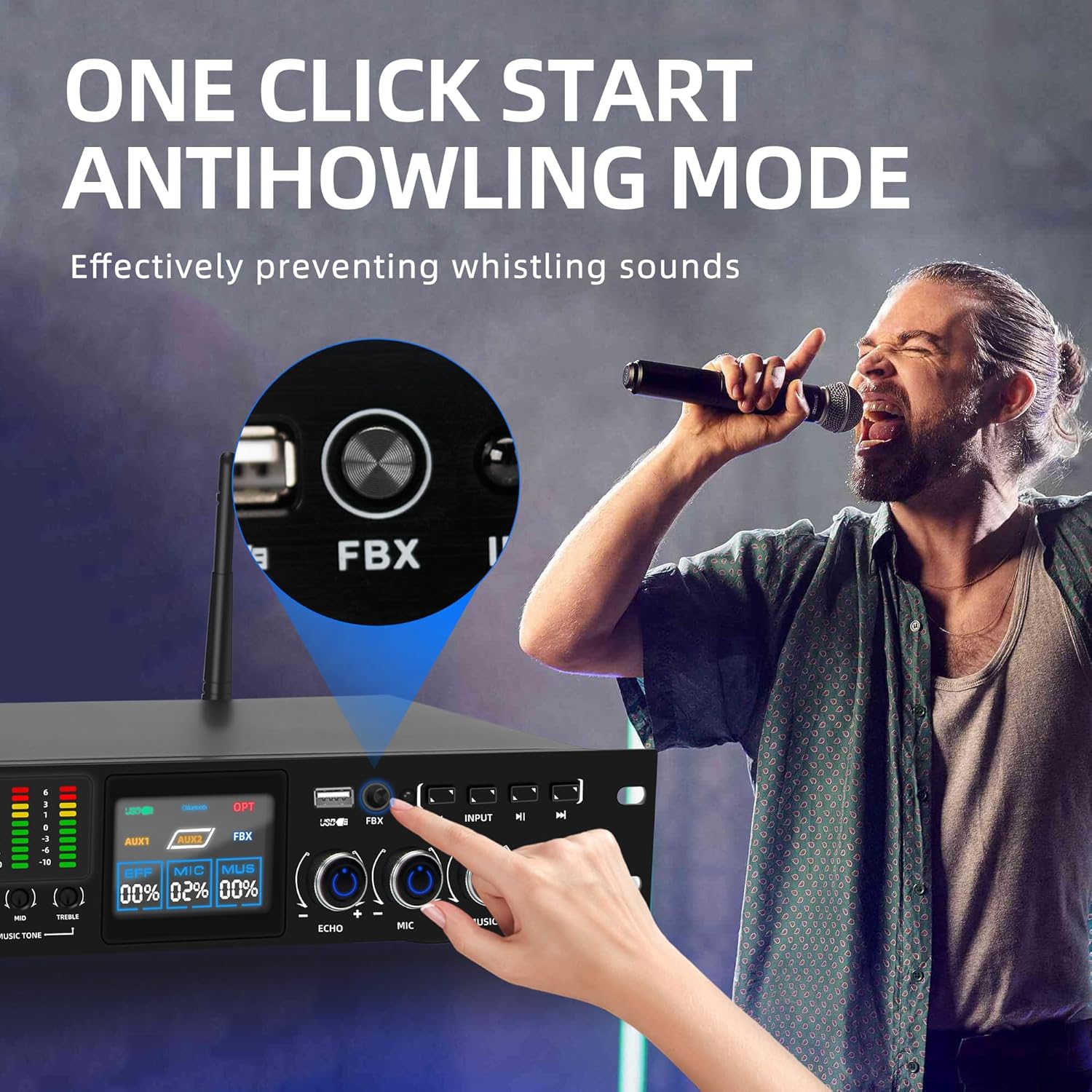
Figure 4: The dynamic spectrum display on the front panel provides real-time visual feedback of audio levels.
4. DSP Effect Adjustments:
The K-6 features DSP (Digital Signal Processing) for various audio effects. Use the dedicated knobs and buttons on the front panel to fine-tune:
- Aidas: Adjust Delay Time, Delay Repeat, and Delay Volume.
- Reverb: Adjust Reverb Volume and Reverb LPF (Low Pass Filter).
- Mikrofono tonas: Adjust Bass, Mid, and Treble for microphone input.
- Muzikos tonas: Adjust Bass, Mid, and Treble for music input.
For detailed adjustments, use a screwdriver to access the hidden knobs for time delay, repeat, treble, alto, and bass adjustments for music and human voice.

Figure 5: Independent adjustment controls for Echo, Microphone, and Music, allowing precise sound customization.
5. Anti-Howling Function:
The K-6 includes an intelligent one-button howling prevention feature. Press the FBX button on the front panel to activate or deactivate this function. It is recommended to keep this function on to effectively suppress feedback and maintain clear audio.

Figure 6: The FBX button on the front panel activates the one-click anti-howling mode, preventing unwanted feedback.
6. Nuotolinio valdymo pulto veikimas:
The included remote control allows for flexible and convenient operation of the K-6 effector. Functions include power on/off, input selection, volume control, and mode changes.

Figure 7: The true color LCD display provides visual data for sound adjustments, complemented by the infrared remote control for easy operation.
Priežiūra
To ensure the longevity and optimal performance of your FULODE K-6 effector, follow these maintenance guidelines:
- Valymas: Use a soft, dry cloth to clean the exterior of the unit. Avoid using liquid cleaners or abrasive materials, as they may damage the finish or internal components.
- Vėdinimas: Ensure the unit is placed in a well-ventilated area to prevent overheating. Do not block the ventilation openings.
- Saugykla: Kai prietaisas ilgesnį laiką nenaudojamas, laikykite jį vėsioje, sausoje vietoje, toliau nuo tiesioginių saulės spindulių ir ekstremalių temperatūrų.
- Kabelių valdymas: Keep all cables neatly organized and free from kinks or excessive tension to prevent damage to the connectors and cables.
Trikčių šalinimas
If you encounter any issues with your FULODE K-6 effector, refer to the following common troubleshooting steps:
- Nėra galios:
- Patikrinkite, ar maitinimo laidas yra tvirtai prijungtas tiek prie įrenginio, tiek prie maitinimo lizdo.
- Ensure the power switch on the front panel is in the 'ON' position.
- Patikrinkite, ar maitinimo lizdas veikia, prijungdami prie jo kitą įrenginį.
- Nėra garso išvesties:
- Įsitikinkite, kad pasirinktas teisingas įvesties šaltinis.
- Check all audio output connections to your ampkeltuvas arba garsiakalbiai.
- Ensure the master volume, music volume, and effect volume knobs are not set to minimum.
- Patikrinkite, ar jūsų ampGarsiakalbiai / garsiakalbiai įjungti ir veikia tinkamai.
- Mikrofonas neveikia:
- Ensure the microphone is properly connected to one of the input jacks.
- Check the microphone volume knob and ensure it is not set to minimum.
- Test the microphone with another device to confirm it is functional.
- Audio Feedback (Howling):
- Activate the one-button howling prevention (FBX) function.
- Reduce microphone volume.
- Adjust the position of microphones relative to speakers to minimize feedback loops.
- „Bluetooth“ ryšio problemos:
- Įsitikinkite, kad „Bluetooth“ antena yra tvirtai pritvirtinta.
- Verify Bluetooth is enabled on your source device and it is within range.
- Try unpairing and re-pairing the device with the K-6 effector.
Specifikacijos
| Funkcija | Detalė |
|---|---|
| Prekės ženklas | FULODE |
| Modelio numeris | K-6 |
| Prekės svoris | 6.7 svaro (3.04 kilogramo) |
| Gaminio matmenys | 19 x 6.3 x 2.5 colio |
| Ryšio technologija | Bluetooth, USB |
| Maitinimo šaltinis | Su laidu elektra |
| Kanalų skaičius | 5 |
Garantija ir palaikymas
For warranty information and technical support, please refer to the warranty policy document included with your product or contact FULODE customer service directly. Keep your purchase receipt for warranty claims.
Ask a question about this manual
Ask about setup, troubleshooting, compatibility, parts, safety, or missing instructions. Manuals+ will review the question and use this page’s manual context to help answer it.