
Įvadas
Welcome to the user manual for your Qubo NEO2NW mobile phone. This device is specifically designed for seniors, featuring large buttons, a clear display, and essential functions for easy communication. Please read this manual carefully to understand how to use your phone safely and effectively.
Produktas baigtasview
The Qubo NEO2NW is a user-friendly flip phone equipped with features tailored for convenience and safety.

Vaizdas: The Qubo NEO2NW flip phone in its open position, displaying its large, easy-to-read keypad and clear screen. A charging dock is visible in the background, indicating its charging method.

Vaizdas: A black flip phone displaying the digital time '22:10' on its screen. This image provides multiple views of the phone, highlighting its large keypad and clear display.
Pagrindinės funkcijos:
- Large buttons for easy dialing and navigation.
- Clear 2.4-inch display with adjustable font size.
- SOS emergency button for quick contact with pre-set numbers.
- Loud ringtone and speaker for improved audibility.
- Charging dock for convenient and stable charging.
- Basic functions: Call, SMS, Phonebook, Alarm Clock, Camera, FM Radio, Torch.
Sąranka
1. Išpakavimas ir komponentai
Carefully unpack your Qubo NEO2NW phone and ensure all components are present.

Vaizdas: ir baigtaview of the box contents, including the Qubo NEO2NW phone, its charging dock, a USB cable, a power adapter, the battery, and printed user manuals.
2. SIM kortelės ir baterijos įdėjimas
- Nuimkite galinį telefono dangtelį.
- Insert your Micro SIM card(s) into the designated slot(s) (supports Dual SIM).
- If desired, insert a MicroSD memory card (up to 32GB) into the memory card slot.
- Insert the 800mAh Lithium-ion battery, ensuring the contacts align.
- Uždėkite galinį dangtelį.
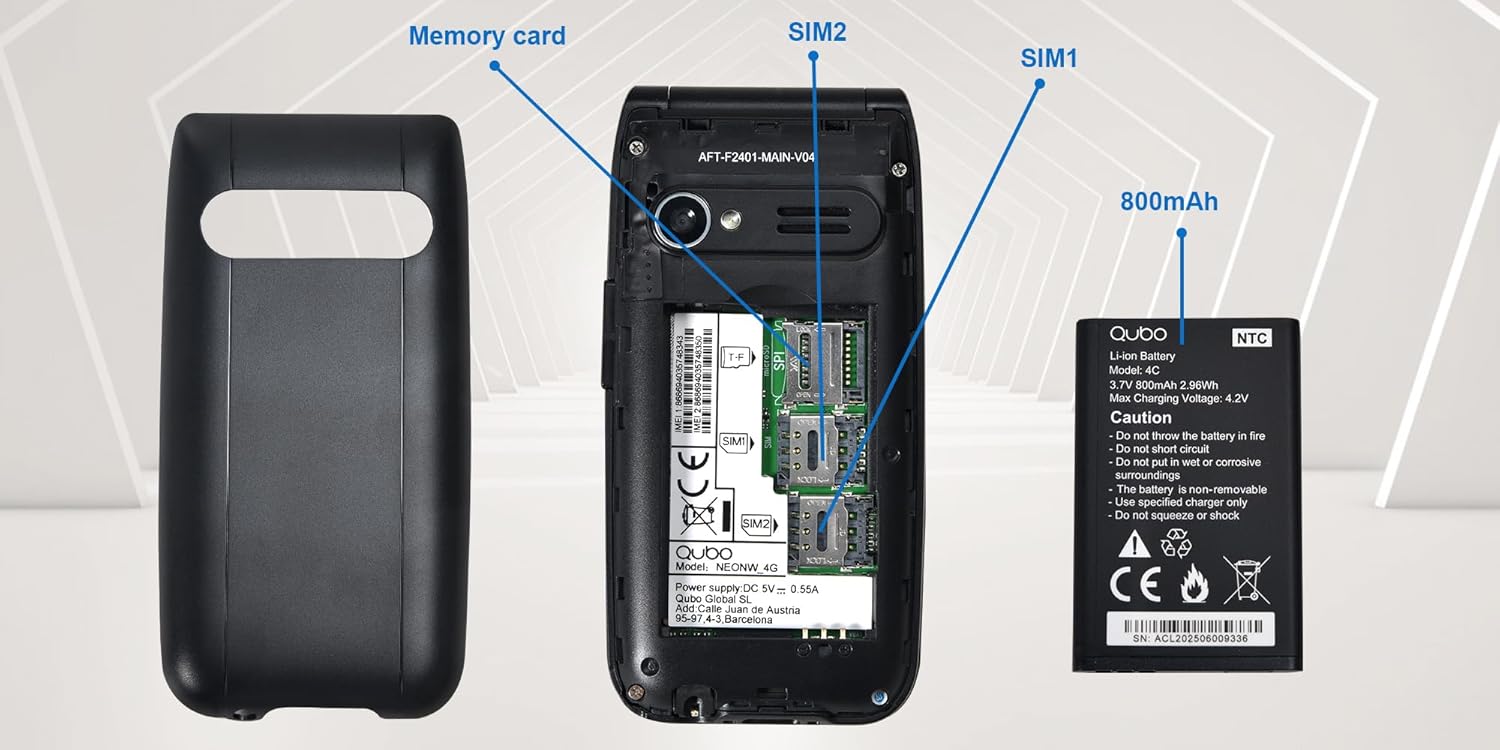
Vaizdas: Išsamią view of the phone's interior, highlighting the slots for two Micro SIM cards (SIM1, SIM2) and a memory card. The 800mAh battery is shown separately.
3. Telefono įkrovimas
Prieš pirmą kartą naudodami, pilnai įkraukite telefoną.
- Connect the USB Type-C cable to the phone and the power adapter. Plug the adapter into a wall outlet.
- Alternatively, place the phone in the charging dock. Ensure it is seated correctly and the charging indicator appears on the screen.
- Pilnas įkrovimas trunka maždaug 2.3 valandų.

Vaizdas: This image shows the Type-C charging interface on the Qubo NEO2NW phone, along with an illustration of its battery compartment and icons indicating low power consumption and power-saving technology.
Naudojimo instrukcijos
1. Maitinimo įjungimas/išjungimas
- Norėdami įjungti: paspauskite ir palaikykite Maitinimas / skambučio pabaiga mygtuką (raudonas mygtukas), kol ekranas užsidegs.
- Norėdami išjungti: paspauskite ir palaikykite Maitinimas / skambučio pabaiga mygtuką, kol pasirodys išjungimo parinktys, tada pasirinkite „Išjungti“.
2. Skambinimas ir skambučių priėmimas
- Norėdami skambinti: Įveskite telefono numerį naudodami klaviatūrą ir paspauskite Skambinti mygtukas (žalias mygtukas).
- Iš telefonų knygos: Navigate to the Phonebook, select a contact, and press the Skambinti mygtuką.
- Atsakyti: Kai suskamba telefonas, paspauskite Skambinti mygtuką.
- Norėdami baigti skambutį: Paspauskite Maitinimas / skambučio pabaiga mygtuką.
3. SMS siuntimas ir gavimas
- Eikite į Pranešimas meniu.
- Select 'New Message' to compose.
- Įveskite gavėjo numerį arba pasirinkite iš kontaktų.
- Įveskite pranešimą naudodami klaviatūrą.
- Paspauskite „Siųsti“.
4. SOS avarinė funkcija
SOS mygtukas leidžia greitai susisiekti su iš anksto nustatytais pagalbos numeriais.
- SOS numerių nustatymas: Eikite į Nustatymai > SOS nustatymai to add up to 5 emergency contacts.
- SOS aktyvinimas: Avarijos atveju paspauskite ir palaikykite SOS button on the back of the phone for a few seconds.
- The phone will automatically call the pre-set numbers in sequence until one answers. It will also send an emergency SMS to these contacts.

Vaizdas: This image demonstrates the SOS emergency call feature. It shows the Qubo NEO2NW phone with a highlighted SOS button and a visual representation of how it connects to up to 5 pre-programmed family numbers in an emergency.
5. Display and Font Settings
The phone features a 2.4-inch screen with options for large fonts for better readability.

Vaizdas: The Qubo NEO2NW phone's screen displaying large, clear fonts and the option to switch font sizes. The image also points out the loud ringtone capability and the large, tactile buttons on the keypad.
Priežiūra
- Laikykite telefoną sausai. Drėgmė gali pažeisti elektronines grandines.
- Venkite ekstremalių temperatūrų. Aukšta temperatūra gali sutrumpinti elektroninių prietaisų tarnavimo laiką ir sugadinti baterijas.
- Telefonui valyti nenaudokite stiprių cheminių medžiagų, valymo tirpiklių ar stiprių ploviklių. Nuvalykite jį minkšta,amp audinys.
- Su telefonu elkitės atsargiai. Nemėtykite, netrankykite ir nekratykite jo.
- Use only Qubo-approved batteries, chargers, and accessories.
Trikčių šalinimas
| Problema | Galima priežastis | Sprendimas |
|---|---|---|
| Telefonas neįsijungia | Baterija išsikrovusi arba netinkamai įdėta. | Kraukite bateriją bent 30 minučių. Įsitikinkite, kad baterija tinkamai įdėta. |
| Negalima skambinti arba priimti skambučių | No SIM card, SIM card not active, or out of network coverage. | Ensure SIM card is inserted and active. Check network signal. Contact your service provider. |
| SOS mygtukas neveikia | SOS numbers not set or incorrect. | Verify that emergency numbers are correctly configured in SOS settings. Ensure sufficient network signal. |
| Prasta garso kokybė | Low volume, poor network, or speaker/microphone obstruction. | Adjust call volume. Move to an area with better network coverage. Ensure speaker and microphone are clear. |
Specifikacijos
| Funkcija | Detalė |
|---|---|
| Modelio pavadinimas | Qubo Flip Phone Charging Dock |
| Ekrano dydis | 2.4 colių |
| Ekrano raiška | 240 x 320 pikselių |
| Operacinė sistema | KaiOS |
| RAM | 64 MB |
| CPU greitis | 260 MHz |
| Korinio ryšio technologija | 2G, 3G (GSM, UMTS) |
| SIM kortelių lizdai | Dual SIM (Micro SIM) |
| Max Flash Memory Support | 32 GB (MicroSD) |
| Galinė kamera | 0.3 MP |
| Baterijos talpa | 800 mAh (ličio jonų) |
| Įkrovimo laikas | apytiksliai 2.3 valandas |
| Pokalbių laikas | apytiksliai 4 valandas |
| Budėjimo laikas | Maždaug 8 dienų |
| Ryšys | USB C tipo, 3.5 mm ausinių lizdas |
| Matmenys | 10.5 x 5.3 x 1.7 cm |
| Ypatingos savybės | SOS Button, FM Radio, Torch, GPS |
Garantija ir palaikymas
For warranty information, please refer to the warranty card included in your product packaging. For technical support or further assistance, please contact Qubo customer service.
- Gamintojas: Qubo
- ASIN: B0C5GXR2VR
- Modelio numeris: 6e39af81-1411-4b00-b5ae-d8778c6ab86c
- Susisiekite: Refer to the official Qubo website or documentation for up-to-date contact information.