
1. Įvadas
This user manual provides detailed instructions for the Rocketek PC/SC USB Smart Card Reader. This device is designed to facilitate secure digital interactions, including online identification, digital signatures, and access to various smart card applications. Please read this manual thoroughly before using the product to ensure proper functionality and longevity.
2. Produktas baigtasview
The Rocketek PC/SC USB Smart Card Reader is a versatile device supporting a wide range of smart cards. It features a compact design and a standard USB interface for easy connectivity.
2.1 Pakuotės turinys
- Rocketek PC/SC USB Smart Card Reader
- Vartotojo vadovas (šis dokumentas)
2.2 Įrenginio funkcijos
The card reader includes dedicated slots for different card types and an indicator light for operational status.
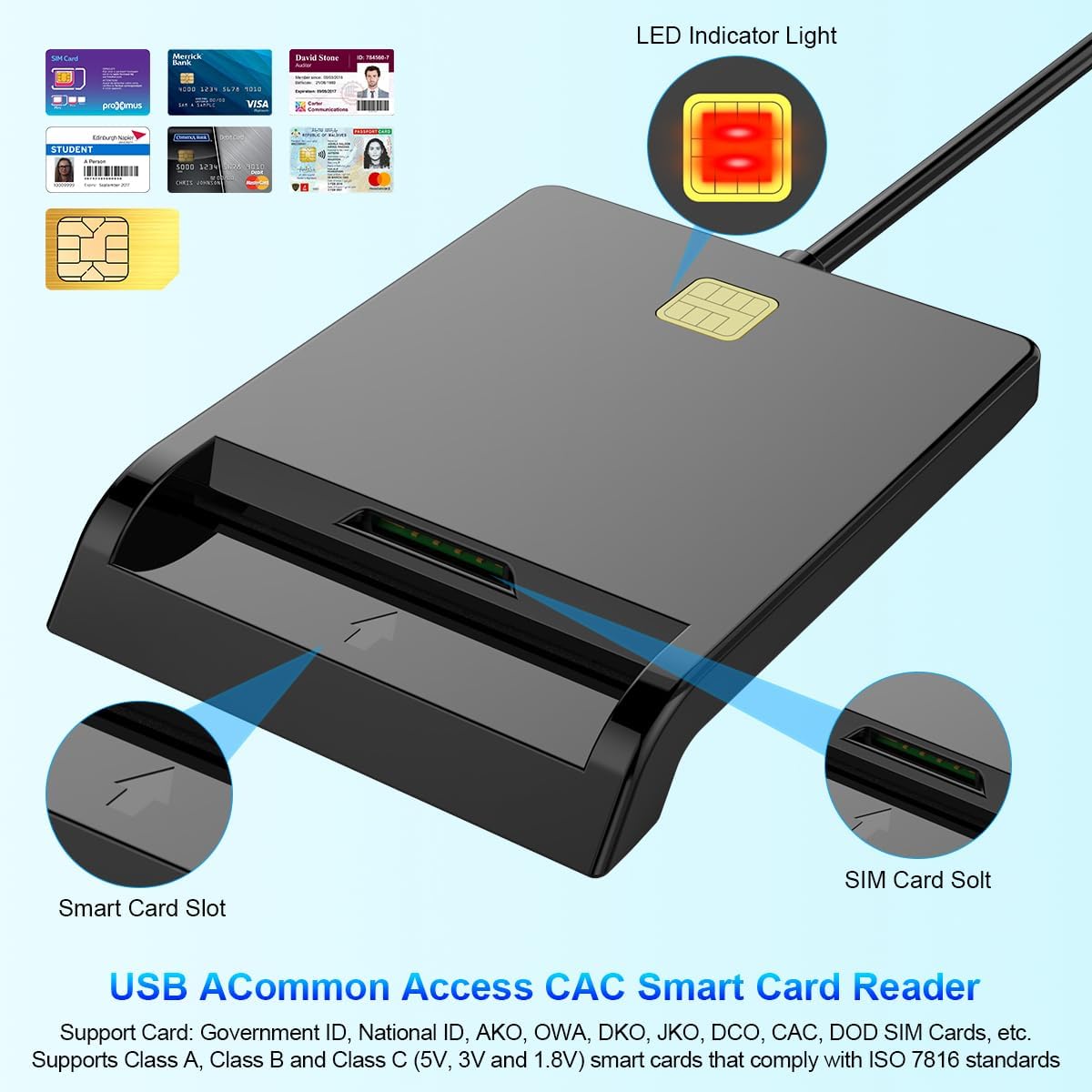
1 paveikslas: Priekyje view of the Rocketek Smart Card Reader, highlighting the LED indicator light, the main smart card slot, and the SIM card slot.

2 paveikslas: The Rocketek Smart Card Reader shown with its USB connector, a SIM card, and a standard debit card, illustrating its multi-card compatibility.
3. Sąranka
Follow these steps to set up your Rocketek PC/SC USB Smart Card Reader.
3.1 Sistemos reikalavimai
- Operacinė sistema: Windows 98 / Me / 2000 / NT 4.0 / XP / CE / Vista / 7 / 8 / 8.1 / 10 / 11, Chromebook OS, Linux, Ubuntu, Mac OS.
- Sąsaja: Galimas USB prievadas.

3 paveikslas: The card reader is compatible with various operating systems, including different versions of Windows and Linux.
3.2 Prietaiso prijungimas
- Raskite laisvą USB prievadą savo kompiuteryje arba nešiojamajame kompiuteryje.
- Plug the USB connector of the Rocketek Smart Card Reader into the USB port.
- The device is generally Plug & Play for Windows systems, meaning it should be recognized automatically without manual driver installation. For Mac OS and Linux, or for specific smart card applications (e.g., Belgian eID, CAC cards), additional drivers or official software may be required. Refer to the card issuer's website for necessary software.
4. Naudojimo instrukcijos
Using the Rocketek PC/SC USB Smart Card Reader is straightforward.
4.1 Išmaniosios kortelės įdėjimas
- Ensure the card reader is connected to your computer.
- For standard smart cards (e.g., ID cards, bank cards), insert the card into the main smart card slot with the chip facing upwards and towards the reader.
- For SIM cards, insert the SIM card into the dedicated SIM card slot.
- The LED indicator light on the reader will illuminate or flash to indicate card detection and activity.
4.2 Kortelių skaitytuvo naudojimas
- Once the card is inserted and recognized, you can use it with compatible software for tasks such as:
- Online banking
- Skaitmeniniai parašai
- Online tax declarations
- Accessing government services (e.g., Belgian eID)
- CAC, AKO, OWA, DKO, JKO, NKO, BOL, GKO, Marinenet, AF-Portal, Pure Edge Viewer programas
- Svarbu: The reader is designed to read only one card at a time. Do not attempt to insert multiple cards simultaneously into different slots if they are intended for active use.

4 paveikslas: The card reader supports high-speed data transmission but can only process one smart card or SIM card at any given moment.
5. Priežiūra
To ensure optimal performance and extend the lifespan of your card reader, follow these maintenance guidelines:
- Laikykite įrenginį švarų ir be dulkių. Valymui naudokite minkštą, sausą šluostę.
- Avoid exposing the reader to extreme temperatures, humidity, or direct sunlight.
- Do not insert foreign objects into the card slots.
- Handle the USB cable gently to prevent damage.
- Store the reader in a safe place when not in use.
6. Problemų sprendimas
If you encounter issues with your Rocketek Smart Card Reader, refer to the following common problems and solutions:
6.1 Įrenginys neatpažintas
- Patikrinkite USB jungtį: Ensure the reader is firmly plugged into a working USB port. Try a different USB port or a different computer if possible.
- Iš naujo paleiskite kompiuterį: Kartais paprastas paleidimas iš naujo gali išspręsti atpažinimo problemas.
- Tvarkyklės diegimas: While the device is generally plug-and-play for Windows, some specific smart cards (e.g., certain government IDs, health cards) or operating systems (Mac OS, Linux) may require dedicated drivers or middleware. Visit the official website of your smart card issuer or the Rocketek support page for driver downloads.
6.2 Card Not Reading
- Teisingas įterpimas: Ensure the smart card is inserted correctly with the chip facing the right direction and fully seated in the slot.
- Kortelės būklė: Check the smart card for any visible damage or dirt on the chip. Clean the chip gently with a soft, dry cloth if necessary.
- Programinės įrangos suderinamumas: Verify that you have the correct software installed for the specific type of smart card you are trying to read (e.g., eID software for Belgian ID cards).
- Single Card Rule: Ensure only one card is inserted into the reader at a time.
6.3 Lėtas veikimas
- USB prievadas: Ensure you are using a high-speed USB port (e.g., USB 2.0 or 3.0).
- Sistemos ištekliai: Close unnecessary applications running in the background that might be consuming system resources.
7. Specifikacijos
| Prekės ženklas | Rocketek |
| Modelis | B0C5LR8DTN |
| Ryšio technologija | USB |
| Suderinami įrenginiai | Kompiuteriai, nešiojamieji kompiuteriai |
| Operacinės sistemos | Windows 98 / Me / 2000 / NT 4.0 / XP / CE / Vista / 7 / 8 / 8.1 / 10 / 11, Chromebook OS, Linux, Ubuntu, Mac OS |
| Ypatinga funkcija | Plug & Play |
| Palaikomi kortelių tipai | Smart, ID, CAC, CRS, CNS, IC, SIM, etc. (ISO 7816 Class A, B, C for 5V, 3V and 1.8V smart cards) |
| Matmenys (apytiksliai) | 84 mm (ilgis) x 65 mm (plotis) x 9.5 mm (aukštis) |
| Cable Length (Approx.) | 95 cm / 2.5 colių |

5 paveikslas: Approximate dimensions of the Rocketek Smart Card Reader and its integrated USB cable.
8. Garantija ir palaikymas
Rocketek stands behind the quality of its products.
8.1 Gamintojo garantija
All Rocketek USB CAC smart card readers come with a worry-free 12 mėnesių gamintojo garantija nuo pirkimo datos. Ši garantija apima medžiagų ir gamybos defektus normaliai naudojant.
8.2 Pagalba klientams
If you have any questions, require technical assistance, or experience issues with your product, please do not hesitate to contact Rocketek customer support directly. Refer to the product packaging or the Rocketek official websvetainė kontaktinei informacijai.