
1. Įvadas
This manual provides detailed instructions for the installation, configuration, and maintenance of the Essentielb MS-7848 VER 1.0 Desktop Motherboard. This motherboard supports LGA1150 processors and DDR3 memory, designed for personal computer systems. Please read this manual thoroughly before proceeding with any installation or operation to ensure proper functionality and safety.
2. Saugos informacija
- Prieš montuodami arba išimdami bet kokius komponentus, visada atjunkite maitinimo šaltinį nuo sieninio lizdo.
- Wear an anti-static wrist strap or frequently touch a grounded metal object to discharge static electricity before handling the motherboard or other components. Static electricity can damage electronic components.
- Pagrindinę plokštę imkite už kraštų, kad neliestumėte jautrių komponentų.
- Užtikrinkite tinkamą ventiliaciją kompiuterio korpuse, kad išvengtumėte perkaitimo.
- Saugokite pagrindinę plokštę nuo drėgmės ir ekstremalių temperatūrų.
3. Pakuotės turinys
Patikrinkite, ar pakuotėje yra visi daiktai. Jei kurio nors daikto trūksta arba jis pažeistas, susisiekite su pardavėju.
- Essentielb MS-7848 VER 1.0 Motherboard
- I / O skydas
- SATA Data Cable(s) (quantity may vary)
- Vartotojo vadovas (šis dokumentas)
- Tvarkyklės CD/DVD (arba nuoroda tvarkyklėms atsisiųsti)
4. Sąranka ir diegimas
4.1 Pagrindinės plokštės išdėstymas
Prieš diegdami pagrindinę plokštę, susipažinkite su įvairiais jos komponentais ir jungtimis.
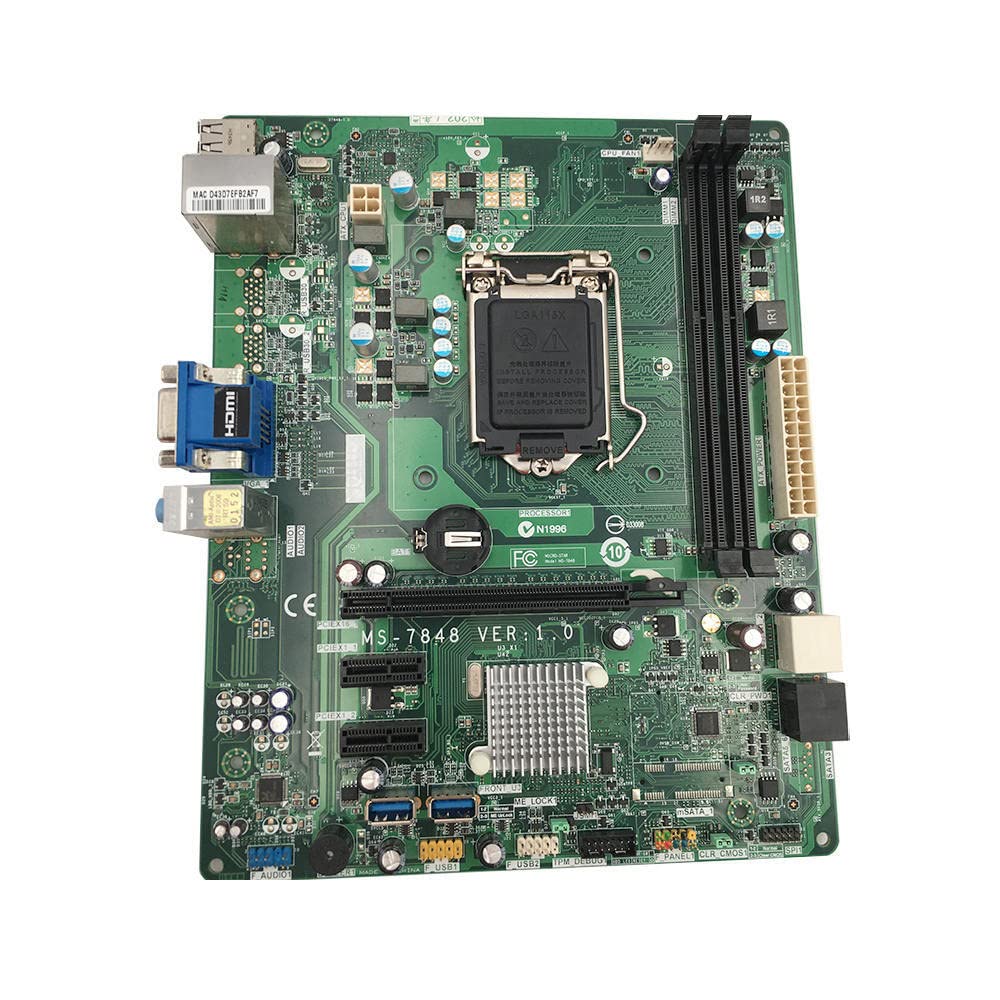
1 paveikslas: Iš viršaus į apačią view of the Essentielb MS-7848 motherboard. This image displays the central LGA1150 CPU socket, two DDR3 RAM slots to its right, multiple PCIe expansion slots below, and various power and data connectors around the board's perimeter. The rear I/O panel is visible on the left side.

2 paveikslas: Close-up of the LGA1150 CPU socket. This image provides a detailed view of the CPU socket with its retention mechanism, surrounded by power delivery components and the CMOS battery. The model number 'MS-7848 VER 1.0' is clearly visible on the PCB.
4.2 CPU diegimas
- Raskite LGA1150 procesoriaus lizdą pagrindinėje plokštėje.
- Gently push down the load lever and pull it away from the socket to open the CPU socket cover.
- Carefully align the notches on your LGA1150 CPU with the alignment keys on the socket. The golden triangle on the CPU should match the triangle on the socket.
- Place the CPU gently into the socket. Do not force it. If it does not sit correctly, re-check alignment.
- Close the load plate and push the load lever back into place until it clicks. This will secure the CPU.
- Apply thermal paste to the CPU surface and install the CPU cooler according to its manufacturer's instructions.
4.3 RAM diegimas
The Essentielb MS-7848 supports DDR3 memory modules. Refer to the specifications for supported speeds and capacities.
- Atidarykite spaustukus abiejuose DIMM lizdo galuose.
- Suderinkite DDR3 atminties modulio įpjovą su DIMM lizdo rakteliu.
- Insert the memory module firmly into the slot until the clips snap into place, securing the module.
4.4 Storage Device (SATA) Connection
Connect your SATA hard drives or SSDs to the SATA ports on the motherboard using SATA data cables. Connect the power cables from your power supply to the drives.
4.5 Expansion Card (PCIe) Installation
This motherboard features PCIe slots for graphics cards and other expansion cards.
- Sulygiuokite išplėtimo plokštę su norimu PCIe lizdu.
- Tvirtai spauskite kortelę žemyn, kol ji bus visiškai įstatyta į lizdą.
- Secure the card with a screw to the computer case.
4.6 Priekinio skydelio jungtys
Connect the front panel cables (power button, reset button, HDD LED, power LED, USB ports, audio jacks) from your computer case to the corresponding headers on the motherboard. Refer to the motherboard diagram for exact pin locations.
4.7 Maitinimo šaltinio prijungimas
Connect the 24-pin ATX main power connector and the 4-pin or 8-pin ATX 12V CPU power connector from your power supply to the respective ports on the motherboard.
5. Naudojimo instrukcijos
5.1 Pirmasis paleidimas
After completing all hardware installations, connect your monitor, keyboard, and mouse. Power on the system. The system should display the BIOS/UEFI splash screen.
5.2 BIOS / UEFI konfigūracija
Paleidimo metu paspauskite atitinkamą klavišą (paprastai DEL or F2) to enter the BIOS/UEFI setup utility. Here you can configure boot order, system time, and other hardware settings. Save changes before exiting.
5.3 Tvarkyklės diegimas
After installing your operating system, install the necessary drivers for the motherboard's chipset, audio, network, and any other integrated components. These drivers are typically provided on a CD/DVD or can be downloaded from the manufacturer's websvetainę.
6. Priežiūra
6.1 Valymas
Regularly clean the interior of your computer case to prevent dust buildup, which can lead to overheating. Use compressed air to remove dust from fans, heatsinks, and other components. Ensure the system is powered off and unplugged before cleaning.
6.2 BIOS naujinimai
Periodiškai tikrinkite gamintojo webBIOS / UEFI atnaujinimų svetainė. Atnaujinimai gali pagerinti sistemos stabilumą, pridėti naujos aparatinės įrangos palaikymą arba ištaisyti klaidas. Atidžiai vykdykite atnaujinimo instrukcijas, kad nesugadintumėte pagrindinės plokštės.
7. Problemų sprendimas
- Nėra galios: Ensure all power cables (24-pin ATX, 4/8-pin CPU) are securely connected. Check the power supply unit (PSU) and wall outlet.
- Nėra ekrano: Verify that the monitor is connected and powered on. Ensure the graphics card (if dedicated) is properly seated and powered. Try reseating RAM modules.
- Sistemos nestabilumas / gedimai: Check RAM modules for proper seating. Ensure CPU cooler is correctly installed and making good contact. Verify power supply is sufficient for all components.
- Operacinė sistema nepaleidžiama: Check boot order in BIOS/UEFI. Ensure storage drives are properly connected and detected.
- Periferinės problemos: Ensure USB devices are connected to functional ports. Install correct drivers for all peripherals.
8. Specifikacijos
| Funkcija | Specifikacija |
|---|---|
| Prekės ženklas | Bendras |
| Modelio pavadinimas | MS 7848 |
| CPU lizdas | LGA 1150 |
| Suderinami procesoriai | Intel Core i5-4xxx, Intel Core i7-4xxx, Intel Core i5-5xxx, Intel Core i7-5xxx |
| RAM technologija | DDR3 |
| Available Memory Slots | 1 |
| Suderinami įrenginiai | Asmeninis kompiuteris |
| Platforma | Windows |
| Pagrindinė maitinimo jungtis | 24 kontaktų |
| Grafikos plokštės sąsaja | PCI Express |
| Supported System Bus Standard | PCIe 2.0 |
| Iš viso SATA prievadų | 6 |
| Iš viso USB prievadų | 2 |
| Total PCIe Ports | 1 |
| Dalies numeris | VCDi_Sei_101665 |
| ASIN | B0C64XFTV1 |
9. Garantija ir palaikymas
For warranty information and technical support, please refer to the documentation provided by your retailer or contact the product manufacturer directly. Keep your proof of purchase for warranty claims.