
1. Svarbios saugos instrukcijos
Prieš naudodami šį gaminį, perskaitykite ir supraskite visas saugos instrukcijas. Nesilaikant šių instrukcijų, gali kilti elektros smūgis, gaisras arba sunkūs sužalojimai.
- Nelaikykite prietaiso ekstremaliose temperatūrose, tiesioginiuose saulės spinduliuose ar didelėje drėgmėje.
- Keep the device away from water and other liquids. If it gets wet, turn it off immediately and allow it to dry completely before reuse.
- Nebandykite ardyti, remontuoti ar modifikuoti įrenginio. Visus techninės priežiūros darbus patikėkite kvalifikuotiems darbuotojams.
- Use only specified charging methods (USB-C, solar, hand crank).
- Laikyti vaikams nepasiekiamoje vietoje.
- Išmeskite baterijas laikydamiesi vietinių taisyklių.
2. Produktas baigtasview
The FosPower Emergency Weather Radio Model A6 is a versatile device designed for emergency preparedness and outdoor activities. It features multiple power sources, radio reception, lighting, and a power bank function.
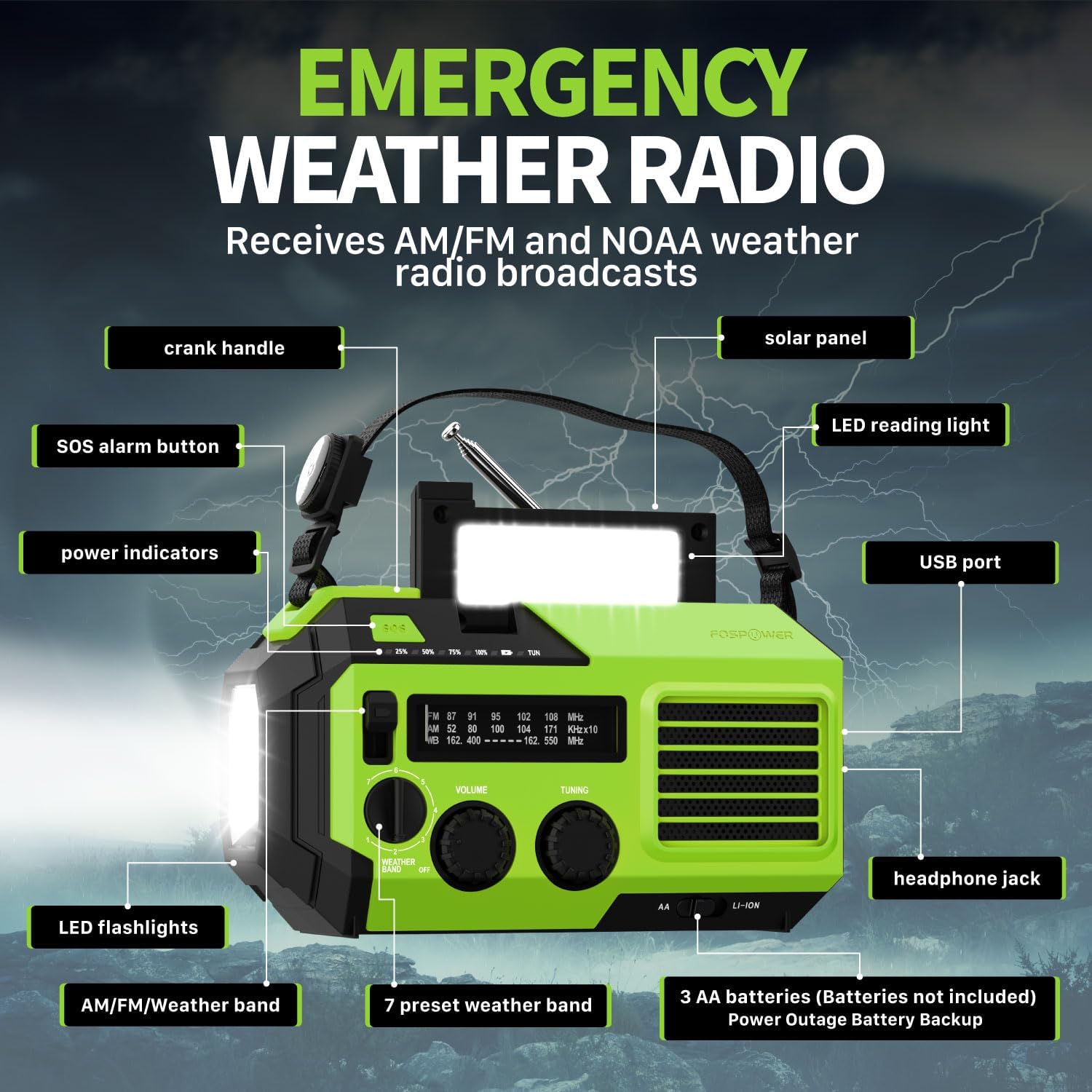
2.1 vaizdas: priekis view of the FosPower Emergency Weather Radio with key components labeled, including the crank handle, solar panel, SOS alarm button, power indicators, LED reading light, USB port, LED flashlights, AM/FM/Weather band selector, volume and tuning knobs, and headphone jack.
Pagrindinės funkcijos:
- NOAA/AM/FM Radio: Access local weather information and emergency hazard alerts, as well as standard AM/FM broadcasts.
- 19240mWh (5200mAh) Power Bank: Charge USB devices during power outages or in outdoor settings.
- Keli maitinimo šaltiniai: Recharge via USB-C cable, solar panel, or hand crank. Can also be powered by AA batteries (not included).
- SOS signalas: Įjungia garsią sireną ir mirksinčią šviesą avariniam signalui.
- Integruotas apšvietimas: Features a powerful flashlight and a reading light.
- IPX3 atsparumas vandeniui: Apsaugo nuo vandens purslų.
3. Sąranka
3.1 Pradinis įkrovimas
Before first use, fully charge the internal battery using the provided USB-C cable. Connect the USB-C cable to the radio's USB-C port and the other end to a USB power adapter (not included) or a computer USB port. The power indicators will illuminate to show charging progress.
3.2 AA Battery Installation (Optional)
The radio can also operate on 3 AA batteries (not included) as a backup power source. Open the battery compartment cover on the back of the radio and insert 3 AA batteries, ensuring correct polarity. Close the cover securely.

3.1 vaizdas: galinis view of the radio highlighting the solar panel, hand-crank, AA battery compartment, and USB charging port, illustrating the multiple power sources.
4. Naudojimo instrukcijos
4.1 Radijo valdymas
- Maitinimo įjungimas/išjungimas: Rotate the 'VOLUME' knob clockwise to turn the radio on and adjust the volume. Rotate counter-clockwise until it clicks to turn off.
- Juostos pasirinkimas: Use the 'WEATHER BAND' switch to select between AM, FM, or WB (Weather Band).
- Tiuningas: Rotate the 'TUNING' knob to scan for radio stations. Extend the telescopic antenna for improved reception, especially for FM and WB.
- NOAA orų grupė: When WB is selected, the radio will receive NOAA weather alerts. The radio supports 7 preset weather bands.
- Ausinių lizdas: For private listening, connect 3.5mm headphones to the headphone jack.
4.2 Flashlight and Reading Light

Image 4.1: The radio demonstrating its high-power flashlight and cool-tone reading lamp funkcijos.
- Žibintuvėlis: Press the flashlight button located on the front of the radio to turn the flashlight on or off.
- Skaitymo lemputė: Lift the solar panel to reveal the LED reading light. Press the reading light button to turn it on or off.
4.3 SOS signalas
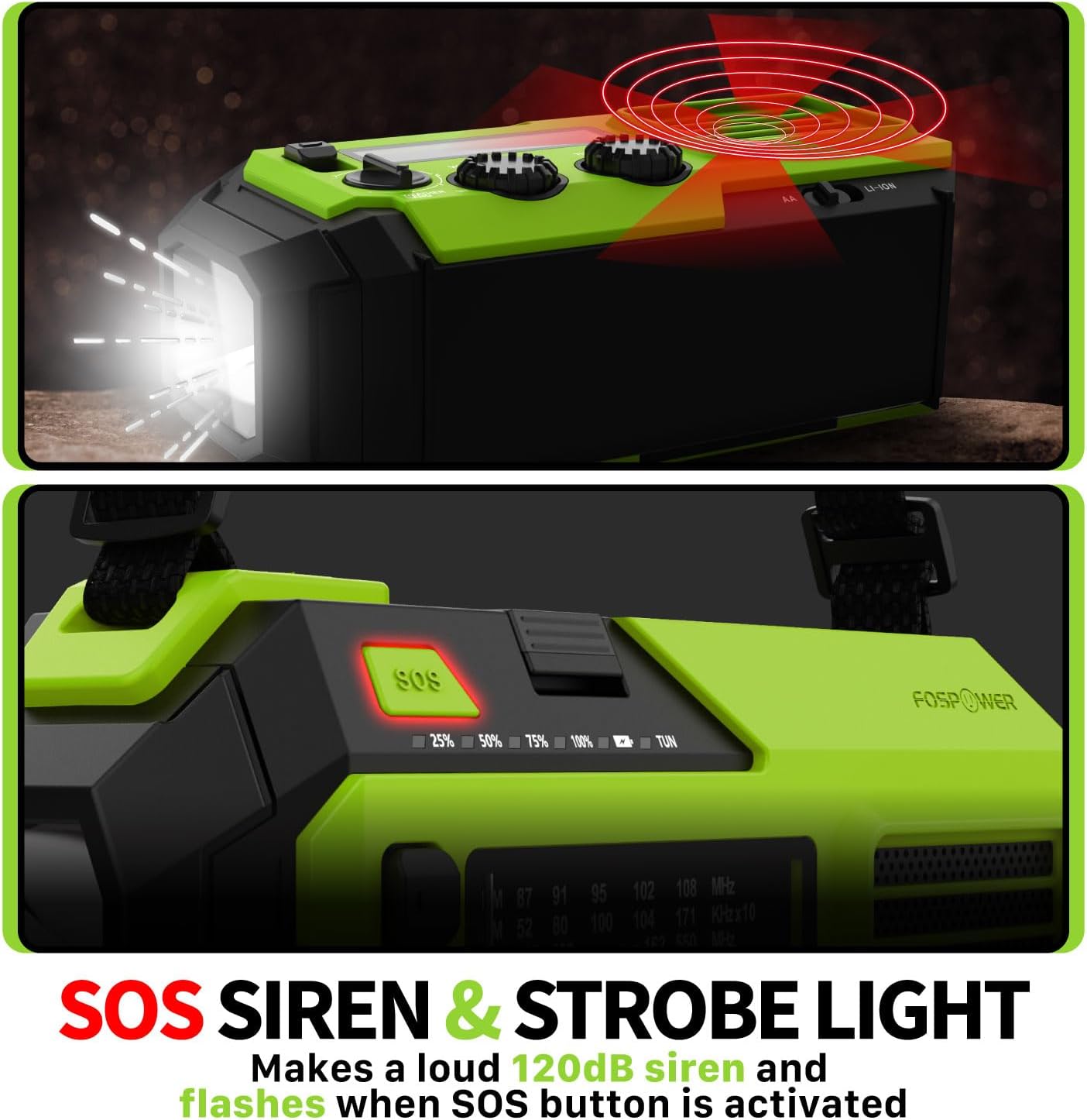
Image 4.2: Close-up of the radio's SOS button and an illustration of the siren and strobe light being activated.
In an emergency, press and hold the 'SOS' button to activate a loud 120dB siren and a flashing strobe light. Press the 'SOS' button again to deactivate.
4.4 Išorinių įrenginių įkrovimas (nešiojamoji baterija)

Image 4.3: The radio connected via USB to a smartphone, demonstrating its power bank capability for charging small electronics.
Connect your USB-powered device (e.g., smartphone, tablet) to the radio's USB-A output port using your device's charging cable. The radio's internal battery will begin charging your device.
4.5 Radijo įkrovimas
- USB-C įkrovimas: Connect the provided USB-C cable to the radio's USB-C input port and a USB power source. This is the most efficient charging method.
- Saulės įkrovimas: Place the radio with the solar panel facing direct sunlight. The solar panel charges the internal battery, primarily for maintaining charge or slow charging in emergencies.
- Rankinis švaistiklio įkrovimas: Rotate the hand crank clockwise or counter-clockwise at a steady pace (approximately 130-150 RPM) for 3-5 minutes to generate power for short-term use or to initiate charging.
5. Priežiūra
- Valymas: Radijo imtuvą valykite minkštu, sausu skudurėliu. Nenaudokite abrazyvinių valiklių ar tirpiklių.
- Saugykla: Store the radio in a cool, dry place away from direct sunlight when not in use for extended periods. For optimal battery health, fully charge the internal battery every 3-6 months.
- Akumuliatoriaus priežiūra: Jei naudojate AA baterijas, išimkite jas, jei radijo imtuvas bus nenaudojamas ilgą laiką, kad išvengtumėte pratekėjimo.
6. Problemų sprendimas
| Problema | Galima priežastis | Sprendimas |
|---|---|---|
| Radijas neįsijungia. | Internal battery is depleted; AA batteries are depleted or incorrectly installed. | Charge the internal battery via USB-C or hand crank. Check and replace AA batteries if used. |
| Prastas radijo priėmimas. | Antena neištiesta; silpno signalo zona; trukdžiai. | Fully extend the telescopic antenna. Adjust radio position. Try tuning to a stronger station. |
| Išorinis įrenginys neįkraunamas. | Radio's internal battery is low; incorrect cable; device not compatible. | Ensure the radio's internal battery is sufficiently charged. Use a functional USB charging cable. Verify device compatibility. |
| Rankinis švaistiklis yra standus arba negeneruoja galios. | Mechanism obstruction; improper cranking speed. | Ensure no obstructions. Crank at a steady, moderate pace (130-150 RPM). |
7. Specifikacijos
| Funkcija | Detalė |
|---|---|
| Modelio numeris | FOSPWB-2419 |
| Gaminio matmenys | 6.76 x 3.52 x 2.59 colio |
| Prekės svoris | 1.08 svaro |
| Vidinė baterija | 19240mWh (5200mAh) |
| Išorinių baterijų palaikymas | 3 x AA baterijos (į komplektą neįeina) |
| Radijo grupės | AM, FM, NOAA orų diapazonas (WB) |
| Įkrovimo būdai | USB-C, Solar, Hand Crank |
| Ypatingos savybės | Built-In Flashlight, Reading Light, SOS Alarm, Power Bank |
| Atsparumas vandeniui | IPX3 |
8. Garantija ir palaikymas
FosPower provides a limited lifetime warranty for this product. For warranty claims, technical assistance, or customer service inquiries, please contact FosPower's USA-based customer support team. Refer to the official FosPower webkontaktinę informaciją rasite svetainėje arba pirkimo dokumentuose.