
1. Įvadas ir pabaigaview
The UGREEN Uno 65W GaN USB-C Charger is a compact and efficient multi-port charging device. Utilizing advanced GaN (Gallium Nitride) technology, it offers high power output in a smaller form factor, reducing energy loss and heat generation during operation. This charger features an interactive LED display that indicates the charging status, providing a clear visual cue.
Equipped with two USB-C ports and one USB-A port, it supports various fast charging protocols, making it compatible with a wide range of devices including laptops, tablets, and smartphones. Integrated multiple safety features protect against short circuits, overcharging, overheating, and overvoltage, ensuring safe and reliable charging.

Image 1.1: UGREEN Uno 65W GaN USB-C Charger, showcasindėl savo kompaktiško dizaino.
2. Saugos informacija
- Saugokite įkroviklį nuo skysčių, drėgmės ar ekstremalių temperatūrų.
- Venkite įkroviklio numetimo ar stiprių smūgių.
- Do not disassemble, modify, or attempt to repair the charger. This may void the warranty and pose safety risks.
- Ensure proper ventilation when using the charger. Do not cover it with clothing or other materials.
- Use only compatible cables and devices with the charger.
- Laikyti vaikams nepasiekiamoje vietoje.
- Atjunkite įkroviklį nuo maitinimo lizdo, kai jo nenaudojate arba perkūnijos metu.
3. Pakuotės turinys
Patikrinkite pakuotę, ar joje yra šie daiktai:
- UGREEN Uno 65W GaN USB-C Charger (Model CD361)
- Vartotojo vadovas
4. Produkto ypatybės
- 65 W maksimali išvestis: Delivers up to 65W of power for rapid charging of compatible devices.
- GaNFast Technology: High-efficiency power conversion (95%) for reduced heat and compact size.
- 3-in-1 Multi-Port Design: Features 2 USB-C ports and 1 USB-A port for simultaneous charging of multiple devices.
- Skystųjų kristalų ekranas: An interactive LED screen indicates the current charging status.
- Pažangi saugos sistema: Built-in protections against short circuits, overcharging, overheating, and overvoltage.
- Removable Magnetic Feet: Provides stability and a unique aesthetic.
- Platus suderinamumas: Supports a wide range of devices including laptops, tablets, and smartphones from various brands.

4.1 pav.: Išsamus view of the charger's ports, magnetic feet, and LED display.
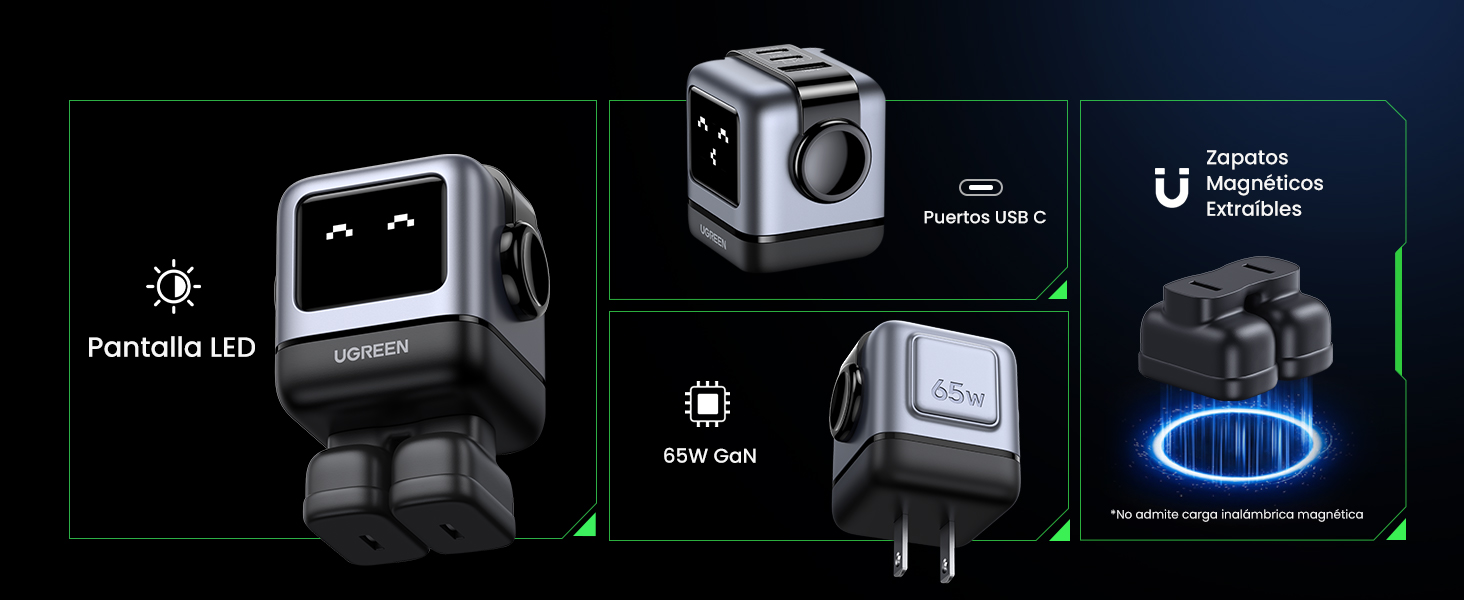
Image 4.2: The charger's LED display showing charging status.
5. Sąranka
- Išpakuokite įkroviklį: Carefully remove the UGREEN Uno 65W GaN USB-C Charger from its packaging.
- Attach Magnetic Feet (Optional): If desired, attach the removable magnetic feet to the bottom of the charger for added stability.
- Prijunkite prie maitinimo lizdo: Plug the charger into a standard wall power outlet (AC 100-240V, 50/60Hz).
- Paruošta naudoti: Įkroviklis dabar paruoštas prijungti jūsų įrenginius.
6. Naudojimo instrukcijos
6.1 Įrenginių prijungimas
- Use a compatible USB-C to USB-C cable for devices that support USB-C charging.
- Use a compatible USB-A to [device connector] cable for devices that charge via USB-A.
- Connect the appropriate cable to one of the charger's ports (2x USB-C, 1x USB-A).
- Prijunkite kitą kabelio galą prie savo prietaiso.
6.2 Energijos paskirstymas
The charger intelligently distributes power based on the connected devices and their charging requirements:
- Vieno prievado naudojimas: When only one USB-C port is used, it can deliver up to 65W (e.g., charging a MacBook Air M2 from 0% to 51% in approximately 30 minutes).
- Kelių prievadų naudojimas: When multiple ports are in use, the 65W total power is dynamically distributed. For example, if both USB-C ports are used, one might provide 45W for a laptop and the other 20W for a mobile device.
- USB-A prievadas: The USB-A port provides standard charging output, typically up to 18W, depending on the device.
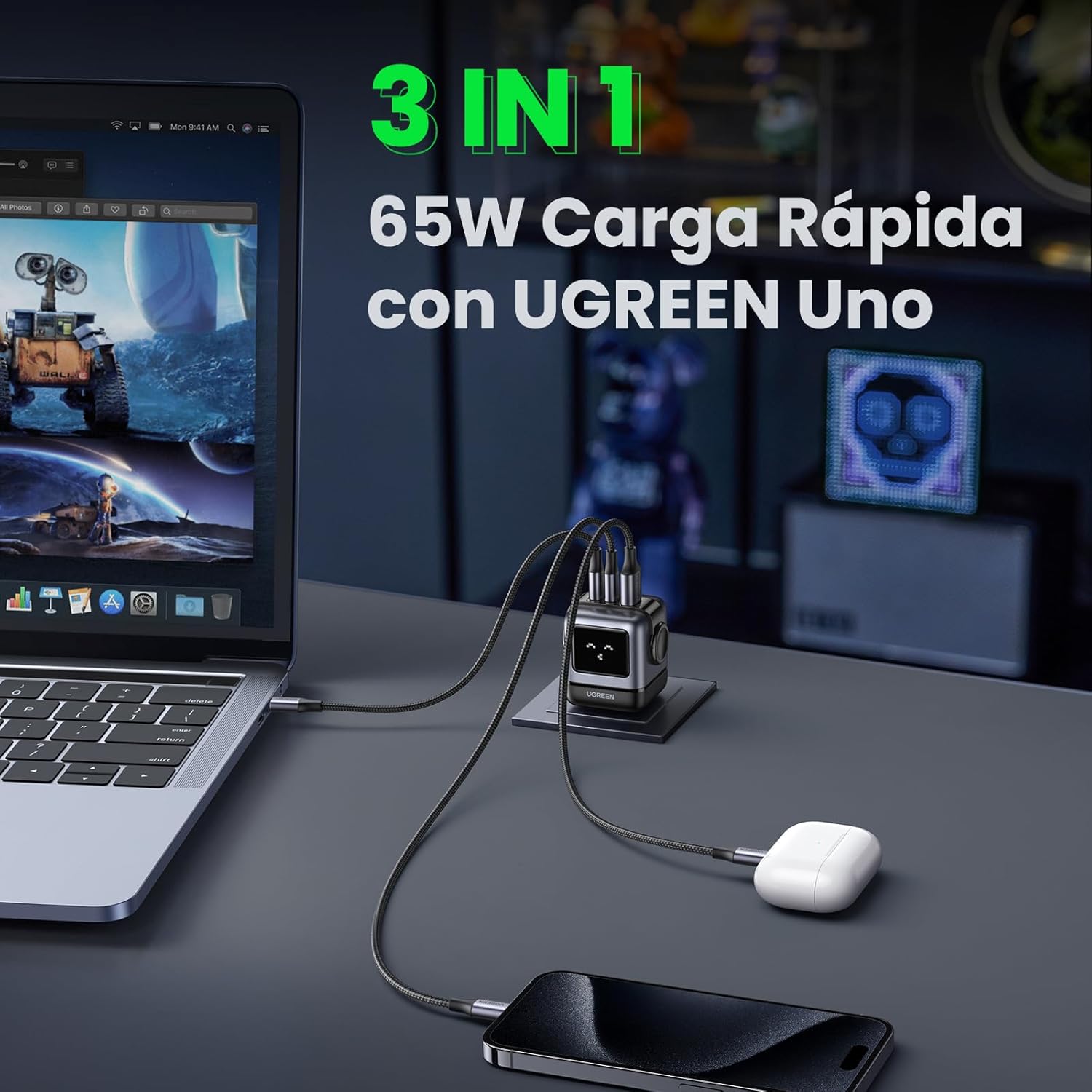
Image 6.1: The charger simultaneously charging a laptop, smartphone, and earbuds.
6.3 LED Display Indications
The LED display on the charger provides visual feedback on its operational status:
- Įkrovimas: The LED display will show an animation or specific icon indicating that a device is actively charging.
- Pilnai įkrautas: Once a connected device reaches full charge, the LED display will change to indicate completion.
- tuščiąja eiga: When no devices are connected or charging, the display may show a standby indicator.

Image 6.2: Comparison of the LED display during charging and when fully charged.
Pastaba: The charger is not compatible with 60W fast charging for the Samsung S26 Ultra; it will charge at a maximum of 45W PPS for this device.
7. Priežiūra
- Valymas: Prieš valydami atjunkite įkroviklį nuo maitinimo lizdo. Paviršiui nuvalyti naudokite minkštą, sausą šluostę. Nenaudokite skystų valiklių ar aerozolių.
- Saugykla: Įkroviklį laikykite vėsioje, sausoje vietoje, apsaugotoje nuo tiesioginių saulės spindulių ir ekstremalių temperatūrų.
- Kabelio priežiūra: Venkite per daug lenkti ar sukti įkrovimo laidų, nes tai gali juos pažeisti.
8. Problemų sprendimas
| Problema | Galima priežastis | Sprendimas |
|---|---|---|
| Įrenginys neįkraunamas. | 1. Charger not plugged in. 2. Cable is faulty. 3. Device is incompatible or port is damaged. | 1. Ensure the charger is securely plugged into a live power outlet. 2. Try a different charging cable. 3. Test with another device or try a different port on the charger. |
| Lėtas įkrovimas. | 1. Using a non-fast charging cable. 2. Multiple devices connected, distributing power. 3. Device does not support fast charging. 4. Device requires higher PPS than provided (e.g., S26 Ultra). | 1. Use a high-quality, fast-charging compatible cable. 2. Disconnect other devices to allow maximum power to a single device. 3. Verify your device supports fast charging. 4. Note that some devices may not achieve their absolute maximum charging speed if they require specific PPS profiles not fully supported by the charger. |
| Įkroviklis atrodo šiltas. | Normalus veikimas, ypač didelio galingumo įkrovimo metu. | The charger is designed with thermal protection. If it becomes excessively hot, disconnect it and allow it to cool. Ensure adequate ventilation. |
| LED display not working or showing incorrect status. | Laikinas programinės įrangos triktis arba maitinimo problema. | Unplug the charger from the wall outlet, wait a few seconds, and plug it back in. If the issue persists, contact customer support. |
9. Specifikacijos
| Funkcija | Detalė |
|---|---|
| Prekės ženklas | ŽALIA |
| Modelio numeris | CD361 |
| Jungties tipas | C tipo USB |
| Suderinami įrenginiai | Game consoles, Laptops, Smartphones, Tablets (e.g., iPhone 8-17 Series, Galaxy S10-S24 Series, Pixel 8/7/6, MacBook Air/Pro, iPad Pro/Air/mini, Watch 8/7, HomePod, AirPods Pro) |
| Įvesties tomastage | 240 Volts (AC 100-240V) |
| Amppakilimas | 3.25 Amperes |
| Iš viso USB prievadų | 3 (2 x USB-C, 1 x USB-A) |
| Maksimali galia | 65 vatų |
| Išėjimo srovė | 5 Amperes |
| Išėjimas ttage | 5 voltų |
| Maitinimo šaltinis | Laidinė elektra |
| Dažnių diapazonas | 50-60 Hz |
| Pagrindinės maitinimo jungties tipas | 2-pin (North America Type A) |
| Nešiojami | Taip |
| Prekės svoris | 146 gramų |
| Išorinė medžiaga | GaN |
| Formos faktorius | Robot-shaped |
10. Garantija ir palaikymas
10.1 Informacija apie garantiją
This UGREEN product is covered by an 18 mėnesių garantija nuo įsigijimo datos. Ši garantija taikoma gamybos defektams ir problemoms, kylančioms dėl įprasto naudojimo. Ji netaikoma žalai, atsiradusiai dėl netinkamo naudojimo, nelaimingų atsitikimų, neleistinų modifikacijų ar stichinių nelaimių.
Išsaugokite pirkimo įrodymą, kad galėtumėte kreiptis dėl garantijos.
10.2 Pagalba klientams
For technical support, warranty claims, or any questions regarding your UGREEN Uno 65W GaN USB-C Charger, please contact UGREEN customer service through the following channels:
- UGREEN oficialus Websvetainė: Apsilankykite www.ugreen.com DUK, pagalbos ištekliai ir kontaktinė informacija.
- Pagalba el. paštu: Žr. kontaktų skiltį oficialioje svetainėje website for the appropriate email address.
- Internetinių mažmenininkų palaikymas: If purchased from an online retailer, you may also contact their customer service for assistance.