
NIDAGE ZP701
NIDAGE ZP701 Articulating Borescope
Instrukcijų vadovas
Įvadas
This manual provides essential instructions for the safe and effective operation, maintenance, and troubleshooting of your NIDAGE ZP701 Articulating Borescope. Please read this manual thoroughly before using the device to ensure optimal performance and longevity.
Pakuotės turinys
Patikrinkite, ar jūsų pakuotėje yra visi toliau išvardyti daiktai:
- NIDAGE ZP701 Articulating Borescope
- Silikoninis apsauginis dangtelis
- C tipo įkrovimo laidas
- 32GB TF Card (Pre-installed)
- Dėklas nešiojimui
- Vartotojo vadovas (šis dokumentas)
Sąranka
- Įrenginio įkrovimas: Connect the borescope to a power source using the provided Type-C charging cable. The device features a 4000mAh rechargeable battery, providing approximately 4-5 hours of operation on a full charge.
- TF kortelės montavimas: The 32GB TF card is typically pre-installed. If not, locate the TF card slot and insert the card with the contacts facing down until it clicks into place. This card is used for storing captured images and videos.
- Maitinimas: Press and hold the power button (usually marked 'OK' or with a power symbol) to turn on the device. The 7-inch IPS screen will illuminate.
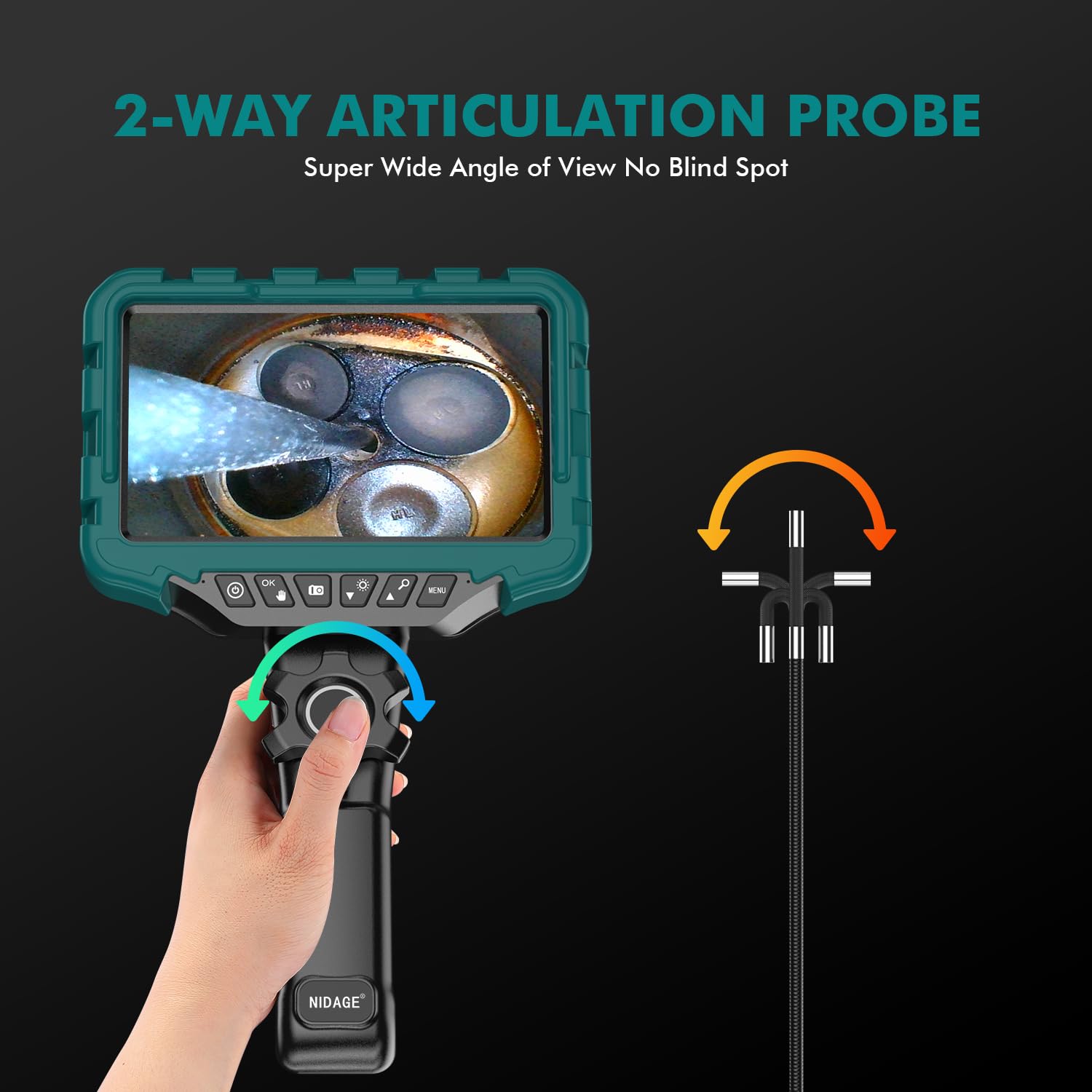
Image: The main unit of the NIDAGE ZP701 Articulating Borescope, showing the 7-inch IPS display and control buttons.
Naudojimo instrukcijos
-
Zondo įdėjimas: Carefully insert the 0.24-inch (6mm) diameter rigid gooseneck probe into the area you wish to inspect. The probe is 1.1m (3.6ft) long and designed to maintain its shape for precise positioning.

Image: Illustration of the rigid gooseneck probe being used to inspect a wall cavity.
-
Articulating the Probe: Use the control wheel on the handle to articulate the camera probe up to 180 degrees in two directions. This allows for flexible viewing angles without needing to reposition the entire probe.

Image: A diagram illustrating the 0.24-inch camera's ability to articulate and inspect internal components like engine valves.

Image: A user demonstrating the two-way 180-degree articulation feature for engine inspection.
-
LED lempučių reguliavimas: The probe is equipped with 8 high-intensity LED lights. Use the designated button (often marked with a light bulb icon) to cycle through 3 adjustable brightness levels to suit different inspection environments.

Image: The borescope probe submerged in water, highlighting its IP67 waterproof rating and the 8 adjustable LED lights.
- Vaizdo ir vaizdo įrašų fiksavimas: Press the appropriate buttons (usually marked with camera and video icons) to capture still images or record video. The captured media will be saved to the installed 32GB TF card.
-
Viewing on the IPS Screen: The 7-inch IPS screen provides a clear and vibrant image for detailed inspections. Its larger size offers a significant advantage over smaller displays, enhancing visibility of inspection details.

Image: A visual comparison highlighting the larger and clearer display of the 7-inch IPS screen compared to a 5-inch screen.
- Priartinimo funkcija: Utilize the 6X zoom function to get a closer view of details on the 7-inch IPS screen.
- Optimalus židinio nuotolis: For the clearest images, maintain a focal distance of 3-8 cm (approximately 1.2-3.1 inches) from the object being inspected.
- Apsauga nuo aukštos temperatūros: The device features automatic shutdown for high-temperature protection. If the temperature exceeds 85°C, the unit will power off to prevent damage. The screen also displays the actual temperature during operation.
- Waterproof and Oil-Resistant: The probe is IP67 rated, making it suitable for inspection in wet plumbing or oily environments.
Priežiūra
- Zondo ir lęšio valymas: After each use, especially in dirty or oily environments, gently wipe the probe and camera lens with a soft, damp cloth. For stubborn residue, a mild cleaning solution can be used, ensuring no liquid enters the main unit.
- Akumuliatoriaus priežiūra: To prolong battery life, charge the device regularly and avoid completely draining the battery. If storing for extended periods, charge the battery to approximately 50%.
- Saugykla: Store the borescope and its accessories in the provided carrying case in a cool, dry place, away from direct sunlight and extreme temperatures.
Trikčių šalinimas
| Problema | Galima priežastis | Sprendimas |
|---|---|---|
| Įrenginys neįsijungia. | Žemas akumuliatoriaus įkrovos lygis; įrenginys neįkrautas. | Visiškai įkraukite įrenginį naudodami C tipo laidą. |
| Prasta vaizdo kokybė. | Lens is dirty; incorrect focal distance; insufficient lighting. | Clean the camera lens. Adjust the probe to be within 3-8 cm of the object. Increase LED brightness. |
| Zondo sąnarys sustingęs arba nereaguoja. | Debris in articulation mechanism; cable kinked. | Gently try to clear any visible debris. Ensure the cable is not severely bent or kinked. Do not force articulation. |
| Įrenginys netikėtai išsijungia. | High-temperature protection activated. | Allow the device to cool down. Avoid using in environments exceeding 85°C. |
| Nepavyksta išsaugoti nuotraukų / vaizdo įrašų. | TF card full or not properly inserted; TF card faulty. | Check TF card insertion. Delete old files to free space. Try a different compatible TF card. |
Specifications (Model: ZP701)
| Ekranas | 7 colių IPS LCD |
| Kameros raiška | 2.0 MP (True) |
| Zondo skersmuo | 0.24 colių (6mm) |
| Zondo ilgis | 1.1 m (3.6 pėdos) |
| Šarnyrinis kampas | Two-way 180° |
| LED lemputės | 8 reguliuojami didelio intensyvumo šviesos diodai |
| Židinio nuotolis | 3-8 cm |
| Mastelio funkcija | 6X skaitmeninis priartinimas |
| Atsparumas vandeniui | IP67 (zondas) |
| Baterijos talpa | 4000 mAh |
| Veikimo laikas | 4-5 valandas |
| Apsauga nuo aukštos temperatūros | Automatic shutdown at 85°C |
| Saugojimo laikmena | 32 GB TF kortelė (pridedama) |
| Vaizdo įrašymo raiška | 1080p |
| Ryšys | C tipo USB |
Garantija ir palaikymas
Your NIDAGE ZP701 Articulating Borescope comes with a 12-month warranty. For technical support, warranty claims, or any inquiries, please refer to the contact information provided on the product packaging or the official NIDAGE websvetainę.
Ask a question about this manual
Ask about setup, troubleshooting, compatibility, parts, safety, or missing instructions. Manuals+ will review the question and use this page’s manual context to help answer it.