Įvadas
This manual provides detailed instructions for the operation and maintenance of your Oilsky V08 64GB Digital Voice Recorder. Please read this manual thoroughly before using the device to ensure proper functionality and to maximize its features.
Produktas baigtasview
The Oilsky V08 is a compact digital voice recorder designed for clear audio capture. It features a built-in 64GB memory, noise reduction technology, and various recording and playback options.

Image: The Oilsky V08 digital voice recorder displaying its screen and key features such as 1536kbps recording, noise cancellation chip, 7 levels recording gain, omni-directional microphone, and built-in speaker. It also lists supported WAV and MP3 recording bitrates.
Pagrindinės funkcijos:
- Aukštos kokybės įrašas: Up to 1536kbps WAV format for clear audio.
- Triukšmo mažinimas: Integrated noise cancellation chip for improved sound clarity.
- Didelė saugykla: Built-in 64GB memory.
- Ilgas baterijos veikimo laikas: Up to 20 hours of continuous recording or 35 hours of continuous playback.
- Universalus įrašymas: Supports external microphone and line-in recording.
- Kelios funkcijos: Voice Activated Recording, Password Protection, Variable Speed Playback, A-B Repeat, Equalizer, MP3 Player, File Perdavimas.
Sąranka
Įrenginio įkrovimas:
The device comes with a built-in rechargeable Lithium Polymer battery. Before first use, fully charge the recorder.
- Connect the recorder to a computer's USB port or a USB wall adapter (not included) using the provided USB cable.
- LCD ekrane esantis akumuliatoriaus indikatorius rodys įkrovimo būseną.
- Pilnas įkrovimas paprastai trunka maždaug 2 valandas.
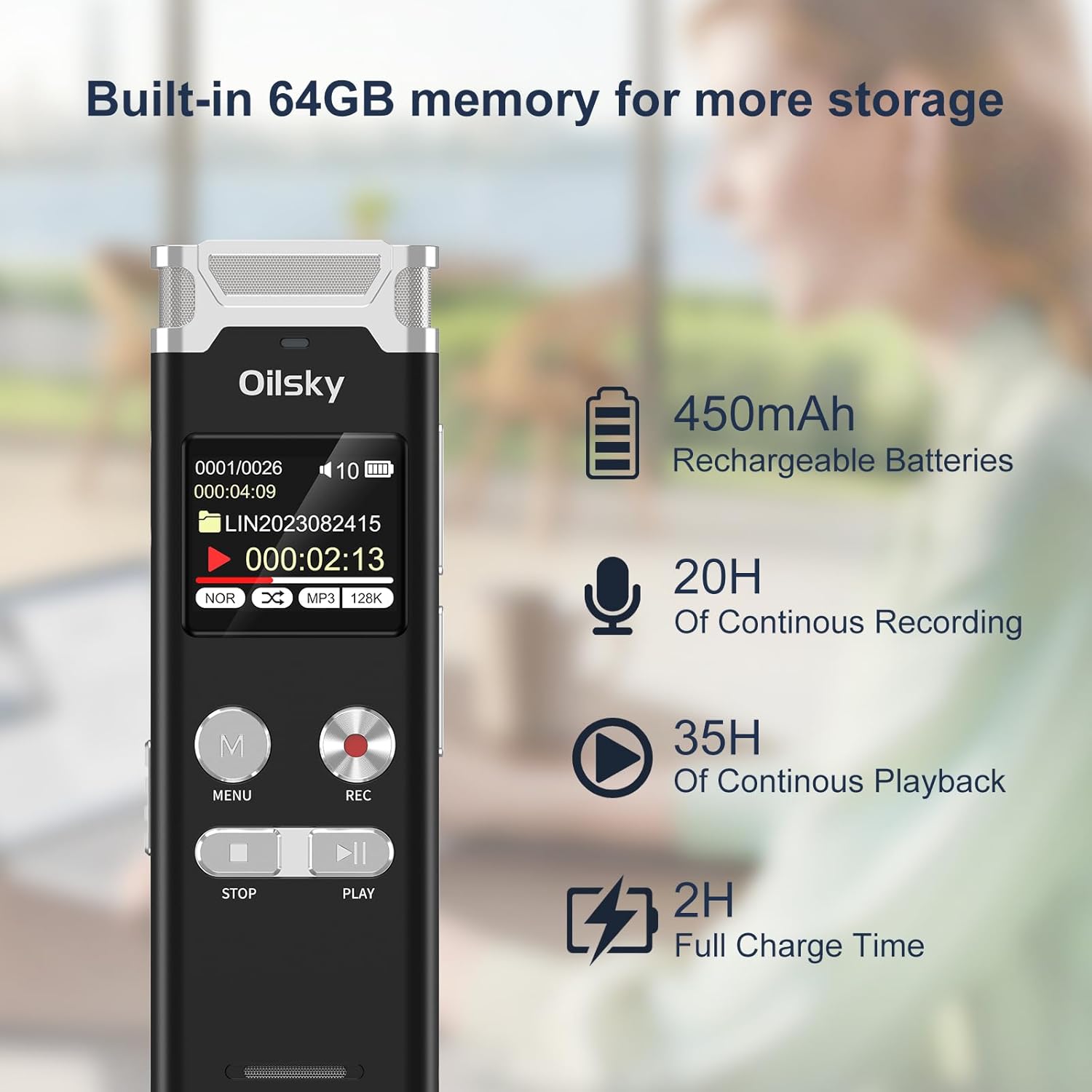
Image: The Oilsky V08 digital voice recorder displaying its screen with battery icon and text indicating 64GB memory, 450mAh rechargeable batteries, 20 hours of continuous recording, 35 hours of continuous playback, and 2 hours full charge time.
Įjungimas / išjungimas:
To power on the device, slide the power switch to the ON position. To power off, slide it to the OFF position.
Naudojimo instrukcijos
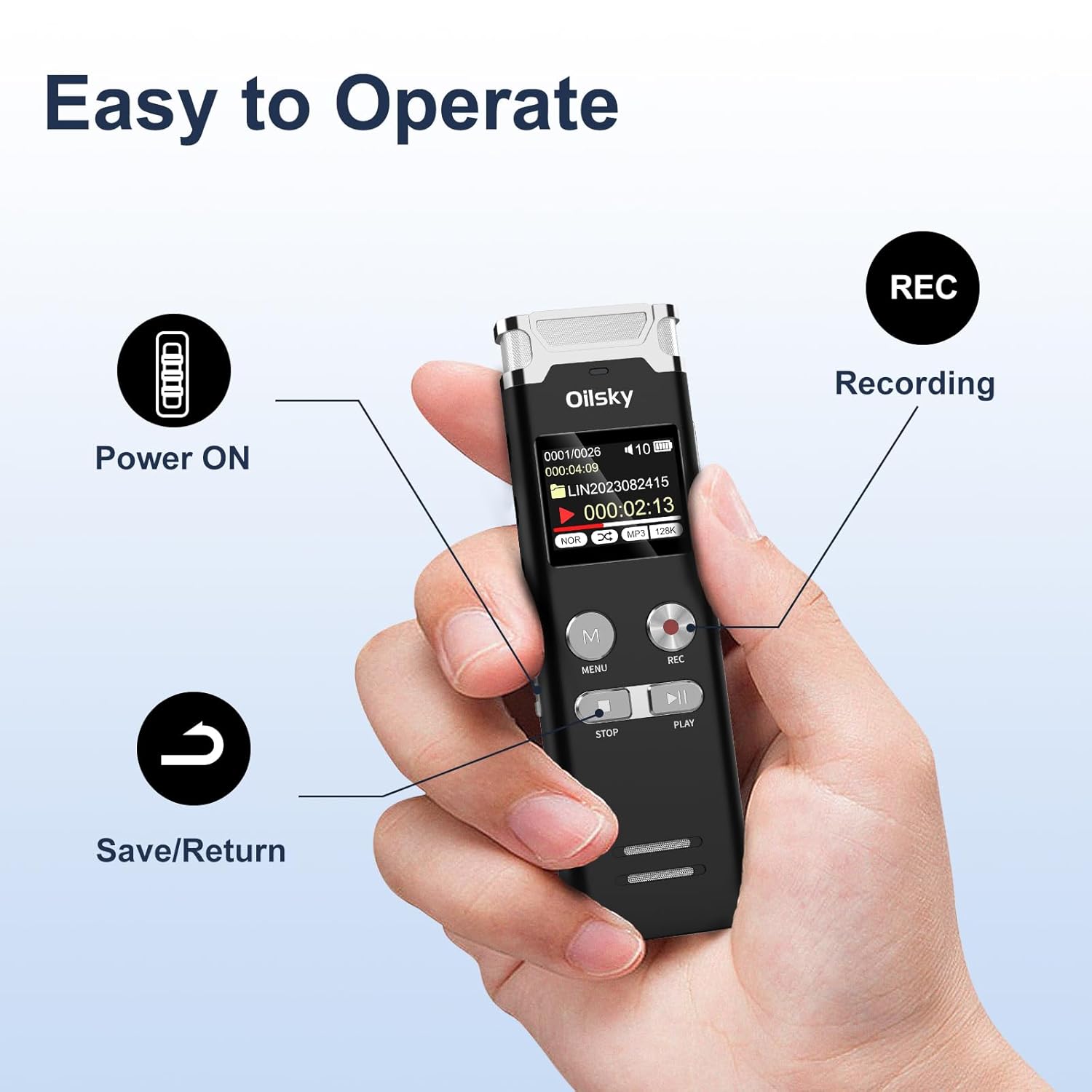
Image: A hand holding the Oilsky V08 digital voice recorder, with arrows pointing to the Power ON switch, REC button for recording, and the Save/Return button (likely the STOP button).
Pagrindinis įrašymas:
- Įsitikinkite, kad įrenginys įjungtas.
- Paspauskite REC button to start recording. The screen will display recording status.
- Norėdami pristabdyti įrašymą, paspauskite REC dar kartą. Norėdami tęsti, paspauskite dar kartą.
- Norėdami sustabdyti ir išsaugoti įrašą, paspauskite STOP mygtuką.
Atkūrimas:
- From the main menu or file list, select the desired audio file.
- Paspauskite ŽAISTI mygtuką, norėdami pradėti atkūrimą.
- Naudokite ANKSTESNIS KITAS buttons (often integrated with volume or fast-forward/rewind) to navigate through files or within a file.
- Paspauskite STOP mygtuką, kad užbaigtumėte atkūrimą.
Meniu naršymas:
Paspauskite MENIU button to access the device settings and options. Use the navigation buttons (usually ANKSTESNIS KITAS) to scroll through options and the ŽAISTI mygtuką, kad patvirtintumėte pasirinkimus. Paspauskite STOP , kad išeitumėte iš meniu.
Išplėstinės funkcijos:

Image: The Oilsky V08 digital voice recorder placed on a keyboard, with an overlay highlighting its multifunction capabilities: Voice Activated Recording, Password Protection, Variable Speed Playback (±8X), Line in Recording, A-B Repeat, Equalizer, MP3 Player, and File Perdavimas.
- Voice Activated Recording (VOR): Enable this feature in the settings. The recorder will automatically start recording when sound is detected and pause when silence occurs, saving memory and battery.
- Slaptažodžio apsauga: Set a password through the menu to protect your recordings from unauthorized access.
- Variable Speed Playback (±8X): Adjust the playback speed of your recordings without altering the pitch. Access this option during playback via the menu.
- AB kartojimas: During playback, mark a start point (A) and an end point (B) to repeatedly play a specific section of an audio file.
- Ekvalaizeris: Adjust audio playback settings (e.g., bass, treble) for different sound profiles.
- Mp3 grotuvas: The device can also play MP3 audio files stored on its internal memory.
- File Pervedimas: Connect the recorder to a computer via USB to transfer recorded files ar kitą garso įrašą files to and from the device. It will appear as a removable disk.
External Recording Options:

Image: The Oilsky V08 digital voice recorder demonstrating two recording methods: one with an external microphone connected, and another showing a line-in connection to a smartphone for recording audio directly from the phone.
- Išorinis mikrofonas: Connect a compatible external microphone to the designated port for enhanced recording flexibility.
- Įrašymas per linijinį įėjimą: Use a 3.5mm audio cable to connect the recorder to other audio sources like phones, computers, or MP3 players to record audio directly.
Priežiūra
- Valymas: Įrenginį valykite minkštu, sausu skudurėliu. Nenaudokite skystų valiklių ar tirpiklių.
- Saugykla: Diktofoną laikykite vėsioje, sausoje vietoje, toliau nuo tiesioginių saulės spindulių ir ekstremalių temperatūrų.
- Akumuliatoriaus priežiūra: Norėdami pailginti akumuliatoriaus veikimo laiką, venkite dažnai visiškai jį iškrauti. Reguliariai įkraukite įrenginį, net jei jis ilgą laiką nenaudojamas.
- Duomenų valdymas: Regularly back up important recordings to a computer to prevent data loss.
Trikčių šalinimas
| Problema | Galimas sprendimas |
|---|---|
| Įrenginys neįsijungia. | Ensure the battery is charged. Connect to a power source and try again. Check the power switch position. |
| Neįmanoma įrašyti. | Patikrinkite, ar atmintis pilna. Ištrinkite nereikalingus files or transfer them to a computer. Ensure the device is not in playback mode. |
| Prasta įrašymo kokybė. | Ensure the microphone is not obstructed. Record in a quieter environment. Adjust recording gain settings if available. Check recording format settings. |
| "Disk Error" message. | This indicates a potential issue with the internal memory. Try connecting the device to a computer to see if it's recognized. If not, a factory reset might be necessary (this will erase all data). If the problem persists, contact customer support. |
| Kompiuteris neatpažįsta įrenginio. | Ensure the USB cable is securely connected. Try a different USB port or cable. Restart your computer. The device should appear as a removable storage drive. |
Specifikacijos
| Funkcija | Detalė |
|---|---|
| Prekės ženklas | Oilskis |
| Modelis | V08 |
| Atminties talpa | 64 GB |
| Įrašymo formatai | WAV (up to 1536kbps), MP3 (up to 128kbps) |
| Baterijos tipas | 1 ličio polimeras (pridedamas) |
| Baterijos talpa | 450 mAh |
| Nepertraukiamo įrašymo laikas | Iki 20 valandų |
| Nepertraukiamo atkūrimo laikas | Iki 35 valandų |
| Pilnas įkrovimo laikas | Maždaug 2 val |
| Gaminio matmenys | 10.15 x 3.2 x 1.25 cm |
| Prekės svoris | 204 g |
| Techninės įrangos sąsaja | USB |
| Suderinami įrenginiai | Asmeninis kompiuteris |
| Ekrano technologija | LCD |
| Stovinčio ekrano dydis | 1 colių |
Garantija ir palaikymas
Specific warranty information is typically provided with your purchase documentation or on the manufacturer's official website. For technical support, troubleshooting assistance, or warranty claims, please refer to the contact information provided by Oilsky at the time of purchase or visit their official support channels.
Išsaugokite pirkimo kvitą kaip pirkimo įrodymą garantijos tikslais.