
FERMAX ST2 CP101 DDA
FERMAX jūrinės panelės „Duox Plus ST2 CP101 DDA“ naudojimo instrukcija
Model: ST2 CP101 DDA

Įvadas
This manual provides comprehensive instructions for the installation, operation, and maintenance of the FERMAX Marine Panel Duox Plus ST2 CP101 DDA. This outdoor security panel is designed for robust performance in marine environments, offering advanced communication and access control features. Please read this manual thoroughly before installation and use to ensure proper functionality and safety.
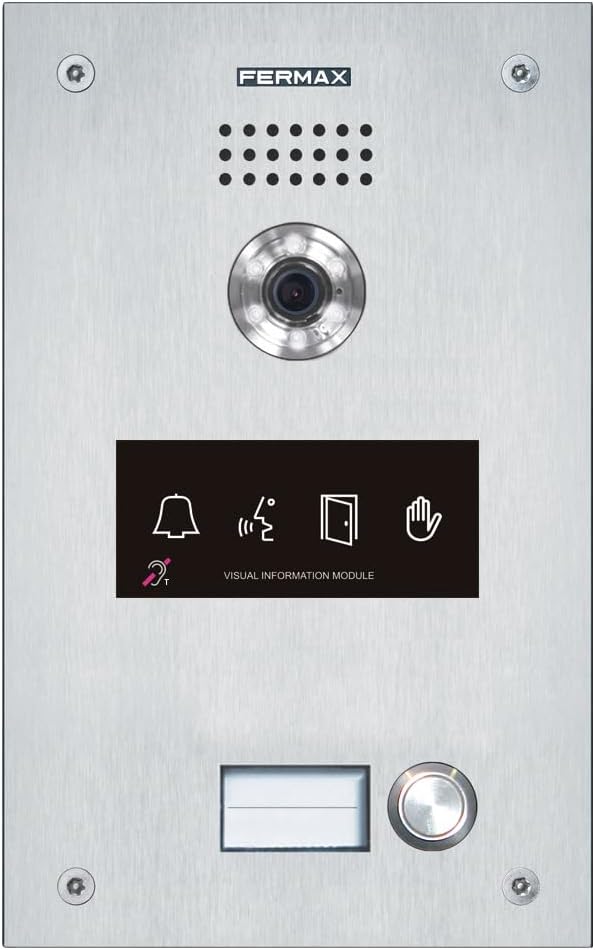
Figure 1: FERMAX Marine Panel Duox Plus ST2 CP101 DDA
The image displays the front of the FERMAX Marine Panel, highlighting its durable stainless steel construction. Key components visible include the integrated camera lens, a speaker grille, a black visual information module with icons for bell, audio, door, and hand, a nameplate slot, and a large, illuminated call button. The panel is secured by four visible screws at the corners.
Sąranka ir diegimas
The FERMAX Marine Panel is designed for wall-mount installation. Ensure the mounting surface is stable and provides adequate protection from extreme weather conditions, although the unit is rated for outdoor use.
1. Svetainės paruošimas
- Choose a location that allows for clear camera view and audio communication.
- Ensure proper wiring access for power and data connections (Wired Connectivity).
- Verify the mounting surface can support the panel's dimensions (9.92 x 6.46 x 3.23 inches).
2. Skydelio montavimas
- Mark the drilling points on the wall using the panel as a template.
- Drill pilot holes suitable for the mounting screws.
- Secure the panel firmly to the wall using appropriate fasteners.
3. Elektros jungtys
Connect the power supply and communication cables according to the wiring diagram provided in the separate installation guide (not included in this manual). This panel utilizes Duox Plus technology for simplified wiring.
4. Tinklo konfigūracija („Wi-Fi“)
The panel supports Wi-Fi connectivity for remote management and integration. Refer to the network setup guide for detailed instructions on connecting to your local Wi-Fi network.
Naudojimo instrukcijos
The FERMAX Marine Panel is designed for intuitive operation, primarily functioning as an outdoor security and communication device.
1. Skambinimas
- To initiate a call, press the large illuminated call button located at the bottom of the panel.
- The visual information module will display relevant status icons (e.g., ringing, speaking).
- Communication is established via the integrated speaker and microphone.
2. Visual Information Module
The visual information module provides feedback on the panel's status and call progress. Icons typically include:
- Varpelio piktograma: Indicates an incoming call or ringing status.
- Audio Wave Icon: Indicates active audio communication.
- Door Icon: May indicate door release status (if integrated with an access control system).
- Hand Icon: May indicate a busy line or other status.
- Ear Icon with T: Indicates compatibility with hearing aids (telecoil).
3. Valdymas balsu
The panel supports voice control for certain functions. Refer to the advanced configuration guide for details on setting up and using voice commands.
Priežiūra
Regular maintenance ensures the longevity and optimal performance of your FERMAX Marine Panel. The panel is constructed from durable Stainless Steel and Steel.
1. Valymas
- Išorinius paviršius nuvalykite minkšta, damp audinys.
- Do not use abrasive cleaners, solvents, or harsh chemicals, as these can damage the finish and electronic components.
- Ensure the camera lens and speaker grille are free from dirt and debris.
2. Patikrinimai
- Periodically check all visible screws and mounting points for tightness.
- Patikrinkite kabelius, ar nėra kokių nors susidėvėjimo ar pažeidimų požymių.
- Ensure the nameplate slot is clean and the nameplate is legible.
Trikčių šalinimas
This section addresses common issues you might encounter with your FERMAX Marine Panel.
| Problema | Galima priežastis | Sprendimas |
|---|---|---|
| No power/Panel is unresponsive. | Maitinimo šaltinio problema, atsilaisvinęs kontaktas. | Check power source and all electrical connections. Consult a qualified electrician if necessary. |
| No audio during a call. | Mikrofono / garsiakalbio kliūtis, laidų problema. | Ensure speaker grille and microphone are clear. Verify audio wiring connections. |
| Prasta vaizdo kokybė. | Dirty camera lens, poor lighting, network issue. | Clean the camera lens. Ensure adequate lighting. Check Wi-Fi signal strength. |
| Nepavyksta prisijungti prie „Wi-Fi“. | Neteisingas slaptažodis, už diapazono ribų, tinklo trukdžiai. | Verify Wi-Fi password. Move closer to the access point or use a Wi-Fi extender. Check for network interference. |
For issues not listed here, please contact FERMAX customer support or refer to the full technical documentation.
Specifikacijos
Key technical specifications for the FERMAX Marine Panel Duox Plus ST2 CP101 DDA:
- Modelis: ST2 CP101 DDA
- Prekinis ženklas: FERMAX
- Montavimo tipas: Sieninis laikiklis
- Belaidžio ryšio technologija: Wi-Fi
- Medžiaga: Nerūdijantis plienas, plienas
- Šviesos šaltinio tipas: LED
- Vaizdo įrašymo formatas: MPEG-4
- Kontrolės metodas: Balsas
- Pakuotės matmenys: 9.92 x 6.46 x 3.23 colio
- Rekomenduojami gaminio naudojimo būdai: Lauko apsauga
- Ryšio technologija: Laidinis
- Naudojimas viduje / lauke: Lauke
- Ryšio protokolas: Wi-Fi
- Gamintojas: FERMAX
- Pirmas prieinamas: 26 m. birželio 2023 d
Garantija ir palaikymas
For warranty information and technical support, please contact FERMAX directly or visit their official website. Details regarding product registration and service centers can typically be found on the manufacturer's support pages.
You can visit the official FERMAX store on Amazon for more products and information: FERMAX Amazon Store.
Ask a question about this manual
Ask about setup, troubleshooting, compatibility, parts, safety, or missing instructions. Manuals+ will review the question and use this page’s manual context to help answer it.