
Įvadas
Welcome to the AILRINNI Smart Lock user manual. This guide provides detailed instructions for the installation, operation, and maintenance of your new smart lock. The AILRINNI Smart Lock offers multiple convenient and secure unlocking methods, including Bluetooth app control, fingerprint recognition, touchscreen keypad entry, and traditional mechanical keys. Designed for ease of use and high security, this lock is suitable for various environments such as homes, offices, bedrooms, and apartments.
Produktas baigtasview
Pagrindinės savybės
- Multifunctional Unlocking: Supports mobile phone application (BLE), digital passwords, semiconductor fingerprint identification, and traditional mechanical keys.
- Aukštas saugumas: Utilizes advanced semiconductor fingerprint technology for faster and more accurate recognition. Constructed from durable aluminum alloy for enhanced reliability.
- Bendra prieiga: Easily share temporary, scheduled, or permanent access codes with family and friends via the mobile application.
- Lengvas montavimas: Designed to meet most lever lock standards, requiring no hard wiring. Adjustable latch for various door sizes.
- Universalus pritaikymas: Ideal for residential and commercial use, including homes, offices, villas, and hotels.
Pakuotės turinys
Prieš pradėdami montavimą, patikrinkite, ar yra visi komponentai.
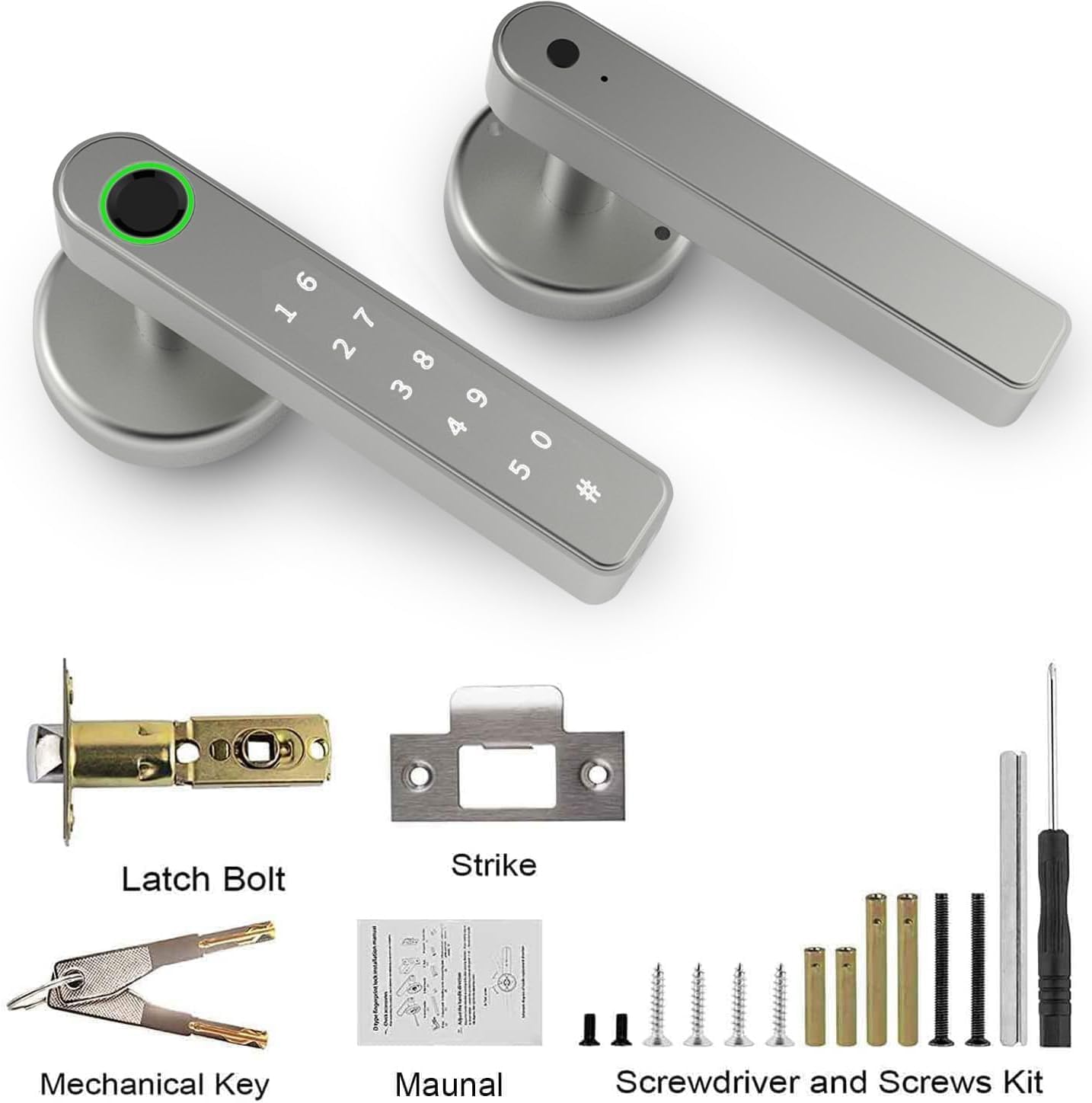
- AILRINNI Smart Lock Unit (Front and Rear Handles)
- Užrakto varžtas
- Streiko plokštė
- Mechaniniai raktai (2)
- Tvirtinimo varžtų ir priedų rinkinys
- Vartotojo vadovas (šis dokumentas)
- Atsuktuvas
Specifikacijos
| Funkcija | Detalė |
|---|---|
| Modelio numeris | 29182-TY90 |
| Prekės ženklas | AILRINNI |
| Matmenys (I x P x A) | 22.91 x 16.51 x 16.51 cm |
| Prekės svoris | 800 g |
| Medžiaga | Plastic (with Aluminum Alloy components) |
| Spalva | Sidabras |
| Apdailos tipas | Nuvalytas |
| Užrakto tipas | Biometrinis |
| Ypatingos savybės | Fingerprint, Weather Resistant, Auto-Lock |
| Maitinimo šaltinis | Baterijos (nepridedamos) |
| Durų storio suderinamumas | 1-3/8 inch (35mm) to 2-3/16 inch (55mm) |
| Latch Compatibility | Adjustable 2-3/8 inch (60mm) or 2-3/4 inch (70mm) |

Note: Batteries are not included and must be purchased separately. Please refer to the installation section for battery requirements.
Sąranka ir diegimas
Before installation, ensure your door meets the specified thickness and latch compatibility requirements. No hard wiring is required for this smart lock.
Patikrinimas prieš montavimą
- Verify door thickness is between 1-3/8 inch (35mm) and 2-3/16 inch (55mm).
- Confirm latch backset is either 2-3/8 inch (60mm) or 2-3/4 inch (70mm).
- Įsitikinkite, kad yra visas pakuotės turinys.
Diegimo žingsniai
- Paruoškite duris: If replacing an existing lock, remove it. Ensure the door boreholes are clean and clear.
- Įdiekite fiksavimo varžtą: Insert the latch bolt into the door edge. Ensure the "UP" arrow on the latch is pointing upwards. Secure with screws.
- Install the Exterior Handle: Feed the spindle and wires from the exterior handle through the latch bolt and door. Align the handle with the latch.
- Install the Interior Handle: Connect the wires from the exterior handle to the interior handle. Align the interior handle with the mounting plate and secure it with screws.
- Įdėkite baterijas: Open the battery cover on the interior handle. Insert the required batteries (typically 4 x AAA, though not explicitly stated in specs, common for these locks).
- Bandomoji operacija: Test the mechanical key, and ensure the handle operates smoothly.

Adjusting Handle Direction
The AILRINNI Smart Lock features a free handle design, allowing it to be opened from either the left or right side. Adjust the handle direction as needed during installation.

Naudojimo instrukcijos
Atrakinimo metodai
Your AILRINNI Smart Lock offers multiple ways to unlock for maximum convenience and security.
1. Mobile App Unlock (Bluetooth)
Download the compatible mobile application (e.g., Tuya Smart or Smart Life app) from your app store. Follow the in-app instructions to pair your lock via Bluetooth.

Once paired, you can unlock the door directly through the app, manage user access, generate temporary passwords, and view prieigos žurnalai.
2. Atrakinimas pirštu antspaudu
The smart lock features a semiconductor fingerprint sensor for quick and secure access.
- Pirštų atspaudų pridėjimas: Refer to the mobile app's instructions for adding new fingerprints. Typically, this involves placing your finger on the sensor multiple times from different angles.
- Atrakinimas: Uždėkite registruotą pirštą ant pirštų atspaudų jutiklio. Užraktas atsirakins, jei pirštų atspaudas bus atpažintas.
3. Touchscreen Keypad Unlock
Use the integrated touchscreen keypad to enter a digital password.
- Setting Passwords: Manage and set new digital passwords through the mobile application. You can create permanent, temporary, or one-time codes.
- Atrakinimas: Enter your valid digital password on the keypad, then press the '#' key to confirm.
4. Mechaninis rakto atrakinimas
For emergency situations or as a backup, use the provided mechanical keys.
- Prieiga prie rakto skylutės: The keyhole is typically located at the bottom of the exterior handle.
- Atrakinimas: Insert the mechanical key and turn to unlock the door.

Priežiūra
Baterijos keitimas
The smart lock is powered by batteries (not included). When the battery level is low, the lock will typically provide an audible or visual alert.
- Open the battery compartment on the interior handle.
- Išimkite senas baterijas ir tinkamai jas išmeskite.
- Įdėkite naujas baterijas, užtikrindami teisingą poliškumą.
- Uždarykite akumuliatoriaus skyrių.
Note: If batteries completely drain, you can use the mechanical key or connect a power bank via the USB charging interface for emergency power to unlock the door and replace batteries.

Valymas
Clean the lock's exterior with a soft, dry cloth. Avoid using abrasive cleaners, solvents, or harsh chemicals, as these can damage the finish and electronic components.
Aplinkosaugos svarstymai
While the lock is weather-resistant, extreme temperatures or prolonged exposure to direct moisture should be avoided to ensure optimal performance and longevity.
Trikčių šalinimas
Bendros problemos ir sprendimai
Lock is not responding / No power
- Patikrinkite baterijas: Įsitikinkite, kad baterijos įdėtos teisingai ir yra pakankamai įkrautos. Jei reikia, pakeiskite.
- Avarinis maitinimas: Use a power bank connected to the USB charging interface for temporary power.
Piršto atspaudas neatpažintas
- Švarus jutiklis: Įsitikinkite, kad pirštų atspaudų jutiklis yra švarus, be nešvarumų ar drėgmės.
- Reposition Finger: Try placing your finger on the sensor from different angles.
- Iš naujo užregistruoti piršto atspaudą: Jei problemos išlieka, ištrinkite ir iš naujo užregistruokite savo piršto atspaudą programėlėje.
Klaviatūra nereaguoja
- Patikrinkite baterijas: Low batteries can affect keypad responsiveness.
- Teisingas kodas: Ensure you are entering the correct digital password.
- Atstatyti: If unresponsive, try removing and reinserting batteries to reset the lock.
Bluetooth ryšio problemos
- Įjungti Bluetooth: Įsitikinkite, kad jūsų mobiliajame įrenginyje įjungtas „Bluetooth“.
- Programos leidimai: Verify the app has necessary Bluetooth permissions.
- Artumas: Ensure your device is within Bluetooth range of the lock.
- Paleiskite programėlę / telefoną iš naujo: Close and reopen the app, or restart your phone.
Lock does not auto-lock
- Patikrinkite nustatymus: Verify auto-lock feature is enabled in the mobile app settings.
- Durų išlyginimas: Ensure the door closes properly and the latch bolt extends fully into the strike plate.
If you encounter issues not listed here or require further assistance, please contact AILRINNI customer support.
Garantija ir palaikymas
Informacija apie garantiją
The AILRINNI Smart Lock (Model 29182-TY90) comes with a 1 metų garantija from the date of purchase. This warranty covers manufacturing defects and malfunctions under normal use. It does not cover damage caused by misuse, unauthorized modification, accident, or improper installation.
Pagalba klientams
For technical support, warranty claims, or any questions regarding your AILRINNI Smart Lock, please contact our customer service team.
- El. paštas: ailrinni_trade@163.com
- Palaikymas internetu: Refer to the official AILRINNI webDUK ir papildomų išteklių svetainė.
Please have your product model number (29182-TY90) and purchase details ready when contacting support.