
1. Produktas baigtasview
The Ctronics 4K CTIPC-660C surveillance camera offers exceptional 8-megapixel image quality, capturing every detail with stunning clarity. Its lens, pivoting 355° horizontally and 90° vertically, allows you to monitor an extended area without blind spots. Powerful 25-meter night vision ensures continuous surveillance even in total darkness. Designed for outdoor security, this camera offers advanced functionalities and a robust construction, providing lasting peace of mind.
Key features include 4K (3840x2160) resolution with a SONY 1/2.8” IMX415 CMOS sensor, advanced backlight compensation, dual-band 2.4G/5G Wi-Fi and wired LAN connectivity, IK10 vandal resistance, IP66 weatherproofing, and AI-powered detection for humans, vehicles, and animals.

Figure 1: Ctronics 4K CTIPC-660C Outdoor Surveillance Camera.
2. Sąranka ir diegimas
2.1 Pakuotės turinys
- Ctronics 4K Surveillance Camera
- Maitinimo adapteris
- Tvirtinimo varžtai ir sieniniai kaiščiai
- Waterproof Kit for Network Cable
- Greitos pradžios vadovas
2.2 Fizinis įrengimas
The camera supports both ceiling and wall mounting. A wall mount bracket is sold separately if required. Ensure the mounting surface is strong enough to support the camera's weight (approximately 1 kg).
- Choose a suitable location for installation, ensuring optimal viewing angle and Wi-Fi signal strength.
- Use the provided drilling template (if included) to mark the screw holes on the mounting surface.
- Išgręžkite skyles ir įkiškite sieninius kaiščius.
- Pritvirtinkite kameros pagrindą prie paviršiaus naudodami pateiktus varžtus.
- Prijunkite maitinimo adapterį prie fotoaparato ir maitinimo lizdo.

Figure 2: Proper ceiling installation of the camera. The camera is designed for easy installation without complex disassembly.
2.3 Tinklo jungtis
The camera supports both wired (LAN) and wireless (2.4G/5G Wi-Fi) connections.
- Laidinis ryšys: Connect an Ethernet cable from your router to the camera's LAN port.
- Belaidis ryšys: The camera supports dual-band Wi-Fi (2.4GHz and 5GHz). Follow the in-app instructions to connect the camera to your Wi-Fi network. The 2.4GHz band offers a longer transmission distance, while the 5GHz band provides a stronger network signal.

Figure 3: Dual-band Wi-Fi connectivity. The camera supports both 2.4GHz for longer range and 5GHz for stronger signal.
2.4 App and Software Installation
Tvarkyti ir view your camera feed, download the Ctronics Pro app on your smartphone or tablet. PC client software is also available.
- Programėlė mobiliesiems: Ieškokite "Ctronics Pro" in your device's app store (iOS/Android).
- Kompiuterio klientas: Download the "HiP2P Client" software from the official Ctronics website for Windows or Mac OS.

Figure 4: Ctronics Pro app interface for managing multiple cameras, playback, and group management.
3. Operacija
3.1 Tiesiogiai View ir nuotolinė prieiga
Access your camera feed anytime, anywhere via the Ctronics Pro app or PC client. The camera provides 24/7 surveillance capabilities.
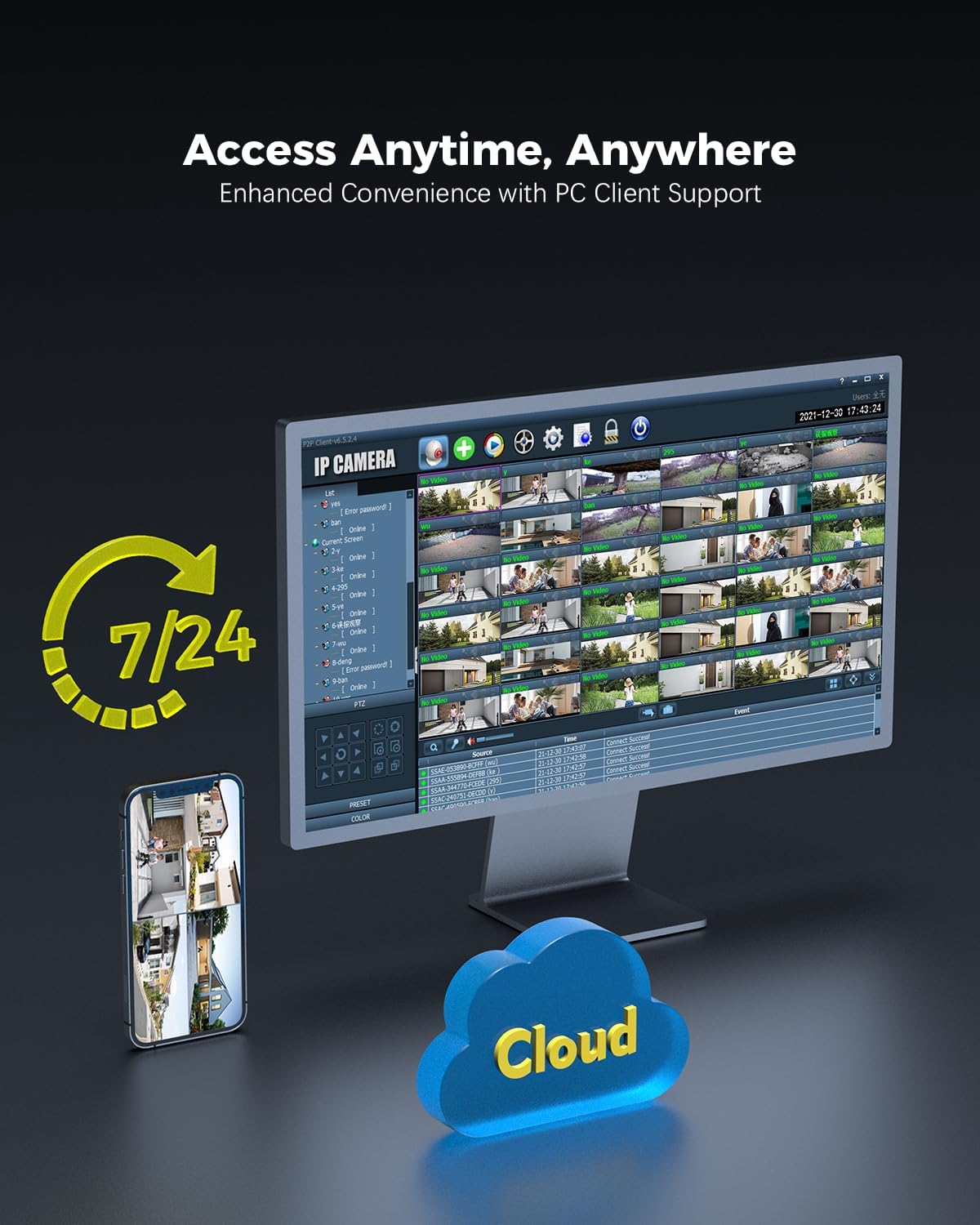
Figure 5: Remote access to camera feeds via PC client and smartphone app, with cloud storage options.
3.2 AI Detection and Auto Tracking
The camera features advanced AI detection to identify and track people, vehicles, and animals. When motion is detected, the camera can automatically track the subject and send instant push notifications to your device.

Figure 6: Smart detection and tracking capabilities. The camera identifies and tracks humans, vehicles, and animals.
3.3 Pan-Tilt Control and Preset Positions
Control the camera's pan (355°) and tilt (90°) movements remotely via the app. You can configure up to 8 preset positions for quick access to specific viewing angles. Customize detection zones and sensitivity settings to suit your surveillance needs.

Figure 7: Setting preset positions and customizing motion detection zones for tailored security.
3.4 Saugojimo parinktys
Kamera siūlo lanksčius įrašytos medžiagos saugojimo sprendimustage:
- „MicroSD“ kortelė: Palaiko iki 256 GB talpos „MicroSD“ korteles vietiniam saugojimui.
- NVR (tinklo vaizdo įrašymo įrenginys): Compatible with ONVIF-enabled NVRs for centralized recording.
- FTP (File Transfer Protocol): Supports FTP for uploading recordings to a server.
- Saugykla debesyje: Cloud storage options are available (subscription may be required).

Figure 8: Multiple storage options including MicroSD card, NAS, and FTP for secure data access.
4. Priežiūra
- Valymas: Reguliariai valykite kameros objektyvą ir korpusą minkšta šluosteamp šluoste, kad būtų užtikrinta aiški vaizdo kokybė. Nenaudokite stiprių cheminių medžiagų.
- Firmware atnaujinimai: Check for and install firmware updates regularly through the Ctronics Pro app or official websvetainę, kad būtų užtikrintas optimalus veikimas ir saugumas.
- Kabelio apžiūra: Inspect power and network cables for any signs of wear or damage, especially for outdoor installations.
- Saugyklos valdymas: Reguliariai review įrašytas footage and manage storage space, especially if using a MicroSD card, to prevent it from becoming full.
5. Problemų sprendimas
| Problema | Galima priežastis | Sprendimas |
|---|---|---|
| Kamera neįsijungia | Nėra maitinimo šaltinio; sugedęs adapteris. | Check power connection. Ensure the adapter is working and connected to a live outlet. |
| Nepavyko prisijungti prie „Wi-Fi“. | Neteisingas „Wi-Fi“ slaptažodis; kamera per toli nuo maršrutizatoriaus; maršrutizatoriaus problemos. | Verify Wi-Fi password. Move camera closer to the router or use a Wi-Fi extender. Restart your router. Ensure you are connecting to the correct 2.4GHz or 5GHz band. |
| QR code not scanning during setup | Poor lighting; dirty lens; incorrect distance. | Ensure sufficient lighting. Clean the camera lens. Adjust the distance between the camera and the QR code on your phone screen. |
| Nėra vaizdo / vaizdo įrašo srauto | Network disconnection; camera malfunction. | Check network connection (wired/wireless). Restart the camera. If the problem persists, contact support. |
| Judesio aptikimas neveikia | Detection settings incorrect; environmental factors. | Review motion detection settings in the app (sensitivity, zones). Ensure no obstructions are blocking the camera's view. |
6. Gaminio specifikacijos
| Funkcija | Detalė |
|---|---|
| Modelio numeris | CTIPC-660C |
| Rezoliucija | 4K (3840x2160), 8 Megapixels |
| Jutiklis | SONY 1/2.8” IMX415 CMOS |
| Kreipimo / pakreipimo kampas | 355°, pakreipimas 90° |
| Naktinio matymo diapazonas | Up to 25 meters (Starlight) |
| Ryšys | Wired (LAN), Wi-Fi (2.4GHz/5GHz) |
| Saugojimo parinktys | MicroSD (up to 256GB), ONVIF NVR, FTP, Cloud |
| Apsauga nuo smūgių | IK10 Vandal-Resistant |
| Atsparumas oro sąlygoms | IP66 |
| Maitinimo šaltinis | AC Power, 24 Watts |
| Kadrų dažnis | 15 kadrų per sekundę |
| View Kampas | 90 laipsnių |
| Priartinimo tipas | Digital Zoom (4x ratio) |
| Suderinami įrenginiai | Computer, Laptop, Smartphone, Tablet |
| Matmenys (I x P x A) | 13 x 13 x 19 cm |
| Svoris | 1 kilogramų |

Figure 9: Internal lens structure highlighting the SONY 415 CMOS sensor for high-quality imaging.

Figure 10: IK10 vandal-resistant design, built to withstand impact and protect the camera.
7. Informacija apie garantiją
Ctronics products typically come with a standard manufacturer's warranty. Please refer to the warranty card included in your product packaging or visit the official Ctronics webIšsamias garantijos sąlygas, taikomas jūsų regionui ir pirkimo datai, rasite svetainėje. Išsaugokite pirkimo įrodymą, jei prireiktų pateikti garantijos pretenzijas.
8. Pagalba klientams
For technical assistance, product inquiries, or support, please contact Ctronics customer service through one of the following methods:
- Oficialus Websvetainė: Apsilankykite pas „Ctronics“ atstovą webDUK, pagalbos straipsnių ir kontaktinių formų svetainė.
- Pagalba el. paštu: Žiūrėkite savo produkto pakuotę arba oficialų webklientų aptarnavimo el. pašto adreso svetainė.
- Pagalba programėlėje: Some issues can be resolved directly through the Ctronics Pro application's support section.
When contacting support, please have your product model number (CTIPC-660C) and purchase information ready.