
Įvadas
This manual provides comprehensive instructions for the Veho Kuzo Sports Smart Watch F1S. Please read this manual carefully before using your device to ensure proper operation and to maximize its features. Keep this manual for future reference.

Vaizdas: priekis view of the Veho Kuzo Sports Smart Watch F1S, showcasindėl savo apvalaus ekrano ir tvirto dizaino.
Saugos informacija
Always follow basic safety precautions when using this device to reduce the risk of injury, electric shock, fire, or damage to the product.
- Nebandykite ardyti ar modifikuoti įrenginio.
- Saugokite įrenginį nuo ekstremalių temperatūrų ir tiesioginių saulės spindulių.
- Venkite stiprių smūgių ar kritimų įrenginyje.
- Prieš pradėdami bet kokį naują mankštos režimą, ypač jei jau turite sveikatos sutrikimų, pasitarkite su medicinos specialistu.
- The device is water-resistant (IP68) but not waterproof for diving or high-pressure water activities.
Pakuotės turinys
Įsitikinkite, kad dėžutėje yra visi daiktai:
- Veho Kuzo Sports Smart Watch F1S (Black)
- Magnetic Charging Cradle (USB-A)
- Daugiakalbis vartotojo vadovas
Sąranka
1. Išmaniojo laikrodžio įkrovimas
Before first use, fully charge your Veho Kuzo F1S Smart Watch.
- Connect the magnetic charging cradle to a USB-A power source (e.g., computer USB port, wall adapter).
- Align the magnetic pins of the cradle with the charging contacts on the back of the watch. The watch will snap into place and display a charging indicator.
- Charge for approximately 2 hours for a full charge. A full charge provides up to 15 days of typical use.

Image: Graphic illustrating the 15-day battery life of the Veho Kuzo F1S Smart Watch.
2. Papildomos programėlės diegimas
To unlock all features and synchronize data, download the official companion app on your smartphone.
- The app is compatible with Apple iOS and Android devices.
- Ieškokite "Kuzo" or "Veho Kuzo" in your device's app store.
- Install the app and follow the on-screen instructions to create an account.
3. Susiejimas su išmaniuoju telefonu
After installing the app, pair your watch with your phone via Bluetooth.
- Įsitikinkite, kad jūsų išmaniajame telefone įjungtas „Bluetooth“.
- Open the companion app and navigate to the device pairing section.
- Turn on your Veho Kuzo F1S Smart Watch.
- Select your watch from the list of available devices in the app.
- Patvirtinkite susiejimo užklausą ir laikrodyje, ir išmaniajame telefone.

Image: A smartphone displaying the Veho Kuzo companion app, showing health and activity data.
Naudojimo instrukcijos
Pagrindinė navigacija
The Veho Kuzo F1S features a 1.3-inch AMOLED touchscreen and physical buttons for navigation.
- Jutiklinis ekranas: Braukite aukštyn, žemyn, kairėn arba dešinėn, kad naršytumėte meniu ir valdiklius. Palieskite, kad pasirinktumėte elementus.
- Šoniniai mygtukai: Use the physical buttons on the side of the watch to return to the home screen, access sports modes, or other quick functions.
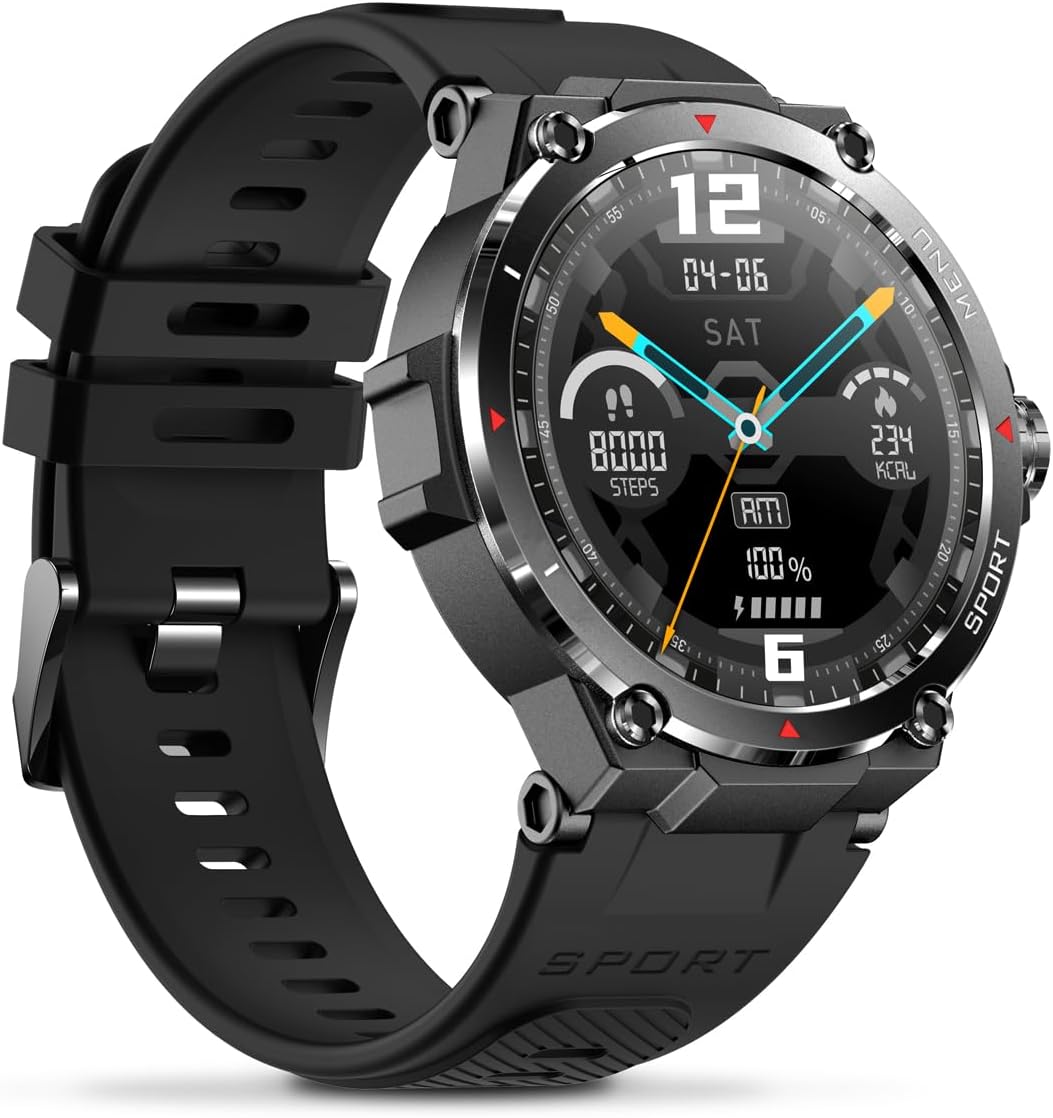
Vaizdas: Šoninė view of the Veho Kuzo F1S Smart Watch, highlighting the control buttons and rugged casing.
Sveikatos ir kūno rengybos stebėjimas
The watch continuously monitors various health and fitness metrics.
- Širdies ritmas: Širdies ritmo stebėjimas visą parą. View realaus laiko duomenys laikrodyje arba išsamios tendencijos programėlėje.
- Kraujo deguonis: Išmatuokite deguonies kiekį kraujyje.
- Veiklos stebėjimo priemonė: Tracks steps, calories burned, and distance covered. Supports walking, running, and cycling.
- Miego monitorius: Monitors daily, weekly, and monthly sleep patterns, detailing deep sleep, light sleep, and awake times.
- GPS: Built-in 3-mode GPS (GPS+Beidou+Glonass) and Assisted GPS (AGPS) for accurate outdoor performance tracking and live map positioning. Compatible with STRAVA.

Image: The Veho Kuzo F1S Smart Watch displaying heart rate monitoring data.
Išmaniosios funkcijos
- Pranešimai: Receive push notifications from apps like WhatsApp, Twitter, Facebook, LinkedIn, Skype, YouTube, Messenger, and Instagram directly on your watch.
- Muzikos valdymas: Control music playback (volume, skip tracks, play/pause) on your paired smartphone directly from the watch.
- Laiko funkcijos: Access alarm, timer, intermittent timer, stopwatch, and countdown functions.
- Rasti telefoną: Naudokite laikrodį, kad surastumėte susietą išmanųjį telefoną.
- News/Weather App: Integrated news and weather application functionality.
- Pritaikomi laikrodžių ciferblatai: Choose from hundreds of different watch face designs through the companion app.
Priežiūra
Valymas
Norėdami išlaikyti laikrodžio išvaizdą ir funkcionalumą:
- Reguliariai valykite laikrodį ir dirželį minkšta šluosteamp audinys.
- Venkite naudoti stiprių cheminių medžiagų ar abrazyvinių valiklių.
- Prieš įkrovimą įsitikinkite, kad įkrovimo kontaktai yra švarūs ir sausi.
Atsparumas vandeniui (IP68)
The Veho Kuzo F1S Smart Watch has an IP68 rating, meaning it is water-resistant in fresh water up to a maximum depth of 1.5 meters for up to 30 minutes, and is protected from dust.
- Do not use the watch for diving, snorkeling, or high-speed water sports.
- Avoid exposing the watch to hot water, steam, or detergents.
- Po sąlyčio su vandeniu laikrodį kruopščiai nusausinkite.
Akumuliatoriaus priežiūra
- Reguliariai kraukite laikrodį, kad palaikytumėte baterijos veikimo laiką.
- Venkite dažnai visiškai iškrauti akumuliatorių.
- Jei ilgesnį laiką nenaudojate laikrodžio, laikykite jį vėsioje, sausoje vietoje.
Trikčių šalinimas
If you encounter issues with your Veho Kuzo F1S Smart Watch, refer to the following common solutions:
- Laikrodis neįsijungia: Ensure the watch is fully charged. Connect it to the charging cradle and check for the charging indicator.
- Nepavyksta susieti su telefonu:
- Įsitikinkite, kad jūsų telefone ir laikrodyje įjungtas „Bluetooth“.
- Įsitikinkite, kad laikrodis yra jūsų telefono diapazone.
- Iš naujo paleiskite ir laikrodį, ir telefoną.
- Pabandykite atjungti ir iš naujo susieti įrenginį per programėlę.
- Netikslūs sveikatos duomenys:
- Įsitikinkite, kad laikrodis tvirtai prigludęs prie riešo, bet ne per stipriai.
- Nuvalykite jutiklį laikrodžio gale.
- Environmental factors and skin conditions can affect accuracy.
- Pranešimai nerodomi:
- Patikrinkite programėlės pranešimų nustatymus savo telefone ir papildomoje programėlėje.
- Įsitikinkite, kad laikrodis prijungtas prie telefono per „Bluetooth“.
Dėl papildomos pagalbos žr. pagalbos skyrių arba susisiekite su klientų aptarnavimo tarnyba.
Specifikacijos
| Modelio pavadinimas | F1S |
| Modelio numeris | VSW-001-F1S-B (164426) |
| Ekranas | 1.3" AMOLED Touchscreen |
| Rezoliucija | 360 x 360 pikselių |
| Lustų rinkinys | Dialogue14695, PPGHX3690 |
| Atmintis | ROM 128MB + RAM 2MB |
| Bluetooth | v5.1 |
| Baterijos talpa | 300mAh Lithium-polymer |
| Darbo laikas | Iki 15 dienų |
| Budėjimo laikas | Iki 21 dienų |
| Įkrovimo laikas | apytiksliai 2 valandas |
| Įkrovimo tipas | USB-A to Magnetic Charging Cradle |
| Atsparumas vandeniui | IP68 (up to 1.5 meters for 30 minutes in fresh water) |
| GPS sistema | 3-mode (GPS+Beidou+Glonass) |
| Matmenys | 46 mm x 12.9 mm |
| Svoris | 51g |
| Dirželio plotis | 22 mm |
| Dirželio ilgis | 260 mm |
| OS suderinamumas | Android, iOS |
| Palaikomos kalbos | All major languages (replicates paired smartphone language) |
Garantija ir palaikymas
The Veho Kuzo Sports Smart Watch F1S comes with a limited warranty. Please refer to the warranty card included in your package or visit the official Veho websvetainėje, kurioje pateikiamos išsamios garantijos sąlygos.
Pagalba klientams
For technical support, troubleshooting, or warranty claims, please contact Veho customer service through their official websvetainėje arba kontaktinę informaciją, pateiktą jūsų produkto dokumentuose.
- Palaikymas internetu: www.veho-world.com/support (Pvzampnuoroda, tikroji nuoroda gali skirtis)
- El. paštas: support@veho-world.com (Exampel. pašto adresas, tikrasis el. pašto adresas gali skirtis)