Įvadas
Thank you for choosing the AIR 7 Mini Wireless Bluetooth Earbuds. These earbuds are designed to provide a superior audio experience with advanced features such as Bluetooth 5.3 connectivity, active noise cancellation, and a comfortable, secure fit. This manual will guide you through the setup, operation, and maintenance of your new earbuds to ensure optimal performance and longevity.
The AIR 7 Mini earbuds offer crisp tones, deep bass, and clear sound, making them ideal for music, podcasts, and calls. With their IPX4 waterproof rating, they are suitable for various activities, including workouts and outdoor use. Enjoy wireless freedom and intuitive touch controls for a seamless audio experience.
Kas yra dėžutėje
- AIR 7 Mini L side earbud
- AIR 7 Mini R side earbud
- Charging station (charging case)
- Reinforced charging cable
- Vartotojo vadovas

Image: Unboxing the AIR 7 Mini Earbuds, displaying all included components.
Sąranka
Ausinių ir dėklo įkrovimas
Before first use, fully charge the AIR 7 Mini earbuds and their charging case. Place the earbuds into the charging case, ensuring they are properly seated. Connect the provided charging cable to the charging port on the case and plug the other end into a USB power source. The indicator light on the case will show charging status.
A full charge provides 3-4 hours of playback, and the 200mAh charging case extends this significantly, offering up to 90 hours of standby time. The case can reach 50% charge in approximately 30 minutes.
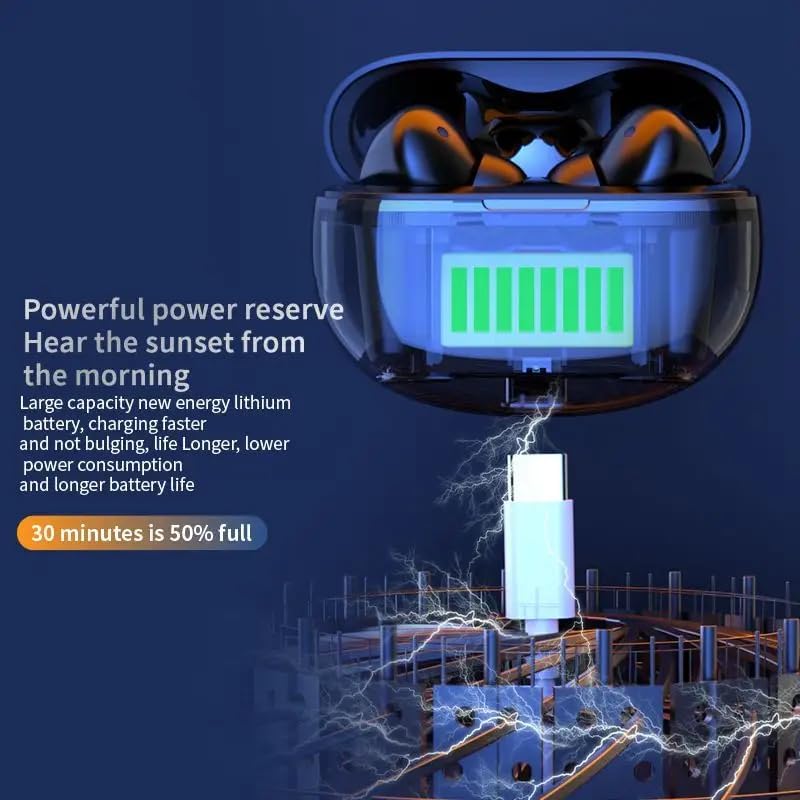
Image: The AIR 7 Mini charging case being charged via its USB-C port.
Susiejimas su jūsų įrenginiu
- Įsitikinkite, kad ausinės yra įkrautos ir yra įkrovimo dėkle.
- Atidarykite įkrovimo dėklą. Ausinės automatiškai įsijungs susiejimo režimą, tai nurodys mirksinti lemputė.
- Savo įrenginyje (išmaniajame telefone, planšetiniame kompiuteryje, nešiojamajame kompiuteryje) eikite į „Bluetooth“ nustatymus ir įjunkite „Bluetooth“.
- Ieškokite available devices. Select "AIR 7 Mini" from the list.
- Prisijungus, balso pranešimas patvirtins sėkmingą susiejimą ir ausinių lemputės nustos mirksėti.
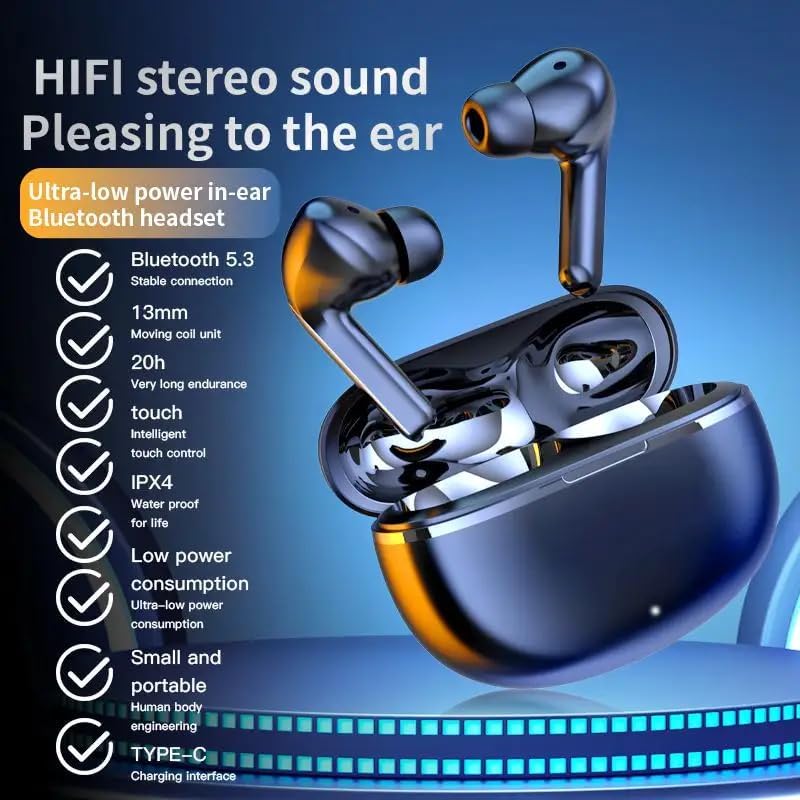
Image: Visual representation of the AIR 7 Mini earbuds' features, including Bluetooth 5.3 connectivity.
Naudojimo instrukcijos
Palieskite valdiklius
The AIR 7 Mini earbuds feature intuitive touch controls for easy management of music playback and calls. The touch-sensitive area is located on the outer surface of each earbud.
| Veiksmas | Funkcija |
|---|---|
| Vienas bakstelėjimas (kairėn / dešinėn) | Leisti/pristabdyti muziką, atsiliepti/baigti skambutį |
| Dvigubas bakstelėjimas (dešinėn) | Kitas takelis |
| Dvigubas bakstelėjimas (kairėn) | Ankstesnis takelis |
| Trigubas bakstelėjimas (kairėn / dešinėn) | Suaktyvinkite balso padėjėją |
| Ilgas paspaudimas (kairėn / dešinėn) | Įjungti aktyvų triukšmo slopinimą (ANC) / skaidrumo režimą |
| Įeinantis skambutis (ilgas paspaudimas) | Atmesti skambutį |

Image: The AIR 7 Mini earbuds providing low sound delay for synchronized audio and visuals, ideal for gaming.
Nešioti ausines
For optimal sound quality and comfort, ensure the earbuds are properly seated in your ears. Gently insert each earbud into the ear canal and twist slightly until it feels secure and comfortable. The ergonomic design of the AIR 7 Mini ensures a snug fit for prolonged listening sessions and active use.

Image: The AIR 7 Mini earbuds in their charging case, demonstrating their compact and ergonomic design.
Triukšmo panaikinimas
The AIR 7 Mini earbuds feature Dual ENC (Environmental Noise Cancellation) technology to reduce ambient noise, allowing you to focus on your audio. This feature is particularly useful in noisy environments, such as commutes or busy offices. To activate or deactivate noise cancellation, use the designated touch control as described in the "Touch Controls" table.

Image: The AIR 7 Mini earbuds illustrating their intelligent noise reduction capabilities.
Priežiūra
Valymas
Regular cleaning helps maintain the performance and hygiene of your earbuds. Use a soft, dry, lint-free cloth to wipe the earbuds and charging case. For stubborn dirt, slightly dampen the cloth with water. Do not use abrasive cleaners or submerge the earbuds or case in liquid.
The earbuds are IPX4 waterproof, meaning they are resistant to splashes and sweat, but they are not designed for submersion.

Image: The AIR 7 Mini earbuds showcasing their life-grade waterproof and sweat-resistant design.
Sandėliavimas
Kai nenaudojate, laikykite ausines įkrovimo dėkle, kad apsaugotumėte jas nuo dulkių, pažeidimų ir kad jos būtų įkrautos. Dėklą laikykite vėsioje, sausoje vietoje, toliau nuo tiesioginių saulės spindulių ir ekstremalių temperatūrų.

Image: The small and mini design of the AIR 7 Mini charging case, highlighting its portability.
Trikčių šalinimas
If you encounter any issues with your AIR 7 Mini earbuds, please refer to the following common solutions:
- Ausinės nesusijungia:
- Įsitikinkite, kad abi ausinės yra įkrautos.
- Place earbuds back in the case, close the lid, wait a few seconds, then open the lid again to re-enter pairing mode.
- Išjunkite ir įjunkite „Bluetooth“ savo įrenginyje.
- Forget "AIR 7 Mini" from your device's Bluetooth list and try pairing again.
- Nėra garso iš vienos ausinės:
- Patikrinkite, ar abi ausinės įkrautos.
- Pabandykite įdėti abi ausines atgal į dėklą ir vėl jas išimti.
- Perform a factory reset if available (refer to specific product instructions if provided, otherwise assume long press or similar).
- Įkrovimo problemos:
- Įsitikinkite, kad įkrovimo laidas yra tvirtai prijungtas tiek prie dėklo, tiek prie maitinimo šaltinio.
- Išbandykite kitą USB prievadą arba maitinimo adapterį.
- Ausinių ir dėklo vidaus įkrovimo kontaktus nuvalykite sausu vatos tamponėliu.
- Prasta garso kokybė arba ryšio nutrūkimas:
- Ensure your device is within the effective Bluetooth range (typically 10 meters/33 feet) without significant obstacles.
- Venkite stiprių elektromagnetinių trukdžių.
- Įsitikinkite, kad ausinės yra švarios ir be nešvarumų.
Specifikacijos
| Funkcija | Detalė |
|---|---|
| Prekės ženklas | Bendras |
| Modelis | AIR 7 Mini |
| Spalva | Juoda |
| Ausų išdėstymas | Ausyje |
| Formos faktorius | Ausyje |
| Triukšmo valdymas | Active Noise Cancellation (Dual ENC) |
| Bluetooth versija | 5.3 |
| Atkūrimo laikas | 3–4 valandos (vienas įkrovimas) |
| Įkrovimo dėklas Akumuliatorius | 200 mAh |
| Budėjimo laikas | Iki 90 valandų |
| Atsparumo vandeniui įvertinimas | IPX4 |
| Valdymo tipas | Palieskite valdiklius |
Svarbi saugos informacija
- Neardykite ir nemodifikuokite ausinių ar įkrovimo dėklo.
- Laikyti atokiai nuo ekstremalių temperatūrų, tiesioginių saulės spindulių ir atviros liepsnos.
- Avoid exposing to excessive moisture or liquids beyond the IPX4 rating.
- Nenaudokite pažeistų laidų ar įkroviklių.
- Prolonged exposure to high volume levels may cause hearing damage. Adjust volume to a safe level.
- Laikyti vaikams ir naminiams gyvūnėliams nepasiekiamoje vietoje.
Produkto vaizdo įrašas
Video: An official product video titled "Air7 Earbuds: Premium Sound" from the seller, showcasing the features and design of the AIR 7 Mini True Wireless Headset, including its sound quality, low latency, long endurance, and touch controls.


