
1. Įvadas
This manual provides comprehensive instructions for the installation, operation, and maintenance of the MAIMEIMI MA-FLC-821 Throttle Response Controller. This device is designed to modify the electronic throttle signal, offering enhanced throttle response and customizable driving modes for compatible vehicles. Please read this manual thoroughly before installation and use to ensure proper function and safety.
2. Produktas baigtasview ir Savybės
The MAIMEIMI MA-FLC-821 Throttle Response Controller is an electronic device that intercepts and modifies the signal from your vehicle's accelerator pedal to the engine control unit (ECU). This modification results in a more immediate and responsive throttle, reducing the typical delay found in electronic throttle systems. The controller features multiple driving modes and fine-tuning levels to suit various driving preferences and conditions.
Pagrindinės funkcijos:
- 9 Drive Modes: Offers nine distinct driving modes, each with nine adjustable intensity levels, allowing for precise customization of throttle response.
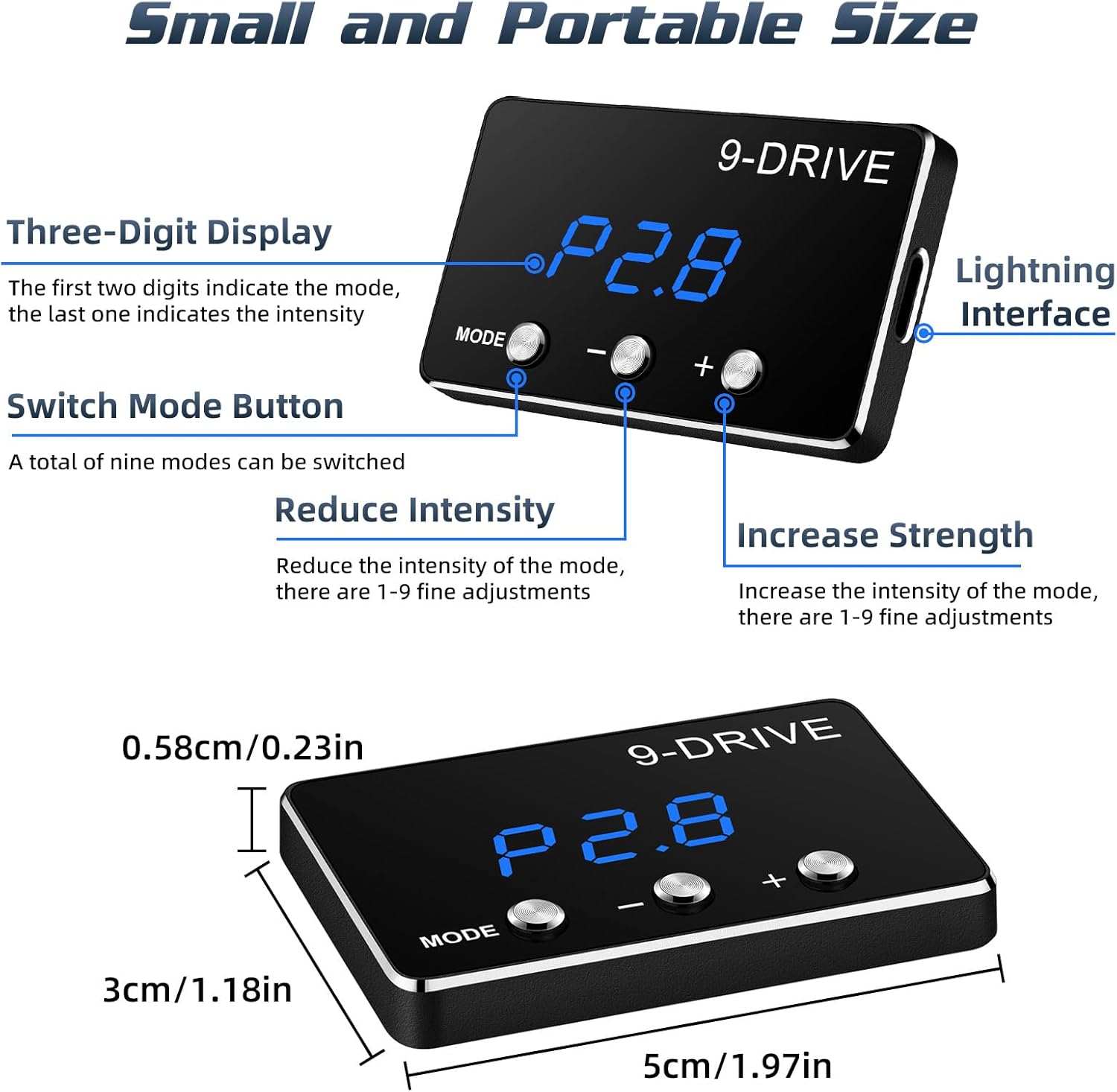
- Clear Display & Easy Adjustment: Equipped with a three-digit LED display to show the current mode and intensity level. Three buttons facilitate easy mode selection and intensity adjustment.
- Mažas ir nešiojamas dizainas: Compact size (approximately 5cm x 3cm x 0.58cm) for discreet installation and minimal intrusion into the vehicle's interior.
- „Plug-and-Play“ diegimas: Designed for straightforward installation without cutting wires or complex modifications.
- Atminties funkcija: Retains the last selected driving mode and intensity level after the vehicle is turned off.
3. Suderinamumas
This throttle response controller is compatible with specific Toyota models. Please verify your vehicle's make, model, year, and engine type against the table below to ensure compatibility.

Svarbi pastaba:
- This electronic throttle controller is only applicable to vehicles equipped with an electronic throttle.
- It does not support vehicles with mechanical throttles.
- Always ensure your car has an electronic throttle with a compatible plug before installation.
4. Pakuotės turinys
Atidarius pakuotę, įsitikinkite, kad yra visi šie komponentai:
- Throttle Response Controller Display Screen
- Main Control Unit (Adapter)
- Jungiamasis kabelis
- Zip Ties (for securing cables)
- Vartotojo vadovas (šis dokumentas)

5. Diegimo vadovas
Follow these steps carefully for a successful installation. Ensure your vehicle's ignition is OFF before beginning.
- Locate the Accelerator Pedal: Identify the electronic accelerator pedal assembly in your vehicle.
- Disconnect the Pedal Interface: Carefully unplug the wiring harness from the accelerator pedal.
- Prijunkite valdiklį: Connect the MAIMEIMI throttle controller's wiring harness inline with the accelerator pedal interface. One end connects to the vehicle's pedal, and the other to the disconnected harness. Ensure a secure fit.
- Mount the Display Unit: Route the cable for the display unit to a convenient location on your dashboard. Use the provided adhesive or zip ties to secure the display unit.
- Saugus laidas: Use the provided zip ties to neatly secure any loose wiring, preventing interference with pedal operation or other vehicle components.

Atsargumo priemonės:
All adjustments to the throttle controller must be made when the vehicle is safely parked and not in motion. Never attempt to adjust settings while driving.
6. Naudojimo instrukcijos
The MAIMEIMI MA-FLC-821 features 9 distinct driving modes, each with 9 adjustable intensity levels (1-9). The display shows the mode (e.g., P1, P2, SSS, EC, NOR) and the intensity level (e.g., .8). The first two digits indicate the mode, and the last digit indicates the intensity.
Režimo pasirinkimas:
- Paspauskite REŽIMAS button to cycle through the available driving modes.
- The display will show the current mode (e.g., P1, P2, SSS, EC, NOR).
Intensyvumo reguliavimas:
- Pasirinkę režimą, naudokite + button to increase the intensity level (1-9).
- Naudokite - button to decrease the intensity level (1-9).
- Higher intensity levels provide a more aggressive throttle response.
Driving Modes Explained:

- NOR (Normal Mode): This is the original factory throttle setting. The controller is active but does not modify the signal.
- P1 Comfort Mode (Automatic/Manual): Provides a smoother, more relaxed throttle response, suitable for daily driving and city conditions.
- P2 Sport Mode (Automatic/Manual): Offers a more dynamic and responsive throttle, ideal for spirited driving and improved acceleration.
- P3 Racing Mode (Automatic/Manual): Delivers the most aggressive throttle response for maximum acceleration and performance.
- EC Fuel-Saving Mode (Automatic/Manual): Optimizes throttle response for improved fuel efficiency, reducing aggressive acceleration.
7. Priežiūra
The MAIMEIMI MA-FLC-821 Throttle Response Controller is designed for durability and requires minimal maintenance. To ensure its longevity and optimal performance:
- Laikykite įrenginį švarų, be dulkių ir drėgmės. Valymui naudokite minkštą, sausą šluostę.
- Stenkitės ilgą laiką nelaikyti prietaiso ekstremaliose temperatūrose arba tiesioginiuose saulės spinduliuose.
- Ensure all connections remain secure. Periodically check the wiring harness for any signs of wear or damage.
- Nebandykite atidaryti ar modifikuoti įrenginio, nes tai panaikins garantiją ir galite jį sugadinti.
8. Problemų sprendimas
If you encounter any issues with your MAIMEIMI MA-FLC-821 Throttle Response Controller, please refer to the following troubleshooting tips:
Be maitinimo / ekranas išjungtas:
- Check all connections to ensure they are securely plugged in.
- Patikrinkite, ar įjungtas automobilio uždegimas.
- Ensure the connecting cable is not damaged.
Droselio atsakas nepakito:
- Confirm that the device is powered on and displaying a mode other than 'NOR'.
- Check the intensity level; increase it using the '+' button.
- Atkūrimo procedūra: With the vehicle ignition ON (engine OFF), press and hold the MODE button until a specific code (e.g., '800') appears. Adjust to '800' if necessary. Fully depress and release the accelerator pedal. Then, press and hold the MODE button again until the main screen reappears. Start the vehicle.
- Ensure your vehicle is compatible with the device (refer to Section 3).
Check Engine Light or Error Codes:
- Immediately disconnect the throttle controller and reconnect the factory accelerator pedal harness.
- Start the vehicle and check if the error codes persist. If they do, consult a qualified mechanic.
- If the codes clear after removing the device, the controller may be incompatible with your specific vehicle's ECU or may be faulty. Contact customer support.
Pertraukiamas funkcionalumas:
- Check for loose connections at both the pedal and the controller.
- Ensure the wiring is not pinched or damaged.
- Consider environmental factors like extreme heat or cold, though the device is designed to be robust.
If these steps do not resolve the issue, please contact MAIMEIMI customer support for further assistance.
9. Specifikacijos
| Specifikacija | Detalė |
|---|---|
| Prekės ženklas | MAIMEIMI |
| Modelio numeris | MA-FLC-821 |
| Prekės svoris | 4.6 uncijos |
| Pakuotės matmenys | 6.26 x 5.79 x 2.13 colio |
| Vairavimo režimai | 9 (each with 9 intensity levels) |
| Ekranas | 3 skaitmenų LED |
| Suderinamumas | Electronic throttle vehicles (specific Toyota models) |
10. Informacija apie garantiją
MAIMEIMI products are manufactured to high-quality standards. This product comes with a limited warranty against defects in materials and workmanship under normal use. The warranty period typically covers 12 months from the date of purchase. Please retain your proof of purchase for warranty claims.
Garantija netaikoma:
- Damage caused by improper installation or misuse.
- Žala, atsiradusi dėl neteisėto remonto ar modifikacijų.
- Normalus nusidėvėjimas.
- Damage due to accidents or external causes.
For detailed warranty terms and conditions, please refer to the official MAIMEIMI websvetainėje arba susisiekite su klientų aptarnavimo tarnyba.
11. Pagalba klientams
If you have any questions, require technical assistance, or need to make a warranty claim, please contact MAIMEIMI customer support through the following channels:
- El. paštas: [Insert Customer Support Email Here]
- Websvetainė: MAIMEIMI Official Store on Amazon
- Telefonas: [Insert Customer Support Phone Number Here]
Please provide your product model number (MA-FLC-821) and proof of purchase when contacting support to expedite the process.