
Speedlink SL-680016-BK
TAUROX Gaming Mouse User Manual
Modelis: SL-680016-BK | Gamintojas: Speedlink
1. Įvadas
The TAUROX gaming mouse is designed to provide precise and responsive control for an enhanced gaming experience. With an impressive sensor resolution of up to 7,200 DPI and customizable features, it adapts to various gaming styles.
Pagrindinės savybės
- High-precision sensor with up to 7,200 DPI for accurate tracking.
- Two integrated DPI switches for on-the-fly sensitivity adjustment.
- 5 configurable buttons for personalized control and macros.
- Lightweight design (135 grams with cable) for comfortable extended use.
- Customizable RGB lighting to personalize your gaming setup.
- Durable fabric-covered cable with 1.8-meter length for flexibility.
- USB-A connection for easy and universal compatibility.

Image: The TAUROX Gaming Mouse showcasing its multi-coloured LED lighting and ergonomic design.
2. Pakuotės turinys
Prašome įsitikinti, kad pakuotėje yra visi daiktai:
- TAUROX Gaming Mouse
- Configuration Software (downloadable or included)

Vaizdas: priekis view of the TAUROX Gaming Mouse retail packaging, highlighting key features.
3. Sąrankos vadovas
3.1 Pelės prijungimas
Connect the USB-A connector of the TAUROX Gaming Mouse to an available USB port on your computer. The mouse is plug-and-play for basic functionality.
3.2 Programinės įrangos diegimas
For full utilization of all functions, including macro programming and advanced customization, the installation of the dedicated configuration software is necessary. This software is typically provided via a download link or included on a small disc. Refer to the product packaging or Speedlink's official website for the download location.
Image: Side of the product box indicating the need for configuration software.
4. Operating Your TAUROX Gaming Mouse
4.1 DPI reguliavimas
The TAUROX Gaming Mouse features two integrated DPI switches located behind the scroll wheel. Use these buttons to cycle through different sensitivity levels (up to 7,200 DPI) to match your gaming style or task requirements. The current DPI setting may be indicated by the mouse's LED lighting color, depending on software configuration.

Image: Screenshot of the Speedlink software's 'Performance' tab, showing DPI control settings.
4.2 programuojami mygtukai
The mouse is equipped with 5 configurable buttons. These buttons can be assigned various functions, including keyboard macros, multimedia controls, or specific in-game actions, using the configuration software. Launch the software and navigate to the 'Button' or 'Macro' section to customize these settings.
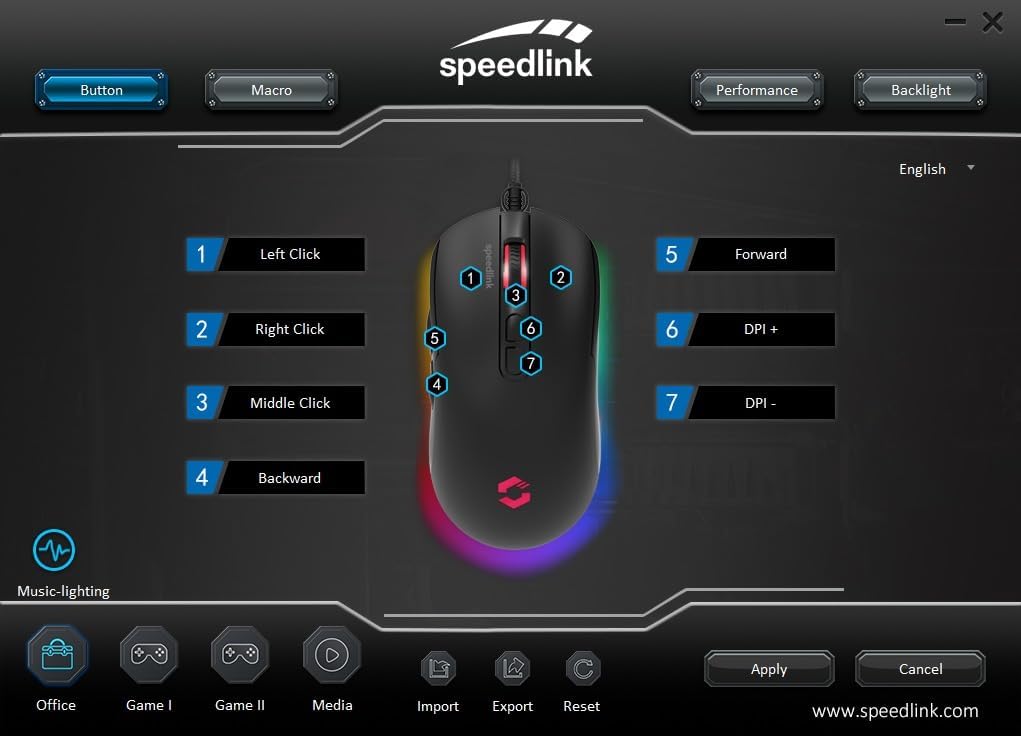
Image: Screenshot of the Speedlink software's 'Button' tab, illustrating the mapping of the mouse's 7 buttons.
4.3 RGB apšvietimas
The TAUROX Gaming Mouse features multi-coloured RGB lighting that can be customized through the configuration software. You can select from various lighting effects, colors, and brightness levels to match your personal preference or gaming setup. Access the 'Backlight' section in the software to adjust these settings.

Image: Screenshot of the Speedlink software's 'Backlight' tab, showing options for customizing the mouse's RGB lighting effects.
5. Priežiūra
To ensure the longevity and optimal performance of your TAUROX Gaming Mouse, follow these maintenance guidelines:
- Valymas: Pelės paviršių valykite minkšta, sausa šluoste. Įsisenėjusius nešvarumus galima lengvai nuvalyti.amp cloth can be used, but ensure no liquid enters the mouse. Avoid abrasive cleaners.
- Kabelio priežiūra: Avoid sharp bends, kinks, or excessive pulling on the cable. Store the cable neatly when not in use to prevent damage.
- Jutiklio priežiūra: Kad sekimas būtų tikslus, laikykite pelės apačioje esantį optinį jutiklį švarų, be dulkių ar šiukšlių.
6. Problemų sprendimas
If you encounter issues with your TAUROX Gaming Mouse, consider the following:
- Pelė nereaguoja: Ensure the USB cable is securely connected to your computer. Try plugging the mouse into a different USB port.
- Netikslus sekimas: Clean the optical sensor on the bottom of the mouse. Ensure you are using the mouse on a suitable surface (e.g., a mouse pad).
- Programinės įrangos problemos: If the configuration software is not functioning correctly, try reinstalling it. Ensure your operating system is up to date.
- Neveikiantys mygtukai: Check the button assignments in the configuration software to ensure they are correctly configured.
- Neveikia apšvietimas: Verify the RGB lighting settings in the configuration software.
For persistent issues, refer to the support section on the Speedlink websvetainę.
7. Techninės specifikacijos
| Funkcija | Specifikacija |
|---|---|
| Gaminio matmenys | 4.92 x 2.48 x 0.04 inches (125x63x40 mm LxWxH) |
| Prekės svoris | 5.7 ounces (135 grams with cable) |
| Modelio numeris | SL-680016-BK |
| Prekės ženklas | Speedlink |
| Spalva | Juoda |
| Ryšio technologija | USB-A (laidinis) |
| Ypatingos savybės | Programmable Buttons, Multi-coloured LED Lighting |
| Judesio aptikimo technologija | Optinis |
| DPI raiška | Iki 7,200 XNUMX DPI (reguliuojama) |
| Kabelio ilgis | 1.8 metrų |
| Gamintojas | Speedlink |
8. Safety Instructions and Compliance
8.1 Svarbios saugos instrukcijos
Please note that the failure to observe these instructions can cause product damage, explosion, fire and/or electric shock!
- Prietaisus naudokite tik taip, kaip nurodyta vartotojo vadove. Neatidarykite ir netaisykite jų.
- Nelaikykite prietaisų nuo skysčių, karščio ar šalčio.
- Nenaudokite reklamoje esančių įrenginiųamp aplinką. Nuvalykite prietaisą sausa šluoste.
- Prietaisus ir visas laisvas dalis laikykite toliau nuo vaikų, naminių gyvūnėlių ir pašalinių asmenų.
- Only use the devices with the appropriate provided accessories.
- Disconnect cables from the devices if they will not be used for a long time. When disconnecting by cables, don't pull on the cord but on the plug.
- Don't use the cables in any way other than mentioned in the user guide. Don't bend, cut, extend, knot or step on them.
- Don't insert any foreign objects into the openings of the device.
- Jei prietaisai kokiu nors būdu pažeisti arba per daug įkaista, nedelsdami nustokite juos naudoti.
- Take caution when using devices that emit radio signals if you have a pacemaker or are dependent on other sensitive electronic aids.
Saugos instrukcijos kitomis kalbomis: www.speedlink.com
8.2 Warning Symbols and Markings
Extended use of input devices may cause health problems such as discomfort or pain. As such, take regular breaks and consult a doctor if problems persist.
8.3 FCC pareiškimas
Ši įranga buvo išbandyta ir nustatyta, kad ji atitinka B klasės skaitmeninio įrenginio apribojimus pagal FCC taisyklių 15 dalį. Šios ribos sukurtos siekiant užtikrinti pagrįstą apsaugą nuo žalingų trukdžių įrengiant gyvenamosiose patalpose. Ši įranga generuoja, naudoja ir gali skleisti radijo dažnių energiją ir, jei ji sumontuota ir naudojama ne pagal instrukcijas, gali sukelti žalingų radijo ryšio trikdžių. Tačiau nėra garantijos, kad tam tikrame įrengime nebus trikdžių. Jei ši įranga sukelia žalingus radijo ar televizijos signalų priėmimo trikdžius, kuriuos galima nustatyti išjungiant ir įjungiant įrangą, naudotojas raginamas pabandyti ištaisyti trikdžius viena ar keliomis iš šių priemonių:
- Perkelkite arba perkelkite priėmimo anteną.
- Padidinkite atstumą tarp įrangos ir imtuvo.
- Prijunkite įrangą prie kitos grandinės, nei imtuvas, lizdo.
- Dėl pagalbos kreipkitės į pardavėją arba patyrusį radijo/televizijos techniką.
Šis įrenginys atitinka FCC taisyklių 15 dalį. Naudojimui taikomos šios dvi sąlygos: (1) šis įrenginys negali sukelti žalingų trukdžių ir (2) šis įrenginys turi priimti bet kokius gaunamus trikdžius, įskaitant trikdžius, kurie gali sukelti nepageidaujamą veikimą.
Pastaba: Modifications to this product will void the user's authority to operate this equipment.
8.4 Conformity Notice
IMPORTUOTOJAS / GAMINTOJAS: Zocherl Media GmbH, Im Dorf 5, 29303 Hemslingen, GERMANY
Telefonas: +49 4267 9341 0
PRODUKTO INFORMACIJA:
Tipo Nr.: SL-680016-BK
Produkto aprašymas: TAUROX žaidimų pelė, juoda
GAMINIS ATITINKA ŠIAS DIREKTYVAS:
EMS: 2014/30/ES
RoHS: 2011/65/ES
For a full declaration of conformity, the latest user guide, FAQ or further information, please visit: www.speedlink.com
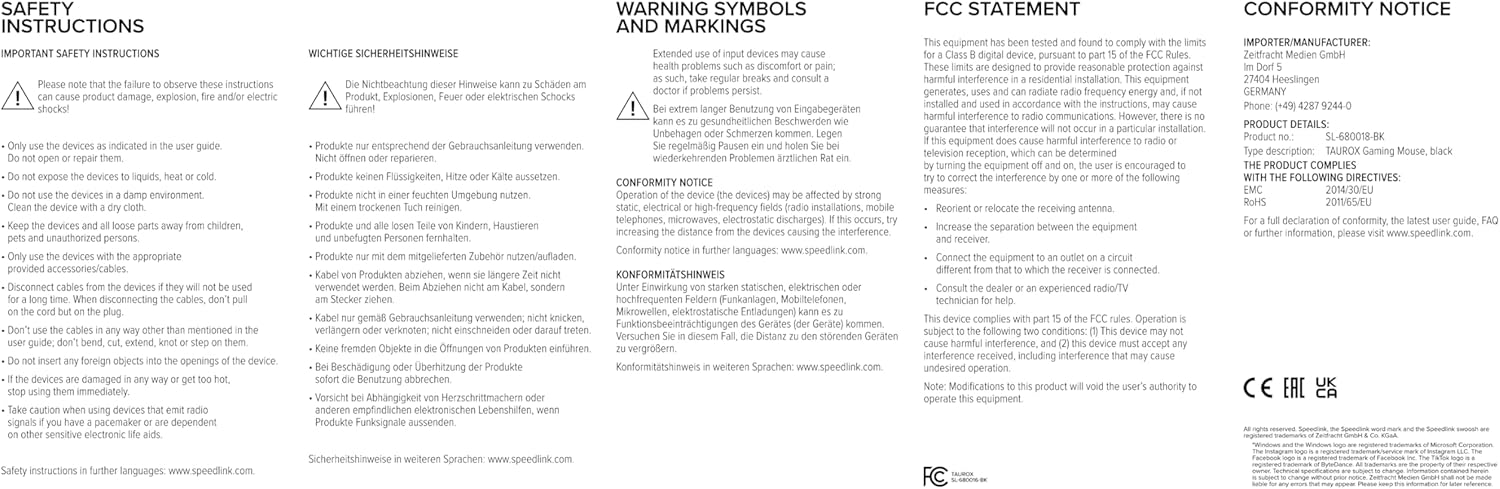
Image: Product packaging displaying various certifications and multilingual product names.
9. Garantija ir palaikymas
For warranty information, technical support, frequently asked questions (FAQs), and the latest user guides, please visit the official Speedlink websvetainė:
Ask a question about this manual
Ask about setup, troubleshooting, compatibility, parts, safety, or missing instructions. Manuals+ will review the question and use this page’s manual context to help answer it.