
Įvadas
Thank you for choosing the Diyeeni Portable Vintage Radio Speaker. This device combines a classic retro design with modern functionality, offering AM/FM/SW radio reception, Bluetooth connectivity, and multiple playback modes. Its portable and lightweight design makes it ideal for both indoor and outdoor use. Please read this manual carefully to ensure proper operation and to maximize your enjoyment of this product.
Saugos informacija
- Saugokite įrenginį nuo lietaus, drėgmės ar ekstremalių temperatūrų.
- Stenkitės, kad prietaisas nenumestų ar nepatirtų stipraus smūgio.
- Neardykite ir nebandykite taisyti įrenginio patys. Visus techninės priežiūros darbus patikėkite kvalifikuotiems specialistams.
- Saugokite įrenginį nuo stiprių magnetinių laukų.
- Use only the provided charging cable and battery, or compatible replacements.
- Įrenginio veikimo metu užtikrinkite tinkamą vėdinimą.
Pakuotės turinys
Patikrinkite pakuotę, ar joje yra šie daiktai:
- 1 x Portable Vintage Radio Speaker (Model RXBT628)
- 1 x Matching Rechargeable Battery
- 1x USB įkrovimo laidas
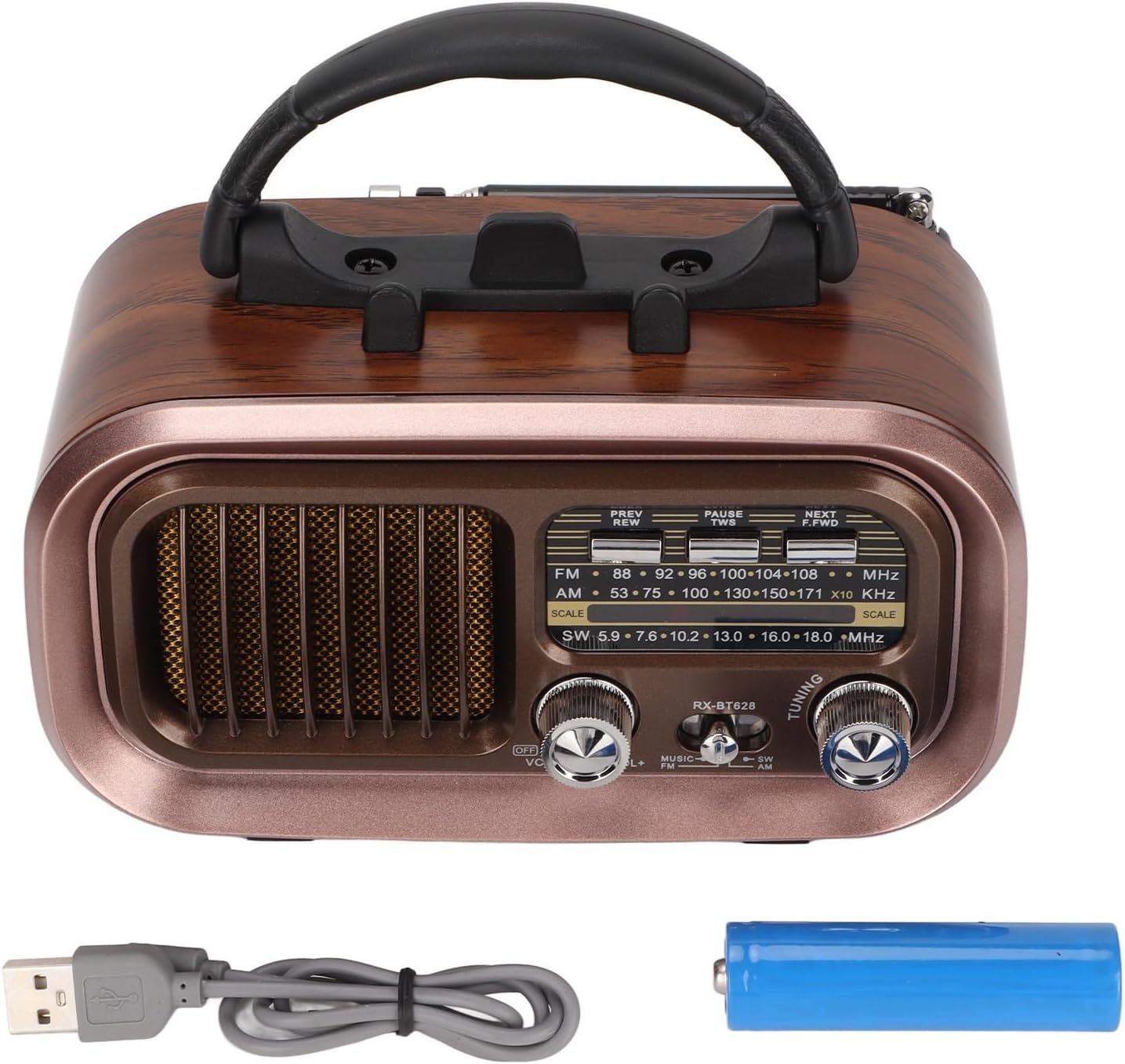
Image: The Diyeeni Portable Vintage Radio Speaker shown with its included rechargeable battery and USB charging cable.
Produkto išdėstymas ir valdikliai

Vaizdas: priekis view of the radio speaker, highlighting the main controls and display area.
- Antena: Ištraukiama teleskopinė antena geresniam radijo signalui.
- Rankena: Integruota rankena lengvam nešiojimui.
- PREV/REW Button: Short press for previous track (Bluetooth/USB/TF), long press for rewind.
- PAUSE/TWS Button: Play/Pause (Bluetooth/USB/TF). Long press for TWS pairing (Bluetooth mode).
- NEXT/F.FWD Button: Short press for next track (Bluetooth/USB/TF), long press for fast forward.
- Dažnio ekranas: Analog display for radio frequencies.
- OFF/VOL Knob: Power On/Off and Volume control. Rotate to adjust volume.
- MUSIC/SW/AM/FM Switch: Selects between Bluetooth/USB/TF (MUSIC) mode and radio bands (SW, AM, FM).
- DERINIMO rankenėlė: Rotate to tune into radio stations.

Image: Side panel of the radio speaker, showing the USB port, TF card slot, power indicator, charge indicator, and DC 5V input port.
- USB prievadas: USB atmintinės įrašų atkūrimui.
- TF kortelės lizdas: Skirta TF (Micro SD) kortelių atkūrimui.
- MAITINIMO indikatorius: Užsidega, kai įrenginys įjungtas.
- ĮKROVIMO indikatorius: Šviečia įkrovimo metu.
- DC 5V IN Port: Mikro USB prievadas vidinei baterijai įkrauti.
Sąranka
1. Akumuliatoriaus įdėjimas
The radio speaker uses a rechargeable battery. Before first use, ensure the battery is correctly installed.
- Suraskite akumuliatoriaus skyrių įrenginio gale.
- Atidarykite akumuliatoriaus skyriaus dangtelį.
- Insert the provided rechargeable battery, ensuring the polarity (+/-) matches the diagram inside the compartment.
- Saugiai uždarykite akumuliatoriaus skyriaus dangtelį.

Vaizdas: Galinis view of the radio speaker, showing the battery compartment cover and specifications label.
2. Akumuliatoriaus įkrovimas
Before initial use, fully charge the battery for optimal performance.
- Connect the small end of the USB charging cable to the DC 5V IN port on the side of the radio.
- Connect the larger end of the USB charging cable to a standard USB power adapter (not included) or a computer USB port.
- The CHARGE indicator light will illuminate, indicating that the battery is charging.
- Once fully charged, the CHARGE indicator light may change color or turn off (refer to specific model behavior). Disconnect the charging cable.
Naudojimo instrukcijos
1. Įjungimas / išjungimas ir garsumo valdymas
- To power on the device, rotate the OFF/VOL knob clockwise until you hear a click and the POWER indicator lights up.
- Toliau sukite OFF/VOL knob clockwise to increase the volume, and counter-clockwise to decrease it.
- Norėdami išjungti, pasukite OFF/VOL knob counter-clockwise until you hear a click and the POWER indicator turns off.
2. Režimo pasirinkimas
Naudokite MUSIC/SW/AM/FM switch to select the desired operating mode:
- FM: FM radijo priėmimui.
- ESU: For AM radio reception.
- SW: For Shortwave radio reception.
- MUZIKA: For Bluetooth, USB, or TF card playback. The device will automatically detect and switch to the available source (Bluetooth, then USB, then TF).
3. Radijo veikimas (AM/FM/SW)
- Extend the telescopic antenna for better reception, especially for FM and SW bands.
- Nustatykite MUSIC/SW/AM/FM switch to the desired radio band (FM, AM, or SW).
- Lėtai pasukite TUNINGAS knob to scan for radio stations. The frequency display will indicate the approximate frequency.
- Adjust the antenna position for optimal signal clarity.
4. „Bluetooth“ poravimas
- Nustatykite MUSIC/SW/AM/FM pereiti prie MUZIKA mode. The device will enter Bluetooth pairing mode, indicated by an audible prompt.
- Mobiliajame įrenginyje (išmaniajame telefone, planšetiniame kompiuteryje ir kt.) įjunkite „Bluetooth“ ir ieškokite galimų įrenginių.
- Select "RXBT628" (or similar name) from the list of found devices to pair.
- Once paired, you will hear a confirmation sound, and you can now play audio from your device through the speaker.
- Naudokite PREV/REW, PAUSE / TWS, ir KITAS/F.FWD mygtukai, skirti valdyti atkūrimą.
5. USB/TF kortelių atkūrimas
- Ensure your USB flash drive or TF (Micro SD) card contains audio files MP3, WMA arba WAV formatu.
- Nustatykite MUSIC/SW/AM/FM pereiti prie MUZIKA režimu.
- Insert the USB flash drive into the USB port or the TF card into the TF card slot. The device will automatically detect and begin playing audio.
- Naudokite PREV/REW, PAUSE / TWS, ir KITAS/F.FWD mygtukai, skirti valdyti atkūrimą.
Priežiūra
- Valymas: Prietaiso išorę nuvalykite minkštu, sausu skudurėliu. Nenaudokite abrazyvinių valiklių ar tirpiklių.
- Saugykla: Kai prietaisas ilgą laiką nenaudojamas, laikykite jį vėsioje, sausoje vietoje, toliau nuo tiesioginių saulės spindulių ir ekstremalių temperatūrų.
- Akumuliatoriaus priežiūra: If the device will not be used for a long time, it is recommended to charge the battery periodically to maintain its lifespan.
Trikčių šalinimas
| Problema | Galima priežastis | Sprendimas |
|---|---|---|
| Nėra galios | Baterija išsikrovusi arba netinkamai įdėta. | Įkraukite bateriją. Įsitikinkite, kad baterija įdėta teisingu poliškumu. |
| Prastas radijo priėmimas | Antena neištiesta, silpnas signalas arba trukdžiai. | Fully extend the telescopic antenna. Adjust the antenna position. Try moving to a different location. |
| „Bluetooth“ nesusieja | Device not in pairing mode, or too far from the speaker. | Ensure the speaker is in MUSIC mode. Make sure Bluetooth is enabled on your mobile device. Keep devices within 10 meters (33 feet). |
| USB/TF kortelė neveikia | Neteisinga file format, card not inserted properly, or damaged card. | Užtikrinkite garsą files are MP3, WMA, or WAV. Reinsert the USB drive/TF card. Try a different USB drive/TF card. |
| Nėra garso | Volume too low, or device muted. | Increase the volume using the OFF/VOL knob. Check if the connected Bluetooth device's volume is also up. |
Specifikacijos
| Funkcija | Specifikacija |
|---|---|
| Modelio numeris | RXBT628 |
| Prekės ženklas | Diyeeni |
| Spalva | Black (Retro Style) |
| Ryšio technologija | Bluetooth |
| Derintuvo technologija | AM, FM, SW (3-Band) |
| Maitinimo šaltinis | Maitinamas baterijomis (įkraunamas) |
| Medžiaga | Plastikiniai |
| Techninės įrangos sąsaja | USB |
| Suderinami įrenginiai | Išmanusis telefonas, planšetinis kompiuteris, nešiojamas kompiuteris |
| Atkūrimo režimai | Bluetooth, USB, TF Card (MP3, WMA, WAV formats) |
| Ypatingos savybės | Lightweight, Portable, External Antenna |
Garantija ir palaikymas
This product comes with a standard manufacturer's warranty. For specific warranty details, please refer to the documentation provided with your purchase or contact Diyeeni customer support. If you encounter any issues not covered in this manual, please reach out to the retailer or manufacturer for assistance.
For further support, please visit the official Diyeeni store or contact their customer service channels.