
1. Įvadas
The NUFEBS Mini 1080P Security Camera Q26 is a compact, plug-in wired security camera designed for indoor use. It offers 1080p high-definition video, 2.4G WiFi connectivity, night vision capabilities, two-way audio communication, and motion detection with tracking. This manual provides detailed instructions for setting up, operating, and maintaining your camera to ensure optimal performance and home security.

Image 1.1: The NUFEBS Mini 1080P Security Camera Q26, a compact device for home monitoring.
2. Pakuotės turinys
Patikrinkite pakuotę, ar joje yra šie daiktai:
- NUFEBS Mini 1080P Security Camera (Q26)
- Instrukcijų vadovas
- Maitinimo įkroviklis
- Magnetinė bazė
3. Produkto ypatybės
The NUFEBS Q26 camera offers a range of features to enhance your home security:
- 1080p HD raiška: Pateikiamas aiškus ir išsamus vaizdo įrašastage.
- 2.4G WiFi ryšys: Easy connection to your home network for remote access.
- Naktinis matymas: Equipped with color night vision for monitoring in low-light conditions.
- Dvipusis garsas: Leidžia bendrauti realiuoju laiku per kamerą.
- Judesio aptikimas ir sekimas: Automatiškai aptinka judesį, seka objektus ir siunčia įspėjimus.
- Vietinė ir debesies saugykla: Supports Micro SD cards (16-128GB) and cloud storage services for recording playback.
- IP65 atsparumo vandeniui įvertinimas: While primarily designed for indoor use, the IP65 rating provides protection against dust and low-pressure water jets, enhancing durability.
- Magnetinė bazė: Offers flexible mounting options on various surfaces.
- Kompaktiškas dizainas: Small footprint (4x4x2 CM) allows for discreet placement.
- „Amazon Alexa“ suderinamumas: Integrates with Amazon Alexa for smart home control.

Image 3.1: Key features of the NUFEBS Q26 security camera.

3.2 pav.: pvz.ample of 1080P HD video quality from the camera.

Image 3.3: The camera's IP65 waterproof design for enhanced durability.
4. Sąrankos vadovas
4.1. Programos diegimas
To control your NUFEBS Q26 camera, download the 'Tris Home' application:
- Ieškokite 'Tris Home' in your mobile device's app store (iOS App Store or Google Play Store).
- Atsisiųskite ir įdiekite programą.
- Registruokitės naujai paskyrai arba prisijunkite, jei jau turite.
4.2. Kameros nustatymas iš naujo
Before connecting the camera for the first time, or if you are switching to a new mobile device or WiFi network, it is recommended to reset the camera:
- Locate the reset button on the camera (refer to the camera's physical design for exact placement).
- Press and hold the reset button for approximately 5-10 seconds until you hear a prompt or see an indicator light change.
4.3. Connect to 2.4G WiFi
The NUFEBS Q26 camera operates on a 2.4G WiFi network. Follow these steps to connect:
- Ensure your mobile phone is connected to your home's 2.4G WiFi network.
- Open the 'Tris Home' app and select the option to 'Add Device' or 'Add Camera'.
- Follow the on-screen instructions in the app, which typically involve scanning a QR code displayed on your phone with the camera lens.
- Once connected, the camera will indicate successful pairing, and you can begin live viewing.
4.4. Montavimo parinktys
The camera comes with a magnetic base, offering versatile placement:
- Magnetinis paviršius: Attach the camera directly to any metallic surface using its magnetic base.
- Tvirtinimas prie sienos / lubų: The magnetic base can also be affixed to a wall or ceiling using screws (not included) for a more permanent installation.
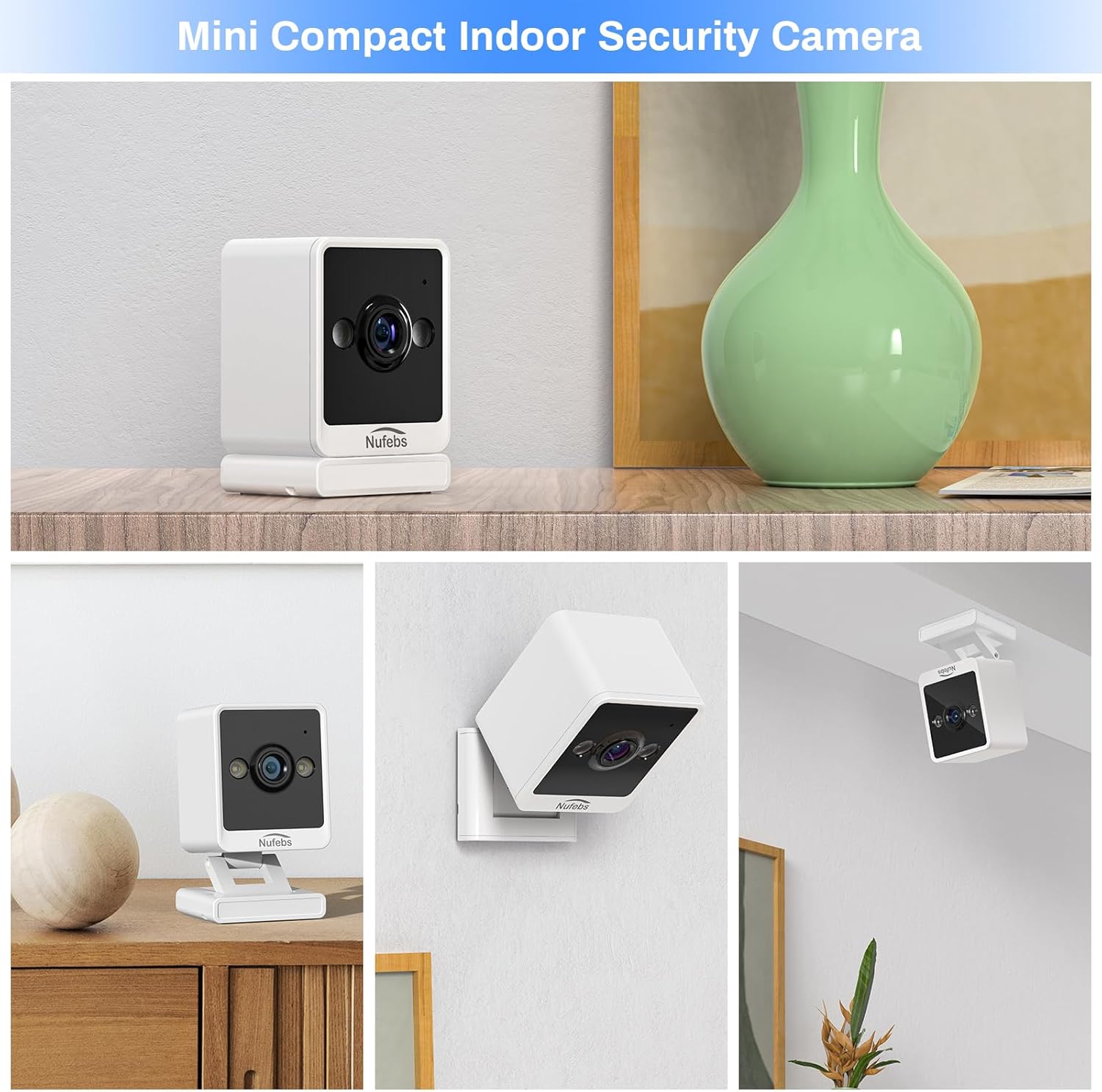
4.1 pav.: pvz.amples of flexible mounting options for the NUFEBS Q26 camera.

Image 4.2: The camera's magnetic base allows for easy attachment to metallic surfaces.
5. Naudojimo instrukcijos
5.1. Gyvai View
Once connected, open the 'Tris Home' app to access the live video feed from your camera. You can monitor your space in real-time from anywhere.

Image 5.1: Remote live preview of the camera feed on a mobile device.
5.2. Dvipusis garsas
The camera features a built-in microphone and speaker. In the 'Tris Home' app, tap the microphone icon to speak through the camera and the speaker icon to listen to audio from the camera's location.
5.3. Judesio aptikimas ir įspėjimai
Enable motion detection in the app settings to receive instant notifications on your phone when movement is detected. The camera can also activate a spotlight and an alarm sound to deter intruders.

Image 5.2: The camera's intelligent alarm system with motion detection and spotlight.
5.4. Įrašymas ir saugojimas
The camera supports two primary storage methods for recorded footage:
- „Micro SD“ kortelė: Insert a Micro SD card (16GB to 128GB, not included) into the camera's designated slot for local storage. Recordings are typically triggered by motion events.
- „Cloud Service“: Subscribe to the optional cloud storage service through the 'Tris Home' app for secure, off-site storage of your video recordings.

Image 5.3: Continuous recording and storage options via SD card and cloud service.
5.5. Naktinis matymas
The NUFEBS Q26 camera automatically switches to color night vision in low-light conditions, providing clear surveillance around the clock.

Image 5.4: The camera's spotlight feature for enhanced night vision.
5.6. Smart Home Integration (Amazon Alexa)
The camera is compatible with Amazon Alexa. You can integrate it into your smart home system to view tiesioginius transliacijas suderinamuose įrenginiuose su „Alexa“ naudojant balso komandas.

Image 5.5: Integration with Amazon Alexa for smart home control.
6. Priežiūra
6.1. Valymas
To maintain optimal image quality, regularly clean the camera lens and body:
- Gently wipe the lens with a soft, lint-free cloth. Avoid abrasive materials.
- Fotoaparato korpusą valykite sausa arba šiek tiek drėgna šluosteamp cloth. Do not use harsh chemicals or liquid cleaners directly on the camera.
6.2. Firmware atnaujinimai
Periodically check the 'Tris Home' app for available firmware updates. Keeping your camera's firmware updated ensures access to the latest features, security enhancements, and performance improvements.
7. Problemų sprendimas
If you encounter issues with your NUFEBS Q26 camera, refer to the following common solutions:
- Kamera neprisijungia prie „Wi-Fi“:
- Ensure your router is broadcasting a 2.4G WiFi signal. The camera does not support 5G WiFi.
- Verify that your mobile phone is connected to the same 2.4G WiFi network during setup.
- Dar kartą patikrinkite programėlėje įvestą „Wi-Fi“ slaptažodį.
- Try resetting the camera and repeating the connection process.
- Ensure the camera is within range of your WiFi router.
- Prasta vaizdo kokybė:
- Patikrinkite interneto ryšio greitį. Optimaliam transliavimui reikalingas stabilus ir greitas ryšys.
- Nuvalykite fotoaparato objektyvą, kad pašalintumėte dulkes ar dėmes.
- Ensure there are no obstructions directly in front of the camera lens.
- Nėra judesio aptikimo įspėjimų:
- Confirm that motion detection is enabled in the 'Tris Home' app settings.
- Programėlėje koreguokite judesio aptikimo jautrumo nustatymus.
- Užtikrinkite kameros matymo lauką view covers the area you wish to monitor for motion.
- Kameros perkaitimas:
- Ensure the camera has adequate ventilation and is not placed in an enclosed space or direct sunlight.
- If the camera feels excessively warm, disconnect it from power and allow it to cool down. If the issue persists, contact customer support.
8. Specifikacijos
| Prekės ženklas | NUFEBS |
| Modelis | Q26 |
| Vaizdo įrašymo raiška | 1080p |
| Ryšio technologija | Wireless (Wi-Fi 2.4G) |
| Maitinimo šaltinis | Su laidu elektra |
| Naudojimas viduje / lauke | Indoor (IP65 rated for durability) |
| Ypatinga funkcija | Easy to Install, Night Vision, 2-Way Talk, Motion Tracking |
| Saugojimo palaikymas | 16-128GB Micro SD card, Cloud Service |
| Išmaniųjų namų suderinamumas | Amazon Alexa |
| Prekės matmenys (I x P x A) | 2.7 x 2.4 x 2.1 inches (approx. 4 x 4 x 2 CM) |
| Prekės svoris | 5.9 uncijos |
9. Saugos informacija
- Use only the provided power adapter to prevent damage or fire.
- Do not expose the camera to extreme temperatures, humidity, or direct water immersion.
- Laikykite fotoaparatą ir jo priedus vaikams ir naminiams gyvūnams nepasiekiamoje vietoje.
- Avoid placing the camera near heat sources or in areas with poor ventilation.
- Nebandykite ardyti ar modifikuoti fotoaparato, nes tai panaikins garantiją ir galite jį sugadinti.
10. Garantija ir palaikymas
For warranty information, technical support, or any questions not covered in this manual, please refer to the contact information provided with your purchase or visit the official NUFEBS websvetainėje. Prašome išsaugoti pirkimo įrodymą garantiniams reikalavimams.
10.1 vaizdo įrašas: metimas per sekundęview video demonstrating the features and functionality of the NUFEBS Mini 1080P Security Camera Q26.