
1. Įvadas
Thank you for choosing the STRICH SEP-80 88-Key Digital Piano. This portable digital piano is designed for beginners and experienced musicians alike, offering a full-size, touch-sensitive keyboard with a wide range of features. Please read this manual carefully to ensure proper setup, operation, and maintenance of your instrument.

Figure 1: STRICH SEP-80 88-Key Digital Piano with included accessories.
2. Kas yra dėžutėje
Your STRICH SEP-80 package includes the following items:
- STRICH SEP-80 88-Key Digital Piano
- X formos klaviatūros stovas
- Sustain pedalas
- Natų stovas
- USB maitinimo adapteris
- Instrukcijų vadovas

Figure 2: All components included in the SEP-80 package.
3. Sąranka
3.1 Assembling the X-Stand
- Unfold the X-shaped keyboard stand.
- Adjust the height to your preferred playing position using the locking mechanism. Ensure the stand is stable before placing the piano.

Figure 3: The X-shaped keyboard stand.
3.2 Placing the Digital Piano on the Stand
Carefully place the SEP-80 digital piano onto the assembled X-stand. Ensure it sits securely on the stand's arms.
3.3 Priedų prijungimas
- Sustain pedalas: Connect the sustain pedal cable to the 'SUS' jack on the rear panel of the piano.
- Natų stovas: Insert the sheet music stand into the designated slots on the top panel of the piano.
- Galia: Connect the USB power adapter to the DC 5V port on the rear panel and plug it into a power outlet. The piano also features a built-in rechargeable battery for portable use.

Figure 4: Rear panel with various connectivity options.

Figure 5: The included sustain pedal.

Figure 6: The sheet music stand.

Figure 7: The USB power adapter.
4. Naudojimo instrukcijos
4.1 Įjungimas / išjungimas ir garsumas
- Paspauskite Galia button to turn the piano on or off.
- Naudokite - ir + buttons next to the LED display to adjust the master volume.
4.2 Tonų ir ritmų pasirinkimas
- The SEP-80 features 128 tones and 128 rhythms.
- Paspauskite Nustatymas button twice quickly to enter tone selection mode. Use the - ir + buttons to browse.
- Paspauskite Nustatymas button once to enter rhythm selection mode. Use the - ir + buttons to browse.
4.3 Specialiosios funkcijos
- Padalintas režimas: Divides the keyboard into two sections, each with its own tone.
- Vibruoti: Adds a vibrato effect to the sound.
- Perkelti: Shifts the pitch of the keyboard up or down.
- Tempas: Reguliuoja ritmų ir demonstracinių dainų greitį.
- Metronomas: Suteikia pastovų ritmą praktikai.
- Įrašas: Allows you to record and playback your performances.
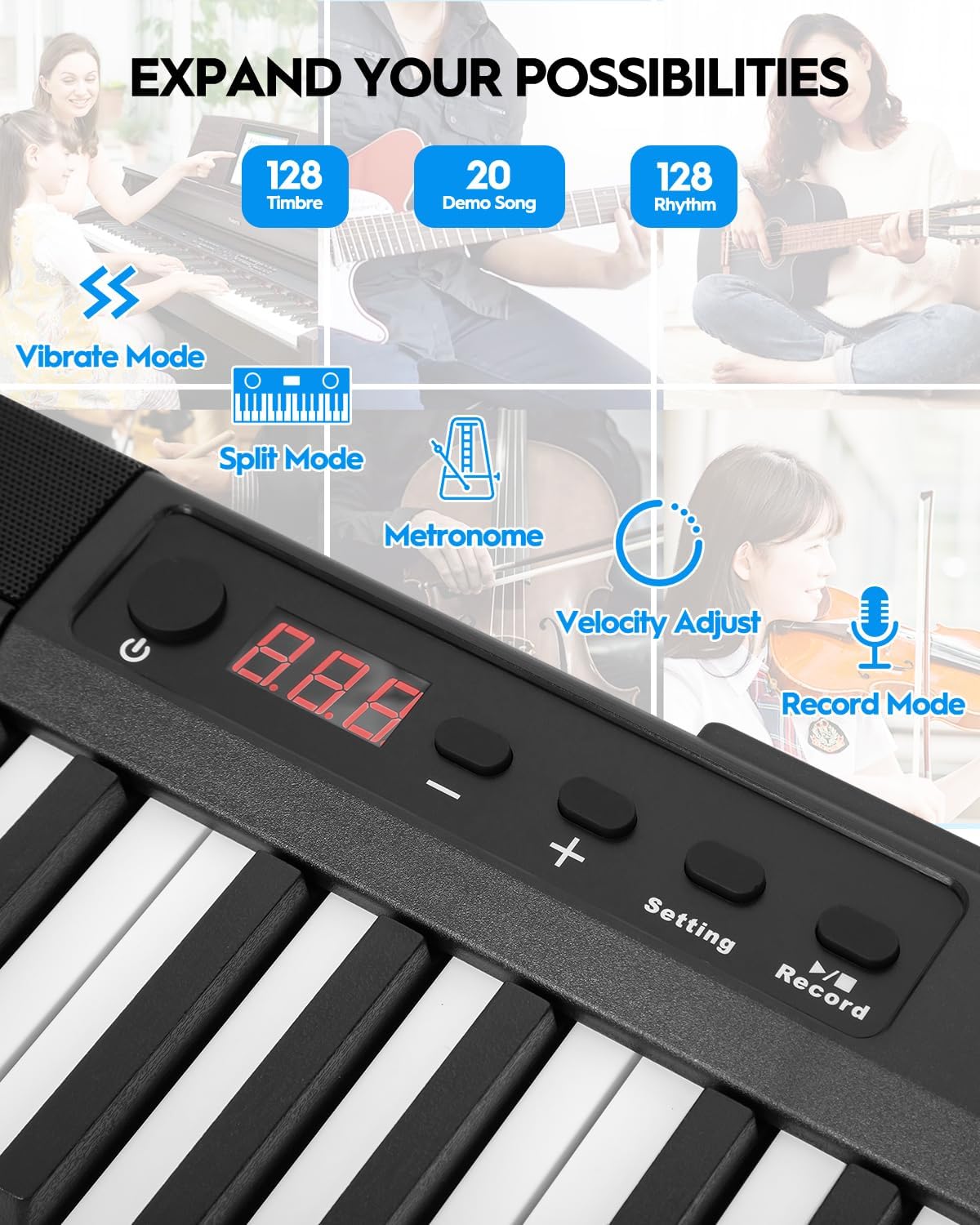
Figure 8: Control panel with various function buttons.
4.4 Ryšys
- Ausinių lizdas (3.5 mm): Dėl privačios praktikos.
- Garso įvestis (3.5 mm): Prijunkite išorinius garso šaltinius.
- MIDI Interface (via USB port): Connect to external software for learning and practice.
- Wireless Connect (GZUT-MUSIC): For wireless connectivity options.

9 pav. Išsamus view of the control panel and connectivity ports.
4.5 Produkto vaizdo įrašai
Video 1: STRICH SEP-80 Velocity-Sensitive Piano Keyboard 88 Keys DEMO. This video demonstrates the velocity-sensitive keys and overall sound of the SEP-80 digital piano.
Video 2: STRICH SEP-80 Rechargeable 88-Keys Portable Electric Piano. This video highlights the portability and rechargeable battery feature of the SEP-80.
Video 3: Sound Sample | SEP-80 Comparison of lively and gentle rhythms. This video provides audio samples demonstrating different rhythms and tones.
Video 4: SEP-80 Keyboard Playing Audition. This video showcases a performance on the SEP-80 keyboard.
5. Priežiūra
- Valymas: Use a soft, dry cloth to clean the surface of the piano. Do not use abrasive cleaners or solvents.
- Saugykla: Store the piano in a dry, cool place away from direct sunlight and extreme temperatures.
- Akumuliatoriaus priežiūra: Norėdami optimalaus akumuliatoriaus veikimo laiko, venkite dažnai visiškai jį iškrauti. Reguliariai jį įkraukite, net jei ilgą laiką nenaudojate.
6. Problemų sprendimas
- Nėra garso: Check if the volume is turned up. Ensure headphones are not plugged in if you intend to use the built-in speakers. Verify power connection or battery charge.
- Klavišai nereaguoja: Ensure the piano is powered on. If specific keys are unresponsive, contact customer support.
- Ryšio problemos: For MIDI via USB, ensure the correct drivers are installed on your computer. For wireless connection, ensure Bluetooth is enabled on your device and select "GZUT-MUSIC".
7. Specifikacijos
| Funkcija | Detalė |
|---|---|
| Prekės ženklas | STRICHAS |
| Modelio pavadinimas | SEP-80 |
| Raktų skaičius | 88 |
| Rakto tipas | Touch-Sensitive, Reduced-Weighted |
| Garsai / tonai | 128 |
| Ritmai | 128 |
| Demo dainos | 20 |
| Ryšys | 3.5mm Headphone Jack, 3.5mm Audio Input, USB (MIDI), Wireless Connect (GZUT-MUSIC) |
| Maitinimo šaltinis | Corded Electric (USB Adapter), Built-in Rechargeable Battery |
| Baterijos veikimo laikas | Up to 5 hours (built-in battery) |
| Gaminio matmenys | 14.76 "D x 53.74" P x 5.31" A |
| Prekės svoris | 19.56 svaro |
| Ypatingos savybės | Built-In Speaker, Portable, Recording, Touch-Sensitive Keys |

Figure 10: Dimensions of the STRICH SEP-80 Digital Piano.
8. Garantija ir palaikymas
The STRICH SEP-80 Digital Piano comes with a standard manufacturer's warranty. For detailed warranty information, product support, or service inquiries, please refer to the contact information provided in your product packaging or visit the official STRICH websvetainę.