
Įvadas
Thank you for choosing the Lecoo MCS30 Wireless Portable Speaker. This device is designed to provide high-quality audio and voice amplification with versatile connectivity options. Please read this manual carefully before using the product to ensure proper operation and to maximize its lifespan.
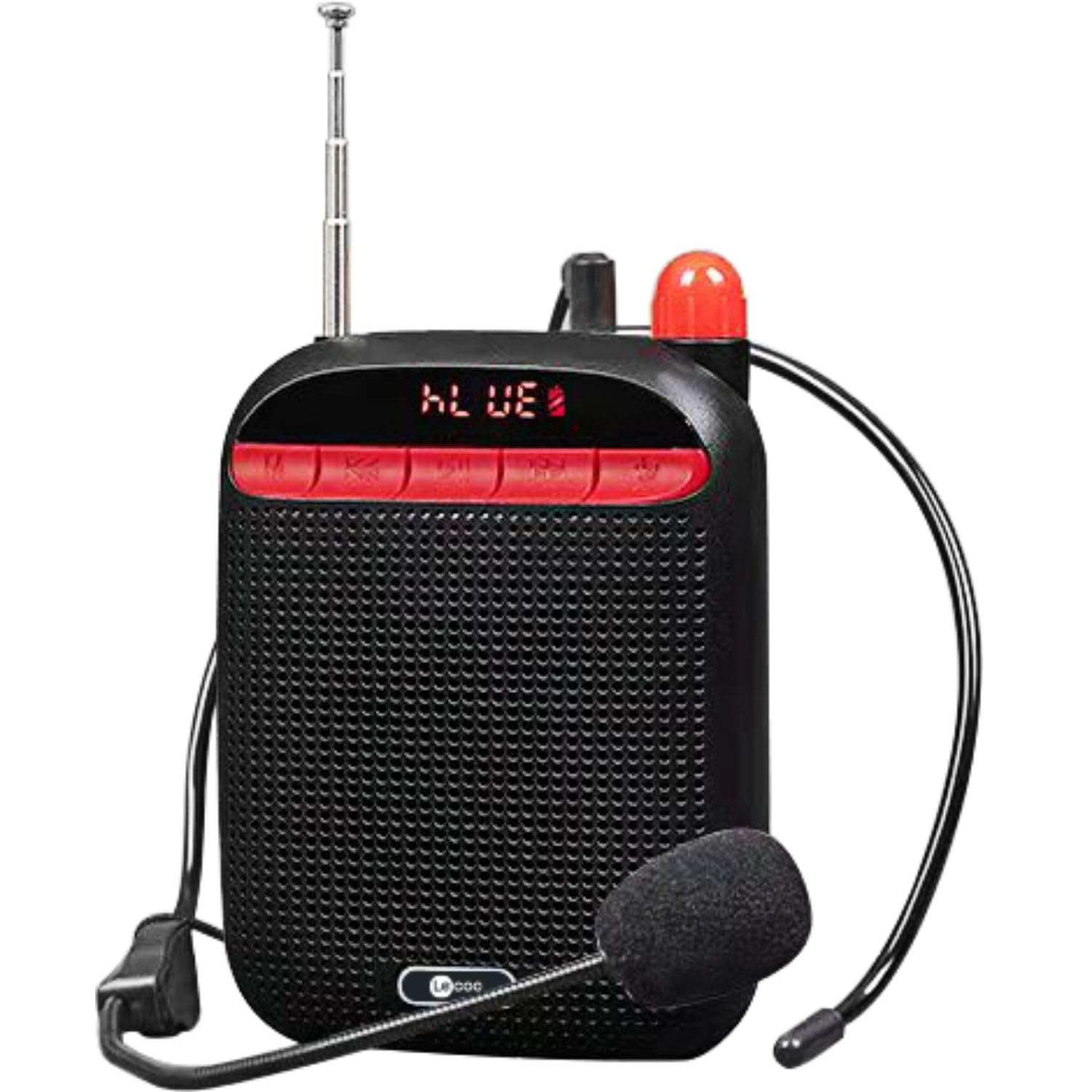
Image: Two Lecoo MCS30 portable speakers, one white and one black, shown with their respective wired headset microphones. Both speakers feature an extendable antenna and front-facing controls.
Produktas baigtasview
The Lecoo MCS30 is a compact and powerful portable speaker featuring multiple input options and dual microphone support for amplification and recording. Familiarize yourself with the device's components and controls.
Priekinio skydelio valdikliai ir ekranas

Vaizdas: Priekinis stambus planas view of the black Lecoo MCS30 speaker, highlighting the digital display and the red control buttons for mode selection, track navigation, and microphone functions.
- Ekranas: Rodo dabartinį režimą, takelio informaciją ir akumuliatoriaus būseną.
- Režimo (M) mygtukas: Switches between Bluetooth, USB, AUX, and SD card modes.
- Ankstesnis / Garsumo mažinimo mygtukas: Trumpas paspaudimas – ankstesniam takeliui, ilgas paspaudimas – garsumui sumažinti.
- Atkūrimo / pristabdymo mygtukas: Paleidžia arba pristabdo garsą.
- Kitas / garsumo didinimo mygtukas: Trumpas paspaudimas – kitam takeliui, ilgas paspaudimas – garsumui padidinti.
- Mikrofono mygtukas: Activates/deactivates microphone functions.
Side and Rear Connections

Vaizdas: Iš viršaus į apačią view of the Lecoo MCS30 speaker, revealing the USB port, TF (SD card) slot, AUX input, and microphone input ports.
- MIC įvestis: For connecting external microphones (headset or lapel).
- USB prievadas: USB atmintinės įrašų atkūrimui.
- TF kortelės lizdas: Skirta SD kortelės atkūrimui.
- AUX įvestis: Skirta išoriniams garso įrenginiams prijungti per 3.5 mm laidą.
- DC 5V įkrovimo prievadas: Prietaiso įkrovimui.
- Maitinimo jungiklis: Įjungimo / išjungimo jungiklis.
- Antena: Extendable antenna for improved signal reception (if applicable for radio functions).
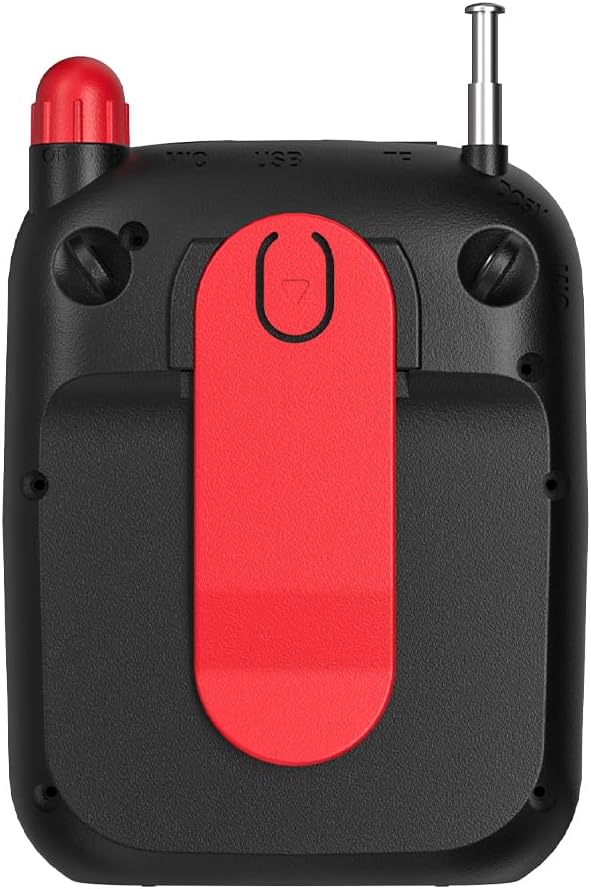
Vaizdas: Galinis view of the Lecoo MCS30 speaker, clearly showing the integrated red belt clip for portable use.
- Diržo segtukas: For attaching the speaker to clothing or a belt for hands-free use.
Sąranka
1. Įkraukite garsiakalbį
- Connect the charging cable to the DC 5V port on the speaker.
- Kitą laido galą prijunkite prie USB maitinimo adapterio (nepridedamas) arba kompiuterio USB prievado.
- Ekrane bus rodoma įkrovimo būsena. Visiškas įkrovimas paprastai trunka 3–4 valandos.
- Disconnect the charger once fully charged to preserve battery life.
2. Įjungimas/išjungimas
- To power on, slide the power switch to the 'ON' position. The display will light up.
- Norėdami išjungti maitinimą, pastumkite maitinimo jungiklį į padėtį „OFF“.
3. Pradinis „Bluetooth“ susiejimas
- Ensure the speaker is powered on and in Bluetooth mode (the display will show 'BLUE' or a Bluetooth icon). If not, press the 'M' (Mode) button to switch.
- Mobiliajame įrenginyje (išmaniajame telefone, planšetiniame kompiuteryje, nešiojamajame kompiuteryje) įjunkite „Bluetooth“ ir ieškokite galimų įrenginių.
- Select 'Lecoo MCS30' from the list of found devices.
- Once paired, the speaker will emit a confirmation sound, and the display will indicate a successful connection.
Naudojimo instrukcijos
1. „Bluetooth“ atkūrimas
- After successful pairing, open your music player on your connected device and start playback.
- Use the speaker's 'Previous/Volume Down' and 'Next/Volume Up' buttons for track navigation (short press) and volume adjustment (long press).
- Use the 'Play/Pause' button to control playback.
2. USB / SD kortelės atkūrimas
- Insert a USB flash drive into the USB port or an SD card into the TF card slot.
- The speaker will automatically switch to USB or SD card mode and begin playing MP3 files. If not, press the 'M' (Mode) button to select the correct mode.
- Use the speaker's control buttons for track navigation and volume adjustment.
3. AUX įvesties atkūrimas
- Prijunkite vieną 3.5 mm garso kabelio (nepridedamas) galą prie garsiakalbio AUX įvesties prievado.
- Kitą galą prijunkite prie savo garso įrenginio ausinių lizdo.
- Press the 'M' (Mode) button until the speaker enters AUX mode.
- Start playback from your audio device. Volume can be controlled via both the speaker and the connected device.
4. Microphone Usage and Voice Recording
- Connect the headset microphone or a lapel microphone to the MIC input port.
- Press the 'Microphone' button to activate the amplification function. Your voice will be ampnuskambėjo per garsiakalbį.
- To record your voice, ensure a USB flash drive or SD card is inserted. Press and hold the 'Microphone' button (or follow specific instructions if a dedicated record button exists, otherwise assume long press). The speaker will indicate recording has started.
- Press the 'Microphone' button again to stop recording. Recorded files are saved to the USB drive or SD card.
5. Garsumo valdymas
- Long press the 'Next/Volume Up' button to increase the volume.
- Long press the 'Previous/Volume Down' button to decrease the volume.
Priežiūra
Valymas
- Garsiakalbio paviršių nuvalykite minkštu, sausu skudurėliu.
- Nenaudokite abrazyvinių valiklių, alkoholio ar cheminių tirpiklių, nes jie gali pažeisti apdailą.
- Avoid getting moisture into any ports or openings.
Sandėliavimas
- Garsiakalbį laikykite vėsioje, sausoje vietoje, toliau nuo tiesioginių saulės spindulių ir ekstremalių temperatūrų.
- Jei akumuliatorių ketinate laikyti ilgesnį laiką, periodiškai jį įkraukite (pvz., kas 3 mėnesius), kad palaikytumėte jo būklę.
Trikčių šalinimas
- Nėra galios:
Ensure the speaker is fully charged. Check the power switch is in the 'ON' position. - Nėra garso:
Check the volume level on both the speaker and the connected device. Ensure the correct input mode (Bluetooth, USB, AUX, SD) is selected. Verify cables are securely connected for AUX input. - „Bluetooth“ neprisijungia:
Ensure the speaker is in Bluetooth pairing mode. Turn off and on Bluetooth on your device. Move the speaker closer to your device. Clear previous Bluetooth connections on your device and try pairing again. - Mikrofonas neveikia:
Ensure the microphone is securely plugged into the MIC input. Press the 'Microphone' button to activate it. Check the microphone's own power source if it has one. - Įrašymas neveikia:
Ensure a compatible USB flash drive or SD card is inserted and has sufficient free space. Check if the recording function is properly activated (refer to 'Microphone Usage and Voice Recording' section).
Specifikacijos
| Funkcija | Aprašymas |
|---|---|
| Prekės ženklas | Lecoo |
| Modelis | MCS30 |
| Ryšio technologija | Bluetooth 5.3, USB, AUX, SD Card |
| Išėjimo galia | 5W |
| Dažnių diapazonas | 100Hz-20KHz |
| Suderinami įrenginiai | Smartphone, Laptop, Karaoke Machine, MP3 Player, Tablet |
| Mikrofono palaikymas | Dual Microphone (Headset/Lapel) with Amplification and Recording |
| Garso formato palaikymas | MP3 |
| Spalva | Juoda |
Garantija ir palaikymas
The Lecoo MCS30 Portable Speaker comes with a Lecoo Turkey Warranty. For warranty claims or technical support, please refer to the warranty card included with your product or visit the official Lecoo websvetainę.
Daugiau informacijos ir pagalbos galite rasti apsilankę Lecoo Store on Amazon.