
Įvadas
Thank you for choosing the PETLIBRO 5L Automatic Pet Feeder with 1080P Camera. This device is designed to provide convenient and reliable feeding for your pets, ensuring they receive their meals on schedule while allowing you to monitor and interact with them remotely. This manual provides essential information for setting up, operating, and maintaining your feeder.

The PETLIBRO 5L Automatic Pet Feeder offers a range of features including a 1080p HD camera, night vision, two-way audio, remote feeding, in-app monitoring, and easy cleanup.
Saugos instrukcijos
- Prieš naudodami tiektuvą, atidžiai perskaitykite visas instrukcijas.
- Šis prietaisas skirtas naudoti tik patalpose.
- Nemerkite pagrindinio įrenginio į vandenį ar kitus skysčius.
- Keep the feeder away from direct sunlight and heat sources.
- Ensure the power cord is not damaged and is placed where pets cannot chew on it.
- Naudokite tik originalų maitinimo adapterį, pateiktą kartu su tiektuvu.
- Always supervise children around the feeder.
- Only use dry pet food with a diameter between 2-15mm.
Pakuotės turinys
Patikrinkite, ar pakuotėje yra visi komponentai:
- PETLIBRO Automatic Pet Feeder (Main Unit)
- Nerūdijančio plieno maisto dubuo
- Maitinimo adapteris
- Vartotojo vadovas
- Desiccant Bag (may be pre-installed)
Produktas baigtasview
Familiarize yourself with the different parts of your PETLIBRO Automatic Pet Feeder.

The main unit of the feeder, featuring the food hopper, dispensing mechanism, 1080P camera, and control panel. A cat is shown eating from the stainless steel bowl, with a smartphone displaying the live camera feed.
- Maisto bunkeris: Stores dry pet food.
- Lid with Twist-Lock: Secures the food hopper and keeps food fresh.
- Valdymo skydelis: Buttons for manual feeding and settings.
- 1080p HD kamera: Tiesioginiam stebėjimui ir įrašymui.
- Infraraudonųjų spindulių jutiklis: Detects low food levels and blockages.
- Garsiakalbis ir mikrofonas: Dvipusiam garso ryšiui.
- Maisto parduotuvė: Kur maistas išpilamas į dubenį.
- Nerūdijančio plieno dubuo: Nuimamas, kad būtų lengva valyti.
- Maitinimo prievadas: Kintamosios srovės adapterio prijungimui.
- Baterijų skyrius: For backup batteries (not included).
Sąranka
1. Išpakavimas ir surinkimas
- Iš pakuotės išimkite visus komponentus.
- Padėkite pagrindinį tiektuvo įrenginį ant lygaus, stabilaus paviršiaus.
- Insert the stainless steel bowl into the designated slot at the base of the feeder.
2. Maitinimo šaltinis
- Prijunkite maitinimo adapterį prie tiektuvo maitinimo prievado ir įjunkite jį į sieninį lizdą.
- Dėl galios otage protection, install 3 D-cell alkaline batteries (not included) into the battery compartment at the bottom of the feeder. This ensures continuous operation during power interruptions.
3. Maisto bunkerio pildymas
- Open the Twist-Lock lid on top of the feeder.
- Pour dry pet food into the hopper. Ensure the food size is between 2-15mm.
- Close the lid securely by twisting it until it locks.
4. Programėlės diegimas ir „Wi-Fi“ ryšys
- Download the PETLIBRO app from the App Store (iOS) or Google Play Store (Android).
- Susikurkite paskyrą ir prisijunkite.
- Follow the in-app instructions to add your feeder. Ensure your smartphone is connected to a 2.4GHz or 5GHz Wi-Fi network. The feeder supports both for a more stable connection.
- The app will guide you through connecting the feeder to your home Wi-Fi network.
5. Kameros sąranka
- Once connected to Wi-Fi, the 1080P camera will automatically activate.
- For video recording, insert a Micro SD card (up to 256GB, not included) into the designated slot, usually located near the camera or at the bottom of the unit.
Naudojimo instrukcijos
1. Rankinis šėrimas
- Press the manual feed button on the feeder's control panel to dispense one portion of food instantly.
- Alternatively, use the 'Feed Now' option in the PETLIBRO app for immediate dispensing.
2. Scheduling Meals via App
The PETLIBRO app allows you to customize your pet's feeding schedule.

The PETLIBRO app provides an intuitive interface to set custom feeding times and amounts, and to review feeding logs.
- Open the PETLIBRO app and select your feeder.
- Navigate to the 'Feeding Schedule' section.
- Nustatykite iki 10 valgymų per dieną. Kiekvienam valgymui nurodykite laiką ir porcijų skaičių (1–50 porcijų vienam valgymui).
- Išsaugokite savo tvarkaraštį. Lesyklėlė automatiškai išduos maistą užprogramuotu laiku.
- Jūs galite view feeding logs within the app to track your pet's meal history.
3. Two-Way Audio & Voice Recording
Communicate with your pet remotely using the two-way audio feature.

The feeder allows two-way audio communication, enabling you to speak to your pet and hear their responses through the app.
- Live Communication: In the app's live view, tap the microphone icon to speak to your pet. Your voice will be played through the feeder's speaker.
- Balso įrašymas: Record a personalized voice message (up to 10 seconds) in the app. This message can be set to play at meal times (0-5 times per meal). A new recording will overwrite any previous one.
4. Monitoring with 1080P Camera and Night Vision
The integrated camera allows you to keep an eye on your pet at all times.

The 1080P camera provides clear vision, even at night, allowing you to monitor your pet's meals with high-definition infrared night vision.
- Access the live camera feed through the PETLIBRO app to view your pet in real-time.
- The 145° wide-angle lens provides a broad view of the feeding area.
- Infrared night vision ensures clear visibility even in dark conditions.
- Videos can be stored on a Micro SD card (up to 256GB, not included).
5. Smart Alerts and Notifications
- Judesio ir garso aptikimas: The feeder automatically records pet activity and saves video clips (SD card required). You will receive notifications on your phone for detected motion or sounds.
- Low Food Level Alert: The infrared sensor monitors the food level in the hopper. You will receive an alert on your phone when the food supply is low, prompting you to refill.
- Blockage Detection: The sensor also detects potential food blockages in the dispensing mechanism and will send an alert if an issue occurs.
- Wi-Fi Disconnection Alert: If the feeder loses its Wi-Fi connection, you will be notified via the app.
Priežiūra
1. Tiektuvo valymas
Reguliarus valymas užtikrina higieną ir tinkamą lesyklėlės veikimą.
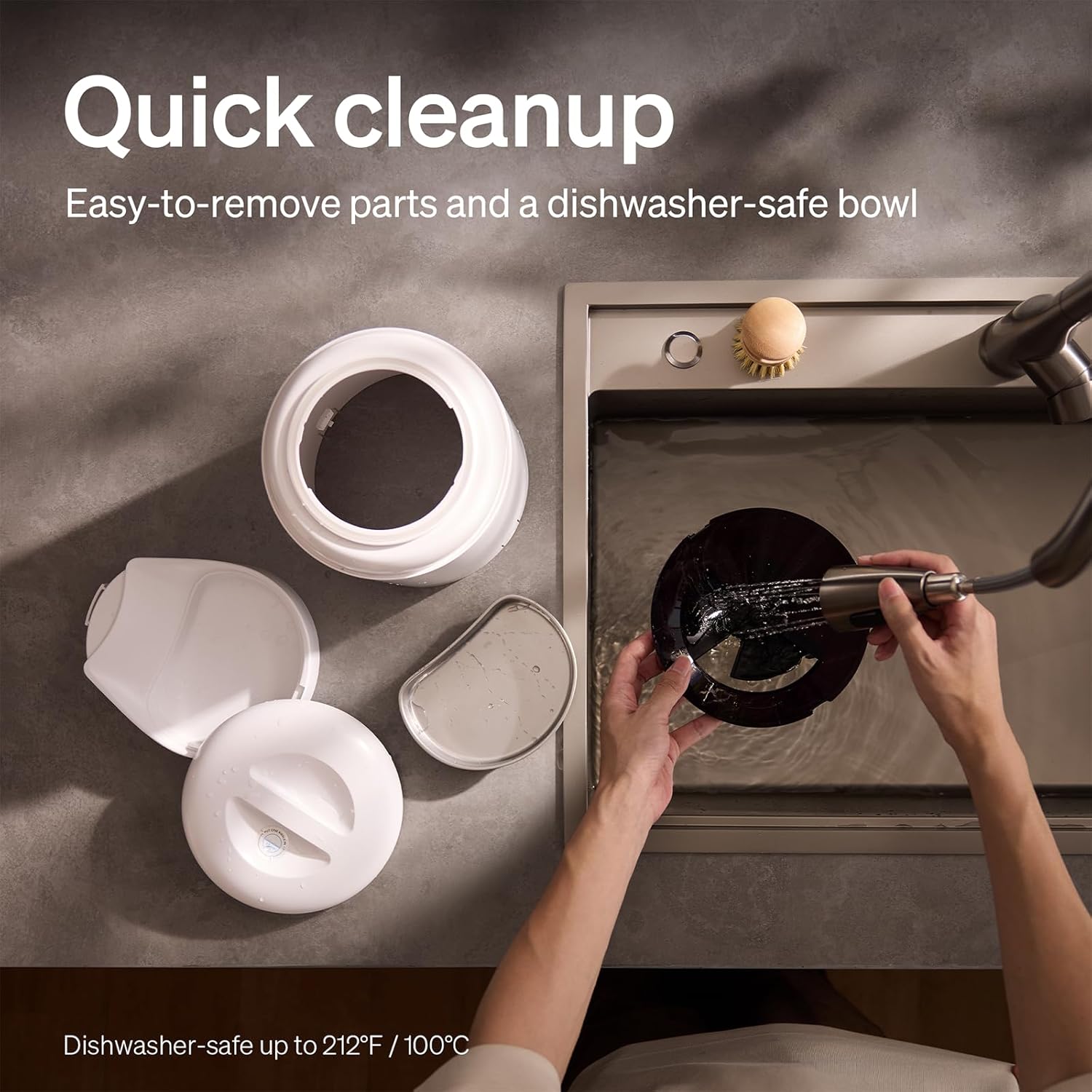
The feeder is designed for quick cleanup with easy-to-remove parts and a dishwasher-safe bowl.
- Atjunkite maitinimą: Prieš valydami visada atjunkite tiektuvą nuo elektros tinklo.
- Pašalinti maistą: Išpilkite iš bunkerio likusį maistą.
- Išardyti: Remove the food bowl, lid, and food hopper.
- Plaunamos dalys: The stainless steel bowl and food hopper are dishwasher-safe (up to 100°C / 212°F) or can be hand-washed with mild soap and water.
- Pagrindinis blokas: Nuvalykite pagrindinį įrenginį minkšta, damp audinys. Nenardinkite į vandenį.
- Kruopščiai išdžiovinkite: Prieš surinkdami ir pripildydami maisto, įsitikinkite, kad visos dalys yra visiškai sausos.
2. Sausiklio keitimas
- The desiccant bag helps keep the food fresh. It is recommended to replace it every 15 days.
- Locate the desiccant compartment, usually under the lid.
- Remove the old desiccant bag and insert a new one.
Trikčių šalinimas
| Problema | Galima priežastis | Sprendimas |
|---|---|---|
| Šėrykla neduoda maisto. | Food blockage; empty hopper; dispensing mechanism issue. | Check for food blockages and clear them. Refill hopper if empty. Ensure food size is appropriate (2-15mm). |
| Wi-Fi atjungimas. | Weak Wi-Fi signal; router issues; incorrect password. | Ensure feeder is within Wi-Fi range. Restart your router. Reconnect the feeder to Wi-Fi via the app, verifying the password. |
| Camera not working or frequently disconnecting. | Poor Wi-Fi connection; app glitch; SD card issue. | Check Wi-Fi stability. Restart the feeder and the app. Ensure the SD card is properly inserted and not full. Consider a system reset if issues persist. |
| App shows "status unknown" or feeding errors. | Wi-Fi disconnection; app synchronization issue. | Verify Wi-Fi connection. Close and reopen the app. Restart the feeder. |
| Balso įrašas neatkuriamas. | No recording saved; volume too low; incorrect schedule. | Ensure a voice message is recorded and saved in the app. Check the playback settings for meal times. |
Specifikacijos
| Funkcija | Detalė |
|---|---|
| Modelio numeris | AF203 |
| Matmenys (I x P x A) | 12 x 10 x 27 cm |
| Svoris | 2.15 kg |
| Medžiaga | Nerūdijantis plienas (dubuo) |
| Talpa | 5 litrai |
| Tikslinės rūšys | Katė šuo |
| Rekomenduojami naudojimo būdai | Automatic indoor dog/cat feeding |
| Ypatingos savybės | 1080P Camera, Smart App, Two-way Audio |
| Spalva | Baltas |
| Ryšio technologija | „Wi-Fi“ (2.4 GHz ir 5 GHz) |
| Veikimo režimas | Automatinis |
| Priežiūros instrukcijos | Dishwasher safe (bowl) |
| Reikalingos baterijos | No (for primary operation), Yes (for backup, 3 D-cell, not included) |
Garantija ir palaikymas
PETLIBRO products come with a standard manufacturer's warranty. For detailed warranty information, please refer to the warranty card included in your package or visit the official PETLIBRO websvetainę.
If you encounter any issues or have questions regarding your PETLIBRO Automatic Pet Feeder, please contact PETLIBRO customer support through the following channels:
- El. paštas: Refer to your product packaging or the PETLIBRO website for the latest support email address.
- Websvetainė: Visit the official PETLIBRO webDUK, trikčių šalinimo vadovų ir kontaktinių formų svetainė.
- Pagalba programėlėje: The PETLIBRO app may offer a support section for direct assistance.
Please have your model number (AF203) and purchase information ready when contacting support.