
Headwolf FPad3 Ulta
Headwolf Fpad3 Mini Tablet
Naudotojo instrukcija
Įvadas
This manual provides comprehensive instructions for the Headwolf Fpad3 Mini Tablet. It covers essential information regarding product setup, operation, maintenance, and troubleshooting to ensure optimal performance and longevity of your device. Please read this manual thoroughly before using the tablet.

Vaizdas: priekis view of the Headwolf Fpad3 Mini Tablet, showcasing jo ekraną.
Sąranka
1. Pakuotės turinys
Išpakuodami patikrinkite, ar yra šie elementai:
- Headwolf Fpad3 Mini Tablet
- C tipo USB įkrovimo laidas
- PD10W Charger
- SIM išstūmimo įrankis
- Vartotojo vadovas (šis dokumentas)
2. Fizinis viršusview

Image: Diagram illustrating the location of the headphone jack, rear camera, volume button, reset button, power button, SIM/SD card slot, and Type-C port on the Headwolf Fpad3 Mini Tablet.
Susipažinkite su planšetinio kompiuterio fizinėmis sudedamosiomis dalimis:
- Maitinimo mygtukas: Esantis šone, naudojamas įrenginiui įjungti / išjungti arba pažadinti / užmigdyti.
- Garsumo mygtukai: Reguliuokite garso garsumą.
- C tipo USB prievadas: Įkrovimui ir duomenų perdavimui.
- 3.5 mm ausinių lizdas: Laidinių ausinių prijungimui.
- SIM / „MicroSD“ kortelės lizdas: For inserting Nano SIM cards and a MicroSD card.
- Priekinė kamera: Located above the screen.
- Galinė kamera: Įsikūręs planšetinio kompiuterio gale.
3. Įrenginio įkrovimas
Before first use, fully charge the tablet. Connect the provided USB Type-C cable to the tablet's Type-C port and the other end to the PD10W charger. Plug the charger into a power outlet. The charging indicator will typically appear on the screen.
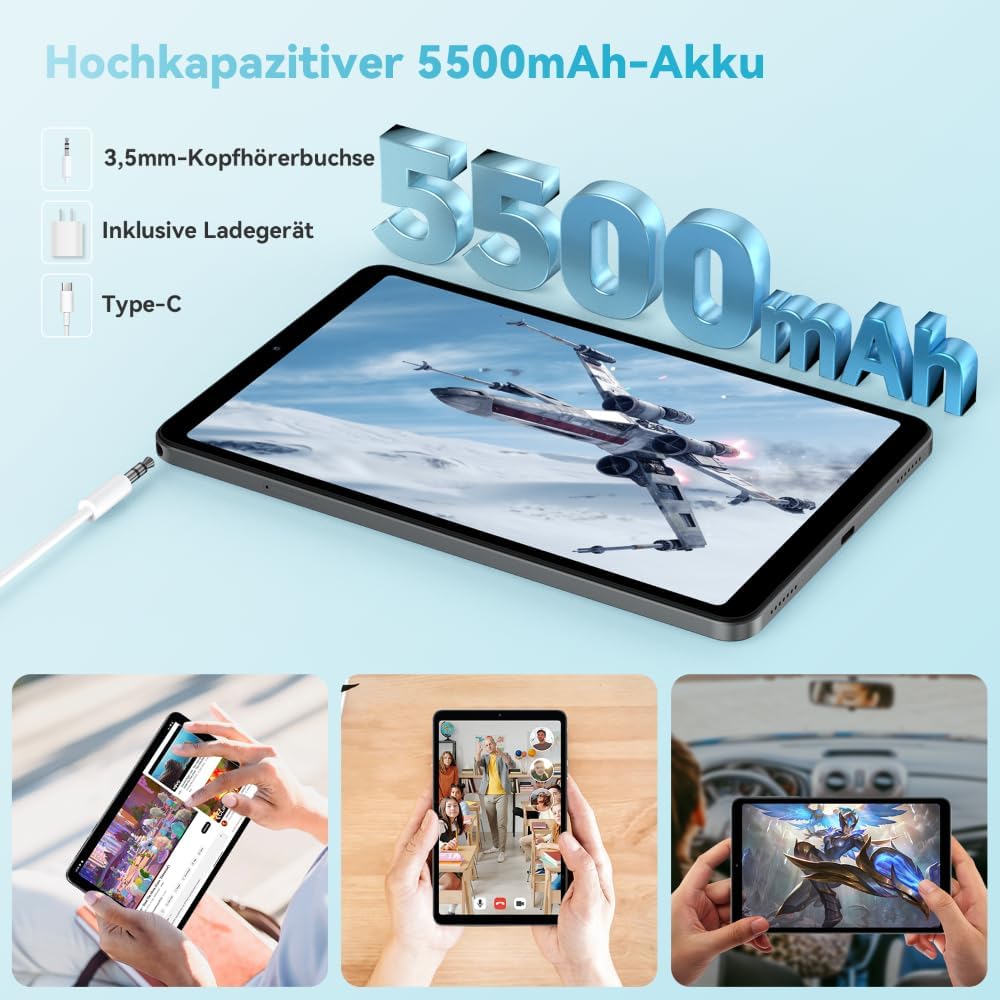
Image: The Headwolf Fpad3 Mini Tablet connected to a charger, highlighting its 5500mAh battery capacity and Type-C charging port.
4. Įjungimas/išjungimas
- Norėdami įjungti: Press and hold the Power button until the Headwolf logo appears.
- Norėdami išjungti: Paspauskite ir palaikykite maitinimo mygtuką, kol pasirodys maitinimo parinkčių meniu, tada pasirinkite „Išjungti“.
- Norėdami paleisti iš naujo: Paspauskite ir palaikykite maitinimo mygtuką, kol pasirodys maitinimo parinkčių meniu, tada pasirinkite „Paleisti iš naujo“.
5. Pradinė sąranka
Upon first power-on, the tablet will guide you through the initial setup process. This includes selecting your language, connecting to a Wi-Fi network, setting up your Google account, and configuring security options. The tablet runs on Android 13 and is Google GMS certified, ensuring access to Google Play services.
6. SIM kortelės ir „MicroSD“ kortelės įdėjimas
The Headwolf Fpad3 supports dual Nano SIM cards for 4G LTE connectivity and a MicroSD card for expandable storage up to 2TB.
- Planšetinio kompiuterio šone raskite SIM / „MicroSD“ kortelės lizdą.
- Įkiškite SIM kortelės išstūmimo įrankį į mažą skylutę šalia dėklo, kad jį atidarytumėte.
- Atsargiai ištraukite dėklą.
- Įdėkite „Nano SIM“ kortelę (-es) ir (arba) „MicroSD“ kortelę į tam skirtus dėklo lizdus, užtikrindami teisingą orientaciją.
- Švelniai stumkite dėklą atgal į planšetinį kompiuterį, kol jis spragtelėdamas užsifiksuos.
Naudojimo instrukcijos
1. Ekranas ir vaizdinė patirtis
The tablet features an 8.4-inch FHD IPS In-Cell display with a resolution of 1920 x 1200 pixels, offering clear and vibrant visuals. It supports Widevine L1 for high-definition streaming from compatible services.

Image: The Headwolf Fpad3 Mini Tablet display showing high-definition content, emphasizing Widevine L1 support for streaming services like YouTube, Prime Video, Disney+, Hulu, and HBO Max.
2. Našumas ir saugykla
Powered by an Unisoc T616 Octa-Core processor (2x A75 at 2.0GHz + 6x A55 at 1.8GHz) and 8GB of RAM (4GB + 4GB virtual expansion), the Fpad3 ensures smooth multitasking and efficient operation. It comes with 128GB of UFS 2.2 internal storage, which can be expanded up to 2TB using a MicroSD card.

Image: An illustration detailing the Headwolf Fpad3 Mini Tablet's powerful Octa-Core Unisoc T616 processor, Mali-G57 GPU, and Android 13 operating system, with a benchmark comparison.

Image: A visual representation of the Headwolf Fpad3 Mini Tablet's 8GB RAM (with 4GB virtual expansion) and 128GB ROM, highlighting its expandability up to 2TB via an SD card.
3. Ryšys
The tablet offers versatile connectivity options:
- „Wi-Fi“: Supports dual-band 2.4G/5G Wi-Fi for stable and fast internet access.
- 4G LTE: Dual Nano SIM support for cellular data and phone call functionality.
- "Bluetooth 5.0": For connecting wireless peripherals like headphones, keyboards, and mice.
- GPS: Integrated GPS, Beidou, and Galileo for accurate navigation.
- OTG (kelyje): Allows connecting USB devices such as flash drives or external keyboards.
4. Fotoaparatai
Užfiksuokite akimirkas su dviguba planšetinio kompiuterio kamera:
- Galinė kamera: 13 MP
- Priekinė kamera: 8 MP
The tablet also supports Face Unlock for convenient and secure access.

Paveikslėlis: sprogęs view of the Headwolf Fpad3 Mini Tablet's dual cameras (8MP front, 13MP rear) and the Face Unlock feature, with exampnaudojimo scenarijų mažiau.
5. Garso įrašas
Experience immersive audio with dual box speakers. A 3.5mm headphone jack is also available for private listening.
6. „Google Kids Space“
The tablet includes support for Google Kids Space, providing a safe and engaging environment for children with access to over 10,000 real-time resources.
Priežiūra
1. Prietaiso valymas
Planšetinio kompiuterio ekraną ir korpusą valykite minkštu, nepūkuotu audiniu. Venkite naudoti stiprių cheminių medžiagų ar abrazyvinių medžiagų, kurios gali pažeisti paviršių.
2. Programinės įrangos atnaujinimai
Reguliariai tikrinkite, ar yra sistemos naujinimų, ir juos įdiekite, kad planšetiniame kompiuteryje būtų įdiegtos naujausios funkcijos, saugos pataisymai ir našumo patobulinimai. Eikite į Nustatymai > Sistema > Sistemos naujinimas norėdami patikrinti, ar nėra atnaujinimų.
3. Akumuliatoriaus priežiūra
- Venkite planšetinio kompiuterio laikymo ekstremaliose temperatūrose.
- Neleiskite baterijai dažnai visiškai išsikrauti.
- Optimaliam įkrovimui naudokite originalų įkroviklį ir laidą.
- Ilgalaikiam laikymui įkraukite akumuliatorių maždaug iki 50–60 %.
Trikčių šalinimas
Bendros problemos ir sprendimai
| Problema | Galimas sprendimas |
|---|---|
| Įrenginys neįsijungia. | Ensure the battery is charged. Press and hold the Power button for at least 10-15 seconds. If unresponsive, connect to charger and try again. |
| Nepavyksta prisijungti prie „Wi-Fi“. | Check if Wi-Fi is enabled in settings. Restart the tablet and the Wi-Fi router. Ensure you are entering the correct password. |
| Programėlės stringa arba užstringa. | Clear the app's cache (Settings > Apps > [App Name] > Storage > Clear cache). Restart the tablet. Ensure the app is updated to its latest version. |
| Planšetinis kompiuteris veikia lėtai arba nereaguoja. | Close unnecessary background apps. Clear cache of frequently used apps. Restart the tablet. Consider performing a factory reset as a last resort (backup data first). |
| SIM kortelė neaptikta. | Įsitikinkite, kad SIM kortelė tinkamai įdėta į dėklą. Paleiskite planšetinį kompiuterį iš naujo. Patikrinkite, ar SIM kortelė aktyvi pas jūsų operatorių. |
Jei problemos išlieka, susisiekite su klientų aptarnavimo tarnyba.
Specifikacijos
| Funkcija | Detalė |
|---|---|
| Prekės ženklas | Galvos vilkas |
| Modelio numeris | FPad3 Ulta |
| Operacinė sistema | Android 13 |
| Procesoriaus prekės ženklas | Unisoc |
| Procesoriaus modelis | T616 Octa-Core |
| RAM | 8 GB (4GB + 4GB virtual) |
| Vidinė saugykla | 128 GB UFS 2.2 |
| Išplečiama saugykla | Iki 2 TB per „MicroSD“ |
| Ekrano dydis | 8.4 colių |
| Ekrano raiška | 1920 x 1200 Pixels (FHD IPS In-Cell) |
| Grafikos mikroschemų rinkinio prekės ženklas | Arm Mali G57 |
| Galinė kamera | 13 MP |
| Priekinė kamera | 8 MP |
| Baterijos talpa | 5500 mAh ličio polimeras |
| Įkrovimo prievadas | USB Type-C (PD10W Fast Charging) |
| Belaidis ryšys | 802.11a/b/g/n/ac (2.4G/5G WiFi), Bluetooth 5.0 |
| Mobilusis ryšys | Dual 4G LTE (Nano SIM) |
| Navigacija | GPS, Beidou, Galileo |
| Ypatingos savybės | Stereo Speakers, Expandable Storage, Phone Call Functionality, Fast Charging, Card Reader, Face ID, Widevine L1 |
| Matmenys (I x P x A) | 25.4 x 15.24 x 7.62 cm |
| Svoris | 610 gramų |
Garantija ir palaikymas
The Headwolf Fpad3 Mini Tablet comes with a one-year warranty from the date of purchase. For any technical assistance, product inquiries, or warranty claims, please contact Headwolf customer service. We offer 24/7 customer support to assist you.
Please refer to your purchase documentation for specific warranty terms and contact information, or visit the official Headwolf websvetainę.
Ask a question about this manual
Ask about setup, troubleshooting, compatibility, parts, safety, or missing instructions. Manuals+ will review the question and use this page’s manual context to help answer it.