
1. Įvadas
Thank you for choosing the LOLARAN AL1000 Money Counter Machine. This manual provides essential information for the safe and efficient operation of your device. Please read it thoroughly before use and retain it for future reference.
The AL1000 is designed for high-speed banknote counting and advanced counterfeit detection, supporting both Dollar and Euro currencies. It features multiple detection methods and operational modes to streamline your cash handling processes.
2. Saugos informacija
- Įsitikinkite, kad mašina pastatyta ant stabilaus, lygaus paviršiaus.
- Prijunkite įrenginį prie įžeminto maitinimo lizdo su tinkamu įtampos lygiutage.
- Nenaudokite įrenginio šlapiomis rankomis arbaamp aplinkos.
- Eksploatacijos metu laikykite pirštus, plaukus ir laisvus drabužius atokiai nuo judančių dalių.
- Prieš valydami ar atlikdami bet kokią techninę priežiūrą, atjunkite maitinimo laidą.
- Nebandykite patys ardyti ar taisyti prietaiso. Kreipkitės į kvalifikuotus techninės priežiūros darbuotojus.
- Laikyti vaikams nepasiekiamoje vietoje.
3. Produktas baigtasview
The LOLARAN AL1000 is a robust money counter machine equipped with advanced features for accurate and secure cash processing.

Image: The LOLARAN AL1000 Money Counter Machine, showcasing its design with banknotes loaded for counting and an external display unit.
Pagrindinės funkcijos:
- Vertės skaičiavimas: Calculates the total sum of money. Requires manual denomination setting for multi-denomination batches.
- Išplėstinis padirbtų prekių aptikimas: Utilizes UV (Ultraviolet), MG (Magnetic), MT (Magnetic Thread), IR (Infrared), and DD (Dimension Detection) technologies. An alarm sounds and the display turns red upon detecting a counterfeit or broken banknote.
- 3.7" Bright LCD Display: Provides clear readability of counting data. Includes an external display for multi-angle viewing.
- Didelis efektyvumas: Counts up to 1,000 notes per minute with a hopper capacity of 200 banknotes, minimizing paper jams.
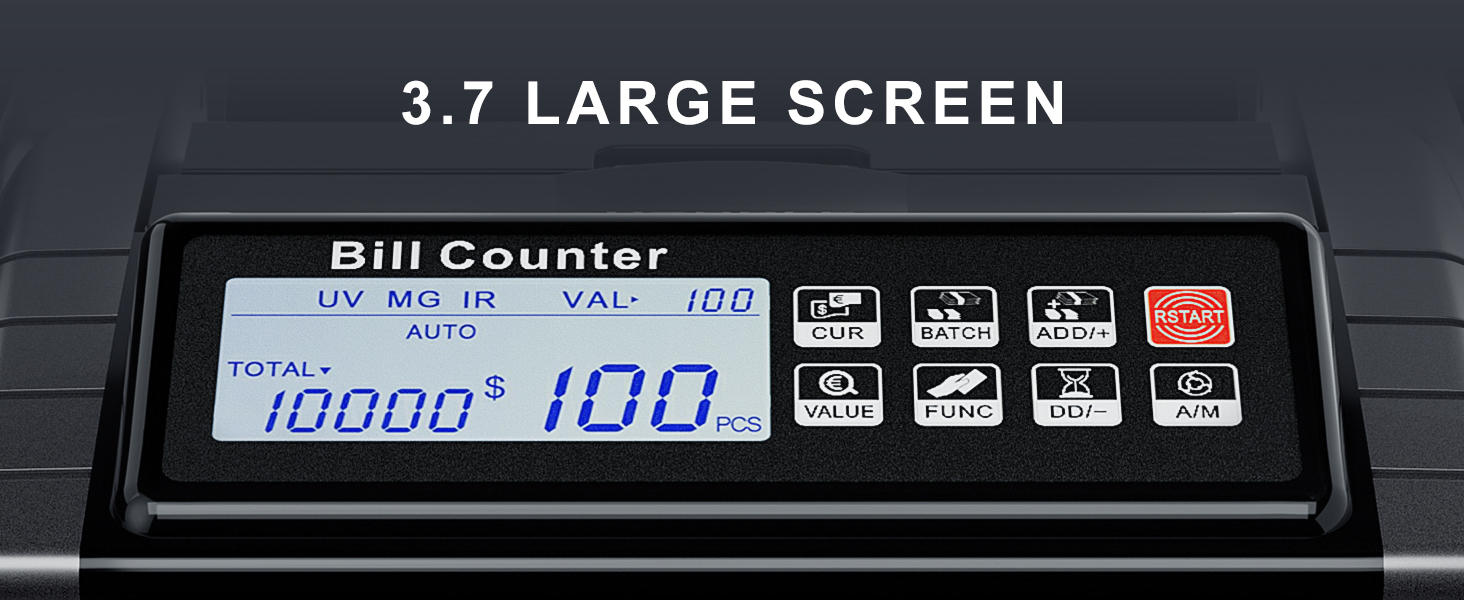
Paveikslėlis: detalus view of the machine's 3.7-inch LCD screen, showing various operational indicators and counting results.
4. Pakuotės turinys
Patikrinkite, ar jūsų siuntinyje yra visi toliau išvardyti daiktai:

Image: All components included in the LOLARAN AL1000 Money Counter Machine package.
- 1 x LOLARAN AL1000 Money Counter Machine
- 1 x maitinimo laidas
- 1 x Valymo šepetėlis
- 1 x External Display
- 1 x Spare Parts (e.g., fuse)
- 4 x Currency Straps
- 1 x naudojimo instrukcija
5. Sąranka
Follow these steps to set up your money counter machine:
- Išpakuoti: Atsargiai išimkite visus komponentus iš pakuotės.
- Vieta: Place the money counter on a flat, stable, and dry surface, ensuring adequate ventilation.
- Maitinimo jungtis: Prijunkite maitinimo laidą prie įrenginio maitinimo įvesties, o tada – prie tinkamo elektros lizdo.
- Išorinis ekranas (pasirenkama): If desired, connect the external display cable to the designated port on the machine.
- Maitinimas: Press the power switch, usually located on the rear or side of the machine. The display should illuminate.
6. Naudojimo instrukcijos
The AL1000 offers various modes for efficient banknote counting and detection.

Image: The control panel of the money counter, highlighting various function buttons.
6.1. Basic Counting
- Įsitikinkite, kad įrenginys įjungtas.
- Place a stack of banknotes neatly into the hopper. Ensure they are aligned and not folded or crumpled.
- The machine will automatically start counting (if in Auto mode) or press the PRADĖTI mygtuką.
- The count will be displayed on the LCD screen.
6.2. Veikimo režimai
Use the function buttons on the control panel to select different modes:

Image: Visual representation of Value, Add, and Batch modes on the display.
- Value Mode: Paspauskite VERTĖ button. Manually set the denomination of the banknotes being counted. The machine will then calculate the total monetary value. Note: The machine does not automatically recognize mixed denominations; the value must be set for each batch.
- Pridėti režimą: Paspauskite ADD/+ button. This mode accumulates the count of multiple batches. Each new batch counted will be added to the previous total.
- Paketinis režimas: Paspauskite PARTIJA button. You can preset a desired number of banknotes (e.g., 100). The machine will stop counting once the preset number is reached.
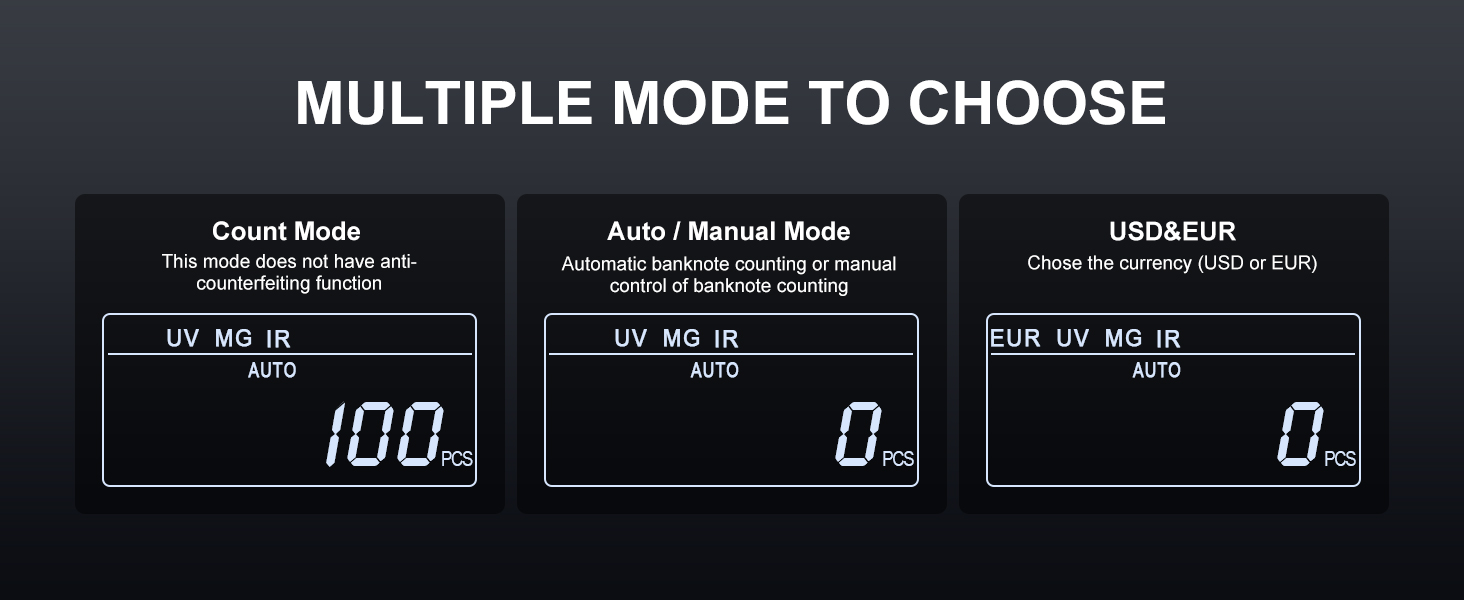
Image: Visual representation of Count, Auto/Manual, and Currency selection modes on the display.
- Skaičiavimo režimas: This is the basic counting mode, providing only the number of pieces. Anti-counterfeiting functions are typically active in this mode unless specified otherwise.
- Automatinis / rankinis režimas: Paspauskite ESU button to switch between automatic banknote counting (starts when notes are placed) and manual counting (starts after pressing PRADĖTI).
- Valiutos pasirinkimas: Paspauskite CUR button to select between USD (United States Dollar) and EUR (Euro).
6.3. Padirbtų prekių aptikimas
The AL1000 employs multiple detection methods to identify suspicious banknotes:

Image: Illustration of the various counterfeit detection technologies used by the machine.
- UV (ultravioletiniai): Detects security threads and fibers visible under UV light.
- MG (Magnetic): Checks for magnetic ink patterns present on genuine banknotes.
- MT (Magnetic Thread): Verifies the magnetic properties of the security thread.
- IR (Infrared): Identifies infrared ink patterns and properties.
- DD (Dimension Detection): Measures the width of banknotes to detect discrepancies.
If a suspicious banknote is detected, the machine will stop, the display will turn red, and an audible alarm will sound. Remove the suspicious note and press PRADĖTI norėdami tęsti skaičiavimą.

Image: Internal components of the money counter responsible for banknote handling and detection.
7. Priežiūra
Regular cleaning ensures optimal performance and longevity of your money counter.
- Išjungti: Prieš valydami visada išjunkite ir atjunkite prietaisą nuo elektros tinklo.
- Dulkių šalinimas: Use the provided cleaning brush to gently remove dust and paper residue from the hopper, stacker, and internal sensors.
- Jutiklio valymas: Carefully clean the sensors (UV, MG, IR) with a soft, dry cloth or cotton swab. Avoid using abrasive materials or liquids.
- Išorinis valymas: Wipe the exterior of the machine with a soft, slightly damp audinys. Nenaudokite stiprių cheminių medžiagų ar tirpiklių.
- Regular Intervals: Clean the machine regularly, especially if used frequently or in dusty environments.
8. Problemų sprendimas
If you encounter issues with your AL1000, refer to the following common problems and solutions:
| Problema | Galima priežastis | Sprendimas |
|---|---|---|
| Mašina neįsijungia | Neprijungtas maitinimo laidas; Išjungtas maitinimo jungiklis; Perdegęs saugiklis | Check power cord connection; Ensure power switch is ON; Replace fuse (refer to spare parts) |
| Banknotes jam frequently | Banknotes are crumpled/folded; Hopper overloaded; Dust/debris in path | Straighten banknotes; Do not overload hopper; Clean banknote path and sensors with brush |
| Netikslus skaičiavimas | Sensors are dirty; Banknotes are not aligned properly | Clean all sensors; Ensure banknotes are neatly stacked and aligned in the hopper |
| Counterfeit detection alarm sounds frequently on genuine notes | Sensors are dirty; Banknotes are worn or damaged | Clean detection sensors; Try counting the notes again or with a different orientation. If issue persists, contact support. |
| Ekrane rodomas klaidos kodas | Specifinė vidinė klaida | Refer to the full instruction manual for specific error code meanings, or power cycle the machine. If the error persists, contact support. |
9. Specifikacijos
| Funkcija | Detalė |
|---|---|
| Modelio numeris | LX-AL1000 |
| Skaičiavimo greitis | Up to 1,000 notes/min |
| Bunkerio talpa | 200 banknotų |
| Padirbtų prekių aptikimas | UV, MG, MT, IR, DD |
| Ekranas | 3.7" LCD, External Display included |
| Palaikomos valiutos | USD, EUR |
| Prekės svoris | 10.43 svaro |
| Pakuotės matmenys | 13.19 x 11.69 x 7.44 colio |
| Medžiagos tipas | Legiruotasis plienas |
| Gamintojas | LOLARAN |
10. Garantija ir palaikymas
LOLARAN provides lifetime service support for the AL1000 Money Counter Machine. If you have any questions, require technical assistance, or need to report an issue, please contact our customer support team.
For assistance, please refer to the contact information provided with your purchase or visit the official LOLARAN websvetainę.