
Yitouniu YTU021
Yitouniu Zigbee 2-Channel DC 7-32V Smart Relay Switch Module
Model: YTU021
Įvadas
The Yitouniu Zigbee 2-Channel DC 7-32V Smart Relay Switch Module (Model YTU021) is a versatile smart home device designed for controlling various appliances. It supports Zigbee 3.0 protocol, allowing integration with compatible Zigbee gateways and smart assistants like Amazon Alexa and Google Home. This module offers three distinct working modes: Inching, Self-Lock, and Interlock, providing flexibility for different automation needs. Its compact design and broad voltage compatibility make it suitable for a wide range of DIY smart home projects.
Saugos informacija
- Ensure all power is disconnected before installation or wiring to prevent electric shock.
- Installation should be performed by qualified personnel or under the supervision of an expert.
- Patikrinkite teisingą ttage and current ratings for your application to avoid damage to the device or connected appliances.
- Nelaikykite prietaiso nuo drėgmės ar ekstremalių temperatūrų.
- Prietaisas skirtas naudoti tik patalpose.
Pakuotės turinys
- 1 x Zigbee Smart Switch Module
- 1 x anglų kalbos instrukcija
- 1 x pakuotės dėžutė
Specifikacijos
| Gamintojas | Yitouniu |
| Dalies numeris | AYTU021 |
| Prekės modelio numeris | YTU021 |
| Prekės svoris | 2.12 uncijos |
| Gaminio matmenys | 4.69 x 1.46 x 1.1 colio |
| Spalva | Baltas |
| ttage | DC/AC 7-32V, USB 5V |
| Maks. Dabartinė | 10A |
| Belaidis protokolas | Zigbee 3.0 |
| RF dažnis | 433.92MHz (for RF control) |
Kontrolinis sąrašas prieš montavimą
Before proceeding with installation, ensure the following:
- A 2.4GHz WiFi network is available (5G networks are not supported).
- Your mobile device runs Android version 4.0 or above.
- If your wireless router has MAC address filtering enabled, disable it temporarily during the pairing process.
- A Zigbee gateway (hub) is required and not included with this module. Ensure the gateway is powered on and within close proximity during pairing.
Setup and Wiring
Produktas baigtasview
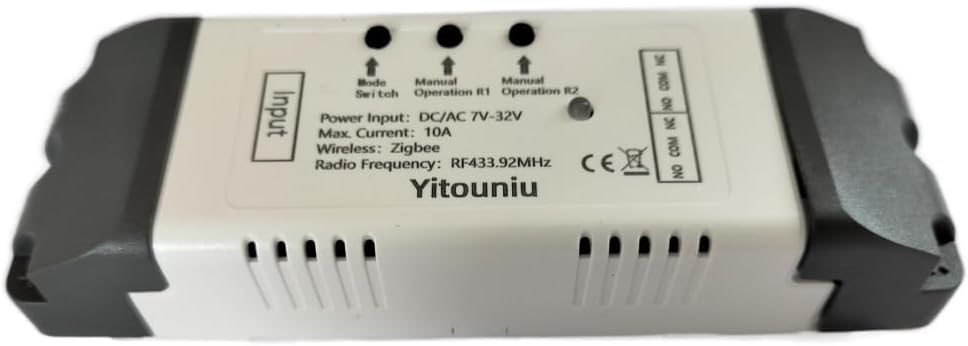
This image displays the Yitouniu Zigbee 2-Channel Smart Relay Switch Module. It shows the input terminals for power, the mode switch button, manual operation buttons for relays R1 and R2, and the output terminals (NO, COM, NC) for connecting appliances. The device is housed in a white casing with ventilation slots.

Šis paveikslėlis pateikia išsamų view of the module's internal circuit board with key components labeled. It highlights the 'Model switch button', 'Manual switch' buttons, 'Network indicator' (red light), 'RF Pairing indicator' (blue light), and the 'Relay' components. Input terminals for DC 7-32V and USB 5V are shown, along with output terminals (NC, COM, NO) for connecting external devices.
Maitinimo parinktys
The module can be powered via two methods:
- DC/AC 7-32V: Connect your power source to the 'Input DC/AC 7-32V' terminals.
- USB 5V: Connect a 5V USB power adapter to the micro USB port.
Wiring Diagrams for Operating Modes
The module supports three operating modes: Inching (Momentary), Self-Lock, and Interlock. The wiring for connected appliances will vary based on the chosen mode and application.

This image illustrates typical wiring configurations. The top diagram shows an Blokavimo režimas connection for a motor, where the module controls the motor's direction (e.g., upload/download). The middle diagram shows a Three-Wire Motor Connection in Interlock Mode, detailing how to connect a 220V motor for directional control. The bottom diagram demonstrates an Appliance Connection in Self-lock Mode for AC 220V lights, where each relay acts as an independent on/off switch.
This diagram specifically shows a Self-locking mode wiring example for a single light bulb. The input power is DC 7-32V, and the light bulb is connected to the relay's output terminals, allowing it to be toggled on or off independently.
Susiejimas su „Zigbee“ šliuzu
This module requires a Zigbee gateway (hub) for smart control. Ensure your Zigbee gateway is set up and ready for device pairing.

This image emphasizes that a Tuya Zigbee Hub is required to connect and manage multiple Zigbee smart devices, including this relay module, within your smart home ecosystem.
- Atsisiųskite programą: Install the Tuya Smart or Smart Life app on your smartphone.
- Prisijungti prie centro: Ensure your Zigbee gateway is connected to your home network.
- Įjunkite susiejimo režimą: Power on the Yitouniu module. Press and hold the 'Mode Switch' button for approximately 5 seconds until the network indicator light blinks, indicating it's in pairing mode.
- Pridėti įrenginį programėlėje: Open the Tuya Smart or Smart Life app, navigate to your Zigbee gateway, and select 'Add Sub Device' or 'Ieškokite devices'. The app should detect the module.
- Patvirtinkite susiejimą: Follow the on-screen prompts to complete the pairing process. Once successfully paired, the network indicator light will stop blinking.

This visual guide outlines the quick setup process: 1. Download the Alexa/SmartThings app. 2. Connect to your Alexa/SmartThings hub. 3. The Yitouniu 2CH Smart Switch module. 4. Add devices within the app.
Veikimo režimai
The Yitouniu Smart Relay Switch Module offers three distinct operating modes:
- Self-Lock Mode: In this mode, each relay acts as a standard on/off switch. A single command (or button press) toggles the relay's state (ON to OFF, or OFF to ON). This is ideal for controlling lights or other appliances that require a persistent state.
- Inching (Momentary) Mode: When activated, the relay turns ON for a preset duration (e.g., 1 to 3600 seconds) and then automatically turns OFF. This mode is commonly used for applications like garage door openers, where a brief pulse is needed to trigger an action.
- Blokavimo režimas: This mode ensures that only one relay can be ON at any given time. If one relay is activated, any other active relay will automatically turn OFF. This is useful for controlling devices with mutually exclusive states, such as motor direction (forward/reverse) or fan speed selection.
You can switch between these modes using the 'Mode Switch' button on the device or through the connected smart home app, depending on the specific gateway and app features.
Išmaniosios valdymo funkcijos
Valdymas balsu
The module is compatible with Amazon Alexa and Google Assistant, allowing for hands-free voice control of connected appliances. Once integrated with your Zigbee gateway and linked to your voice assistant, you can use commands like:
- "Alexa, turn on the garage light."
- „Ei, Google, išjunk ventiliatorių.“
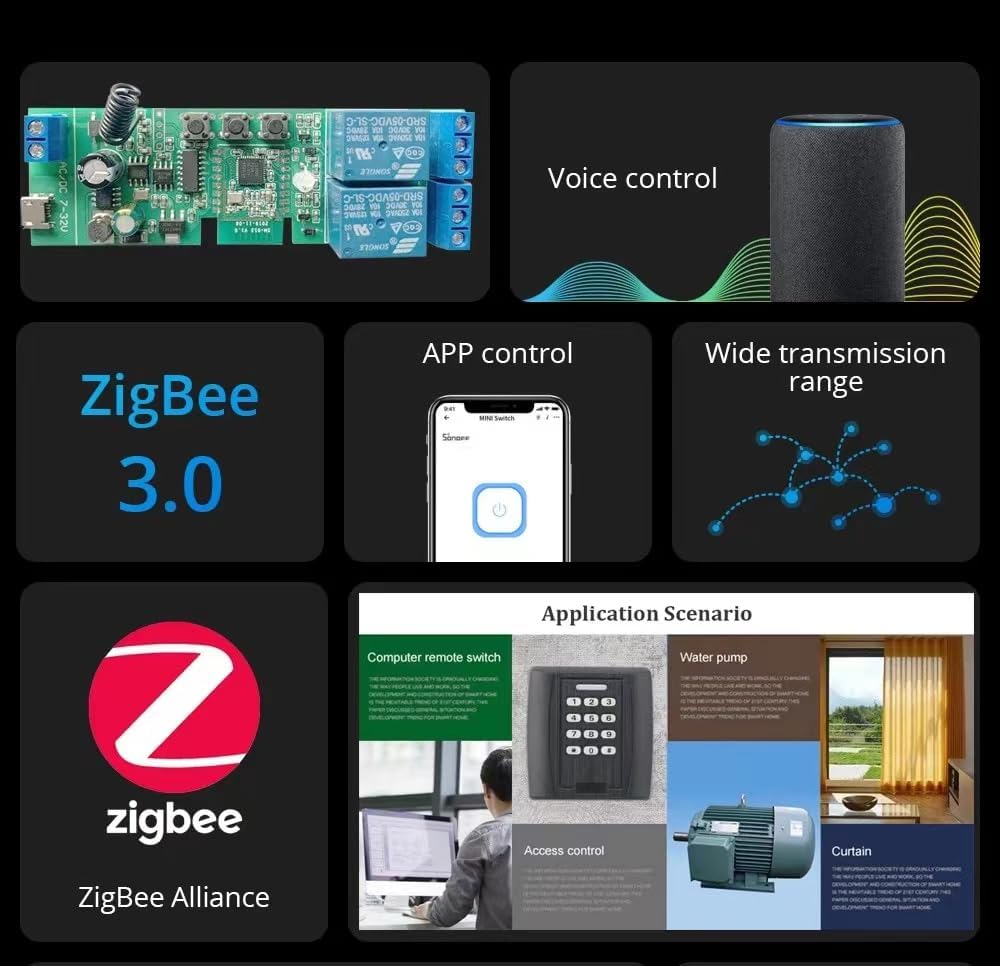
This image highlights key features including Zigbee 3.0 compatibility, voice control integration with smart speakers, app control via a smartphone, and the wide transmission range offered by Zigbee networks.
App Control and Scheduling
Manage your connected appliances remotely using the Tuya Smart or Smart Life app. Features include:
- Nuotolinis įjungimas/išjungimas: Control devices from anywhere.
- Būsenos stebėjimas: View the real-time status of your devices in the app.
- Laikmačiai: Set countdown, scheduled, or cycle timers for automated operation.
- Išmaniosios scenos: Create custom automation rules based on conditions like departure/home mode, temperature, humidity, or other Zigbee product interactions.
RF kontrolė
The module includes a built-in 433MHz RF receiver, allowing it to be controlled by compatible 433MHz learning code remote controls (not included).
Priežiūra
The Yitouniu Smart Relay Switch Module is designed for low maintenance. To ensure optimal performance and longevity:
- Laikykite prietaisą švarų ir be dulkių.
- Avoid exposing it to direct sunlight or high humidity.
- Periodiškai patikrinkite laidų jungtis, kad įsitikintumėte, jog jos yra tvirtos.
- Ensure your Zigbee gateway firmware and smartphone app are updated to the latest versions for best compatibility and features.
Trikčių šalinimas
- Įrenginys nesusijungia:
- Ensure the Zigbee gateway is powered on and within range.
- Confirm the module is in pairing mode (blinking network indicator).
- Check if your router's MAC filtering is disabled.
- Verify you are using a 2.4GHz WiFi network for the gateway.
- No response from voice control:
- Ensure the module is successfully paired with your Zigbee gateway and linked to Alexa/Google Home.
- Patikrinkite savo interneto ryšį.
- Verify the device name in the Alexa/Google Home app matches your voice command.
- Appliance not turning ON/OFF:
- Check all wiring connections for security and correctness according to the chosen operating mode.
- Verify the power supply to the module and the connected appliance.
- Ensure the module is receiving commands from the app or voice assistant.
Palaikymas

This image provides information on how to contact customer support. For assistance, please visit your 'Orders' page, locate your Yitouniu order, and click the 'Contact Seller' button. This method ensures quick access to your order details for efficient problem resolution.
Ask a question about this manual
Ask about setup, troubleshooting, compatibility, parts, safety, or missing instructions. Manuals+ will review the question and use this page’s manual context to help answer it.