
1. Įvadas
Thank you for choosing the N-Gear Let's Go Party 5150 Portable Bluetooth Speaker. This manual provides essential information for the safe and efficient operation of your device. Please read it thoroughly before use and retain it for future reference.

Image 1.1: N-Gear Let's Go Party 5150 Portable Bluetooth Speaker with active LED lighting.
Pagrindinės funkcijos:
- Powerful 200 Watt output with dual 6-inch speakers.
- Bluetooth wireless connectivity for seamless audio streaming.
- Integrated LED disco lighting and light projection for enhanced ambiance.
- True Wireless Stereo (TWS) function to connect multiple speakers.
- Wireless microphone included for karaoke and announcements.
- MP3 playback via USB and MicroSD card.
- AUX garso įvestis laidiniam prijungimui.
- Built-in power bank function to charge external devices.
- Up to 5 hours of battery life (actual duration may vary).
- Nuotolinio valdymo pultas patogiam valdymui.
- Vandeniui atsparus dizainas, skirtas naudoti lauke.
2. Saugos informacija
Kad nesugadintumėte įrenginio ar nesusižalotumėte, laikykitės šių saugos priemonių:
- Do not expose the speaker to extreme temperatures, direct sunlight, or excessive humidity.
- Ensure the charging port cover is securely closed when not charging, especially in wet environments, to maintain its waterproof rating.
- Neardykite, neremontuokite ir nemodifikuokite įrenginio patys. Dėl bet kokio remonto kreipkitės į kvalifikuotus techninės priežiūros darbuotojus.
- Laikykite garsiakalbį atokiau nuo stiprių magnetinių laukų šaltinių.
- Naudokite tik nurodytą įkrovimo laidą ir maitinimo adapterį.
- Venkite ilgai klausytis itin dideliu garsumu, kad nepažeistumėte klausos.
- Laikyti vaikams nepasiekiamoje vietoje.
3. Pakuotės turinys
Patikrinkite, ar pakuotėje yra visi reikalingi daiktai:
- N-Gear Let's Go Party 5150 Portable Bluetooth Speaker
- Belaidis mikrofonas
- Nuotolinio valdymo pultas
- AC įkrovimo kabelis
- Vartotojo vadovas (šis dokumentas)

Image 3.1: Included Remote Control and Wireless Microphone.
4. Sąranka
4.1 Garsiakalbio įkrovimas
- Locate the AC charging port on the back panel of the speaker.
- Connect the supplied AC charging cable to the speaker and then to a power outlet.
- Užsidegs įkrovimo indikatoriaus lemputė. Visiškas įkrovimas trunka maždaug 3–4 valandas.
- Kai įkrovimas bus visiškai atliktas, atjunkite įkrovimo laidą ir įsitikinkite, kad prievado dangtelis yra sandariai uždarytas.
4.2 Įjungimas / išjungimas
- To power on: Press and hold the Power button (usually located on the control panel) for a few seconds until you hear an audible prompt or see the display light up.
- Norėdami išjungti: dar kartą paspauskite ir palaikykite nuspaudę maitinimo mygtuką, kol garsiakalbis išsijungs.
4.3 Bluetooth poravimas
- Ensure the speaker is powered on and in Bluetooth mode. If not, press the 'MODE' button on the speaker or remote control until "Bluetooth" or "BT" is displayed.
- Mobiliajame įrenginyje (išmaniajame telefone, planšetiniame kompiuteryje ir kt.) įjunkite „Bluetooth“ ir ieškokite galimų įrenginių.
- Select "N-Gear LGP 5150" from the list of devices.
- Once paired, the speaker will emit a confirmation sound, and the Bluetooth indicator will remain solid.
Pastaba: Įjungus garsiakalbį, jis automatiškai bandys prisijungti prie paskutinio suporuoto įrenginio.
4.4 Connecting the Wireless Microphone
- Insert batteries into the wireless microphone (if not pre-installed).
- Power on the microphone using its dedicated power switch.
- The microphone should automatically connect to the speaker. Adjust the microphone volume using the dedicated knob on the speaker's control panel.
5. Naudojimo instrukcijos
5.1 Režimo pasirinkimas
Press the 'MODE' button on the speaker or remote control to cycle through available input modes:
- Bluetooth (BT): For wireless audio streaming from your paired device.
- USB: For playing MP3 files iš USB atmintinės.
- MicroSD (TF Card): For playing MP3 fileiš „MicroSD“ kortelės.
- AUX: For wired audio input using a 3.5mm audio cable.
5.2 Garso atkūrimas
- Garsumo valdymas: Use the main volume knob on the speaker or the VOL+/- buttons on the remote control.
- Trasos navigacija: Use the Previous/Next buttons on the speaker or remote control to skip tracks in Bluetooth, USB, or MicroSD modes.
- Leisti / pristabdyti: Press the Play/Pause button to start or pause playback.
5.3 LED apšvietimo valdymas
The speaker features integrated LED disco lights and a top light projector.
- Press the dedicated 'LIGHT' or 'LED' button on the speaker or remote control to cycle through different light modes or turn them off.
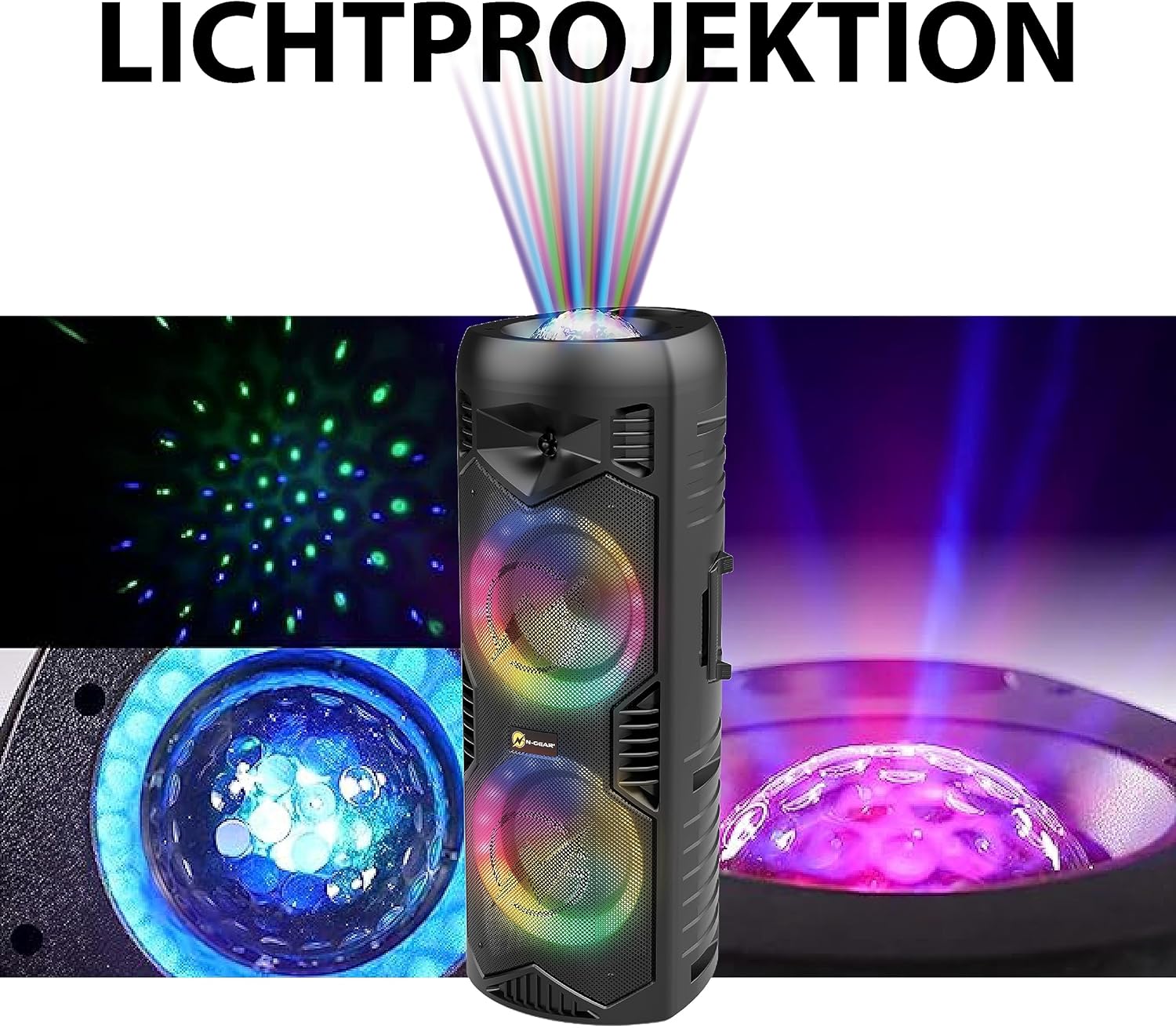
Image 5.1: Detail of the speaker's light projection and LED effects.
5.4 Tikrojo belaidžio stereo (TWS) funkcija
The TWS function allows you to pair two N-Gear Let's Go Party 5150 speakers together for a stereo sound experience.
- Įsitikinkite, kad abu garsiakalbiai įjungti ir veikia „Bluetooth“ režimu, bet neprijungti prie jokio įrenginio.
- On one speaker (this will be the primary speaker), press and hold the 'TWS' button (if available) or a combination of buttons as indicated in the quick start guide.
- Pagrindinis garsiakalbis ieškos antrinio garsiakalbio. Prijungus išgirsite patvirtinimo garsą.
- Dabar prijunkite mobilųjį įrenginį prie pagrindinio garsiakalbio per „Bluetooth“, kaip aprašyta 4.3 skyriuje. Garsas bus grojamas stereo režimu per abu garsiakalbius.
5.5 Išorinės baterijos funkcija
The speaker can be used to charge external devices via its USB output port.
- Connect your device's USB charging cable to the USB output port on the speaker.
- Garsiakalbis pradės krauti jūsų įrenginį.
6. Priežiūra
6.1 Valymas
- Garsiakalbio išorę nuvalykite minkšta,amp audinys. Nenaudokite abrazyvinių valiklių ar tirpiklių.
- Ensure all ports are dry before use, especially after exposure to water.
6.2 Saugykla
- Garsiakalbį laikykite vėsioje, sausoje vietoje, toliau nuo tiesioginių saulės spindulių ir ekstremalių temperatūrų.
- Jei akumuliatorių sandėliuosite ilgesnį laiką, įkraukite jį maždaug iki 50 % kas kelis mėnesius, kad pailgintumėte jo tarnavimo laiką.
7. Problemų sprendimas
| Problema | Galima priežastis | Sprendimas |
|---|---|---|
| Garsiakalbis neįsijungia. | Baterija išsikrovusi. | Connect the speaker to a power source using the AC charging cable and allow it to charge. |
| Nėra garso iš garsiakalbio. | Volume is too low; incorrect mode selected; device not properly connected. | Increase the volume. Ensure the correct input mode (Bluetooth, USB, AUX) is selected. Re-pair Bluetooth device or check cable connections. |
| „Bluetooth“ įrenginio nepavyksta susieti. | Garsiakalbis nėra susiejimo režime; įrenginys yra per toli; trukdžiai. | Ensure speaker is in Bluetooth mode and discoverable. Move device closer to speaker. Turn off other Bluetooth devices. |
| Mikrofonas neveikia. | Microphone is off; batteries are low/dead; microphone volume is low. | Ensure microphone is powered on. Replace microphone batteries. Increase microphone volume on the speaker. |
| LED lemputės neveikia. | Šviesos išjungtos arba veikia statiniu režimu. | Press the 'LIGHT' or 'LED' button to cycle through modes or turn them on. |
8. Specifikacijos
| Funkcija | Detalė |
|---|---|
| Modelio numeris | LGP 5150 BK |
| Prekės ženklas | N-Gear |
| Išėjimo galia | 200 vatų |
| Garsiakalbio dydis | Dvigubi 6 colių garsiakalbiai |
| Ryšys | Bluetooth, USB, MicroSD, AUX (3.5mm) |
| Belaidė technologija | Bluetooth |
| Baterijos tipas | Ličio jonų (į komplektą įeina) |
| Baterijos veikimo laikas | Iki 5 valandų (kinta priklausomai nuo naudojimo) |
| Matmenys (I x P x A) | 26.5 x 32 x 68.5 cm (10.4 x 12.6 x 26.9 colio) |
| Svoris | 5.5 kilogramų (12.1 svarai) |
| Atsparus vandeniui | Taip |
| Įtraukti komponentai | Speaker, Wireless Microphone, Remote Control, AC Charging Cable, User Manual |

Image 8.1: Speaker Dimensions.
9. Garantija ir palaikymas
N-Gear products are designed and manufactured to the highest quality standards. For information regarding warranty coverage, please refer to the warranty card included with your purchase or visit the official N-Gear websvetainę.
For technical support, troubleshooting assistance, or service inquiries, please contact N-Gear customer support through their official channels. Contact information can typically be found on the product packaging or the N-Gear websvetainę.
Websvetainė: www.n-gear.eu