
1. Baigėsiview
The TOMASHI Portable AM/FM Radio Model 6107 is a compact and lightweight device designed for convenient audio listening. It features a digital display, a built-in speaker, and a headphone jack for personal use. This manual provides essential information for setting up, operating, and maintaining your radio.
- Kompaktiškas dizainas: Small and lightweight, ideal for portability.
- Patobulintas priėmimas: Equipped with a DSP chip for improved signal clarity.
- Garso išvestis: Features a loud speaker and a 3.5mm headphone jack.
- Iš anksto nustatytos stotys: Allows saving up to 5 favorite radio stations for quick access.
- Maitinamas su baterijomis: Operates on 2 AAA batteries (not included).

Priekyje view of the TOMASHI Portable AM/FM Radio, highlighting the digital display and controls.
2. Sąranka
2.1 Akumuliatoriaus įdėjimas
- Raskite baterijų skyriaus dangtelį radijo imtuvo gale.
- Atidarykite dangtelį.
- Įdėkite dvi (2) AAA baterijas, užtikrindami teisingą poliškumą (+ ir -), kaip nurodyta skyriaus viduje.
- Saugiai uždarykite akumuliatoriaus skyriaus dangtelį.
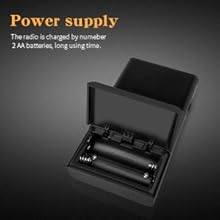
Illustration of the battery compartment for AAA battery installation.
2.2 Antenos reguliavimas
- Siekiant optimalaus FM priėmimas, fully extend the telescopic antenna.
- Už AM priėmimas, the radio uses an internal antenna. Rotating the radio may improve signal strength.
3. Naudojimo instrukcijos
3.1 Maitinimo įjungimas/išjungimas
Stumkite ON/OFF jungiklis located on the side of the radio to power it on or off.
3.2 Juostos pasirinkimas
Paspauskite FM or AM button on the front panel to switch between the FM and AM frequency bands.
3.3 Derinimas
- Rankinis derinimas: Naudokite Tune + or Melodija - buttons to adjust the frequency incrementally.
- Automatic Scan (ATS): Paspauskite ir palaikykite ATS button. The radio will automatically scan for and save available stations to the preset memory slots (P01, P02, etc.).

Išsamus view of the radio's control panel, including ATS, band selection, and tuning buttons.
3.4 Preset Stations (M1-M5)
- Išankstinių nustatymų išsaugojimas: Tune to your desired station. Press and hold one of the preset buttons (M1, M2, M3, M4, or M5) until the display confirms the station is saved (e.g., "P01").
- Išankstinių nustatymų atšaukimas: Briefly press one of the preset buttons (M1-M5) to quickly switch to a saved station.
3.5 Garsumo valdymas
Garso išvesties lygį reguliuokite naudodami garsumo ratukas located on the side of the radio.
3.6 Ausinių naudojimas
Insert standard 3.5mm headphones into the ausinių lizdas on the top of the radio for private listening. The internal speaker will automatically mute when headphones are connected.

The radio features a 3.5mm headphone jack for personal audio enjoyment.
4. Priežiūra
- Valymas: Wipe the radio's exterior with a soft, dry cloth. Do not use liquid cleaners, aerosols, or abrasive solvents.
- Akumuliatoriaus priežiūra: Remove batteries if the radio will not be used for an extended period to prevent potential battery leakage and damage. Replace batteries promptly when the low battery indicator appears.
- Saugykla: Store the radio in a cool, dry environment, away from direct sunlight, high temperatures, and humidity.
5. Problemų sprendimas
| Problema | Galima priežastis | Sprendimas |
|---|---|---|
| Radijas neįsijungia | Neteisingai įdėtos arba išsikrovusios baterijos | Patikrinkite baterijų poliškumą; pakeiskite naujomis AAA baterijomis. |
| Prastas radijo priėmimas | Antenna not extended (FM) or radio orientation (AM) | Fully extend FM antenna. Rotate radio for better AM signal. Move away from interference sources. |
| Nėra garso iš garsiakalbio / ausinių | Volume too low or headphones not fully inserted | Increase volume. Ensure headphones are securely plugged in. |
| Cannot save preset stations | Preset button not held long enough | Press and hold the desired preset button until the display confirms saving. |
6. Specifikacijos
| Funkcija | Detalė |
|---|---|
| Gaminio matmenys | 2.2 colio ilgis x 0.79 colio plotis x 3.9 colio aukštis (5.59 cm ilgis x 2.01 cm plotis x 9.91 cm aukštis) |
| Prekės svoris | 2.78 uncijos (78.8 gramų) |
| FM juosta | 64/87 - 108 MHz |
| AM grupė | 520/522 - 1710 KHz |
| Maitinimo šaltinis | 2 x AAA baterijos (į komplektą neįeina) |
| Ausinių lizdas | 3.5 mm |
| Ypatinga funkcija | Nešiojami |
| Derintuvo technologija | AM/FM |
| Modelio numeris | 6107 |
7. Garantija ir palaikymas
For detailed warranty information, product registration, or technical support, please refer to the documentation included with your purchase or visit the official TOMASHI websvetainėje. Išsaugokite pirkimo kvitą kaip pirkimo įrodymą garantiniams reikalavimams.