
AILRINNI Smart lock
„AILRINNI“ išmaniosios spynos naudotojo vadovas
Model: Smart lock
1. Produktas baigtasview
The AILRINNI Smart Lock is a versatile 4-in-1 keyless entry electronic door handle designed for enhanced security and convenience in homes, offices, bedrooms, and apartments. It offers multiple unlocking methods including fingerprint recognition, digital keypad codes, Bluetooth via the Tuya application, and traditional mechanical keys for emergency access.

2. Sudedamosios dalys
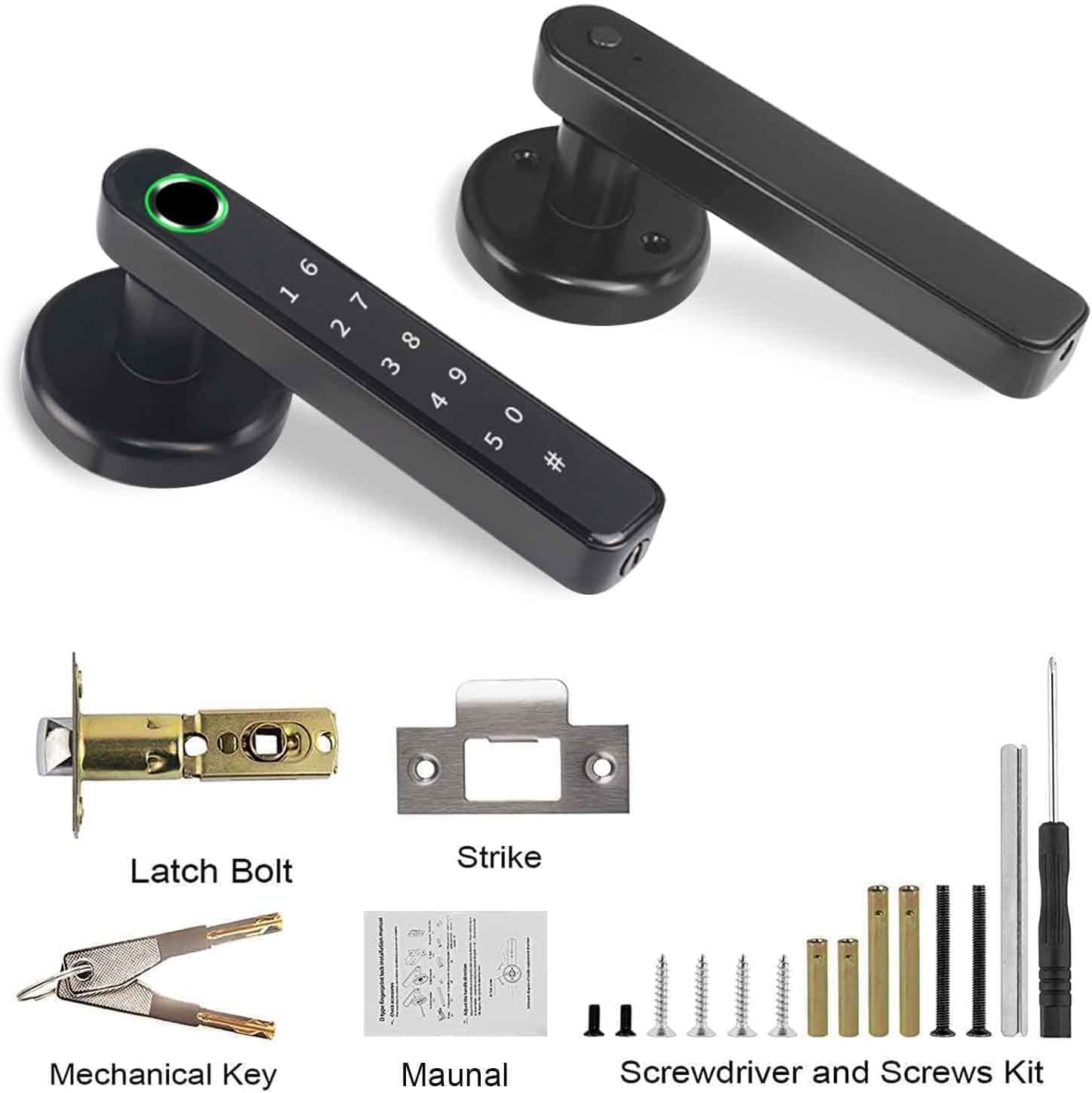
Please verify that all the following components are present in your package before beginning installation:
- Smart Lock Handle (Exterior and Interior)
- Užrakto varžtas
- Streiko plokštė
- Mechaniniai raktai (2)
- Installation Hardware (Screws, Spindles)
- Atsuktuvas
- Vartotojo vadovas (šis dokumentas)
3. Specifikacijos
| Funkcija | Detalė |
|---|---|
| Prekės ženklas | AILRINNI |
| Modelio numeris | Išmanusis užraktas |
| Spalva | Juoda |
| Medžiaga | Nerūdijantis plienas, legiruotasis plienas |
| Gaminio matmenys | 25 x 18 x 1.4 cm |
| Prekės svoris | 920 gramų |
| Užrakto tipas | Biometrinė, Klaviatūra |
| Ypatingos savybės | Keyless, Fingerprint, Easy to Install, Sturdy, Auto-Lock |
| Maitinimo šaltinis | 4 x AAA šarminės baterijos (nepridedamos) |

4. Sąranka ir diegimas
The AILRINNI Smart Lock is designed for straightforward installation, typically taking around 20 minutes with basic tools. It is compatible with most standard left and right wooden doors, as well as metal doors, provided they meet the specified dimensions.
4.1 Door Requirements
- Durų storis: 1.49–1.88 colio (38–48 mm)
- Skylės skersmuo: 2–1/8 colių (54 mm)
4.2 Reikalingi įrankiai
- Atsuktuvas (pridedamas)
- Drill bit (if new holes are required)
4.3 diegimo žingsniai
- Paruoškite duris: Ensure your door meets the thickness and hole diameter requirements. If replacing an existing lock, remove the old hardware.
- Įdiekite fiksavimo varžtą: Insert the latch bolt into the door edge, ensuring the bevel faces the door frame. Secure it with screws.
- Install the Exterior Handle: Place the exterior handle assembly through the door, aligning the spindle with the latch bolt.
- Install the Interior Handle: Connect the interior handle assembly to the exterior handle, ensuring all cables are properly routed and connected. Secure with mounting screws.
- Įdėkite baterijas: Open the battery cover on the interior handle and insert 4 AAA alkaline batteries (not included), observing polarity.
- Bandomoji operacija: Before closing the door, test the handle's mechanical operation and ensure the latch retracts smoothly.
- Įdiekite apsauginę plokštę: Secure the strike plate to the door frame, aligning it with the latch bolt.
5. Naudojimo instrukcijos
The AILRINNI Smart Lock offers multiple convenient ways to unlock your door.
5.1 Atrakinimo būdai
5.1.1 Atrakinimas pirštų atspaudais
The biometric fingerprint sensor provides quick and secure access. To register fingerprints, follow the instructions within the Tuya application. The lock supports up to 100 fingerprints.
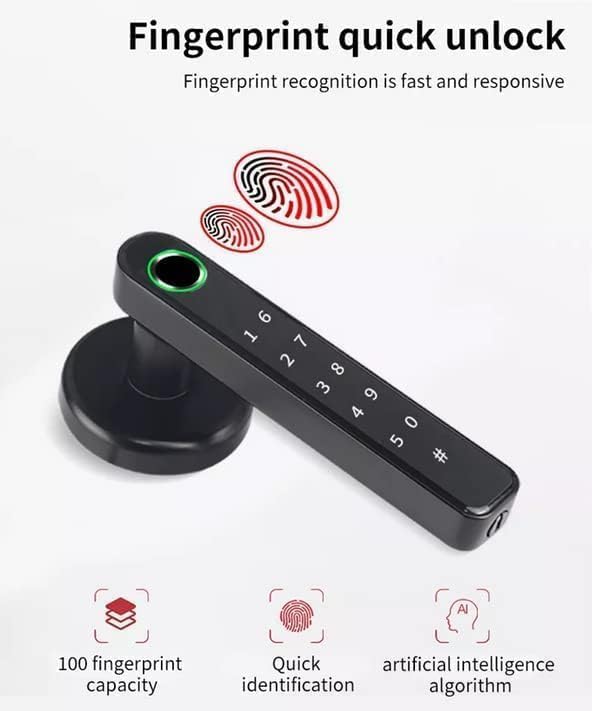
Image: The smart lock's fingerprint sensor in action, illustrating its quick identification capability. To unlock: Place your registered finger firmly on the fingerprint sensor. The lock will unlock if the fingerprint is recognized.
5.1.2 Digital Keypad Unlocking
You can set and use digital passcodes for entry. The keypad features an anti-peep function, allowing you to enter random digits before or after your actual code to prevent others from guessing your password.

Image: The digital keypad, demonstrating the anti-peep feature where fake digits can be entered before and after the correct password. To unlock: Enter your registered passcode followed by the '#' key. You may include random digits before and after your actual code for privacy.
5.1.3 Bluetooth (Tuya App) Unlocking
Connect the smart lock to the Tuya application on your smartphone via Bluetooth. This allows you to unlock the door remotely when within Bluetooth range, manage users, set temporary passwords, and view real-time unlocking records.

Vaizdas: Viršview of unlocking options including mechanical key, USB charging for emergency power, fingerprint, and smartphone app control. To unlock: Open the Tuya app, ensure Bluetooth is enabled, and tap the unlock icon for your smart lock.
5.1.4 Mechanical Key Unlocking
In case of battery depletion or electronic malfunction, the smart lock can be opened using the provided mechanical keys. The keyhole is discreetly located on the handle.
To unlock: Insert the mechanical key into the keyhole and turn to unlock the door.
5.2 Passage Mode and Auto-Lock
- Automatinis užraktas: The lock is designed to automatically lock after a set period (configurable via the app) to ensure security, preventing you from forgetting to lock the door.
- Praėjimo režimas: This mode allows the door to remain unlocked for continuous access, useful for periods of high traffic. This can be enabled or disabled via the Tuya app.
6. Priežiūra
Proper maintenance ensures the longevity and optimal performance of your AILRINNI Smart Lock.
6.1 Akumuliatoriaus keitimas
The lock operates on 4 AAA alkaline batteries. When the battery level is low, the lock will provide a low voltage reminder. Replace all four batteries simultaneously to ensure consistent power.
- Open the battery compartment on the interior handle.
- Išimkite senas baterijas.
- Insert new AAA alkaline batteries, ensuring correct polarity.
- Saugiai uždarykite akumuliatoriaus skyrių.
6.2 Valymas
Regularly clean the exterior of the lock, especially the fingerprint sensor and keypad, with a soft, dry cloth. Avoid using abrasive cleaners or solvents that could damage the finish or electronic components.
7. Problemų sprendimas
If you encounter issues with your AILRINNI Smart Lock, refer to the following common solutions:
- Užraktas nereaguoja: Check battery levels. If batteries are depleted, use the mechanical key or connect a power bank to the USB interface for emergency power.
- Piršto atspaudas neatpažintas: Ensure your finger is clean and dry. Try re-registering your fingerprint through the app if the issue persists.
- Klaviatūra nereaguoja: Ensure the keypad is clean and dry. Re-enter the code carefully.
- Programos ryšio problemos: Ensure Bluetooth is enabled on your phone and you are within range of the lock. Restart the app or your phone if necessary.
- Nenormalus aliarmas: The lock may trigger an alarm for abnormal activity (e.g., forced entry attempts, multiple incorrect entries). Check the app for real-time records to identify the cause.
- Mechaninės problemos: If the handle or latch mechanism feels stiff or is not operating correctly, ensure all installation screws are properly tightened and components are aligned. Do not force the handle.
8. Garantija ir palaikymas
For detailed warranty information, including coverage period and terms, please refer to the official AILRINNI website or the warranty card included with your product. For technical support, troubleshooting assistance beyond this manual, or to inquire about replacement parts, please contact AILRINNI customer service through their official channels.
Išsaugokite pirkimo įrodymą, kad galėtumėte kreiptis dėl garantijos.
Ask a question about this manual
Ask about setup, troubleshooting, compatibility, parts, safety, or missing instructions. Manuals+ will review the question and use this page’s manual context to help answer it.