
1. Įvadas
This manual provides detailed instructions for the installation, operation, and maintenance of your Tiandy TC-C32XN 2MP Fixed IP Dome Turret Camera. Please read this manual thoroughly before using the product to ensure correct usage and optimal performance. Keep this manual for future reference.
2. Saugos informacija
- Ensure the power supply matches the camera's requirements to prevent damage.
- Nelaikykite fotoaparato ekstremalioje temperatūroje, drėgmėje ar korozinėje aplinkoje.
- Avoid pointing the camera directly at strong light sources for extended periods, as this may damage the image sensor.
- Elkitės su fotoaparatu atsargiai. Nemeskite jo ir nelaikykite jo stiprioje vibracijoje.
- All installation and service should be performed by qualified personnel.
- Prieš valydami ar atlikdami techninę priežiūrą, atjunkite maitinimą.
3. Pakuotės turinys
Patikrinkite, ar pakuotėje yra visi reikalingi daiktai:
- Tiandy TC-C32XN 2MP Fixed IP Dome Turret Camera
- Adapteris
- Tvirtinimo varžtai ir sieniniai kaiščiai
- Greito paleidimo vadovas (jei pridėtas)
4. Produktas baigtasview
The Tiandy TC-C32XN is a 2MP Fixed IP Dome Turret Camera designed for reliable surveillance. It features Smart IR for clear night vision up to 30 meters, a built-in microphone, and an SD card slot for local storage.

4.1 pav.: priekis view of the Tiandy TC-C32XN camera, showing the lens and IR illuminators.
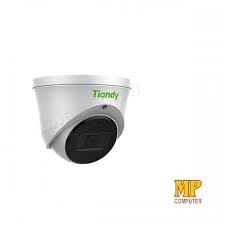
4.2 pav.: šonas view of the Tiandy TC-C32XN camera, highlighting its dome turret form factor.
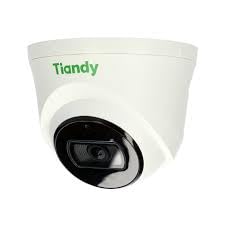
4.3 pav.: Kampinis view of the Tiandy TC-C32XN camera, showcasindėl savo kompaktiško dizaino.
5. Sąranka ir diegimas
5.1 Montavimas
- Pasirinkite vietą: Choose a suitable outdoor or indoor location (IP67 rated for outdoor use) that provides the desired viewing angle and is within reach of power and network connections. The camera is designed for protruding mounting.
- Gręžimo skylės: Use the provided mounting template (if applicable) to mark and drill holes for the mounting screws.
- Apsaugokite fotoaparatą: Attach the camera base securely to the mounting surface using the provided screws and wall plugs.
5.2 Laidai
- Maitinimo jungtis: Connect the provided adapter to the camera's power input and then to a power outlet. The camera operates on corded electric power.
- Tinklo prisijungimas: Connect an Ethernet cable from your network router or PoE switch to the camera's Ethernet port. This camera supports Ethernet connectivity for data transmission.
5.3 Pradinė konfigūracija
- Maitinimas: Once wired, power on the camera.
- Tinklo aptikimas: Use the Tiandy client software or a network scanner tool to discover the camera's IP address on your local network.
- Prieigos kamera: Atidarykite a web naršyklę ir įveskite kameros IP adresą, kad pasiektumėte jos web interface. Log in using the default credentials (refer to the quick start guide for default username/password).
- Pakeisti numatytąjį slaptažodį: Dėl saugumo, pirmą kartą prisijungę, nedelsdami pakeiskite numatytąjį slaptažodį.
- NVR integracija: If using with an NVR, add the camera to your NVR system following the NVR's instructions. This camera is compatible with all brand NVRs.
- Programėlės mobiliesiems sąranka: Download the official Tiandy mobile application (available for Android and iOS) and follow the in-app instructions to add your camera for remote viewvaldymas.
6. Naudojimo instrukcijos
6.1 Tiesiogiai View ir Įrašymas
Pasiekite tiesioginį kameros vaizdą view per web interface, NVR, or mobile app. Configure recording schedules and methods (continuous, motion-triggered) via the camera's settings.
6.2 Smart IR and Night Vision
The camera features Smart IR technology, which automatically adjusts the intensity of its infrared LEDs to prevent overexposure of objects close to the camera, ensuring clear images in low-light conditions up to 30 meters. It also supports 'Night Color' low light technology for enhanced visibility.
6.3 Judesio aptikimas ir įspėjimai
Configure motion detection zones and sensitivity in the camera settings. The camera supports 'Motion Only' alert types. When motion is detected, the camera can trigger recordings, send notifications to your mobile device, or activate other configured actions. It also supports advanced features like tripwire and perimeter intrusion detection.
6.4 Garso funkcionalumas
The built-in microphone allows for audio monitoring of the surveillance area. Audio settings can be adjusted in the camera's web sąsaja arba NVR.
6.5 SD Card Storage
Insert a compatible SD card into the camera's SD card slot for local storage of recordings. Ensure the card is formatted correctly via the camera's settings. The camera supports SD flash memory type.
6.6 Atkūrimo mygtukas
A reset button is included for restoring the camera to its factory default settings. Consult the quick start guide for the exact location and procedure for your model.
7. Priežiūra
- Valymas: Švelniai nuvalykite fotoaparato objektyvą ir korpusą minkštu, sausu skudurėliu. Nenaudokite stiprių cheminių medžiagų ar abrazyvinių valiklių.
- Firmware atnaujinimai: Regularly check the Tiandy official websvetainės, kurioje rasite programinės įrangos atnaujinimus. Nuolat atnaujinant fotoaparato programinę įrangą užtikrinamas optimalus veikimas ir saugumas.
- Kabelio apžiūra: Reguliariai tikrinkite visus kabelius, ar nėra susidėvėjimo ar pažeidimų požymių, ypač jei jie montuojami lauke.
8. Problemų sprendimas
- Nėra galios: Įsitikinkite, kad maitinimo adapteris yra tvirtai prijungtas ir maitinimo lizdas veikia.
- Nėra vaizdo įrašo: Check network cable connections. Verify the camera's IP address and network settings. Ensure the camera is properly added to your NVR or viewprogramine įranga.
- Prasta vaizdo kokybė: Clean the camera lens. Adjust focus if applicable. Check lighting conditions and camera placement.
- Tinklo ryšio problemos: Verify router and network cable functionality. Restart the camera and network devices.
- Nepavyksta pasiekti Web Sąsaja: Ensure your computer is on the same network segment as the camera. Verify the camera's IP address. Try resetting the camera to factory defaults if necessary (this will erase all settings).
9. Specifikacijos
| Funkcija | Specifikacija |
|---|---|
| Modelis | TC-C32XN |
| Veiksminga nejudančioji raiška | 2 MP (1920 x 1080) |
| Kadrų dažnis | 30 kadrų per sekundę |
| Nuotraukų jutiklių technologija | CMOS (1/2.8 colio) |
| Naktinio matymo diapazonas | 30 Metres (Smart IR) |
| Silpnos šviesos technologija | Naktinė spalva |
| Optinis priartinimas | 3 x |
| Integruotas mikrofonas | Taip |
| SD kortelės lizdas | Yes (Flash Memory Type: SD) |
| Įspėjimo tipas | Motion Only (supports tripwire and perimeter) |
| Ryšio technologija | Wireless (IR), Ethernet |
| Maitinimo šaltinis | Su laidu elektra |
| Tarptautinis apsaugos įvertinimas | IP67 |
| Formos faktorius | Dome Turret |
| Montavimo tipas | Atsikišęs |
| Operacinės sistemos suderinamumas | Android, iOS |
| Gaminio matmenys (I x P x A) | 50 x 50 x 70 milimetrai |
| Prekės svoris | 20 gramų |
| Įtraukti komponentai | Adapteris |
| Spalva | Baltas |
10. Garantija ir palaikymas
For warranty information and technical support, please refer to the warranty card included with your product or visit the official Tiandy website. Contact the seller or manufacturer directly for assistance with product issues or inquiries.