
1. Įvadas
This manual provides detailed instructions for the proper use and maintenance of your Arlec Remote SS3136. This remote control is specifically designed to operate the Arlec Wall Fan AWDC001HA, offering convenient and effortless control over your fan's functions. Please read this manual thoroughly before first use to ensure optimal performance and longevity of your device.
2. Produkto ypatybės
- Lengvas valdymas: Utilizes Infrared technology for seamless communication with your Arlec Wall Fan AWDC001HA from up to 10 meters away.
- Ilgalaikė galia: Requires 3 alkaline batteries for extended use.
- Elegantiškas dizainas: Finished in a sophisticated black color.
- Universalus suderinamumas: Designed to control Arlec Wall Fans, specifically model AWDC001HA.
- Paprasta operacija: Features 3 intuitive buttons for easy fan control.
3. Pakuotės turinys
Patikrinkite, ar pakuotėje yra visi reikalingi daiktai:
- 1 x Arlec Remote SS3136
- 1 x Wall Mount Holder
- 2 x montavimo varžtai
- 2 x sieniniai kištukai
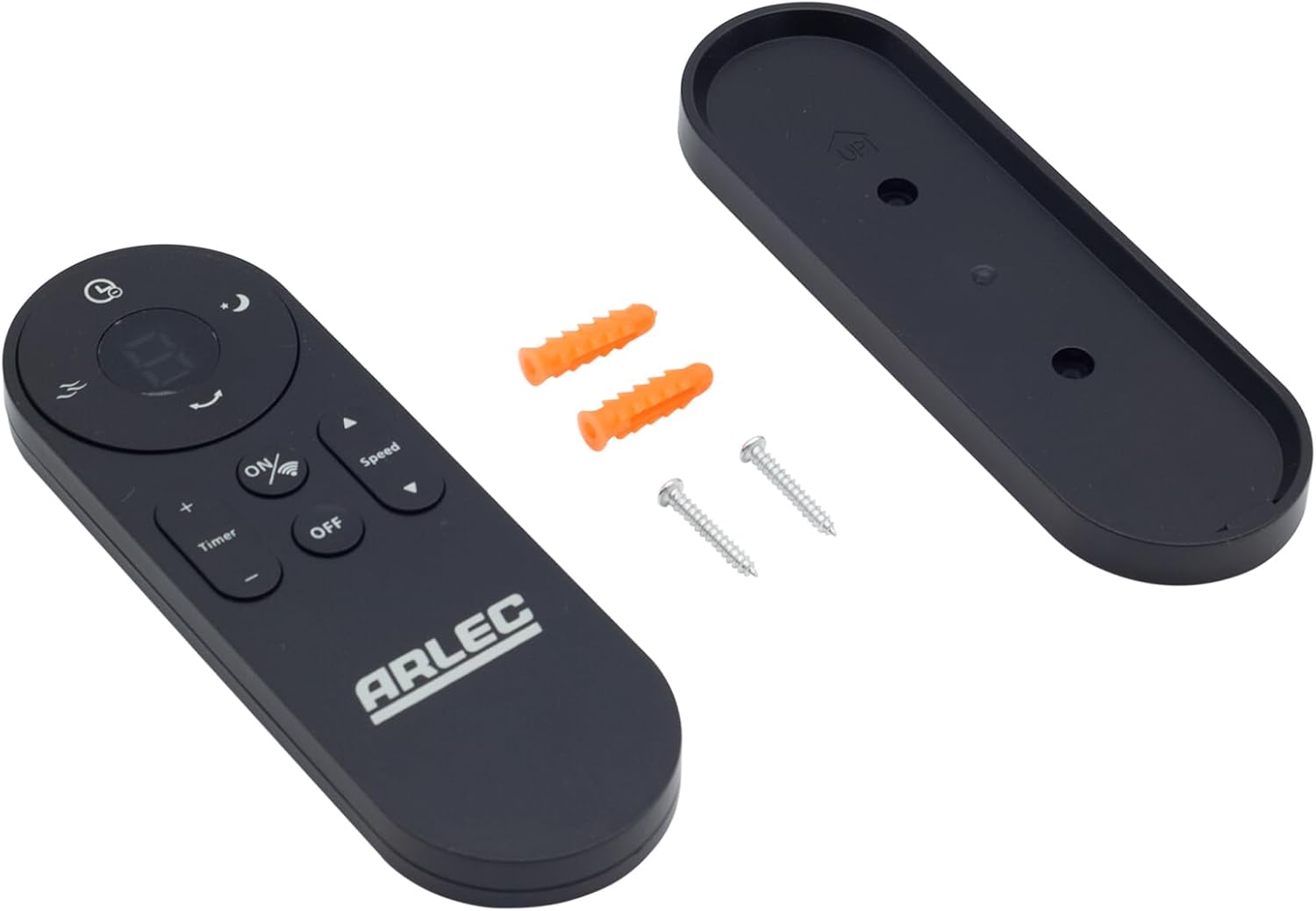
Image: Arlec Remote SS3136 shown with its included wall mount holder, two mounting screws, and two wall plugs, indicating the complete package contents.
4. Sąranka
4.1 Akumuliatoriaus įdėjimas
- Nuotolinio valdymo pulto gale raskite baterijų skyrių.
- Atidarykite akumuliatoriaus skyriaus dangtelį.
- Insert 3 Alkaline batteries (not included) into the compartment, ensuring the correct polarity (+ and -) as indicated inside the compartment. The remote requires 3 Volts (DC).
- Saugiai uždarykite akumuliatoriaus skyriaus dangtelį.
4.2 Sieninio laikiklio montavimas (neprivaloma)
- Choose a suitable location on a wall for the remote holder.
- Mark the positions for the two mounting screws using the holder as a template.
- Drill pilot holes at the marked positions. Insert the wall plugs if drilling into drywall or masonry.
- Secure the wall mount holder to the wall using the provided screws.
- Place the remote control into the installed holder for convenient storage.
5. Naudojimo instrukcijos
The Arlec Remote SS3136 features a simple 3-button layout for controlling your Arlec Wall Fan AWDC001HA. Ensure there is a clear line of sight between the remote and the fan's infrared receiver for optimal performance.

Vaizdas: Stambus planas view of the Arlec Remote SS3136, highlighting its three main control buttons: ON/OFF, Speed, and Timer.
- ĮJUNGIMO/IŠJUNGIMO mygtukas: Paspauskite šį mygtuką norėdami įjungti arba išjungti ventiliatorių.
- Greičio mygtukas: Use this button to cycle through the available fan speed settings (e.g., Low, Medium, High).
- Laikmačio mygtukas: Press this button to set or adjust the fan's timer function. Refer to your Arlec Wall Fan AWDC001HA manual for specific timer intervals.
The remote operates using Infrared (IR) technology. Point the remote directly towards the fan's IR receiver. The effective operating range is up to 10 meters (approximately 33 feet).
6. Priežiūra
- Valymas: Nuotolinio valdymo pultą valykite minkštu, sausu skudurėliu. Nenaudokite abrazyvinių valiklių ar tirpiklių.
- Baterijos keitimas: Replace batteries when the remote's performance degrades or it stops responding. Always replace all 3 batteries at the same time with new alkaline batteries.
- Saugykla: Jei nuotolinio valdymo pultas ilgesnį laiką nebus naudojamas, išimkite baterijas, kad jos neištekėtų. Laikykite vėsioje, sausoje vietoje.
7. Problemų sprendimas
| Problema | Galima priežastis | Sprendimas |
|---|---|---|
| Remote not responding to fan. |
|
|
| Mygtukai nereaguoja arba yra neaktyvūs. | Purvas ar šiukšlės po mygtukais. | Clean the remote surface with a soft, dry cloth. Avoid liquids. |
8. Specifikacijos
| Atributas | Detalė |
|---|---|
| Modelis | SS3136 |
| Gamintojas | Arlecas |
| Suderinami įrenginiai | Arlec Wall Fan AWDC001HA |
| Ryšio technologija | Infraraudonųjų spindulių (IR) |
| Mygtukų skaičius | 3 |
| Valdiklio tipas | Mygtukų valdymas |
| Baterijos tipas | Alkaline (3 required) |
| ttage | 3 volto (DC) |
| Veikimo diapazonas | Iki 10 metrų |
9. Garantija ir palaikymas
For warranty information and technical support, please refer to the documentation provided with your Arlec Wall Fan AWDC001HA or contact Arlec customer service directly. Keep your purchase receipt as proof of purchase.
For further assistance, please visit the manufacturer's official websvetainėje arba susisiekite su jų klientų aptarnavimo linija.