
1. Produktas baigtasview
The Assark 2.5K Indoor Surveillance Camera, Model X3E, is designed to provide comprehensive indoor monitoring with advanced features. This camera offers high-definition video, flexible pan and tilt capabilities, and intelligent detection functions to enhance your home security or pet monitoring experience.

1.1 vaizdas: Assark 2.5K Indoor Surveillance Camera. This image shows the white dome-shaped camera next to a smartphone displaying a high-resolution image of a dog, illustrating the camera's primary function and video quality.
Pagrindinės funkcijos:
- 2.5K (5MP) Super HD Video: Užfiksuoja aiškų ir detalų maistątage at 2560x1920 resolution.
- 360° panoraminio/pakreipimo aprėptis: Offers 350° horizontal and 70° vertical rotation for comprehensive area monitoring.
- 2.4G WLAN Connectivity: Connects to your home Wi-Fi network for remote access.
- Išplėstinis aptikimas: Features motion, sound, and human detection with instant notifications.
- Dvipusis garsas: Integruotas mikrofonas ir garsiakalbis bendravimui realiuoju laiku.
- Išmanusis naktinis matymas: Infrared LEDs provide clear visibility in low-light conditions.
- Dvigubo saugojimo parinktys: Supports local Micro SD card storage (up to 128GB) and cloud storage services.
- Išmaniųjų namų integracija: Suderinamas su Amazon Alexa ir Google Assistant.

1.2 vaizdas: Funkcija baigtaview. This diagram highlights key functionalities such as 2.5K video resolution, pan-tilt control (350° horizontal, 70° vertical), two-way audio, motion detection, 24/7 recording, smart night vision, instant alerts, and privacy mask.
2. Sąrankos vadovas
2.1 Pakuotės turinys
Prieš pradėdami, įsitikinkite, kad yra visi reikalingi daiktai:
- Assark 2.5K Indoor Surveillance Camera (Model X3E)
- Maitinimo adapteris
- USB Power Cable (Micro USB)
- Mounting Accessories (Screws, Wall Plug, Mounting Plate)
- Vartotojo vadovas (šis dokumentas)
2.2 Kameros įjungimas
- Connect the Micro USB power cable to the camera's power port.
- Plug the USB power adapter into a standard electrical outlet.
- Kamera įsijungs ir pradės mirksėti indikatoriaus lemputė, rodanti, kad ji paruošta sąrankai.
2.3 Programėlės diegimas ir paskyros sukūrimas
- Atsisiųskite Assark app from your mobile device's app store (available for iOS and Android).
- Atidarykite programėlę ir vykdykite ekrane pateikiamus nurodymus, kad sukurtumėte naują paskyrą arba prisijunkite, jei jau turite.
2.4 Prisijungimas prie „Wi-Fi“.
- In the Assark app, tap the "Add Device" or "+" icon.
- Select your camera model (X3E) from the list.
- Vadovaukitės programėlėje pateiktomis instrukcijomis, kad prijungtumėte kamerą prie 2.4 GHz „Wi-Fi“ tinklo. Pastaba: This camera supports 2.4 GHz Wi-Fi only. Ensure your mobile device is connected to the 2.4 GHz band of your router during setup.
- The app may guide you through scanning a QR code displayed on your phone with the camera lens or using an audio pairing method.
- Once connected, the camera's indicator light will change, typically to a solid blue or green, indicating a successful connection.
2.5 Kameros montavimas (pasirinktinai)
Kamerą galima pastatyti ant lygaus paviršiaus arba pritvirtinti prie sienos ar lubų.
- Choose a suitable location with a clear view ir yra „Wi-Fi“ ryšio diapazone.
- Use the provided mounting plate as a template to mark screw positions on the desired surface.
- Išgręžkite kreipiamąsias skyles ir, jei reikia, įkiškite sieninius kaiščius.
- Secure the mounting plate with the screws.
- Pritvirtinkite kamerą prie tvirtinimo plokštelės sukdami ją, kol ji užsifiksuos vietoje.
3. Naudojimo instrukcijos
3.1 Tiesiogiai View ir panoraminio/pakreipimo valdymas
- Open the Assark app and select your camera from the device list to access the live view.
- Use the on-screen joystick or swipe gestures to control the camera's pan (horizontal 350°) and tilt (vertical 70°) movements.
- You can save specific viewing angles as presets for quick access.
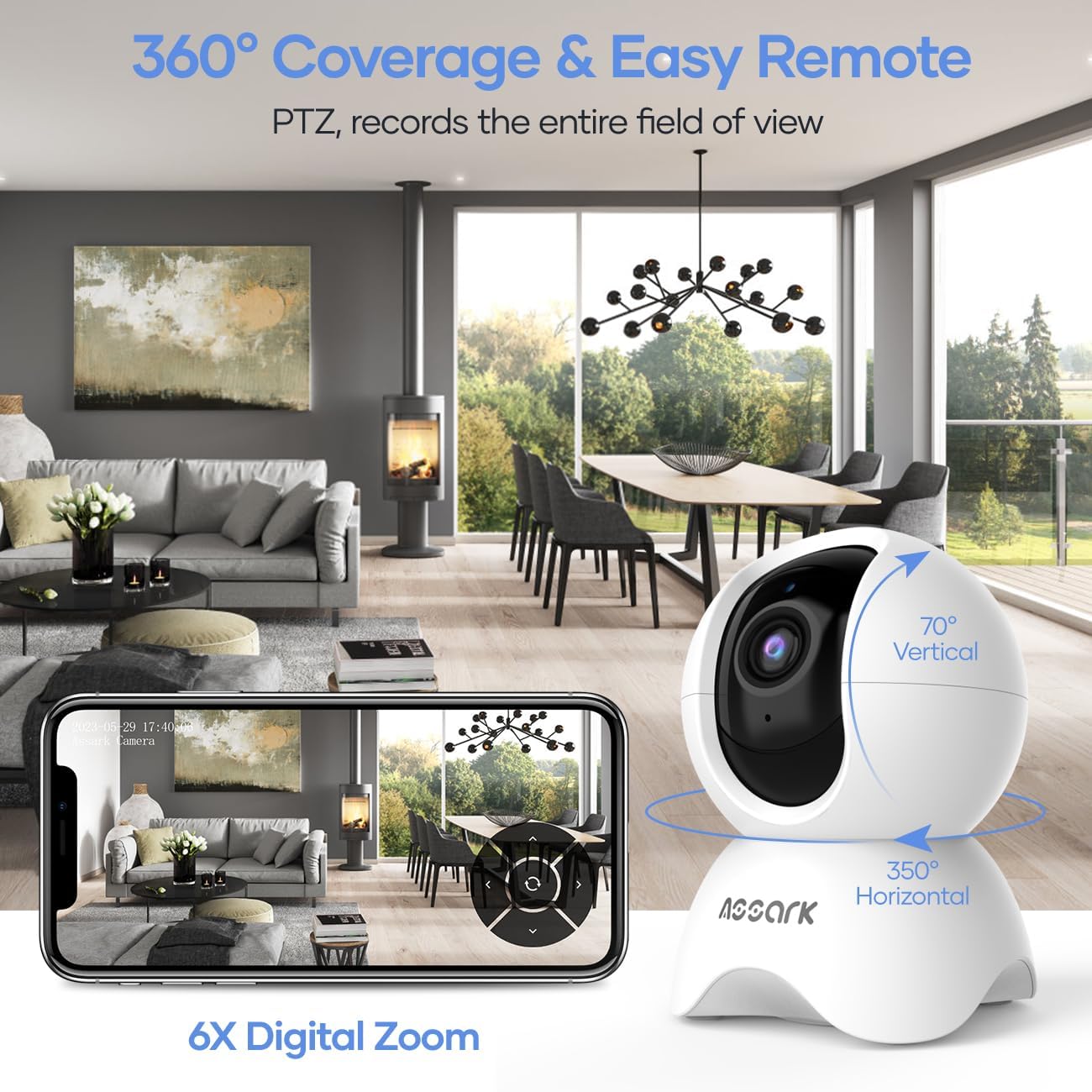
3.1 vaizdas: 360° Coverage and Remote Control. This image demonstrates the camera's ability to cover a wide area with its pan and tilt functions, controlled remotely through the smartphone application.
3.2 Dvipusis garsas
Norėdami naudoti dvipusio garso funkciją:
- Kol vyksta gyvai view, programėlėje palieskite mikrofono piktogramą.
- Kalbėkite į telefono mikrofoną, kad jūsų balsas būtų perduotas per kameros garsiakalbį.
- The camera's built-in microphone will capture audio from its surroundings, which you can hear through your phone.
3.3 Motion, Sound, and Human Detection
The camera can detect various events and send instant notifications to your phone.
- Navigate to the camera settings in the Assark app.
- Enable and configure detection settings for motion, sound, and human detection.
- Prireikus sureguliuokite jautrumo lygius ir nustatykite aptikimo zonas.
- When an event is detected, you will receive an instant notification on your mobile device.

3.2 vaizdas: Instant Alerts. This image displays a smartphone screen with notifications indicating detected abnormal motion, abnormal sound, and human motion, demonstrating the camera's alert capabilities.
3.4 Night Vision and Capture Modes
The camera automatically switches to night vision in low-light conditions. You can also manually select capture modes.
- In the app, access the video settings to select between Day, Night, or Auto mode.
- In Auto mode, the camera will automatically adjust based on ambient light.
- Night mode utilizes infrared LEDs for clear black-and-white video in complete darkness.

3.3 vaizdas: Capture Modes. This image shows the camera and icons representing Day, Night, and Auto modes, indicating the camera's flexibility in different lighting conditions, including 850nm infrared light for night vision.
3.5 Vaizdo įrašymas ir saugojimas
The camera offers continuous recording and event-triggered recording with flexible storage options.
- „Micro SD“ kortelė: Insert a Micro SD card (up to 128GB, not included) into the camera's designated slot for local storage. The camera supports 24/7 continuous recording.
- Saugykla debesyje: The Assark app offers cloud storage services, often with a free trial period (e.g., 30 days). Subscribe to a plan for extended cloud storage and advanced features.
- Video footage is compressed using H.265 technology for efficient storage.

3.4 vaizdas: Dual Storage Options. This image visually represents the camera's support for both Micro SD card storage (up to 256GB, though product specs state 128GB) and encrypted cloud storage with a 30-day free trial, along with H.265 compression.
3.6 Išmaniųjų namų integracija
Integrate your Assark camera with smart home platforms for enhanced control.
- Amazon Alexa: Enable the Assark skill in the Alexa app and link your account. Use voice commands like "Alexa, show me the [camera name]" to view the live feed on compatible devices.
- „Google“ padėjėjas: Link your Assark account in the Google Home app. Use voice commands like "Hey Google, show me the [camera name]" to view the live feed on compatible devices.
4. Priežiūra
4.1 Kameros valymas
To maintain optimal performance, periodically clean your camera:
- Prieš valydami įsitikinkite, kad kamera yra išjungta.
- Kameros korpusą nuvalykite minkštu, sausu skudurėliu.
- Objektyvui valyti naudokite specialiai optikai skirtą šluostę, kad išvengtumėte įbrėžimų.
- Nenaudokite skystų valiklių ar abrazyvinių medžiagų.
4.2 Firmware atnaujinimai
Regularly check for and install firmware updates through the Assark app. Firmware updates can improve performance, add new features, and enhance security.
4.3 SD kortelės valdymas
If using a Micro SD card for local storage:
- Periodically check the card's status in the app.
- Format the SD card through the app if you experience recording issues or wish to clear all data.
5. Problemų sprendimas
If you encounter issues with your Assark camera, refer to the following common problems and solutions:
5.1 Kamera neįsijungia
- Ensure the power cable is securely connected to both the camera and the power adapter.
- Verify that the power adapter is plugged into a working electrical outlet.
- Try using a different USB power cable and adapter if available.
5.2 Nepavyksta prisijungti prie „Wi-Fi“
- Confirm your Wi-Fi network is 2.4 GHz. The camera does not support 5 GHz Wi-Fi.
- Ensure your mobile device is connected to the 2.4 GHz Wi-Fi network during setup.
- Patikrinkite savo „Wi-Fi“ slaptažodžio tikslumą.
- Perkelkite kamerą arčiau „Wi-Fi“ maršrutizatoriaus, kad pagerintumėte signalo stiprumą.
- Restart your Wi-Fi router and the camera, then attempt setup again.
5.3 Poor Video Quality or Lag
- Ensure the camera has a strong Wi-Fi signal. Relocate the camera or router if necessary.
- Check your internet connection speed. A stable and fast internet connection is required for optimal streaming.
- Clean the camera lens if it appears dirty.
5.4 Negautų pranešimų
- Verify that detection settings (motion, sound, human) are enabled and configured correctly in the Assark app.
- Check your phone's notification settings to ensure the Assark app has permission to send notifications.
- Įsitikinkite, kad jūsų telefone yra aktyvus interneto ryšys.
For further assistance, please refer to the help section within the Assark app or visit the manufacturer's support websvetainę.
6. Specifikacijos
| Funkcija | Specifikacija |
|---|---|
| Modelis | X3E |
| Prekės ženklas | Assark |
| Matmenys (I x P x A) | 7.8 x 7.8 x 11.5 cm |
| Svoris | 400 gramų |
| Vaizdo raiška | 5 MP (2560 x 1920) |
| "Pan" diapazonas | 350 ° horizontaliai |
| Pakreipimo diapazonas | 70 ° vertikaliai |
| Ryšys | 2.4 GHz WLAN |
| Saugojimo parinktys | „Micro SD“ kortelė (iki 128 GB), debesies saugykla |
| Maitinimo įvestis | 5 Watts (USB powered) |
| Naktinis matymas | Infraraudonieji šviesos diodai |
| Garsas | Dvipusis garsas (įmontuotas mikrofonas ir garsiakalbis) |
| Aptikimas | Motion Detection, Sound Detection, Human Detection |
| Išmaniųjų namų suderinamumas | Amazon Alexa, Google Assistant |
7. Garantija ir palaikymas
7.1 Informacija apie garantiją
Warranty details for the Assark 2.5K Indoor Surveillance Camera (Model X3E) are typically provided at the point of purchase or can be found on the official Assark websvetainėje. Prašome išsaugoti pirkimo įrodymą garantiniams reikalavimams.
7.2 Pagalba klientams
For technical support, troubleshooting assistance, or any product-related inquiries, please:
- Refer to the comprehensive help section within the Assark mobile application.
- Visit the official Assark support websvetainė, kurioje rasite DUK, vadovus ir kontaktinę informaciją.